
3DxDEV · Launch Video Breakdown: Hook, Pacing & Motion Design
I can't stop staring at this @Cartesian_C broke down the mimic effect — procedural curves that move, twist, and displace in real time. No simulation. Just nodes. The fact that this comes with a ful…
Scene-by-scene timeline & spoken transcript
The Hook
Final Form Reveal
“(No spoken dialogue — ambient visual with a subtle, rhythmic pulse implied by the motion.)”
- On screen
- Final
- Camera
- Static, slightly elevated isometric view, focusing on the central object.
- Motion
- Procedural generation, organic growth, real-time displacement.
Product Reveal
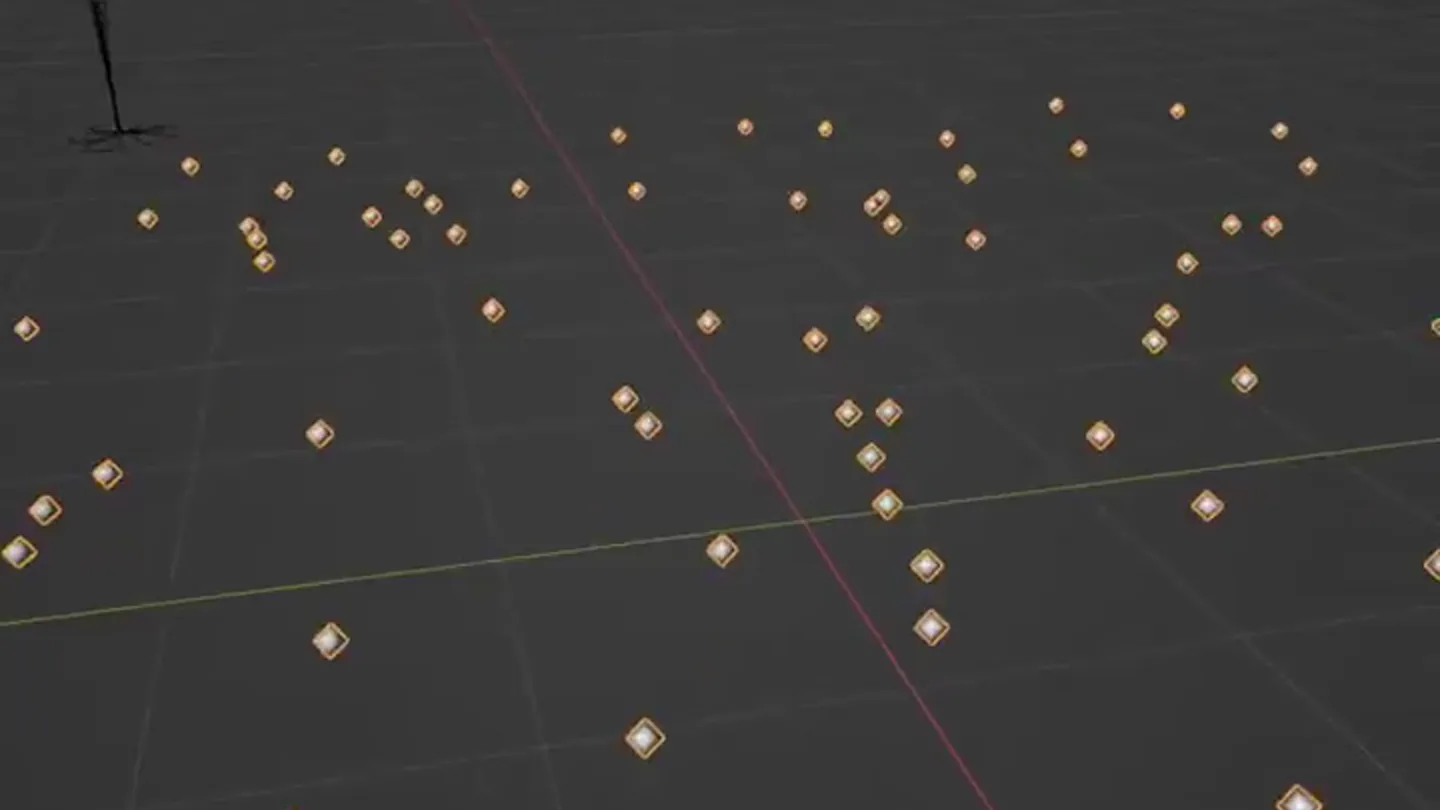
Scattered Points & Instance Roots
“(No spoken dialogue — ambient visual with a subtle, rhythmic pulse implied by the motion.)”
- On screen
- Scatter Points Instance Root
- Camera
- Static, slightly elevated isometric view, showing a grid of points and then initial root structures.
- Motion
- Grid-based instantiation, point distribution, basic curve generation.
Feature Teaser
Curve Deletion & Centralization
“(No spoken dialogue — ambient visual with a subtle, rhythmic pulse implied by the motion.)”
- On screen
- Delete Far Curves Start to Center
- Camera
- Static, slightly elevated isometric view, demonstrating the selective removal of elements and the growth towards a central point.
- Motion
- Conditional rendering, curve interpolation, radial growth.
Call to Action
Curve Trimming & Displacement
“(No spoken dialogue — ambient visual with a subtle, rhythmic pulse implied by the motion.)”
- On screen
- Trim Curves Diplace Curves
- Camera
- Static, slightly elevated isometric view, showcasing the final stages of curve manipulation and organic displacement.
- Motion
- Curve trimming, real-time displacement mapping, procedural animation.
Motion design primitives
Synthesizable in Remotion · key components of the procedural-network-flow-visualizer template.
ProceduralOrganicGrowth
Abstract curves and forms appear to grow and expand from a central point or scattered instances, mimicking organic structures like roots or tentacles. The growth is dynamic and non-linear.
+ Code construction recipe
Utilize Remotion's `<Canvas>` component with WebGL shaders or SVG path animations. Interpolate `d` attributes for SVG paths or manipulate vertex positions in a shader based on time and noise functions to simulate growth and branching. Use `spring` for organic elasticity.
RealtimeDisplacementEffect
The generated curves and forms exhibit a 'mimic' effect, where they twist, undulate, and displace in real-time, suggesting a responsive, non-simulated movement. This creates a fluid, living texture.
+ Code construction recipe
Implement a custom Remotion component that uses `useCurrentFrame` and `interpolate` to drive displacement values. For SVG, apply `filter` effects with `feTurbulence` and `feDisplacementMap`. For canvas, update vertex shaders with time-based noise (e.g., Perlin noise) to create real-time distortions.
NodeDrivenVisualizer
Visual elements transition from abstract points to structured instances, then to interconnected curves, demonstrating a 'node-based' or 'procedural' construction process. Text overlays explain each step.
+ Code construction recipe
Create a sequence of Remotion `<Sequence>` components. Each sequence renders a different stage of the procedural generation. Use `spring` for smooth transitions between stages. Text overlays can be simple `<Text>` components with `interpolate` for fade-in/out.
Style DNA & aesthetic system
Visual aesthetic
Typography
Motion
Special effects
Pacing & rhythm
Conceptual story rhythm
- 1
The Enigmatic Reveal
Purpose. Immediately captivate the audience with the final, complex output of the system, creating curiosity.
Execution. Show the fully formed, dynamically moving 'mimic' effect object with a 'Final' label, hinting at advanced capabilities.
- 2
Deconstruction to Primitives
Purpose. Begin to demystify the complexity by showing the foundational elements.
Execution. Transition from the final form to scattered points and then to basic 'Instance Root' structures on a grid, illustrating the starting components.
- 3
Algorithmic Sculpting
Purpose. Illustrate the key procedural steps that transform primitives into the final form.
Execution. Demonstrate 'Delete Far Curves', 'Start to Center' growth, and 'Trim Curves', revealing the logic behind the organic shape.
- 4
Dynamic Finalization
Purpose. Showcase the real-time, non-simulated dynamic behavior that makes the effect compelling.
Execution. Conclude with 'Displace Curves', emphasizing the fluid, real-time movement and the power of the node-based system.
Remix in Animatiq Studio
Master remix prompt · agent-ready
Sample remix
Objective
Launch a new real-time data visualization platform called 'NexusFlow'.How the recipe adapts
The 'ProceduralOrganicGrowth' primitive will be adapted to 'ProceduralNetworkGrowth', where nodes and edges sprout and connect dynamically. 'RealtimeDisplacementEffect' becomes 'RealtimeDataFlowDisplacement', showing edges pulsating and nodes shifting based on simulated data traffic. 'NodeDrivenVisualizer' will illustrate the steps from raw data points to a complex, interactive network graph, with labels like 'Data Ingestion', 'Node Clustering', and 'Edge Weighting'.Remix blueprint · procedural-network-flow-visualizer
Scene durations (4 scenes, 14.6s)
Key Remotion components
Related Tech & SaaS Product Launches
Explore all Tech & SaaS launches →
Against all odds. Congrats @elonmusk and @SpaceX.
Unreal Engine 6 has been announced with Rocket League.

Trade 24/7 with a social feed and onchain signals.