
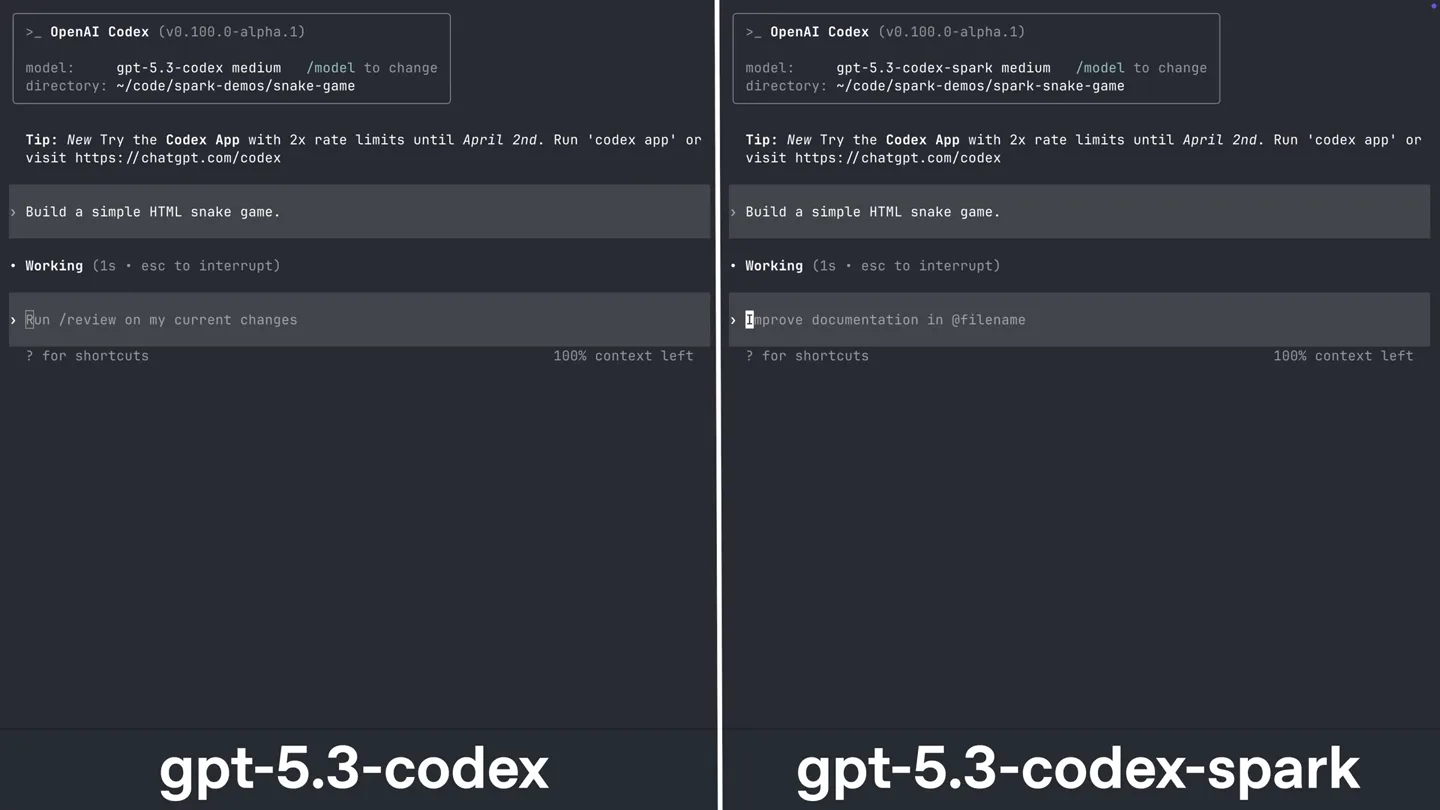
Scene-by-scene timeline & spoken transcript
The Hook
Dual Terminal Code Generation
“(No spoken dialogue — The audio track begins with a sustained, evolving pad sound, building anticipation.)”
- On screen
- OpenAI Codex (v0.100.0-alpha.1) model: gpt-5.3-codex medium /model to change directory: ~/code/spark-demos/snake-game Tip: New Try the Codex App with 2x rate limits until April 2nd. Run 'codex app' or visit https://chatgpt.com/codex > Build a simple HTML snake game. • Working (0s • esc to interrupt) > Run /review on my current changes ? for shortcuts 100% context left gpt-5.3-codex > OpenAI Codex (v0.100.0-alpha.1) model: gpt-5.3-codex-spark medium /model to change directory: ~/code/spark-demos/spark-snake-game Tip: New Try the Codex App with 2x rate limits until April 2nd. Run 'codex app' or visit https://chatgpt.com/codex > Build a simple HTML snake game. • Working (0s • esc to interrupt) > Improve documentation in @filename ? for shortcuts 100% context left gpt-5.3-codex-spark
- Camera
- Static, split-screen view comparing two terminal interfaces side-by-side.
- Motion
- Text typing animation, code generation, and UI element updates within the terminal windows.
Product Reveal
Real-time Code Execution & Game Play
“(No spoken dialogue — A high-energy audio transition with a rising synth sweep and sub-bass impact leads into a rhythmic section with pizzicato synths and a driving sub-bass line.)”
- On screen
- OpenAI Codex (v0.100.0-alpha.1) model: gpt-5.3-codex medium /model to change directory: ~/code/spark-demos/snake-game Tip: New Try the Codex App with 2x rate limits until April 2nd. Run 'codex app' or visit https://chatgpt.com/codex > Build a simple HTML snake game. • Working (2s • esc to interrupt) > Run /review on my current changes ? for shortcuts 100% context left I'm going to scaffold a minimal browser-based Snake game in this workspace with index.html, style.css, and script.js, then quickly verify the files are wired correctly. Explored l list rg --files The directory is empty, so I'll create the three files from scratch and implement keyboard controls, score, restart, and wall/self collision logic. Preparing file creation (5s • esc to interrupt) Ran cat > index.html << 'EOF' <!doctype html> <html lang="en"> <head> <meta charset="utf-8"> <title>Snake</title> <style> body { margin: 0; display: flex; justify-content: center; align-items: center; min-height: 100vh; background-color: #282c34; font-family: 'Press Start 2P', cursive; color: #abb2bf; } #game-container { border: 2px solid #61afef; box-shadow: 0 0 15px rgba(97, 175, 239, 0.7); padding: 20px; border-radius: 8px; background-color: #21252b; text-align: center; } canvas { background-color: #282c34; display: block; margin: 0 auto 15px auto; border: 1px solid #3e4451; } button { background-color: #61afef; color: #282c34; border: none; padding: 10px 20px; margin: 0 5px; border-radius: 5px; cursor: pointer; font-family: 'Press Start 2P', cursive; font-size: 0.8em; transition: background-color 0.3s ease; } button:hover { background-color: #52a0e0; } #score-display { margin-bottom: 15px; font-size: 1.2em; } </style> </head> <body> <div id="game-container"> <div id="score-display">Score: 0</div> <canvas id="game" width="400" height="400"></canvas> <div> <button id="start-pause-button">Start / Pause</button> <button id="restart-button">Restart</button> </div> </div> <script> const canvas = document.getElementById('game'); const ctx = canvas.getContext('2d'); const gridSize = 20; let snake = [{ x: 10, y: 10 }]; let food = {}; let direction = { x: 0, y: 0 }; let score = 0; let gameOver = false; let gameInterval; let gameSpeed = 150; // milliseconds function generateFood() { food = { x: Math.floor(Math.random() * (canvas.width / gridSize)), y: Math.floor(Math.random() * (canvas.height / gridSize)), }; } function draw() { ctx.clearRect(0, 0, canvas.width, canvas.height); for (let i = 0; i < snake.length; i++) { ctx.fillStyle = i === 0 ? 'green' : 'lime'; ctx.fillRect(snake[i].x * gridSize, snake[i].y * gridSize, gridSize, gridSize); } ctx.fillStyle = 'red'; ctx.fillRect(food.x * gridSize, food.y * gridSize, gridSize, gridSize); } function update() { if (gameOver) return; const head = { x: snake[0].x + direction.x, y: snake[0].y + direction.y }; // Wall collision if ( head.x < 0 || head.x >= canvas.width / gridSize || head.y < 0 || head.y >= canvas.height / gridSize ) { gameOver = true; alert('Game Over! Score: ' + score); return; } // Self collision for (let i = 1; i < snake.length; i++) { if (head.x === snake[i].x && head.y === snake[i].y) { gameOver = true; alert('Game Over! Score: ' + score); return; } } snake.unshift(head); if (head.x === food.x && head.y === food.y) { score++; generateFood(); } else { snake.pop(); } draw(); } function startGame() { snake = [{ x: 10, y: 10 }]; direction = { x: 0, y: 0 }; score = 0; gameOver = false; generateFood(); clearInterval(gameInterval); gameInterval = setInterval(update, gameSpeed); } document.addEventListener('keydown', e => { switch (e.key) { case 'ArrowUp': if (direction.y === 0) direction = { x: 0, y: -1 }; break; case 'ArrowDown': if (direction.y === 0) direction = { x: 0, y: 1 }; break; case 'ArrowLeft': if (direction.x === 0) direction = { x: -1, y: 0 }; break; case 'ArrowRight': if (direction.x === 0) direction = { x: 1, y: 0 }; break; } }); document.getElementById('start-pause-button').addEventListener('click', () => { if (gameInterval) { clearInterval(gameInterval); gameInterval = null; document.getElementById('start-pause-button').textContent = 'Resume'; } else { gameInterval = setInterval(update, gameSpeed); document.getElementById('start-pause-button').textContent = 'Pause'; } }); document.getElementById('restart-button').addEventListener('click', startGame); startGame(); </script> </body> </html> -22 lines (no output) Ran cat > style.css << 'EOF' :root { color-scheme: light; } +65 lines (no output) Ran cat > script.js << 'EOF' const canvas = document.getElementById('game'); const ctx = canvas.getContext('2d'); const gridSize = 20; let snake = [{ x: 10, y: 10 }]; let food = {}; let direction = { x: 0, y: 0 }; let score = 0; let gameOver = false; let gameInterval; let gameSpeed = 150; // milliseconds function generateFood() { food = { x: Math.floor(Math.random() * (canvas.width / gridSize)), y: Math.floor(Math.random() * (canvas.height / gridSize)), }; } function draw() { ctx.clearRect(0, 0, canvas.width, canvas.height); for (let i = 0; i < snake.length; i++) { ctx.fillStyle = i === 0 ? 'green' : 'lime'; ctx.fillRect(snake[i].x * gridSize, snake[i].y * gridSize, gridSize, gridSize); } ctx.fillStyle = 'red'; ctx.fillRect(food.x * gridSize, food.y * gridSize, gridSize, gridSize); } function update() { if (gameOver) return; const head = { x: snake[0].x + direction.x, y: snake[0].y + direction.y }; // Wall collision if ( head.x < 0 || head.x >= canvas.width / gridSize || head.y < 0 || head.y >= canvas.height / gridSize ) { gameOver = true; alert('Game Over! Score: ' + score); return; } // Self collision for (let i = 1; i < snake.length; i++) { if (head.x === snake[i].x && head.y === snake[i].y) { gameOver = true; alert('Game Over! Score: ' + score); return; } } snake.unshift(head); if (head.x === food.x && head.y === food.y) { score++; generateFood(); } else { snake.pop(); } draw(); } function startGame() { snake = [{ x: 10, y: 10 }]; direction = { x: 0, y: 0 }; score = 0; gameOver = false; generateFood(); clearInterval(gameInterval); gameInterval = setInterval(update, gameSpeed); } document.addEventListener('keydown', e => { switch (e.key) { case 'ArrowUp': if (direction.y === 0) direction = { x: 0, y: -1 }; break; case 'ArrowDown': if (direction.y === 0) direction = { x: 0, y: 1 }; break; case 'ArrowLeft': if (direction.x === 0) direction = { x: -1, y: 0 }; break; case 'ArrowRight': if (direction.x === 0) direction = { x: 1, y: 0 }; break; } }); document.getElementById('start-pause-button').addEventListener('click', () => { if (gameInterval) { clearInterval(gameInterval); gameInterval = null; document.getElementById('start-pause-button').textContent = 'Resume'; } else { gameInterval = setInterval(update, gameSpeed); document.getElementById('start-pause-button').textContent = 'Pause'; } }); document.getElementById('restart-button').addEventListener('click', startGame); startGame(); </script> </body> </html> -175 lines (no output) I've finished implementation and I'm doing a quick sanity check of file contents and structure before handing it back. Explored l List ls -la Checking file presence and size (38s • esc to interrupt) Implemented a complete simple Snake game in: - index.html - style.css - script.js What it includes: - 20x20 grid canvas game - Arrow keys + WASD movement - Food spawning and growth - Wall/self collision game-over state - Score + persistent best score via localStorage > Run /review on my current changes ? for shortcuts 96% context left Snake Score: 20 Best: 70 Start / Resume Pause Restart Game running. Use arrows or WASD. Tip: on desktop, restart to try a faster snake after 30 points. gpt-5.3-codex Snake Score: 30 Best: 70 Start / Resume Pause Restart Game running. Use arrows or WASD. Tip: on desktop, restart to try a faster snake after 30 points. gpt-5.3-codex Snake Score: 40 Best: 70 Start / Resume Pause Restart Game running. Use arrows or WASD. Tip: on desktop, restart to try a faster snake after 30 points. gpt-5.3-codex Snake Score: 50 Best: 70 Start / Resume Pause Restart Game running. Use arrows or WASD. Tip: on desktop, restart to try a faster snake after 30 points. gpt-5.3-codex Snake Score: 60 Best: 70 Start / Resume Pause Restart Game running. Use arrows or WASD. Tip: on desktop, restart to try a faster snake after 30 points. gpt-5.3-codex Snake Score: 70 Best: 70 Start / Resume Pause Restart Game running. Use arrows or WASD. Tip: on desktop, restart to try a faster snake after 30 points. gpt-5.3-codex Snake Score: 80 Best: 80 Start / Resume Pause Restart Game running. Use arrows or WASD. Tip: on desktop, restart to try a faster snake after 30 points. gpt-5.3-codex Snake Score: 90 Best: 80 Start / Resume Pause Restart Game running. Use arrows or WASD. Tip: on desktop, restart to try a faster snake after 30 points. gpt-5.3-codex Snake Score: 100 Best: 100 Start / Resume Pause Restart Game running. Use arrows or WASD. Tip: on desktop, restart to try a faster snake after 30 points. gpt-5.3-codex Snake Score: 110 Best: 110 Start / Resume Pause Restart Game running. Use arrows or WASD. Tip: on desktop, restart to try a faster snake after 30 points. gpt-5.3-codex Snake Score: 120 Best: 120 Start / Resume Pause Restart Game running. Use arrows or WASD. Tip: on desktop, restart to try a faster snake after 30 points. gpt-5.3-codex Snake Score: 130 Best: 130 Start / Resume Pause Restart Game running. Use arrows or WASD. Tip: on desktop, restart to try a faster snake after 30 points. gpt-5.3-codex
- Camera
- Static, split-screen view. The right panel transitions from a terminal to a live, playable Snake game.
- Motion
- Seamless transition from code output to interactive game UI. The game itself features smooth, pixel-art style animation for the snake and food.
Feature Teaser
Comparative Performance & Iteration
“(No spoken dialogue — Another significant high-energy transition occurs with a prominent riser and a powerful sub-bass drop/impact. The track then continues with a more intense, layered electronic texture.)”
- On screen
- OpenAI Codex (v0.100.0-alpha.1) model: gpt-5.3-codex medium /model to change directory: ~/code/spark-demos/snake-game Tip: New Try the Codex App with 2x rate limits until April 2nd. Run 'codex app' or visit https://chatgpt.com/codex > Build a simple HTML snake game. • Working (0s • esc to interrupt) > Run /review on my current changes ? for shortcuts 97% context left I'm going to scaffold a minimal browser-based Snake game in this workspace with index.html, style.css, and script.js, then quickly verify the files are wired correctly. Explored l list rg --files The directory is empty, so I'll create the three files from scratch and implement keyboard controls, score, restart, and wall/self collision logic. Preparing file creation (9s • esc to interrupt) Ran cat > index.html << 'EOF' <!doctype html> <html lang="en"> <head> <meta charset="utf-8"> <title>Snake</title> <style> body { margin: 0; display: flex; justify-content: center; align-items: center; min-height: 100vh; background-color: #f0f0f0; font-family: 'Press Start 2P', cursive; color: #333; } #game-container { border: 2px solid #a0a0a0; box-shadow: 0 0 10px rgba(0, 0, 0, 0.2); padding: 20px; border-radius: 8px; background-color: #fff; text-align: center; } canvas { background-color: #e0e0e0; display: block; margin: 0 auto 15px auto; border: 1px solid #ccc; } button { background-color: #61afef; color: #fff; border: none; padding: 10px 20px; margin: 0 5px; border-radius: 5px; cursor: pointer; font-family: 'Press Start 2P', cursive; font-size: 0.8em; transition: background-color 0.3s ease; } button:hover { background-color: #52a0e0; } #score-display { margin-bottom: 15px; font-size: 1.2em; } </style> </head> <body> <div id="game-container"> <div id="score-display">Score: 0</div> <canvas id="game" width="400" height="400"></canvas> <div> <button id="start-pause-button">Start / Pause</button> <button id="restart-button">Restart</button> </div> </div> <script> const canvas = document.getElementById('game'); const ctx = canvas.getContext('2d'); const gridSize = 20; let snake = [{ x: 10, y: 10 }]; let food = {}; let direction = { x: 0, y: 0 }; let score = 0; let gameOver = false; let gameInterval; let gameSpeed = 150; // milliseconds function generateFood() { food = { x: Math.floor(Math.random() * (canvas.width / gridSize)), y: Math.floor(Math.random() * (canvas.height / gridSize)), }; } function draw() { ctx.clearRect(0, 0, canvas.width, canvas.height); for (let i = 0; i < snake.length; i++) { ctx.fillStyle = i === 0 ? 'green' : 'lime'; ctx.fillRect(snake[i].x * gridSize, snake[i].y * gridSize, gridSize, gridSize); } ctx.fillStyle = 'red'; ctx.fillRect(food.x * gridSize, food.y * gridSize, gridSize, gridSize); } function update() { if (gameOver) return; const head = { x: snake[0].x + direction.x, y: snake[0].y + direction.y }; // Wall collision if ( head.x < 0 || head.x >= canvas.width / gridSize || head.y < 0 || head.y >= canvas.height / gridSize ) { gameOver = true; alert('Game Over! Score: ' + score); return; } // Self collision for (let i = 1; i < snake.length; i++) { if (head.x === snake[i].x && head.y === snake[i].y) { gameOver = true; alert('Game Over! Score: ' + score); return; } } snake.unshift(head); if (head.x === food.x && head.y === food.y) { score++; generateFood(); } else { snake.pop(); } draw(); } function startGame() { snake = [{ x: 10, y: 10 }]; direction = { x: 0, y: 0 }; score = 0; gameOver = false; generateFood(); clearInterval(gameInterval); gameInterval = setInterval(update, gameSpeed); } document.addEventListener('keydown', e => { switch (e.key) { case 'ArrowUp': if (direction.y === 0) direction = { x: 0, y: -1 }; break; case 'ArrowDown': if (direction.y === 0) direction = { x: 0, y: 1 }; break; case 'ArrowLeft': if (direction.x === 0) direction = { x: -1, y: 0 }; break; case 'ArrowRight': if (direction.x === 0) direction = { x: 1, y: 0 }; break; } }); document.getElementById('start-pause-button').addEventListener('click', () => { if (gameInterval) { clearInterval(gameInterval); gameInterval = null; document.getElementById('start-pause-button').textContent = 'Resume'; } else { gameInterval = setInterval(update, gameSpeed); document.getElementById('start-pause-button').textContent = 'Pause'; } }); document.getElementById('restart-button').addEventListener('click', startGame); startGame(); </script> </body> </html> -22 lines (no output) Ran cat > style.css << 'EOF' :root { color-scheme: light; } +65 lines (no output) Ran cat > script.js << 'EOF' const canvas = document.getElementById('game'); const ctx = canvas.getContext('2d'); const gridSize = 20; let snake = [{ x: 10, y: 10 }]; let food = {}; let direction = { x: 0, y: 0 }; let score = 0; let gameOver = false; let gameInterval; let gameSpeed = 150; // milliseconds function generateFood() { food = { x: Math.floor(Math.random() * (canvas.width / gridSize)), y: Math.floor(Math.random() * (canvas.height / gridSize)), }; } function draw() { ctx.clearRect(0, 0, canvas.width, canvas.height); for (let i = 0; i < snake.length; i++) { ctx.fillStyle = i === 0 ? 'green' : 'lime'; ctx.fillRect(snake[i].x * gridSize, snake[i].y * gridSize, gridSize, gridSize); } ctx.fillStyle = 'red'; ctx.fillRect(food.x * gridSize, food.y * gridSize, gridSize, gridSize); } function update() { if (gameOver) return; const head = { x: snake[0].x + direction.x, y: snake[0].y + direction.y }; // Wall collision if ( head.x < 0 || head.x >= canvas.width / gridSize || head.y < 0 || head.y >= canvas.height / gridSize ) { gameOver = true; alert('Game Over! Score: ' + score); return; } // Self collision for (let i = 1; i < snake.length; i++) { if (head.x === snake[i].x && head.y === snake[i].y) { gameOver = true; alert('Game Over! Score: ' + score); return; } } snake.unshift(head); if (head.x === food.x && head.y === food.y) { score++; generateFood(); } else { snake.pop(); } draw(); } function startGame() { snake = [{ x: 10, y: 10 }]; direction = { x: 0, y: 0 }; score = 0; gameOver = false; generateFood(); clearInterval(gameInterval); gameInterval = setInterval(update, gameSpeed); } document.addEventListener('keydown', e => { switch (e.key) { case 'ArrowUp': if (direction.y === 0) direction = { x: 0, y: -1 }; break; case 'ArrowDown': if (direction.y === 0) direction = { x: 0, y: 1 }; break; case 'ArrowLeft': if (direction.x === 0) direction = { x: -1, y: 0 }; break; case 'ArrowRight': if (direction.x === 0) direction = { x: 1, y: 0 }; break; } }); document.getElementById('start-pause-button').addEventListener('click', () => { if (gameInterval) { clearInterval(gameInterval); gameInterval = null; document.getElementById('start-pause-button').textContent = 'Resume'; } }); document.getElementById('restart-button').addEventListener('click', startGame); startGame(); </script> </body> </html> -175 lines (no output) I've finished implementation and I'm doing a quick sanity check of file contents and structure before handing it back. Explored l List ls -la Checking file presence and size (38s • esc to interrupt) Implemented a complete simple Snake game in: - index.html - style.css - script.js What it includes: - 20x20 grid canvas game - Arrow keys + WASD movement - Food spawning and growth - Wall/self collision game-over state - Score + persistent best score via localStorage > Run /review on my current changes ? for shortcuts 96% context left Snake Score: 0 Best: 0 Use Arrow Keys or WASD. Press Space to restart after game over. gpt-5.3-codex Snake Score: 1 Best: 0 Use Arrow Keys or WASD. Press Space to restart after game over. gpt-5.3-codex
- Camera
- The left panel transitions to a different UI theme for the Snake game, while the right panel continues the game in its original theme. This highlights a comparison.
- Motion
- Simultaneous, contrasting UI updates and game states across the split screen, emphasizing the speed and flexibility of the AI agent.
Motion design primitives
Synthesizable in Remotion · key components of the dual-terminal-live-preview template.
DualTerminalRaceSplit
Two distinct terminal interfaces are displayed side-by-side, with text typing and code generation occurring simultaneously in both, showcasing a comparison of AI models or processes.
+ Code construction recipe
Utilize Remotion's `AbsoluteFill` for the overall layout. Implement two `Sequence` components, each containing a `CodeSurfer` or custom `Typewriter` component for the terminal text. Use `interpolate` for cursor blinking and text reveal animations. Ensure precise timing for synchronized typing across both panels.
CodeToGameTransition
A terminal window seamlessly transforms into a live, interactive game interface, demonstrating the direct output and execution of generated code.
+ Code construction recipe
Start with a `CodeSurfer` component. At a specific frame, use `spring` or `interpolate` to animate the terminal content shrinking or fading out, while a `Canvas` or `WebView` component for the game fades in and scales up. Ensure smooth easing for a fluid transition.
ThemedGameComparison
Two instances of the same game are displayed side-by-side, each with a distinct visual theme, highlighting customization or different AI-generated versions.
+ Code construction recipe
Employ two `Sequence` components, each rendering the `GameCanvas` component. Pass different `theme` props to each `GameCanvas` to control colors and styles. Use `AbsoluteFill` with `flexDirection: 'row'` for the split-screen layout.
Style DNA & aesthetic system
Visual aesthetic
Typography
Motion
Special effects
Pacing & rhythm
Conceptual story rhythm
- 1
Initial Prompt & AI Response
Purpose. Introduce the AI's capability to understand and initiate complex coding tasks.
Execution. Dual terminal screens showing a user prompt and the AI's immediate, detailed plan for building a Snake game.
- 2
Code Generation & Live Preview
Purpose. Demonstrate the AI's ability to generate functional code and instantly visualize its output.
Execution. One terminal rapidly generates HTML, CSS, and JS, while the adjacent panel transforms into a live, playable Snake game, showing the code's direct impact.
- 3
Iterative Refinement & Comparison
Purpose. Highlight the AI's speed in making modifications and the comparative advantage of a new model.
Execution. The left terminal shows further code generation or review, while the right panel continues the game, potentially with subtle improvements or a different theme, implying iterative development.
- 4
Final Product & Call to Action
Purpose. Showcase the polished result and encourage user engagement.
Execution. Both screens display fully functional, themed versions of the Snake game, with a clear on-screen prompt for users to try the new research preview.
Remix in Animatiq Studio
Master remix prompt · agent-ready
Sample remix
Objective
Launch a new feature for Animatiq Remotion Studio that allows real-time preview of UI animations as code is written.How the recipe adapts
The left panel will display a user typing Remotion code for a new UI animation, such as a bouncing button or a fading text effect. The right panel will instantly render and play that animation in a live preview window. As the user adjusts parameters in the code, the animation on the right will update in real-time, demonstrating the studio's rapid prototyping capabilities. The final scene will show two different animated UI components side-by-side, each created with slightly different code, highlighting the ease of A/B testing or theme variations.Remix blueprint · dual-terminal-live-preview
Scene durations (3 scenes, 47s)
Key Remotion components
Related AI Agents Product Launches
Explore all AI Agents launches →
To ensure that artificial general intelligence benefits all of humanity

Gopuff introduces Go, an AI shopping assistant built with SpaceXAI: say what you need and the order is placed.

Iliad (Troy) trailer made by Grok Imagine 1.5, which was just released