
Scene-by-scene timeline & spoken transcript
The Hook
Sensory Tease: Abstract Textures & Color Swatches
“(No spoken dialogue — The track opens with a fast, intricate percussive melody, heavily featuring xylophone/marimba-like sounds and tight, driving drums, creating a lively, almost mechanical rhythm.)”
- On screen
- TANGERINE A bright orange with a juicy, sunlit quality. #EF8B57 PEACH A light warm orange with a gentle, creamy feel. #F1A275 FOREST #14361A
- Camera
- Extreme close-up on abstract, translucent material (plastic sheet), then quick cut to a hand flipping through color swatch cards, focusing on specific color descriptions.
- Motion
- Rapid, almost subliminal cuts; shallow depth of field; focus pull on text elements; tactile interaction with physical objects.
Problem Agitation
Navigating Complexity: Manual Tasks & Information Overload
“(No spoken dialogue — The intricate percussive melody continues, maintaining a driving, slightly tense rhythm, emphasizing the struggle and complexity of the tasks shown.)”
- On screen
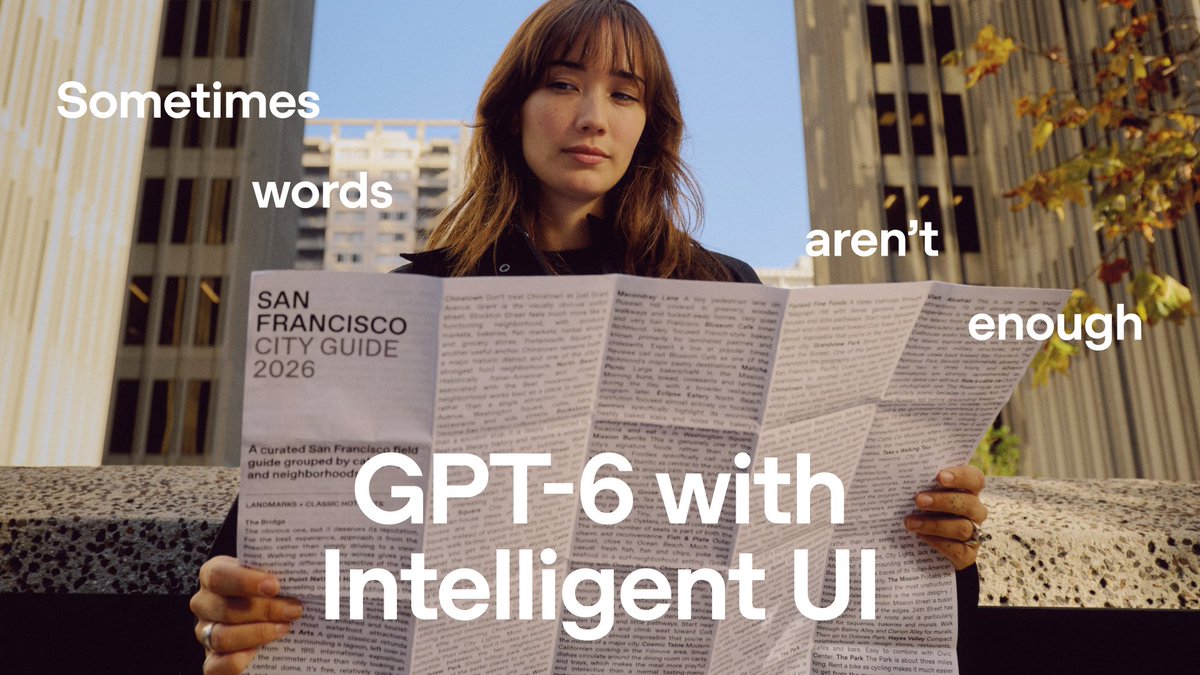
- SAN FRANCISCO CITY GUIDE 7. Fold each top co by the same am for ears, horns, 18. INSTALL REFLECTORS OR OTHER LOOSE ACCESSORIES 19. CHECK THE CHAINGUARD
- Camera
- Wide shot of a person looking lost in a city, then close-up on a person struggling with a large paper map. Cuts to hands folding origami with written instructions, then to a person assembling a bike, consulting a dense paper manual. Mix of medium and close-up shots, often from a slightly low or eye-level perspective, emphasizing the human element.
- Motion
- Fast-paced montage of real-world scenarios; quick cuts between different people and tasks; subtle camera movements (pans, slight zooms) to follow action; focus on hands and faces to convey effort and frustration.
Product Reveal
Seamless Solutions: ChatGPT's Visual & Interactive Power
“(No spoken dialogue — At 0:25, a significant high-energy transition occurs as a full big band ensemble enters, characterized by prominent brass and woodwinds, supported by a powerful rhythm section. The music maintains a consistently high-energy, upbeat swing feel, underscoring the ease and efficiency of the solutions.)”
- On screen
- Rocket Youth Bike Assembly Instructions Fit the front wheel San Francisco, your way Alcatraz Island Live wall color preview INTERACTIVE COLOR EXPLORER Let's fold an origami baby fox! This beginner-friendly version takes about 5-10 minutes. STEP 3 OF 12
- Camera
- Over-the-shoulder shots of hands interacting with a smartphone. The phone's screen is seamlessly integrated into the live-action scene, showing interactive ChatGPT UI overlays that directly solve the previously agitated problems (bike assembly, navigation, color selection, origami instructions). Camera often tracks the phone or the user's interaction.
- Motion
- Augmented reality (AR) style UI overlays; smooth, responsive UI animations (swipes, taps, content loading); dynamic content generation (maps, instructions, color previews); seamless transition from physical struggle to digital solution; clean, modern UI design.
Call to Action
Empowering Creativity: The Future of Interaction
“(No spoken dialogue — Another notable build-up occurs around 0:58, leading into a final, intense section before concluding abruptly with a definitive chord at 1:08. The big band energy peaks, creating a sense of triumph and excitement. The final 2.2 seconds are likely a static logo or fade-out.)”
- On screen
- Sometimes words aren't enough GPT-6 with Intelligent UI ChatGPT Now rolling out in ChatGPT for everyone.
- Camera
- Dynamic shot of a child riding a bike, then a hand holding a phone with text overlays. Followed by a vibrant, animated montage of various icons and elements related to ChatGPT's capabilities, culminating in the brand logo and tagline.
- Motion
- Bold, impactful typography animation (scale, fade, position); energetic, illustrative icon animations; rapid visual collage of brand elements; final, strong brand lockup with clear call to action text. The overall pacing is extremely fast, driven by the music.
Motion design primitives
Synthesizable in Remotion · key components of the openai-chatgpt-launch-style template.
UIOverlayReveal
A digital user interface (typically a smartphone screen) appears seamlessly over a live-action scene, often scaling up slightly or sliding into place, perfectly aligning with the real-world context it's augmenting. Content within the UI then animates in.
+ Code construction recipe
Use `AbsoluteFill` or `Sequence` for the base video. Overlay a `Composition` with `spring()` for scale/position animation. Utilize `interpolate()` for opacity and subtle blur effects on the underlying video as the UI appears. Implement `useCurrentFrame()` for precise timing of internal UI element animations (e.g., text, images, buttons fading/sliding in).
TextPopInScale
Short, impactful text phrases appear on screen with a rapid, slightly exaggerated scale-up animation, often accompanied by a subtle bounce or overshoot, then settling into place. Opacity fades in quickly.
+ Code construction recipe
Employ `spring()` with high damping and stiffness for the scale property (e.g., from 0.8 to 1.0, or 1.2 to 1.0). Combine with `interpolate()` for opacity (from 0 to 1). Use `measureText()` to ensure text fits and positions correctly, especially for multi-line layouts.
DynamicIconGrid
A collection of diverse icons, illustrations, and UI elements rapidly animate onto the screen, often from various directions or scaling in, forming a dynamic, non-uniform collage. Elements might subtly rotate or shift position.
+ Code construction recipe
Create an array of `Image` or `Svg` components. Stagger their `Sequence` start times. Apply `spring()` animations for `x`, `y` position, `scale`, and `rotate` properties. Use `random()` or a deterministic seed for varied initial positions and animation delays to create a chaotic yet controlled entrance. Consider `blur()` or `opacity` interpolation for elements entering from off-screen.
InstructionalStepHighlight
Within a UI, specific text lines, buttons, or visual elements are highlighted or animated to draw attention to the next step in a process. This could be a subtle background color change, an underline animation, or a slight pulse/scale.
+ Code construction recipe
Use `AbsoluteFill` for the UI background. For the target element, apply `interpolate()` on `backgroundColor` or `scale` property. For text, consider animating an `underline` SVG path or a `Text` component's `color` or `fontWeight`. Use `delayRender()` or `Sequence` to time these highlights with the narrative flow.
Style DNA & aesthetic system
Visual aesthetic
Typography
Motion
Special effects
Pacing & rhythm
Conceptual story rhythm
- 1
The Mundane Maze
Purpose. Establish relatable everyday challenges and the frustration of manual, analog processes.
Execution. A rapid montage of individuals struggling with physical maps, dense instruction manuals, and complex assembly tasks, shot with a slightly empathetic, observational camera.
- 2
The Digital Intervention
Purpose. Introduce the product as the elegant, intuitive solution to these everyday problems.
Execution. Seamless AR-style overlays of the ChatGPT UI appearing over the live-action scenes, instantly providing clear, visual, and interactive guidance, transforming struggle into ease.
- 3
Empowered Exploration
Purpose. Showcase the breadth and depth of the product's capabilities across diverse use cases, highlighting its versatility.
Execution. A series of quick cuts demonstrating different users interacting with the UI for various tasks (travel planning, home design, creative projects), each interaction leading to a successful and satisfying outcome.
- 4
The Visionary Leap
Purpose. Elevate the product beyond mere utility to a tool that unlocks new possibilities and enhances human potential.
Execution. Bold, animated typography declaring 'Sometimes words aren't enough' and 'GPT-6 with Intelligent UI,' followed by a vibrant, illustrative collage of icons and brand elements, culminating in the core brand message.
Remix in Animatiq Studio
Master remix prompt · agent-ready
Sample remix
Objective
A user wants to launch "AuraSync," a smart home hub that unifies all smart devices with an intelligent, visual interface.How the recipe adapts
The UIOverlayReveal primitive would show the AuraSync app appearing over a user fumbling with multiple remotes, instantly displaying a unified control panel. TextPopInScale would highlight features like "One Tap Scenes" or "Voice Control Enabled." The DynamicIconGrid would be adapted to showcase various smart home device icons (lights, thermostats, cameras) animating in a playful yet organized manner. The InstructionalStepHighlight would guide users through setting up a new automation routine within the AuraSync app, making complex tasks seem simple. The overall pacing and optimistic tone would be maintained, but with a visual language tailored to smart home aesthetics (e.g., subtle glow effects, clean architectural lines in the UI).Remix blueprint · openai-chatgpt-launch-style
Scene durations (4 scenes, 70.2s)
Key Remotion components
Related AI Product Launches
Explore all AI launches →
It sets a new state of the art on Physics-IQ, and powers robots, trains AIs, and generates interactive experiences.

Describe a need once, then open the app it creates for you and use it every day.

Grok Bot can now search, read, and monitor X.