
Scene-by-scene timeline & spoken transcript
The Hook
Imagination Unleashed
“I think creativity is just imagination. I think it's just being able to imagine something.”
- On screen
- (No on-screen text)
- Camera
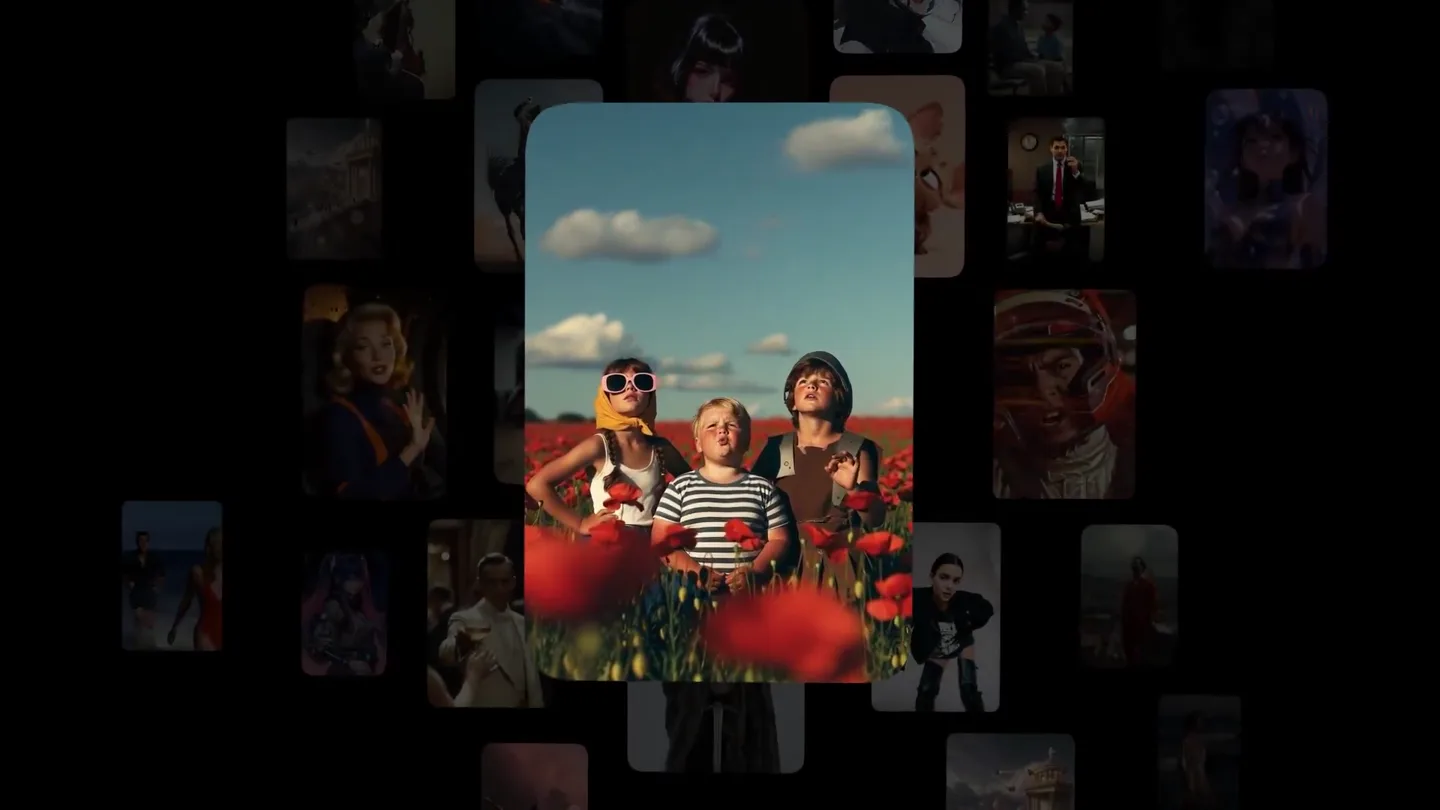
- The camera slowly zooms out and pans across a grid of diverse, AI-generated images, revealing more content.
- Motion
- Grid expansion with subtle 3D perspective shift and depth-of-field blur on background elements.
Product Reveal
Infinite Possibilities
“I'm imagining Thanksgiving pie. I'm imagining a world where I can just imagine anything.”
- On screen
- (No on-screen text)
- Camera
- The camera continues to pan and zoom through the expanding grid of AI-generated images, highlighting various styles and subjects.
- Motion
- Continuous grid scroll with dynamic image scaling and rotation, creating a sense of endless content.
Feature Teaser
Diverse Creations
“I'm imagining a world where I can just imagine anything.”
- On screen
- (No on-screen text)
- Camera
- The camera maintains a dynamic, sweeping motion across the image grid, emphasizing the breadth of AI-generated content.
- Motion
- Fluid camera path with parallax scrolling of image cards, maintaining visual interest and momentum.
Call to Action
Grok Imagine 1.0 Launch
“(No spoken dialogue — The music fades slightly, and a final sub-bass drop/impact occurs, leading into a clean, direct call to action.)”
- On screen
- Grok Imagine 1.0 Try it now for free grok.com/imagine
- Camera
- The screen transitions to a static black background with centered text, then fades to a new line of text.
- Motion
- Hard cut to black, followed by a simple fade-in and fade-out text animation.
Motion design primitives
Synthesizable in Remotion · key components of the dynamic-grid-product-launch template.
DynamicImageGrid
A grid of rounded-rectangle image cards dynamically expands and scrolls, with individual cards subtly scaling and rotating as the camera moves through them.
+ Code construction recipe
Utilize Remotion's <AbsoluteFill> for the background. Implement a grid layout using CSS Grid or Flexbox. Each image card should be a <Sequence> with <Img> components. Animate 'transform' properties (scale, rotateY, translateX, translateY) and 'opacity' using 'interpolate' and 'spring' functions based on camera position and card proximity to the center. Apply 'borderRadius' for the rounded corners. Use a parent <Camera> component to simulate the 3D pan and zoom.
SubtleDepthParallax
As the camera pans, background image cards move at a slightly different speed than foreground cards, creating a subtle parallax effect and enhancing depth.
+ Code construction recipe
Group image cards into different Z-depth layers. Apply varying 'translateX' and 'translateY' interpolation speeds to each layer based on the camera's movement. Use 'z-index' to ensure correct layering. Consider applying a slight 'blur' filter to more distant elements to enhance the depth perception.
FadeInTextSequence
Text elements appear sequentially with a smooth fade-in and slight scale-up animation, then fade out to reveal the next text element.
+ Code construction recipe
Each line of text should be a separate <Sequence> component. Animate 'opacity' from 0 to 1 and 'scale' from 0.95 to 1 using 'spring' or 'interpolate' with an 'easeOut' curve. Use 'delay' and 'duration' props on the <Sequence> to control the timing of each text element's appearance and disappearance.
Style DNA & aesthetic system
Visual aesthetic
Typography
Motion
Special effects
Pacing & rhythm
Conceptual story rhythm
- 1
The Creative Spark
Purpose. Introduce the core concept of imagination and creativity, immediately linking it to the product's capability.
Execution. A single, captivating AI-generated image appears, then slowly expands into a dynamic grid, visually representing the explosion of ideas.
- 2
Infinite Canvas
Purpose. Demonstrate the vast and diverse range of content the AI can generate, emphasizing its limitless potential.
Execution. The camera continuously pans and zooms through an ever-expanding, diverse grid of AI-generated images, showcasing various styles and subjects.
- 3
Personalized Vision
Purpose. Reinforce the idea that the AI can bring any imagination to life, no matter how specific or abstract.
Execution. Specific, striking images within the grid are briefly highlighted or brought into sharper focus as the camera moves, suggesting personalized creation.
- 4
Call to Action
Purpose. Clearly state the product name and provide a direct path for users to engage.
Execution. A hard cut to a clean, black screen with bold, white text revealing the product name and website, fading in sequentially.
Remix in Animatiq Studio
Master remix prompt · agent-ready
Sample remix
Objective
Launch a new smart home device called 'AuraFlow' that integrates seamlessly with existing ecosystems and offers personalized ambient lighting.How the recipe adapts
The DynamicImageGrid would display various smart home setups with AuraFlow lights, showing different color schemes and moods. Instead of diverse AI images, the grid would feature product shots, UI mockups, and lifestyle scenes. The camera would zoom into specific 'cards' showing features like 'Voice Control' or 'Scene Presets'. The FadeInTextSequence would introduce 'AuraFlow: Your Home, Illuminated' and 'Experience Seamless Integration' before the final call to action 'Get AuraFlow Today at auraflow.com'.Remix blueprint · dynamic-grid-product-launch
Scene durations (4 scenes, 25s)
Key Remotion components
Related AI Agents Product Launches
Explore all AI Agents launches →
To ensure that artificial general intelligence benefits all of humanity

Gopuff introduces Go, an AI shopping assistant built with SpaceXAI: say what you need and the order is placed.

Iliad (Troy) trailer made by Grok Imagine 1.5, which was just released