
xAI · Launch Video Breakdown: Hook, Pacing & Motion Design
Grok's new Voice connector is live for everyone: generate voice memos, turn daily events into a personalized podcast, or create automations for a daily brief. Available on iOS, Android and Web with zero setup.
Scene-by-scene timeline & spoken transcript
The Hook
Introducing Voice Connectors
“(No spoken dialogue — High-energy riser builds with driving electronic beat, sub-bass, and synth elements.)”
- On screen
- Introducing Voice Connectors
- Camera
- Static wide shot, centered text.
- Motion
- Subtle text fade-in, background texture appears to shimmer slightly.
Product Reveal
Automating Voice Memos
“(No spoken dialogue — Sub-bass drop/impact at 0:02, driving electronic beat continues.)”
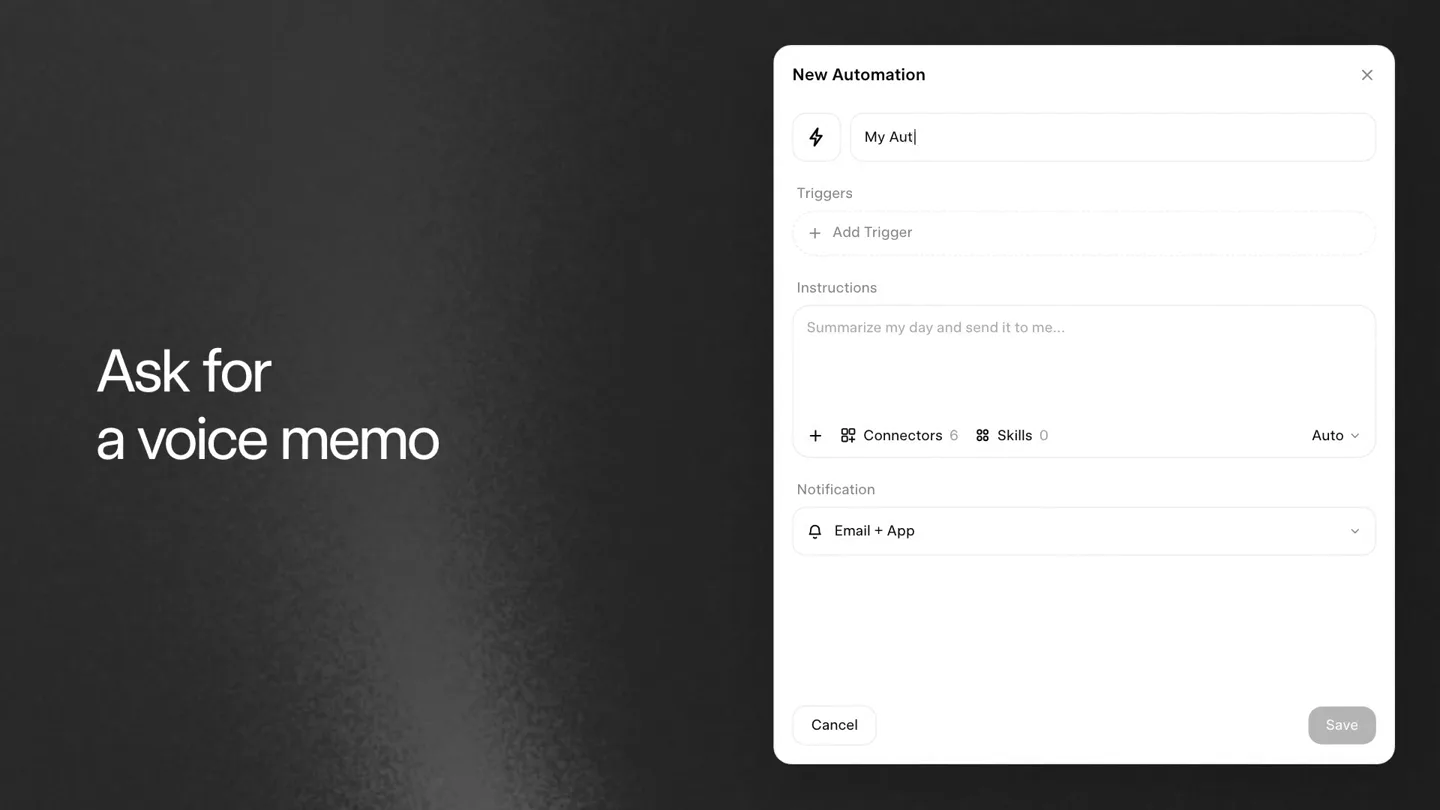
- On screen
- Ask for a voice memo New Automation My Aut| Triggers + Add Trigger Instructions Summarize my day and send it to me... + Connectors 0 Skills 0 Auto v Notification Email + App Cancel Save My Automation Daily at 9:12 PM summarize latest news from X and send it to me as voice memo
- Camera
- Static wide shot, split screen with text on left and product UI on right.
- Motion
- Text typing animation within the UI, UI elements animate into view from the right, left text fades in.
Feature Teaser
Grok Generates Audio Summary
“NASA has confirmed a new launch window for the Artemis 4 Lunar Flyby.”
- On screen
- Grok creates a voice recording My Automation Daily at 9:12pm Worked for 39s Here's a quick summary of the latest major news circulating on X today: • NASA confirmed a new launch window for the Artemis IV lunar flyby. @NASA • Markets rallied after chipmakers posted record quarterly earnings. @CNBC I've turned this summary into a voice memo for you: latest_news_summary.mp3 0:00 / 0:59 38 sources Press play, catch up
- Camera
- Static wide shot, split screen with text on left and product UI on right.
- Motion
- Text typing animation within the UI, audio waveform visualization animates, left text fades in and out.
Call to Action
Availability Across Platforms
“(No spoken dialogue — Driving electronic beat continues, fades out.)”
- On screen
- Available now on iOS, Android, and Web
- Camera
- Static wide shot, centered text.
- Motion
- Text fades in, background texture shimmers.
Motion design primitives
Synthesizable in Remotion · key components of the ai-voice-connector-launch template.
TextFadeShimmer
Text fades in smoothly while a subtle, grainy background texture shimmers and shifts, creating a dynamic yet understated visual. The text itself has a slight glow effect.
+ Code construction recipe
Use `interpolate` for opacity and scale on the text. Implement a `Shader` component for the background grain and shimmer, animating its `time` uniform. Apply a `DropShadow` with a very low blur radius and high spread for the text glow.
UITypingReveal
UI elements slide in from the right, and text within input fields appears with a realistic typing animation, simulating user interaction. Other UI elements like buttons and dropdowns also animate into their final states.
+ Code construction recipe
Utilize `spring` for the initial slide-in of UI containers. For typing, use `Sequence` and `Character` components to reveal text character by character with a slight delay. Animate `opacity` and `x` position for individual UI elements.
AudioWaveformPlayback
An audio waveform visualizer animates to show playback progress, with a play/pause button changing state. The waveform itself is a series of vertical bars that react to the audio.
+ Code construction recipe
Render an SVG or Canvas component for the waveform. Map audio amplitude data to the height of individual bars using `useCurrentFrame` and `getAudioData`. Animate the playhead position using `interpolate` based on audio playback time. Use `useState` for play/pause button state.
Style DNA & aesthetic system
Visual aesthetic
Typography
Motion
Special effects
Pacing & rhythm
Conceptual story rhythm
- 1
The Reveal
Purpose. Introduce the core product concept and its immediate benefit.
Execution. Bold title text on a textured background, followed by a quick cut to a split screen showing the product UI and a concise benefit statement.
- 2
The Setup
Purpose. Demonstrate the ease of setting up the product's core functionality.
Execution. Real-time typing animation within the UI, showing how to configure an automation, paired with a clear textual explanation on the left.
- 3
The Payoff
Purpose. Showcase the product delivering its promised value.
Execution. The UI displaying the generated summary and an interactive audio player, with the actual voice memo playing, reinforcing the product's output.
- 4
The Call
Purpose. Inform users about availability and prompt them to engage.
Execution. A clean, full-screen text overlay stating platform availability, maintaining the minimalist aesthetic.
Remix in Animatiq Studio
Master remix prompt · agent-ready
Sample remix
Objective
Launch a new AI-powered financial assistant called 'ApexFlow' that generates personalized daily financial reports.How the recipe adapts
The 'TextFadeShimmer' primitive will introduce 'Introducing ApexFlow'. The 'UITypingReveal' will show a user configuring 'Generate daily financial summary' within ApexFlow's interface. The 'AudioWaveformPlayback' will visualize ApexFlow reading out a summary of market trends and portfolio updates. The final call to action will use 'TextFadeShimmer' to display 'Available on Web and Mobile'.Remix blueprint · ai-voice-connector-launch
Scene durations (4 scenes, 17s)
Key Remotion components
Related AI Agents Product Launches
Explore all AI Agents launches →
To ensure that artificial general intelligence benefits all of humanity

Gopuff introduces Go, an AI shopping assistant built with SpaceXAI: say what you need and the order is placed.

Iliad (Troy) trailer made by Grok Imagine 1.5, which was just released