
MiniMax · Launch Video Breakdown: Hook, Pacing & Motion Design
Set up a complete video generation pipeline with MiniMax Video Model Hailuo 2.3 — vivid motions and infinite styles.
Scene-by-scene timeline & spoken transcript
The Hook
AI Agent Pipeline Setup
“(No spoken dialogue — Driving electronic beat with rhythmic synth plucks and a building riser.)”
- On screen
- Let OpenClaw set up a complete VidGen pipeline for itself MINIMAX | Hailuo AI
- Camera
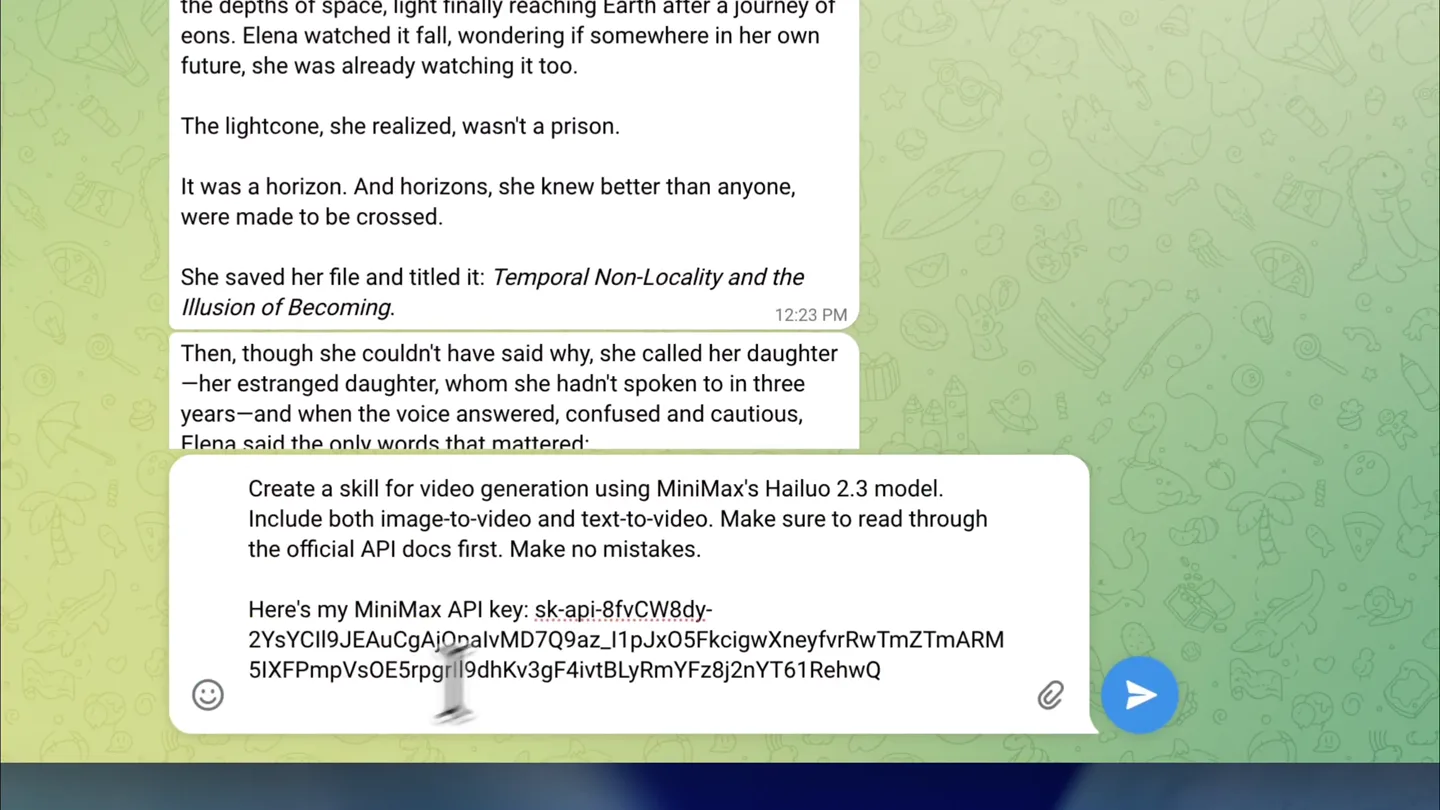
- Static wide shot of a cartoon band, then a close-up on a Telegram chat interface, followed by a zoom out to reveal the full browser window.
- Motion
- Text overlay, UI interaction simulation (typing, sending), rapid zoom and pan.
Product Reveal
Automated Skill Generation
“(No spoken dialogue — Sub-bass drop/impact at 0:05, maintaining rhythmic electronic beat.)”
- On screen
- Create a skill for video generation using MiniMax's Hailuo 2.3 model. Include both image-to-video and text-to-video. Make sure to read through the official API docs first. Make no mistakes. Here's my MiniMax API key: sk-api-8fvCW8dy-2YsYCII9JEAuCgAjQpalvMD7Q9az_l1pJxO5FkcigwXneyfvrRwTmZTmARM5IXFpmpVsOE5rpgriI9dhKv3gF4ivtBLyRmYFz8j2nYt61RehwQ Now I'll create a comprehensive skill for MiniMax video generation. Let me set up the skill structure with scripts and documentation. Now let me test the script for syntax errors.
- Camera
- Static shot of the Telegram chat, then a blurred background with a progress bar overlay, followed by a return to the chat interface.
- Motion
- UI typing animation, progress bar fill with glitch effect, text reveal.
Feature Teaser
Image-to-Video Generation
“(No spoken dialogue — Riser builds from 0:12 to 0:13, culminating in a sub-bass impact at 0:14.)”
- On screen
- --resolution 1080P --output video.mp4 Image-to-Video Bash python scripts/generate_video.py \ --mode i2v \ --image "https://example.com/photo.jpg" \ --prompt "turtle waves on water" \ --resolution 1080P \ --output animated.mp4 Setup Bash cd ~/openclaw/workspace/skills/minimax-video pip install -r scripts/requirements.txt export MINIMAX_API_KEY=sk-api-8fvCW8dy-2YsYCII9JEAuCgAjQpalvMD7Q9az_l1pJxO5FkcigwXneyfvrRwTmZTmARM5IXFpmpVsOE5rpgriI9dhKv3gF4ivtBLyRmYFz8j2nYt61RehwQ Key Capabilities • Models: MiniMax Hailuo-2.3 (default), Hailuo-2.3 Fast, Hailuo-02 • Mode: Text-to-video, Image-to-video • Resolutions: 720P, 768P, 1080P (512P for Hailuo-02) • Durations: 5s or 10s (10s only at 768P for 2.3 models) • Camera Controls: 15 commands including [Pan], [Zoom], [Push in],[Tracking shot] • Async Workflow: Creates task + polls status + downloads result The API documentation is in references/api-reference.md for detailed endpoint specs. Please generate a video based off this with image: Send Photo SEND
- Camera
- Close-up on the message input field, then a pop-up modal for sending a photo, followed by the generated image and a loading animation.
- Motion
- UI typing animation, modal overlay, image upload simulation, loading bar with glitch effect.
Call to Action
Vivid Motions & Infinite Styles
“(No spoken dialogue — Sustained rhythmic electronic beat, fading out with a final impact.)”
- On screen
- LOADING ... Your rock band sea creatures! The cool octopus drummer in shades and the lobster guitarist with bandana, jamming in their garage. Generated with MiniMax image-to-video. MINIMAX | Hailuo AI Intelligence with Everyone
- Camera
- Blurred background with a loading bar, then a return to the chat with the generated video, followed by a full-screen playback of the generated video, and finally the MiniMax logo and tagline.
- Motion
- Loading bar with glitch, video playback, extreme motion blur transition, logo reveal with subtle animation.
Motion design primitives
Synthesizable in Remotion · key components of the ai-agent-pipeline-launch template.
UITypingReveal
Text appears character by character in a chat input field, simulating real-time typing, followed by a message send animation.
+ Code construction recipe
Use `interpolate` to animate `opacity` and `width` of a cursor element. For text, use `split` to break text into characters and `map` over them, applying a delayed `opacity` and `transform` (e.g., `translateY`) based on character index and `spring` for a subtle bounce.
GlitchProgressBar
A progress bar fills with a distinct glitching effect, accompanied by a text overlay that also exhibits a subtle glitch or pixelation.
+ Code construction recipe
Implement a `LinearGradient` for the progress bar fill, animating its `width` using `interpolate`. Apply an SVG `filter` with `feTurbulence` and `feDisplacementMap` for the glitch effect, animating the `baseFrequency` or `scale` over time. Text can use a `text-shadow` with multiple offsets and colors, animating their `opacity` or `position` for a pixelated glitch.
ExtremeMotionBlurTransition
A scene transition where the current visual blurs intensely and stretches horizontally, creating a streaky, high-speed effect before resolving into the next scene.
+ Code construction recipe
Utilize a `canvas` or `SVG filter` with `feGaussianBlur` and `feOffset` to create the blur and stretch. Animate the `stdDeviation` of the blur and the `dx` (horizontal offset) of the offset filter using `spring` or `interpolate` with an aggressive easing curve (e.g., `easeOutCubic`) to achieve the rapid, streaky effect.
Style DNA & aesthetic system
Visual aesthetic
Typography
Motion
Special effects
Pacing & rhythm
Conceptual story rhythm
- 1
The AI Agent's Task
Purpose. Introduce the core capability: an AI agent setting up a video generation pipeline.
Execution. Opening with a whimsical cartoon, quickly transitioning to a Telegram chat where the AI agent receives its initial instruction.
- 2
Automated Skill Creation
Purpose. Demonstrate the AI's ability to autonomously generate and test complex skills.
Execution. Typing animation in the chat, followed by a progress bar indicating skill setup, and then the AI confirming its work with code snippets.
- 3
Image-to-Video in Action
Purpose. Showcase a key feature: generating video from an image and prompt.
Execution. User interaction to upload an image, a loading sequence, and the immediate display of the generated video within the chat interface.
- 4
Product Power & Brand
Purpose. Highlight the vivid output and reinforce the MiniMax brand message.
Execution. Full-screen playback of the generated video, followed by a dynamic transition to the MiniMax logo and tagline.
Remix in Animatiq Studio
Master remix prompt · agent-ready
Sample remix
Objective
Launch a new AI-powered code refactoring tool called 'SyntaxFlow'.How the recipe adapts
The video would open with a developer typing a complex code refactoring request into a 'SyntaxFlow' chat interface, using the UITypingReveal primitive. A GlitchProgressBar would show the AI processing the code, with 'Refactoring...' text. The ExtremeMotionBlurTransition would then lead to a split-screen view showing 'before' and 'after' code snippets, highlighting the AI's efficiency. The final scene would feature the SyntaxFlow logo with a tagline like 'Intelligent Code Transformation' using the same clean typography and color palette.Remix blueprint · ai-agent-pipeline-launch
Scene durations (4 scenes, 21.5s)
Key Remotion components
Related AI Agents Product Launches
Explore all AI Agents launches →
To ensure that artificial general intelligence benefits all of humanity

Gopuff introduces Go, an AI shopping assistant built with SpaceXAI: say what you need and the order is placed.

Iliad (Troy) trailer made by Grok Imagine 1.5, which was just released