
Helumi · Launch Video Breakdown: Hook, Pacing & Motion Design
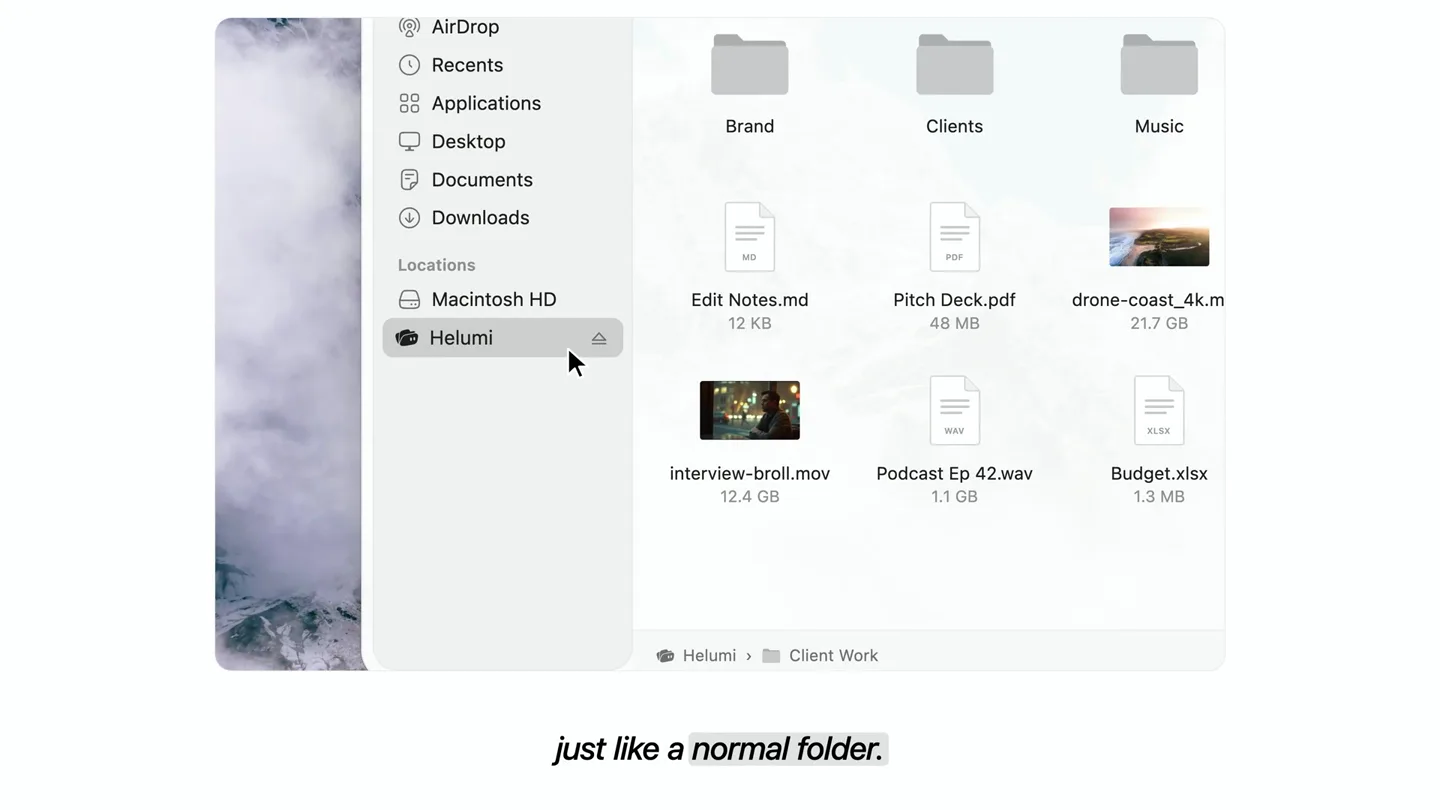
Lives in Finder just like a normal folder: files stay in the cloud and take basically zero space on your Mac.
Scene-by-scene timeline & spoken transcript
Problem Agitation
The Storage Struggle: Full Disks & Cloud Frustrations
“storage almost full. again. so you start deleting... old videos, photos you love. an external drive? expensive. and it's never with you when you need it. cloud drives? you wait for every file to download... and your mac fills up again.”
- On screen
- Finder File Edit View Go Thu 8:42 PM Your disk is almost full Save space by optimizing storage. Your disk is almost full Save space by optimizing storage. storage almost full. again. Favorites AirDrop Recents Applications Desktop Documents Downloads Macintosh HD Pictures wedding-film.mov 48.2 GB Family Brand Shoot.jpg 18.4 GB interview.mov 12.4 GB Album Cover.psd 2.3 GB Old Projects Podcast Ep 42.wav 1.1 GB Holiday 2023 Sample Pack.zip 3.6 GB Macintosh HD > Pictures so you start deleting... old videos, photos you love. Backup Drive wedding-film.mov 48.2 GB goa-trip_2024.mov 21.7 GB Family Archive Album Cover.psd 2.3 GB Backup Drive $129 an external drive? expensive. The alias "wedding-film.mov" can't be opened because the original item can't be found. OK Fix Alias... Delete Alias and it's never with you when you need it. iCloud Drive Wedding 2024 13 of 214 items Goa Trip 4 of 96 items wedding-film.mov 3.5 of 48.2 GB Client Work 2 of 38 items Family Photos 33 of 1,208 items interview.mov 1.2 of 12.4 GB Projects 2025 7 of 132 items drone-4k.mp4 1.0 of 9.8 GB Music 1 of 340 items Archive 3 of 77 items iCloud Drive 10 items, 16.9 GB available cloud drives? you wait for every file to download... iCloud Drive 10 items, 1.5 GB available and your mac fills up again.
- Camera
- Static, slightly zoomed-out perspective of a macOS desktop. The camera remains fixed, allowing UI elements to animate within the frame.
- Motion
- Seamless UI animation, simulating macOS interactions like notifications appearing, files being dragged to trash, Finder windows opening/closing, and file info panels appearing. Subtle camera shake on impact sounds.
Product Reveal
Meet Helumi: The Zero-Space Solution
“meet helumi.”
- On screen
- meet meet helumi.
- Camera
- Static, centered view on a white background.
- Motion
- Text reveal with a subtle fade-in and scale, followed by the Helumi logo animating into place with a quick, impactful pop.
Feature Teaser
Cloud Files, Local Feel: Instant Access, Zero Space
“keep all your files in the cloud. they take zero space on your mac, and open instantly. just”
- On screen
- Finder File Edit View Go Thu 6:42 PM Client Work Brand Clients Music Archive wedding-film_final... 48.2 GB Edit Notes.md 12 KB Pitch Deck.pdf 48 MB drone-coast_4k.mp4 21.7 GB Brand Shoot.jpg 18.4 MB Album Cover.psd 2.3 GB interview-broll.mov 12.4 GB Podcast Ep 42.wav 1.1 GB Budget.xlsx 1.3 MB Sample Pack.zip 3.6 GB Invoice.pdf 3.2 MB Helumi > Client Work keep all your files in the cloud. wedding-film_final.mov Modified: Today, 10:24 AM Add Tags... General: Kind: QuickTime movie Size: 48,213,574,021 bytes (Zero bytes on disk) Where: Helumi > Client Work Created: Yesterday, 9:42 AM More Info: Name & Extension: 48.2 GB they take zero space they take zero space on your mac, and open instantly. AirDrop Recents Applications Desktop Documents Downloads Macintosh HD Helumi just
- Camera
- Static, slightly zoomed-out perspective of a macOS desktop. The camera remains fixed, allowing UI elements to animate within the frame.
- Motion
- Simulated macOS Finder interactions demonstrating Helumi's functionality: files appearing in a Helumi folder, an info panel showing 'Zero bytes on disk', and a video file opening instantly within QuickTime. Text highlights with color changes.
Call to Action
More Space, No New Mac: Download Helumi
“more space for your mac. without buying a new one. download for mac. free to download. needs macos 26.”
- On screen
- before 1.2 GB after 259 GB more space for your mac. meet helumi. more space for your mac, without buying a new one. download for mac free to download · needs macos 26
- Camera
- Static, centered view on a white background, then a slight zoom out to reveal the full CTA.
- Motion
- Abstract data visualization showing 'before' and 'after' storage bars with a file stack transforming into the Helumi logo. Text reveals with a subtle scale and fade, followed by a prominent call-to-action button appearing with a bounce effect.
Motion design primitives
Synthesizable in Remotion · key components of the macos-productivity-launch template.
MacOSUISequence
Simulates native macOS Finder and notification interactions, including window opens, file drags, info panel reveals, and application launches, all within a consistent desktop environment.
+ Code construction recipe
Utilize Remotion's <AbsoluteFill> for the desktop background. Implement <Sequence> components for each UI element (windows, notifications, dock icons). Animate position, opacity, and scale using `interpolate` with `easeOutCubic` for natural macOS-like transitions. Use SVG assets for UI elements and icons. For file operations, animate `x` and `y` positions of file icons.
TextRevealPop
Text appears with a slight scale-up and fade-in, often accompanied by a subtle bounce or impact, emphasizing key phrases or product names.
+ Code construction recipe
Wrap text in a <Text> component. Animate `opacity` from 0 to 1 and `scale` from 0.9 to 1 using `spring` for a bouncy effect or `interpolate` with `easeOutBack` for a quick pop. Apply a `delay` to stagger multiple text elements.
DataBarComparison
Visualizes data comparison using horizontal bars that fill or change length, accompanied by numerical values and illustrative icons.
+ Code construction recipe
Create two <Rect> components for the 'before' and 'after' bars. Animate the `width` property of the bars using `interpolate` from 0 to their target length. Use <Text> components for numerical values, animating their `opacity` and `y` position. Integrate SVG icons for visual context (e.g., cloud, Helumi folder).
Style DNA & aesthetic system
Visual aesthetic
Typography
Motion
Special effects
Pacing & rhythm
Conceptual story rhythm
- 1
The Pain Point
Purpose. Establish and agitate the common frustrations users face with storage, making the problem relatable and urgent.
Execution. Rapid-fire UI animations showing 'disk full' notifications, file deletion, external drive issues, and slow cloud downloads.
- 2
The Introduction
Purpose. Introduce the product as the definitive solution to the agitated problems.
Execution. A clean, impactful reveal of the product name and logo on a stark white background, coinciding with a sub-bass drop.
- 3
The Solution Demo
Purpose. Visually demonstrate how the product solves the problems, highlighting key benefits like zero space and instant access.
Execution. Seamless UI walkthrough of Helumi in Finder, showing files taking 'zero bytes on disk' and opening instantly, with text highlights.
- 4
The Transformation & CTA
Purpose. Summarize the core benefit and guide the user to take the next step.
Execution. Abstract data visualization showing a dramatic 'before and after' storage comparison, followed by a clear call-to-action button.
Remix in Animatiq Studio
Master remix prompt · agent-ready
Sample remix
Objective
A new macOS app, 'FlowState', that helps users block distractions and enter deep work sessions.How the recipe adapts
The 'Problem Agitation' phase would show a macOS desktop cluttered with notification pop-ups, bouncing dock icons, and multiple open, distracting apps. The 'Product Reveal' would introduce 'FlowState' with its logo. The 'Feature Teaser' would demonstrate FlowState's UI, showing a user activating a focus mode, apps fading into a 'blocked' state, and a clean, minimalist timer appearing. The 'Call to Action' would use a data bar comparison to show 'before' (scattered attention) vs. 'after' (focused work hours) and prompt users to download FlowState.Remix blueprint · macos-productivity-launch
Scene durations (4 scenes, 35s)
Key Remotion components
Related Productivity Product Launches
Explore all Productivity launches →
Don't type, just speak. Flawless voice-to-text across every app at 240 WPM.

One workspace for knowledge scattered across Slack, email, Docs, and Notion. Connect your tools and build apps and agents that stay live with your data.

Notion positions itself as the backbone of your dock — a brand film of the Notion icon among everyday apps, ending on “Works with everything.”