
herdr · Launch Video Breakdown: Hook, Pacing & Motion Design
herdr 0.9 puts every machine running herdr in a single client, so you can control agents and projects across local and remote machines without jumping between terminal tabs.
Scene-by-scene timeline & spoken transcript
The Hook
Problem Agitation: The Need for Unified Control
“(No spoken dialogue — Silent video with ambient visual cues.)”
- On screen
- Support multiple remote Herdr servers #515 icedac started this conversation in Ideas icedac on May 28 edited Current behavior Herdr currently has a 1:1 client/server attach model. herdr attaches to one local headless server. herdr --remote <target> attaches to one remote headless server. For users working across two or more local/remote Herdr or tmux-backed servers, the practical workaround is still separate windows or nested Herdr/tmux sessions. That nesting technically works, but even two layers create friction: shortcuts become ambiguous, mouse UI actions can go to the wrong layer or stop working reliably, and host-terminal features such as image paste do not behave consistently. Requested change It would be genuinely useful if a user could add remote Herdr headless servers once, then use several servers from one Herdr sidebar almost as if they were one server. Desired user experience: launch herdr locally or herdr --remote <target> ; treat the launched server as the main server; use menu -> add remote to add another remote host or localhost ; show local and remote workspaces/agents together in the sidebar; click a workspace or agent to switch to that server; cycle the spaces header through all -> local/main -> remote... ; Implementation notes draft This is only a possible direction, not the requested user-facing contract. Keep the launched server as the main server. Persist only a lightweight remote registry on the main server. Keep actual secondary server connections client-owned. Refactor sidebar ownership so the thin client can render a unified sidebar from server/workspace/agent summ Reuse the existing remote attach/SSH bridge where possible for secondary connections. 0 0 1 0 comments 0 replies ogulcanceik on May 28 Maintainer i know this is much wanted and i appreciate your help offer, but this is a big change i want to tackle myself for now stuff. ty tho! 6 14 1 66 41 1 102 64 1 34 comments 5 replies
- Camera
- Static overhead shot of a GitHub issue page, slowly scrolling down to reveal more text.
- Motion
- Smooth, slow vertical scroll with subtle content reveal.
Product Reveal
Unified Terminal Experience: Adding Remote Machines
“(No spoken dialogue — Silent video with ambient visual cues.)”
- On screen
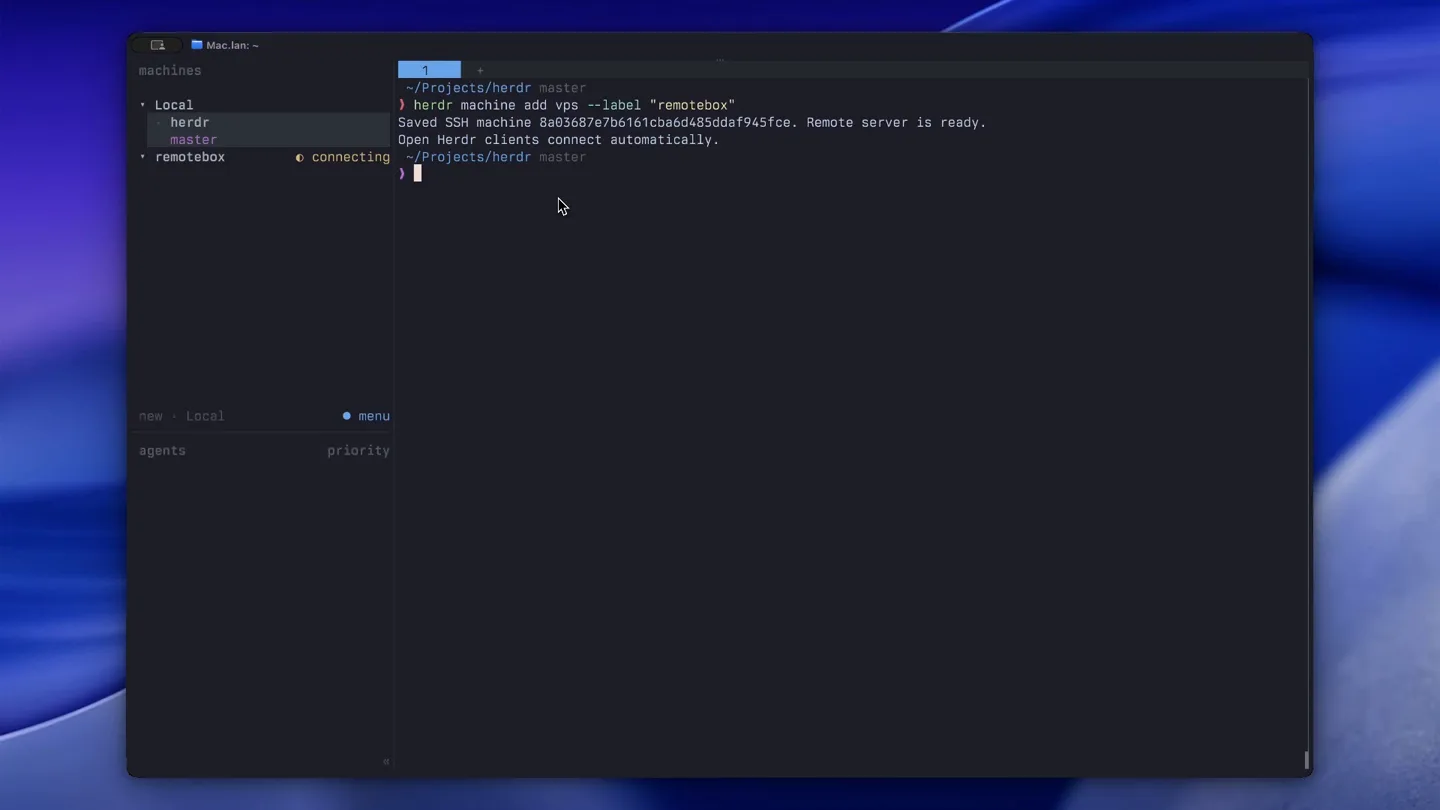
- dev / herdr Public machines Local herdr master remotebox connecting spaces herdr master new agents priority Mac.Jami ~/projects/herdr master herdr machine remove b3150b00a3c932c5c897d4fcfeaf88 herdr machine add vps --label "remotebox" Saved SSH machine 8a03f87e7b61cba850d4f945fce. Remote server is ready. Open Herdr clients connect automatically. ~/Projects/herdr master
- Camera
- Static wide shot of a terminal window, with a sidebar expanding to show 'machines'.
- Motion
- UI element expansion, text typing animation, and dynamic list population.
Feature Teaser
Seamless Agent Control: AI Integration
“(No spoken dialogue — Silent video with ambient visual cues.)”
- On screen
- rohan: web-app machines Local herdr master remotebox web-app master job-runner master box ) codex OpenAI Codex (v0.153.4) model: gpt-5.6-luna medium /model to change directory: ~/herdr-video-demo/web-app Tip: You can run any shell command from Codex using ! (e.g. !ls) You have 2 usage limit resets available. Run /usage to use one. gpt-5.6-luna medium ~/herdr-video-demo/web-app repeat: on repeat: one herdr all th Working (0s esc to interrupt) menu > Ask Codex to do anything gpt-5.6-luna medium ~/herdr-video-demo/web-app One herdr, all the machines! new remotebox agents priority web-app remotebox codex 100% context left
- Camera
- Static wide shot of the terminal, with focus on the command line and AI agent interaction.
- Motion
- Typing animation, dynamic text output, and UI state changes (e.g., 'Working' indicator).
Call to Action
The Herdr Vision: One Client, All Machines
“(No spoken dialogue — Silent video with ambient visual cues.)”
- On screen
- (No on-screen text)
- Camera
- Static wide shot of the terminal, concluding with the core message.
- Motion
- Final text reveal, emphasizing the product's core benefit.
Motion design primitives
Synthesizable in Remotion · key components of the unified-terminal-launch template.
DynamicTerminalTyping
Text appears character by character in a terminal window, simulating live typing, often followed by command execution output.
+ Code construction recipe
Use Remotion's `Sequence` and `spring` for character reveal, combined with `interpolate` for cursor blinking. Output text can appear instantly or with a slight delay after command execution.
SidebarExpansionAndPopulation
A sidebar UI element smoothly expands or collapses, revealing a list of items that dynamically populate or update.
+ Code construction recipe
Employ `spring` for the sidebar width/height transition. List items can use `Sequence` with `delay` and `spring` for staggered entry animations (e.g., fade-in and slide-up).
GitHubScrollReveal
A web page, specifically a GitHub issue, scrolls vertically to reveal more content, simulating user interaction.
+ Code construction recipe
Utilize `interpolate` for the `translateY` property of the content container, creating a smooth scrolling effect. Ensure `overflow: hidden` on the parent container.
Style DNA & aesthetic system
Visual aesthetic
Typography
Motion
Special effects
Pacing & rhythm
Conceptual story rhythm
- 1
The Current Pain Point
Purpose. Establish the problem of managing multiple remote machines with existing tools, highlighting friction and complexity.
Execution. Scrolling through a GitHub issue detailing the 'Current behavior' and 'Requested change' for multi-server support.
- 2
The Elegant Solution
Purpose. Introduce Herdr 0.9 as the answer, demonstrating its ability to unify machines in a single client.
Execution. Transition to the Herdr terminal, showing the 'herdr machine add vps' command and the new 'remotebox' appearing in the sidebar.
- 3
Seamless Workflow Integration
Purpose. Showcase the practical benefits and advanced features, like AI agent integration, within the unified client.
Execution. Interacting with an OpenAI Codex agent within the Herdr client, demonstrating how it operates across machines.
- 4
The Future of Control
Purpose. Conclude with the overarching vision of Herdr: simplified, powerful control over all machines.
Execution. The final command output 'One herdr, all the machines!' reinforcing the core value proposition.
Remix in Animatiq Studio
Master remix prompt · agent-ready
Sample remix
Objective
Launch 'Synapse', a tool for unified cloud resource management.How the recipe adapts
The GitHub scroll will detail the pain of multi-cloud sprawl. The terminal will show 'synapse provider add aws' and 'synapse provider add azure', populating a sidebar with these new cloud environments. An AI agent will then be prompted to 'deploy app to all providers', demonstrating cross-cloud orchestration. The final text will be 'Synapse: Your Clouds, Unified.'Remix blueprint · unified-terminal-launch
Scene durations (4 scenes, 30s)
Key Remotion components
Related Developer Tools Product Launches
Explore all Developer Tools launches →
xAI opens voice cloning on its API: build a custom voice in about two minutes or pick from 80+ voices in 28 languages.

Agentic CLI for coding, building apps, and automating workflows.
Sakana AI launches Fugu, a multi-agent orchestration system served through a single model API, led by its Fugu Ultra model.