
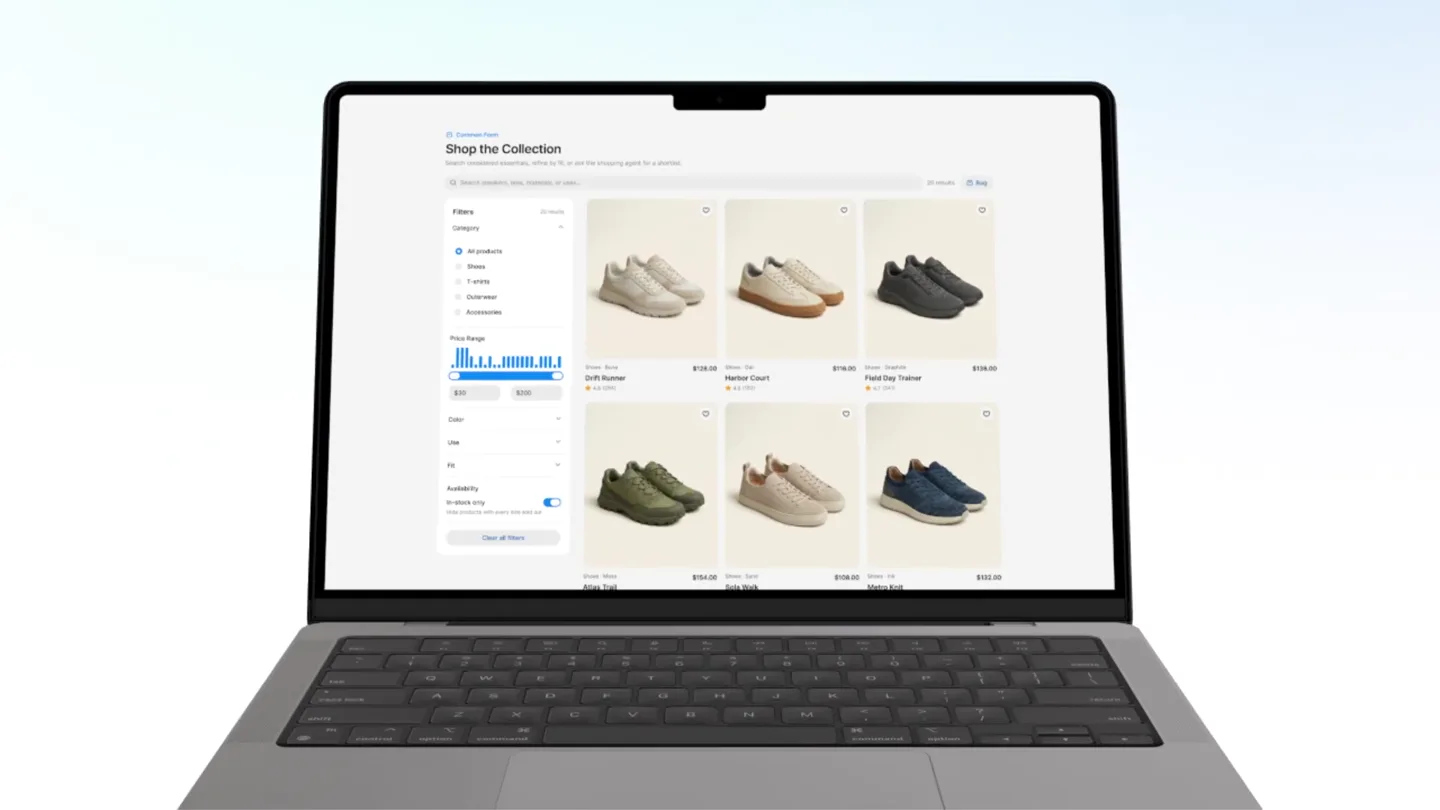
HeroUI · Launch Video Breakdown: Hook, Pacing & Motion Design
HeroUI Agents lets you embed an agent in your product. It understands page context, calls your tools, generates charts, tables, and forms, and can ask for approval before acting.
Scene-by-scene timeline & spoken transcript
The Hook
Agent Installation & Product Intro
“(No spoken dialogue — The track begins with a sustained, evolving synth pad creating an atmospheric drone.)”
- On screen
- npm install @heroui/agent Introducing HeroUI
- Camera
- Starts with a blurred close-up of a laptop screen, pulls back to reveal the full laptop, then zooms into a terminal command input, and finally transitions to a full-screen text overlay.
- Motion
- Zoom out, text overlay, UI element interaction (typing animation, cursor movement), subtle background particle animation.
Product Reveal
Agent-Powered Data Visualization
“(No spoken dialogue — A subtle rhythmic pulse emerges with a filtered synth arpeggio at [00:06]. A high-energy riser builds from [00:19] to [00:21], culminating in a sub-bass impact and a more prominent, driving synth melody.)”
- On screen
- Welcome, Alex What should we explore in Business Banking? Can you create charts of all my metrics? Metrics Visualization Session Organizing metric retrieval Analyze startup metrics Exploring UI composition Preparing your data view Designing a dashboard Building your data view Final response read Startup Metrics — Sep 2025 to Aug 2026 Latest metrics · Aug 2026 foreca MRR ARR Sep 25 Dec 25 Burn profile Gross burn versus net burn after customer collections. Gross burn $194,999.98 +13.37% $200K $150K $100K $50K $0 Sep 25 Dec 25 Gross burn Net burn Financial health Cash balance, runway, and gross margin. Values use their native units, hover for exact readings. Cash balance $431,000.00 -44.74% $800K $600K $400K $200K $0 From natural langua Generating... Powered by hero
- Camera
- Dynamic camera movements around a laptop screen, focusing on UI elements, then a full-screen mobile UI perspective, followed by a close-up on a chat input field.
- Motion
- Screen wipe transitions, UI element pop-ins, data visualization animations (chart drawing, number counters), generative UI effects (pixelated reveal), cursor interaction.
Feature Teaser
Dynamic UI Generation & Data Insights
“(No spoken dialogue — Another riser and sweep occur from [00:30] to [00:32], leading to a more intense, layered synth arrangement with a stronger rhythmic presence.)”
- On screen
- Generating... wrap $7.25 rt bowl ional $5.90 $4.85 $18.00 $1.58 $19.58 Add to cart Purchase Purchase complete Estimated delivery Sold by HeroUI Pro Store $1,390.00 View details YOU HAVE 2 CREDITS LEFT Get a paid plan to unlock UNLIMITED 1 min Pick up 455 Valencia St Kate Wilson Revenue mix Monthly revenue $133K +2.0% Active customers 2,847 +0.5% Growth Recommended Revenue trend Monthly reliability budget Remaining error budget for the currently reliability window. 0% 100% Revenue trend compared with the monthly target. $100K $50K $0 Growth Revenue is compounding ahead of target for the first straight month. Churn watch Enterprise churn ticked up 0.8 points — three renewals need attention. Pipeline Expansion pipeline added $12K in qualified opportunities this week. Portfolio Total balance $5,606.94 Elevated checkout errors PRODUCTION - API Payments team 8 minutes Dismiss Open incident Order Summary Order #88412 - Drift Runner Shipped Gift order Left the regional hub this morning and is expected tomorrow. Delivery progress Warehouse utilization Compute capacity is a share of provisioned capacity. 73% Capacity used 0% 100% Current churn rate 12.5% +0.0% Customer health Best match: Drift Runner Use this product to benchmark a few of the dimensions. Drift Runner $128.00 AA 900 Buenos Aires San Francisco 9:05 PM On time Fri, Apr 25 Revenue trend Revenue compared with the monthly target. $82,000.00 +10.83% MAX Central Buenos Aires pizza picks Ranked pizzas commonly shown on the map. I/O Control Dashboard Report production Weekly pipeline Instructions Review accounts at risk. Delivery Daily Weekly Monthly Dashboard Email Maximum accounts 50 Confirm threshold Delivery time 10:00 AM Cancel Save
- Camera
- Rapid cuts between various UI elements, a 3D isometric view of multiple UI cards, and a dark mode version of the same UI cards.
- Motion
- Generative UI effects (pixelated reveal, expanding elements), 3D card rotation and arrangement, light/dark mode toggle animation, data visualization updates.
Call to Action
Agent Versatility & Brand Reveal
“(No spoken dialogue — A final, extended riser and sweep build from [00:48] to [00:50], followed by a deep sub-bass drop and a return to the atmospheric synth pad, which fades out.)”
- On screen
- Ask about your data Live answers with charts, metrics, and tables. What is our current MRR? Which customer accounts are at risk? Ctrl 2 Ask anything... Approve for me Agent may make mistakes. Verify all outputs. Powered by hero One Agent Travel Finance Shopping Support Food hero Visit to heroui.pro/agents to get started
- Camera
- Focus on a mobile UI chat interface, then a full-screen text overlay, followed by a list of categories, and finally the company logo and call to action.
- Motion
- Generative UI effects (pixelated reveal), text reveal, list item pop-ins, 3D logo animation, subtle background particle animation.
Motion design primitives
Synthesizable in Remotion · key components of the ai-design-tool-launch template.
GenerativeUIPixelReveal
UI elements or content appear by resolving from a pixelated, dithered state into clear, crisp visuals, often with a subtle glow or color shift during the transition.
+ Code construction recipe
Utilize Remotion's <AbsoluteFill> and <Sequence> components. Implement a custom shader or SVG filter for pixelation and dither effects. Animate the 'amount' or 'intensity' of the pixelation property using `interpolate` or `spring` from a high value to zero. Overlay a gradient or color shift animation during the transition.
DynamicDataChartDraw
Charts and graphs animate their data points and lines dynamically, appearing to 'draw themselves' onto the screen, often accompanied by numerical counters updating in real-time.
+ Code construction recipe
Render SVG paths for chart lines and bars. Animate the `stroke-dasharray` and `stroke-dashoffset` properties for line drawing effects. For bar charts, animate the `height` property. Use `interpolate` for smooth numerical counter animations, ensuring data values are passed as props and updated over time.
IsometricCardStack
Multiple UI cards are arranged and animated in a 3D isometric perspective, rotating, scaling, and repositioning to reveal different information or states (e.g., light/dark mode).
+ Code construction recipe
Create individual React components for each UI card. Position them using CSS `transform` properties for 3D rotation (`rotateX`, `rotateY`, `rotateZ`) and translation (`translateX`, `translateY`, `translateZ`). Animate these properties using `spring` for natural, bouncy movements. Implement a global state or prop to toggle between light and dark themes, animating color properties with `interpolate`.
Style DNA & aesthetic system
Visual aesthetic
Typography
Motion
Special effects
Pacing & rhythm
Conceptual story rhythm
- 1
The Seamless Integration
Purpose. To immediately demonstrate the ease of integrating HeroUI Agents into an existing product environment.
Execution. A quick zoom-out from a blurred laptop screen revealing a full UI, followed by a command-line installation, visually establishing the developer-friendly nature.
- 2
Intelligent Data Interaction
Purpose. To showcase the agent's ability to understand natural language queries and generate complex data visualizations and insights.
Execution. Dynamic UI animations of chat inputs, generative loading states, and charts drawing themselves, emphasizing the AI's analytical power.
- 3
Versatile UI Generation
Purpose. To highlight the agent's capability to create diverse UI elements, from forms to dashboards, adapting to various product needs.
Execution. Rapid cuts between different UI components, 3D card rotations, and light/dark mode transitions, illustrating the agent's flexibility.
- 4
The Universal Agent
Purpose. To convey that HeroUI Agents are a single, powerful solution applicable across multiple domains and use cases.
Execution. A list of categories (Travel, Finance, Shopping) appearing with a central 'One Agent' message, culminating in the brand logo and call to action.
Remix in Animatiq Studio
Master remix prompt · agent-ready
Sample remix
Objective
Launch a new AI-powered design tool, 'CanvasFlow', that automates UI component creation and design system management.How the recipe adapts
The GenerativeUIPixelReveal primitive would be used for new UI components appearing on the CanvasFlow artboard. DynamicDataChartDraw would animate design system health metrics or component usage statistics. IsometricCardStack would showcase different design system themes or component variations in a 3D space. The overall fast pacing and clean aesthetic would be maintained, with the color palette adapted to CanvasFlow's brand colors, likely a vibrant blue and white.Remix blueprint · ai-design-tool-launch
Scene durations (4 scenes, 56s)
Key Remotion components
Related Developer Tools Product Launches
Explore all Developer Tools launches →
xAI opens voice cloning on its API: build a custom voice in about two minutes or pick from 80+ voices in 28 languages.

Agentic CLI for coding, building apps, and automating workflows.
Sakana AI launches Fugu, a multi-agent orchestration system served through a single model API, led by its Fugu Ultra model.