
Dominik Kandravy · Launch Video Breakdown: Hook, Pacing & Motion Design
Drop anything, to anyone, instantly from your menu bar. No sign-up, no third party — just iCloud.
Scene-by-scene timeline & spoken transcript
The Hook
Instant Voice & File Drop
“(No spoken dialogue — A subtle audio riser builds anticipation as a driving electronic beat establishes the energetic atmosphere.)”
- On screen
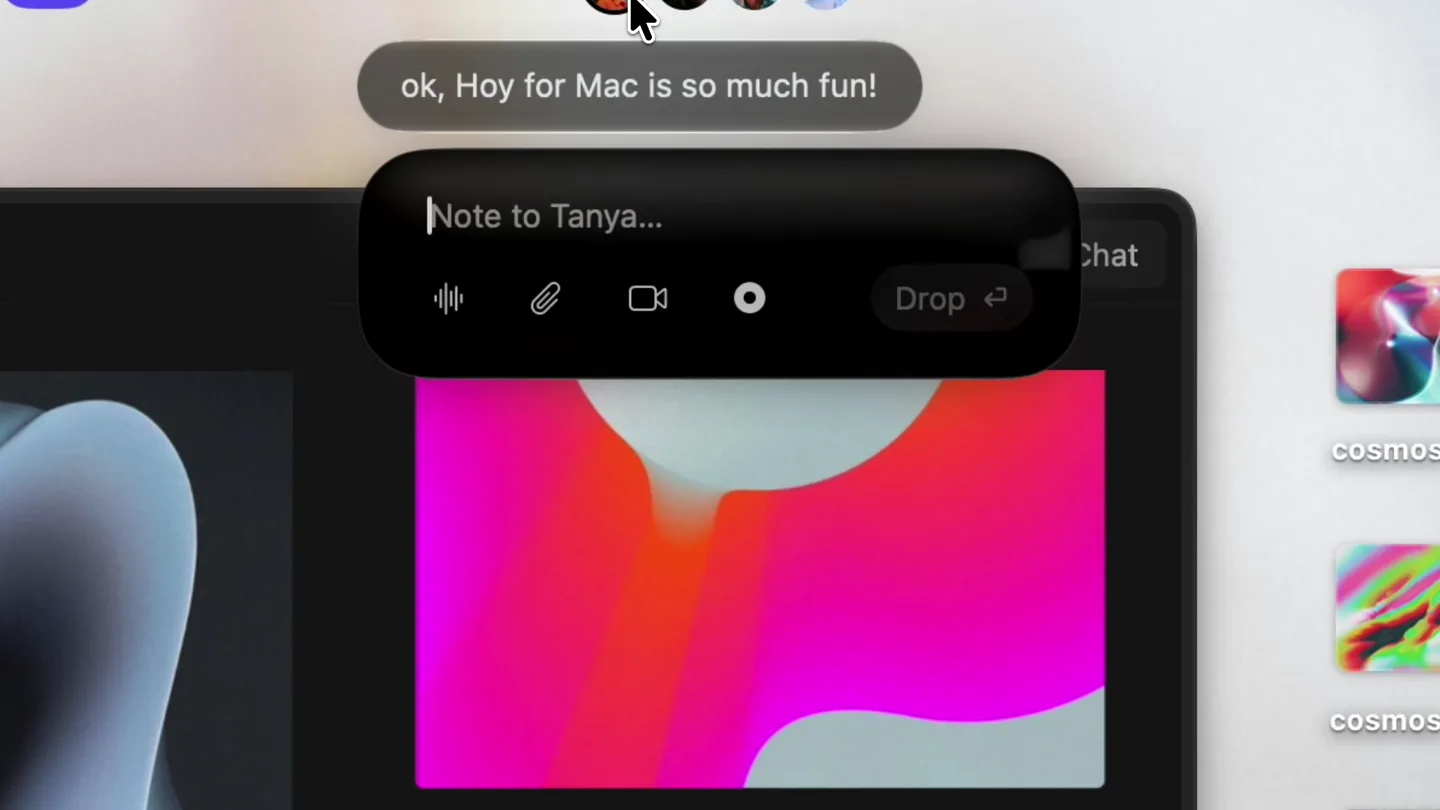
- Tanya ok, Hoy for Mac is so much fun! i can just drop anything to anyone? no sign-up, no third-party? exactly, just your iCloud. En Half the time Recording 0:02 Stop Half the time I don't even type I just talk Esc 0:05 Drop Note to Tanya...
- Camera
- Static overhead shot of a macOS desktop, focusing on the menu bar and a chat interface. The perspective is a direct screen capture.
- Motion
- UI element reveals and interactions (hover states, text input, recording indicators) with subtle glows and smooth transitions. Text bubbles animate in and out.
Problem Agitation
Effortless Multi-File Sharing
“(No spoken dialogue — The driving electronic beat continues, punctuated by a noticeable audio sweep at 0:14, signaling a transition.)”
- On screen
- cosmos-1 cosmos-2 cosmos-3 and you can throw anything right in my face too cool, didn't expect this! check this then... Note to Tanya... Esc Drop 0:06 Chat
- Camera
- The camera remains static, focused on the macOS desktop. A slight zoom-in occurs to highlight the file drag-and-drop action.
- Motion
- Drag-and-drop animation of multiple image files into the chat interface. Text bubbles continue to animate, simulating a rapid conversation flow. Subtle glow effects around interactive elements.
Product Reveal
Seamless Screen Recording & Sharing
“(No spoken dialogue — The electronic beat intensifies, leading to a significant sub-bass drop/impact at 0:21, marking a major reveal.)”
- On screen
- cosmos.so | Unsorted Elements — by @iamdk / Cosmos Chat cosmos-1 cosmos-2 cosmos-3 Recording: 0:00 0:07 ok stop, i love it!! Note to Tanya...
- Camera
- A rapid, dynamic camera pan and zoom transition from the chat interface to a full-screen browser window, then quickly back to a minimized screen recording within the chat. The camera simulates a user's rapid interaction.
- Motion
- Fast-cut transitions, screen-in-screen effects, and a simulated screen recording playback. The UI elements maintain their glowing, futuristic aesthetic. Motion blur is used during rapid camera movements.
Feature Teaser
Universal Drop & iCloud Integration
“(No spoken dialogue — The driving electronic beat with pizzicato synth melodies and sub-bass continues, maintaining high energy until the end.)”
- On screen
- (No on-screen text)
- Camera
- Dynamic, rapid cuts showcasing various UI interactions and abstract visual elements. The camera perspective shifts between close-ups of UI elements and wider shots of the desktop, often with a slight, energetic wobble or subtle camera shake.
- Motion
- Abstract visualizers, glitch effects, and rapid UI interactions. Elements animate with a 'springy' feel, emphasizing responsiveness. Text and UI elements often appear with a subtle, glowing aura and smooth, fast transitions.
Motion design primitives
Synthesizable in Remotion · key components of the dominik-kandravy-drop-remix template.
GlowingUITransition
UI elements (buttons, text fields, chat bubbles) appear and disappear with a soft, vibrant glow and a smooth, slightly elastic animation. Interactive elements highlight with an intensified glow on hover/click.
+ Code construction recipe
Utilize `interpolate` for opacity and scale, combined with `spring` for a subtle bounce effect. Implement SVG filters for glow effects (e.g., `feGaussianBlur` and `feColorMatrix`) applied to UI components. Use `useCurrentFrame` and `AbsoluteFill` for precise timing.
RapidScreenInScreen
A smaller screen recording or application window quickly scales down and nests within another UI element, often with a brief, energetic motion blur during the transition.
+ Code construction recipe
Employ `AbsoluteFill` for layering. Use `interpolate` for `scale`, `x`, `y` transformations, and `opacity`. Apply a temporary `filter: blur()` or a custom GLSL shader for motion blur during the rapid scaling and positioning. Ensure z-index management for correct layering.
AbstractGlitchReveal
Abstract, colorful visualizers or background elements appear with a subtle, controlled glitch or distortion effect, often synchronized with audio impacts.
+ Code construction recipe
Implement a custom WebGL shader (e.g., using `react-three-fiber` or a raw canvas) to generate the abstract visuals and apply glitch effects (e.g., pixel displacement, color channel shifting). Synchronize shader parameters (e.g., distortion intensity, color shift) with audio cues using `useVideoConfig` and `useCurrentFrame`.
Style DNA & aesthetic system
Visual aesthetic
Typography
Motion
Special effects
Pacing & rhythm
Conceptual story rhythm
- 1
The Instant Drop
Purpose. Immediately showcases the core functionality: dropping anything to anyone instantly, without friction.
Execution. Rapid-fire UI interactions demonstrating voice notes, file drops, and screen recordings within a chat interface, all with glowing, responsive animations.
- 2
Seamless Integration
Purpose. Highlights the 'no sign-up, no third-party — just iCloud' benefit, emphasizing trust and ease.
Execution. Text bubbles explicitly stating the iCloud integration, followed by demonstrations of various file types being shared effortlessly, reinforcing the native feel.
- 3
Beyond Basic Sharing
Purpose. Expands on the product's versatility, showing advanced features like screen recording and multi-file drops.
Execution. Dynamic transitions showcasing screen recording playback within the chat, and multiple abstract images being dragged and dropped, demonstrating robust capabilities.
- 4
The Universal Connector
Purpose. Reinforces the product as a comprehensive solution for all sharing needs, leveraging the macOS ecosystem.
Execution. A montage of rapid UI interactions, abstract visualizers, and quick cuts, culminating in a sense of effortless, universal connectivity across the macOS environment.
Remix in Animatiq Studio
Master remix prompt · agent-ready
Sample remix
Objective
Launch a new AI-powered code editor, 'SyntaxFlow', emphasizing speed and intelligent features.How the recipe adapts
The 'GlowingUITransition' primitive will be used for code completion suggestions and interactive debugging highlights. 'RapidScreenInScreen' will showcase real-time collaboration windows nesting within the main editor. 'AbstractGlitchReveal' will visualize AI processing and code analysis, synchronized with audio impacts. The color palette will shift to cooler blues and greens with neon accents, maintaining the high-tech feel. Typography will remain a clean sans-serif, but with subtle monospaced elements for code snippets. The fast-cut rhythm will highlight quick AI responses and seamless developer workflows.Remix blueprint · dominik-kandravy-drop-remix
Scene durations (4 scenes, 44s)
Key Remotion components
Related Productivity Product Launches
Explore all Productivity launches →
Anthropic introduces Cowork, which brings the Claude Code way of delegating tasks to everyday, non-technical work.

Don't type, just speak. Flawless voice-to-text across every app at 240 WPM.

One workspace for knowledge scattered across Slack, email, Docs, and Notion. Connect your tools and build apps and agents that stay live with your data.