
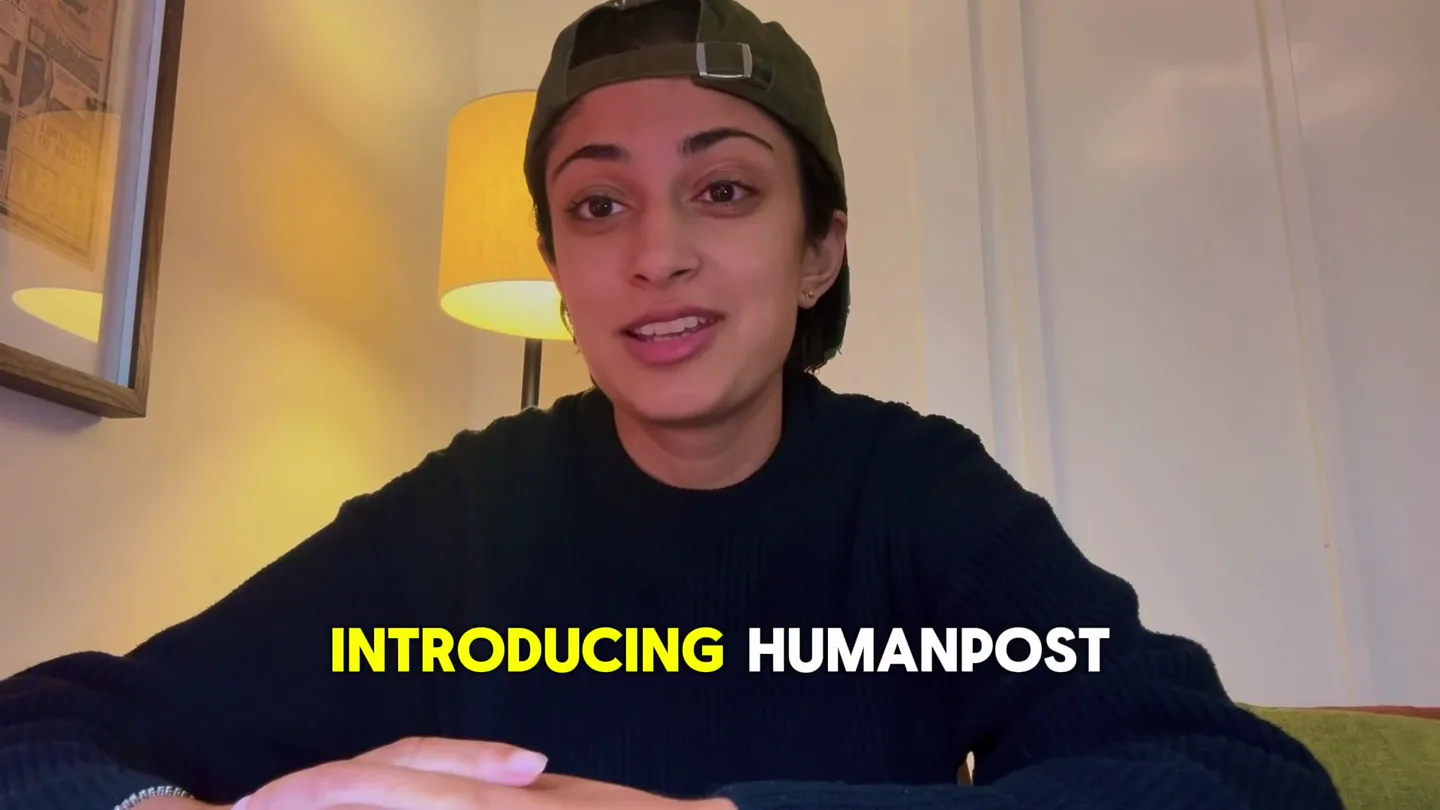
HumanPost · Launch Video Breakdown: Hook, Pacing & Motion Design
HumanPost lets brands hire 10, 100, or 1,000 dedicated U.S.-operated social accounts to post TikToks with warmed verticals and no VPN.
Scene-by-scene timeline & spoken transcript
The Hook
The Challenge of Internet Content Distribution
“In a world where it's getting harder and harder to distribute content, introducing Human Post. We're making it easier for companies like yours to distribute content at scale.”
- On screen
- OF THE INTERNET IN A WORLD BETTER EVERY SINGLE HARDER AND HARDER WE'RE MAKING IT LIKE YOURS WE AREN'T UGC CREATOR MARKETPLACE CONTENT FROM YOU SCALE
- Camera
- Medium close-up on presenter, static shot. Occasional subtle zoom-ins to emphasize points.
- Motion
- Dynamic text highlighting (yellow fill) synchronized with spoken words, appearing word-by-word. Subtle screen shake on impactful words.
Product Reveal
HumanPost: The Dedicated Account Solution
“We aren't a UGC or creator marketplace. Human Post sets up dedicated accounts for your brand in the United States. Our posters set up warm-up terms, usernames, and avatars that you provide to give them a very healthy account.”
- On screen
- SCALE HUMANPOST SETS FOR YOUR BRAND UNITED STATES OUR POSTERS SET GIVE THEM AVATARS THAT YOU VERY HEALTHY ACCOUNT DISTRIBUTING CONTENT IS TO START DISTRIBUTING HUMAN POST IS
- Camera
- Medium close-up on presenter, static. A product UI overlay appears and disappears.
- Motion
- Product UI overlay (HumanPost dashboard) slides in from the right, then slides out. Text highlighting continues. HumanPost logo appears with a subtle bounce.
Feature Teaser
Beyond UGC: Authentic Content Distribution
“(No spoken dialogue — The audio track features a consistent, driving electronic beat with a prominent sub-bass line. The instrumentation includes pizzicato synths, a subtle orchestral synth pad, and 808-style drums. High-energy audio transitions are used to punctuate key statements, with a notable riser and sub-bass drop at [0:02] for "Introducing Human Post." Another impactful sub-bass drop occurs at [0:11] for "We're making it easier." A final impactful sub-bass drop and riser is heard at [0:42] for "The solution for distributing content is here." (BPM: 120))”
- On screen
- (No on-screen text)
- Camera
- Close-up on presenter, static. Occasional subtle head nods and hand gestures.
- Motion
- No explicit motion graphics in this segment, relying on the presenter's delivery and audio cues.
Call to Action
The Solution for Content Distribution
“So if you're looking to start distributing content at scale, Human Post is the solution for distributing content is here.”
- On screen
- DISTRIBUTING CONTENT IS TO START DISTRIBUTING HUMAN POST IS
- Camera
- Medium close-up on presenter, static. HumanPost logo reappears.
- Motion
- Text highlighting continues. HumanPost logo appears with a subtle bounce and fades out at the end.
Motion design primitives
Synthesizable in Remotion · key components of the founder-led-tech-launch template.
WordHighlightReveal
Individual words or phrases are highlighted with a vibrant yellow fill, appearing precisely synchronized with the spoken dialogue. The highlight animates in quickly.
+ Code construction recipe
Use Remotion's <Text> component with a dynamic `fill` property. Interpolate the `backgroundColor` from transparent to yellow based on `AbsoluteFill` and `spring` for a snappy reveal. Map spoken word timestamps to `from` and `to` frames.
ProductDashboardOverlay
A semi-transparent product UI dashboard slides in from the right side of the screen, overlays the presenter, and then slides back out.
+ Code construction recipe
Implement a `SlideInFromRight` component using `interpolate` on the `translateX` CSS property. Use `spring` for smooth entry and exit animations. Ensure `z-index` places it above the presenter video.
LogoBounceFade
The HumanPost logo appears with a subtle, quick bounce animation, then holds, and finally fades out.
+ Code construction recipe
Use `spring` for `scale` and `translateY` to create the bounce effect upon appearance. For the fade, `interpolate` the `opacity` from 1 to 0 over a short duration. Position the logo using `AbsoluteFill` and `top`/`right` properties.
Style DNA & aesthetic system
Visual aesthetic
Typography
Motion
Special effects
Pacing & rhythm
Conceptual story rhythm
- 1
Problem & Solution Hook
Purpose. Immediately identifies a common pain point (content distribution difficulty) and introduces HumanPost as the solution.
Execution. Presenter directly addresses the camera, dynamic word-by-word text highlighting, and a quick product logo reveal.
- 2
Differentiating Value Proposition
Purpose. Clarifies what HumanPost is NOT (UGC, creator marketplace) and explains its unique offering (dedicated, warmed-up accounts).
Execution. Presenter continues, with a brief overlay of the HumanPost dashboard UI to show the platform in action, reinforcing the 'how it works'.
- 3
Mechanism & Trust Building
Purpose. Details the process of setting up 'healthy accounts' with warm-up terms, usernames, and avatars, building trust in the method.
Execution. Continued direct address from the presenter, with text highlighting specific features and benefits, maintaining a personal connection.
- 4
Call to Action & Reinforcement
Purpose. Reiterates the core benefit and encourages potential users to engage with HumanPost.
Execution. Presenter delivers the concluding statement, with the HumanPost logo reappearing to solidify brand recognition.
Remix in Animatiq Studio
Master remix prompt · agent-ready
Sample remix
Objective
Launch a new AI-powered legal document review platform called 'LexiScan' that helps law firms automate contract analysis.How the recipe adapts
The LexiScan video would feature the founder explaining the pain point of manual contract review. WordHighlightReveal would emphasize terms like 'tedious,' 'errors,' and 'speed.' ProductDashboardOverlay would show LexiScan's interface analyzing a document, highlighting key clauses. LogoBounceFade would introduce the LexiScan logo. The fast cuts and driving electronic beat would maintain energy, while the founder's direct address builds trust in the AI solution.Remix blueprint · founder-led-tech-launch
Scene durations (4 scenes, 49s)
Key Remotion components
Related Productivity Product Launches
Explore all Productivity launches →
Don't type, just speak. Flawless voice-to-text across every app at 240 WPM.

One workspace for knowledge scattered across Slack, email, Docs, and Notion. Connect your tools and build apps and agents that stay live with your data.

Notion positions itself as the backbone of your dock — a brand film of the Notion icon among everyday apps, ending on “Works with everything.”