
Scene-by-scene timeline & spoken transcript
The Hook
Introducing iHermes: Your Personal AI Assistant
“(No spoken dialogue — Driving electronic beat with pizzicato synths and sub-bass, building anticipation.)”
- On screen
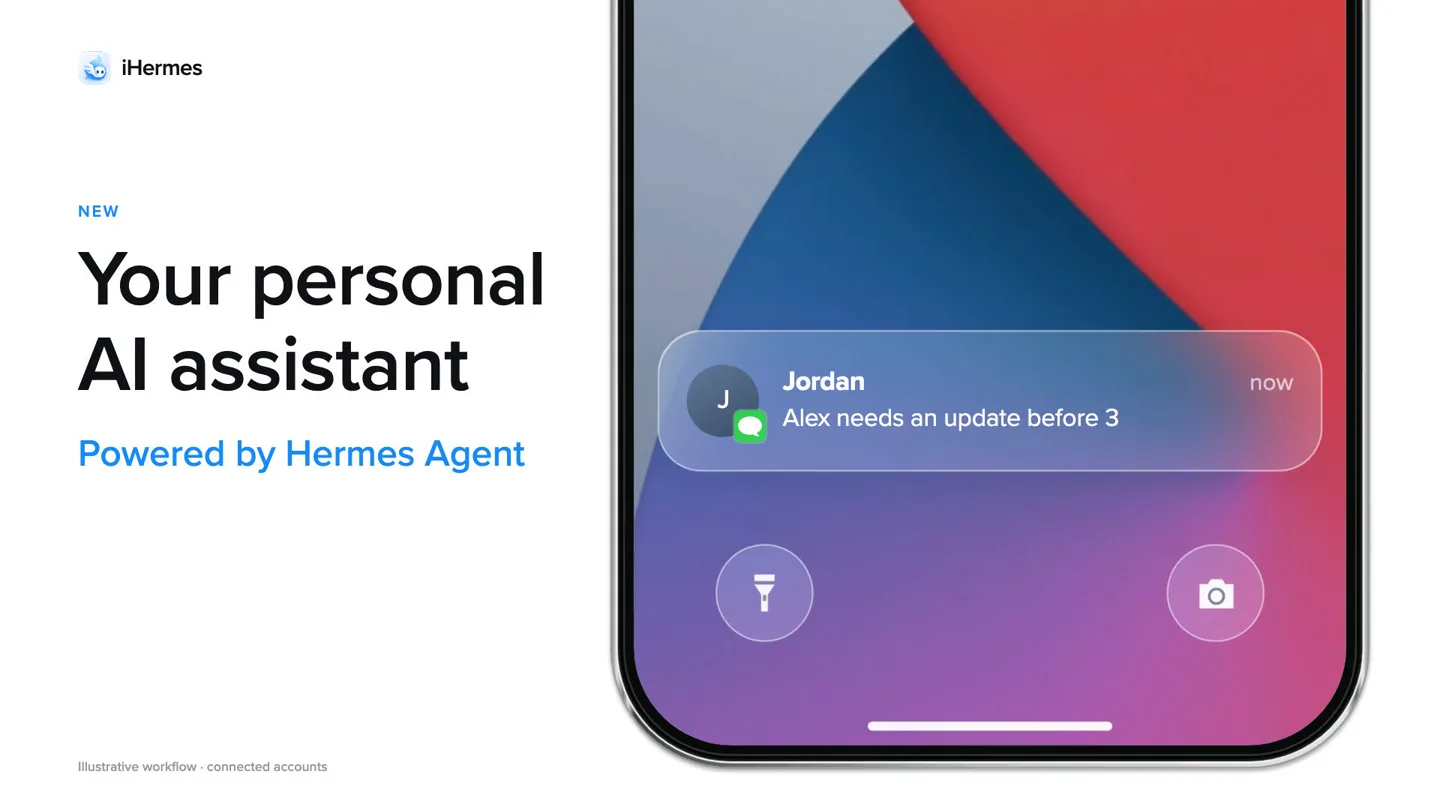
- iHermes NEW Your personal AI assistant Powered by Hermes Agent Illustrative workflow - connected accounts Jordan Alex needs an update before 3
- Camera
- Static wide shot of an iPhone screen on the right, with text overlay on the left. The iPhone screen shows an iMessage conversation.
- Motion
- Text reveal animation (fade-in, slide-up), UI element interaction (message bubble animation), screen transitions (swipe left/right).
Product Reveal
Privacy-First AI & Intelligent Workflow
“(No spoken dialogue — The electronic beat continues with a high-energy audio transition at 0:08, maintaining a consistent tempo.)”
- On screen
- iHermes Your data isn't for sale No ad targeting No model training without opt-in Jordan iHermes Alex 2:41 PM Alex needs an update before 3. 2:35 PM Can you send the pilot update? Prep me for Alex at 3. Draft an update from my notes. Delivered Found your notes. Drafting now. Remembers how you work
- Camera
- Dynamic camera movement, panning across the iPhone screen to reveal different parts of the iMessage interface and then zooming in on specific message interactions.
- Motion
- Horizontal screen pan, text typing animation, message bubble pop-in, content reveal (scrolling).
Feature Teaser
Seamless Cross-App Integration
“(No spoken dialogue — Another high-energy audio transition at 0:15, the beat intensifies with more percussive elements.)”
- On screen
- iHermes Gets things done Send it. Delivered Sent to Alex To: Alex · Gmail Pilot approved. Kickoff Monday. Next: confirm the budget. Send this? 2:41 < Sent Pilot update Me · Gmail To: Alex Tuesday · 2:45 PM Pilot approved. Kickoff Monday. Next: confirm the budget. Sent to Alex Works across your apps From iMessages 2:45 Tuesday, September 8 2:45 iHermes Alex at 3. Update sent. Ask about the budget.
- Camera
- Rapid cuts between different app interfaces (iMessage, Email, Lock Screen) on the iPhone, demonstrating integration. The camera maintains a close-up on the phone.
- Motion
- Fast cuts, app transition animations (swipe, fade), notification pop-up, screen lock/unlock simulation.
Call to Action
Key Features & Call to Action
“(No spoken dialogue — High-energy audio transition at 0:24, leading to a significant sub-bass drop/impact at 0:26, concluding the track.)”
- On screen
- iHermes Research Reminders Memory Your AI assistant in iMessage Text iHermes ihermes.co Music: Like You Mean It
- Camera
- Full-screen text overlays with rapid background color changes, followed by a static shot of the logo and call to action text.
- Motion
- Text wipe/reveal, background color shift, logo animation (scale/fade), final call to action display.
Motion design primitives
Synthesizable in Remotion · key components of the ai-agent-ui-launch template.
SplitScreenUIReveal
A dynamic split-screen layout where a mobile UI (iPhone) occupies one side, while a textual headline and sub-text animate in on the opposing side. The UI content updates with message bubbles and app transitions.
+ Code construction recipe
Utilize `AbsoluteFill` for the background, `interpolate` for text opacity and Y-position for slide-up effects. Use `Sequence` for timed text reveals. The iPhone UI can be a `Composition` with nested `Sequence` and `spring` animations for message bubbles and screen transitions.
RapidFeatureFlash
Quick, impactful full-screen text reveals, each with a distinct background color, designed to highlight core features in rapid succession. Text appears with a sharp, almost glitch-like transition.
+ Code construction recipe
Implement `AbsoluteFill` with a `spring` animation for background color changes. Text elements use `interpolate` for scale and opacity, combined with a `Sequence` for rapid, staggered appearance. Consider `measureText` for precise centering.
AppInteractionSequence
Simulated user interaction within a mobile application, showcasing typing, message sending, and seamless transitions between different app views (e.g., iMessage to Email).
+ Code construction recipe
Create a `Composition` for the iPhone screen. Use `Sequence` to orchestrate typing animations (character by character reveal), message bubble `spring` animations for pop-in, and `interpolate` for screen swipe transitions between app views. SVG paths can simulate keyboard presses.
Style DNA & aesthetic system
Visual aesthetic
Typography
Motion
Special effects
Pacing & rhythm
Conceptual story rhythm
- 1
The Hook & Core Value Prop
Purpose. Immediately introduces the product and its primary benefit (personal AI assistant) while establishing its core interaction method (iMessage).
Execution. Split-screen layout with a clear headline and a live iMessage UI demonstration, showing an AI-generated message.
- 2
Trust & Core Functionality
Purpose. Addresses privacy concerns and then demonstrates the AI's ability to understand and act on complex instructions within iMessage.
Execution. Transition to a privacy statement, followed by a detailed, zoomed-in sequence of typing, AI response, and iterative refinement within the iMessage interface.
- 3
Cross-Platform Power
Purpose. Highlights the AI's ability to integrate and perform tasks across multiple applications, not just iMessage.
Execution. Rapid cuts showcasing the AI sending an email from iMessage, followed by a lock screen notification confirming the action, emphasizing seamless integration.
- 4
Feature Recap & CTA
Purpose. Summarizes key benefits and provides a clear call to action for users to engage with the product.
Execution. Fast-paced full-screen text reveals of features (Research, Reminders, Memory) with changing background colors, culminating in the logo, tagline, and website/texting CTA.
Remix in Animatiq Studio
Master remix prompt · agent-ready
Sample remix
Objective
Launch 'Synapse Connect', an AI-powered project management tool.How the recipe adapts
The SplitScreenUIReveal primitive will introduce Synapse Connect with a Slack interface on one side and a headline on the other. The AppInteractionSequence will demonstrate automated task creation in Notion via a Slack command. RapidFeatureFlash will highlight 'Reporting', 'Collaboration', and 'Insights' with distinct background colors, leading to a final call to action for 'synapseconnect.com'.Remix blueprint · ai-agent-ui-launch
Scene durations (4 scenes, 27s)
Key Remotion components
Related AI Agents Product Launches
Explore all AI Agents launches →
To ensure that artificial general intelligence benefits all of humanity

Introducing Claude Fable 5: a Mythos-class model that we’ve made safe for general use. Its capabilities exceed those of any model we’ve ever made generally available. https://t.co/2AvmEjHIX8

To understand the true nature of the universe.