
World Labs · Launch Video Breakdown: Hook, Pacing & Motion Design
Turn a single image into a fully meshed 3D world in minutes Built by a World Labs team member, image-blaster combines Marble + Claude skills + @fal to generate 3DGS environments, meshes, interactiv…
Scene-by-scene timeline & spoken transcript
The Hook
Instant 3D World Generation from a Single Image
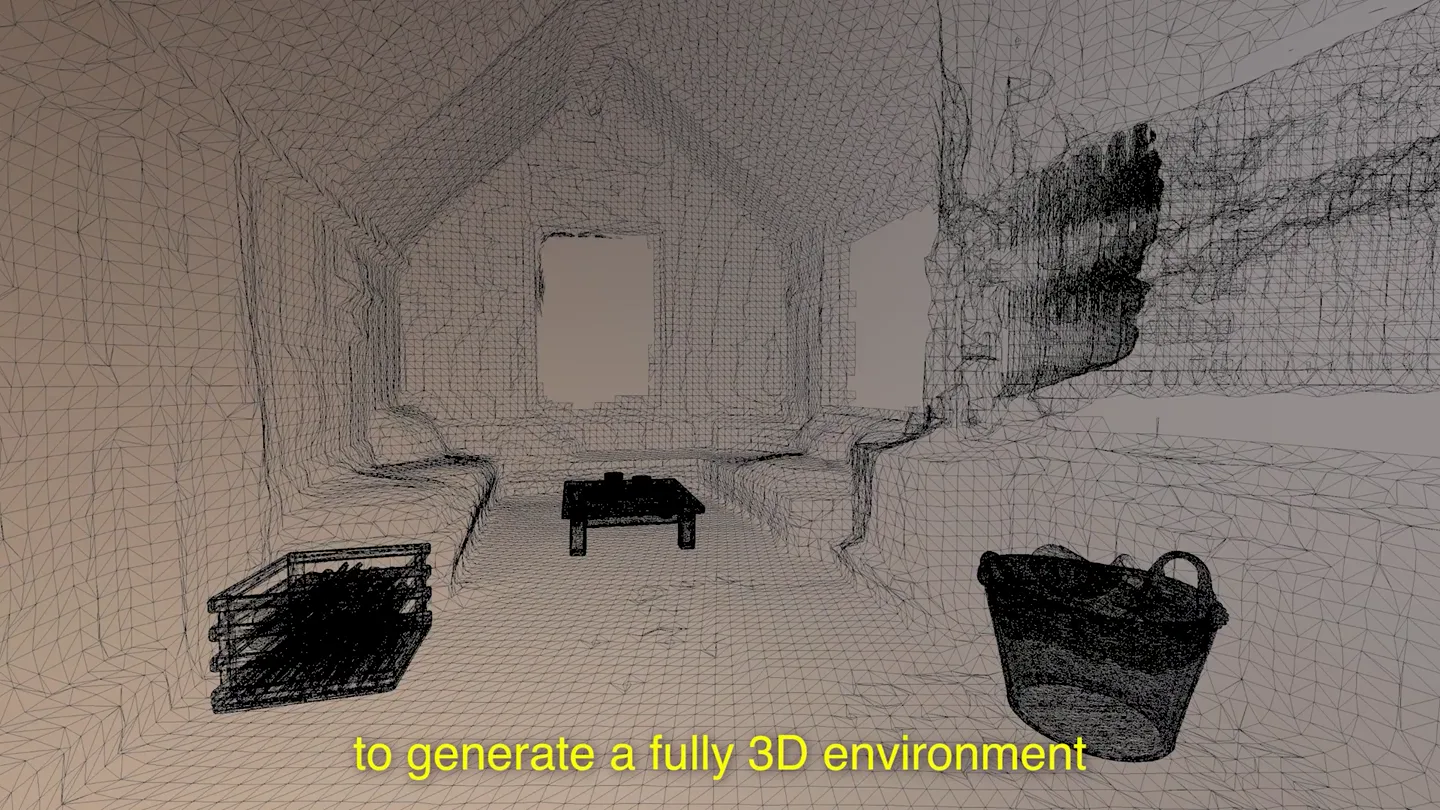
“to generate a fully 3D environment at the scene, generates the static environment that get thrown And this is all then put in back by hand. from the original source image. an image for each of those objects files and PBR materials. to create a clean, static environment”
- On screen
- to generate a fully 3D environment at the scene, generates the static environment that get thrown And this is all then put in back by hand. italian-village-sidestreet image.json output bentwood-chair bistro-table potio-umbrella potted-plant red-mailbox sfx world project.json scene.json source 0-neilson-sunlight-b...t-plate-request.json 0-neilson-sunlight-b...c7c4-60f4-47fd.json 0-neilson-sunlight-b...c7c4-60f4-47fd.png 0-neilson-sunlight-b...-sidestreet-plate.png PNG image - 1.9 MB Information Created Yesterday, 11:00 AM Modified Yesterday, 11:00 AM Dimensions 1232x928 Tags Add tags... Macintosh HD > Users > neilsonkoerner-safrata > WLT > neilsonkoerner-safrata — Create a new scene — caffeinate - claude — 83x23 Write(world/quiet-stone-fountain-courtyard/output/round-side-table/object.json) Write 20 lines to world/quiet-stone-fountain-courtyard/output/round-side-table/object.json { "name": "bistro-table", "alias": "quiet-stone-fountain-courtyard", "object": { "name": "round wooden side table", "description": "low round side table with a flat circular woode n top on cast iron legs. It has a distressed, rustic appea.", "source_images": ["world/quiet-stone-fountain-courtyard/source /0-neilson-quiet-little-a-stone-garden-small-fountain-stone-coffee-2d bdc800-c0bd-4d6d.png"], "evidence": [ + 16 lines (ctrl-e to expand) + Razzmatazz. (17s - 1.2k tokens - thought for 5s) Tip: Use /config to change your default permission mode (including Plan Mode) > >> auto mode on (shift+tab to cycle) - esc to interrupt italian-village-sidestreet image.json output bentwood-chair bistro-table potio-umbrella potted-plant red-mailbox sfx world project.json scene.json source 0-potted-plant_image-request.json 0-potted-plant_model-request.json 0-potted-plant-obj.obj 0-potted-plant-thumbnail.png 0-potted-plant.glb 0-potted-plant.png object.json red-mailbox 0-red-mailbox_image-request.json 0-red-mailbox_model-request.json 0-red-mailbox-obj.obj 0-red-mailbox-thumbnail.png 0-red-mail 0-red-mai object.json sfx world project.json scene.json source 0-neilson-sunlight-b...t-plate-request.json 0-neilson-sunlight-b...c7c4-60f4-47fd.json 0-neilson-sunlight-b...c7c4-60f4-47fd.png 0-neilson-sunlight-b...-sidestreet-plate.png 0-potted-plant.png PNG image - 1 MB Information Created Yesterday, 11:00 AM Modified Yesterday, 11:00 AM Dimensions 1024x1024 Tags Add tags... Macintosh HD > Users > neilsonkoerner-safrata > WLT > neilsonkoerner-safrata — Create a new scene — caffeinate - claude — 83x23 Agent "SFX side table impact" completed Side table chunks done - 4 hollow wooden hits. All SFX is wrapped. 4 agents still running (world + 3 meshes). Brewed for 2s - 4 local agents still running Hit for the rest >> auto mode on - 4 local agents ↓ to manage main O image-blast-world World generation O image-blast-3d 3D round side table O image-blast-3d 3D wooden tray O image-blast-3d 3D stone ashtray 2s 17s 1.2k tokens - enter to view 12.0k tokens 2s 13s 12.0k tokens 2s 11s 12.1k tokens Waiting on the world >> auto mode on - 1 local agent ↓ to manage main O image-blast-world World generation 40s 48s 14.3k tokens italian-village-sidestreet image.json output bentwood-chair bistro-table potio-umbrella potted-plant red-mailbox sfx world project.json scene.json source 0-neilson-sunlight-b...t-plate-request.json 0-neilson-sunlight-b...c7c4-60f4-47fd.json 0-neilson-sunlight-b...c7c4-60f4-47fd.png 0-neilson-sunlight-b...-sidestreet-plate.png 0-neilson-sunlight-b...-italian-village-sidestreet-bright- wh-4d4c7c4-60f4-47fd.png PNG image - 1.9 MB Information Created Yesterday, 11:00 AM Modified Yesterday, 11:00 AM Dimensions 1232x928 Tags Add tags... Macintosh HD > Users > neilsonkoerner-safrata > WLT > neilsonkoerner-safrata — Create a new scene — caffeinate - claude — 83x23 Agent "SFX side table impact" completed Side table chunks done - 4 hollow wooden hits. All SFX is wrapped. 4 agents still running (world + 3 meshes). Brewed for 2s - 4 local agents still running Hit for the rest >> auto mode on - 4 local agents ↓ to manage main O image-blast-world World generation O image-blast-3d 3D round side table O image-blast-3d 3D wooden tray O image-blast-3d 3D stone ashtray 2s 17s 1.2k tokens - enter to view 12.0k tokens 2s 13s 12.0k tokens 2s 11s 12.1k tokens Waiting on the world >> auto mode on - 1 local agent ↓ to manage main O image-blast-world World generation 40s 48s 14.3k tokens
- Camera
- The camera smoothly pans and rotates around various 3D environments, showcasing object manipulation and scene construction. It often transitions between a full 3D view and a split-screen showing the original 2D image or a wireframe view.
- Motion
- Split-screen reveal, 3D object manipulation, wireframe overlay, seamless environment transitions, UI integration.
Product Reveal
AI Agents for Dynamic 3D Environment Generation
“A panoramic environment generative model As well or any other 3D authoring tool. to just change this web app Either one works.”
- On screen
- A panoramic environment generative model image-blaster ? FPS Low Scene Graph 1 selected square wooden... wooden basket low wooden cof... small ceramic... small shallow... wooden basket Assets World All small ceramic mug low wooden coffee table low wooden coffe... square wooden slat bas... small shallow bowl woven basket scene.json wooden-cabin-winter Position Rotation Scale Drop small wooden coffee table wooden-cabin-winter-coffee-table-j-mpebu-... Pos 0.00 1.875 Rot 0 0 0 Scale 2.5 2.5 2.5 Body RigidBody Sun 6 -32.23 0 -40.56 Evn 2 HDRi Shadow 0.428 Reset Color World 1.369 Reset Ground Collider On Floor Collider Off As well image-blaster ? FPS Low blacksmith-studio concrete-lobby-desk-groupings elaborate-old-study italian-village-sidestreet medieval-apothecary-room roman-amphora-storeroom sound-stage-cyc-chair stone-plant-garden-courtyard wooden-cabin-winter scene.json wooden-cabin-winter small ceramic mug low wooden coffee table low wooden coffe... square wooden slat bas... small shallow bowl woven basket or any other 3D authoring tool. image-blaster ? FPS Low blacksmith-studio concrete-lobby-desk-groupings elaborate-old-study italian-village-sidestreet medieval-apothecary-room roman-amphora-storeroom sound-stage-cyc-chair stone-plant-garden-courtyard wooden-cabin-winter scene.json wooden-cabin-winter small ceramic mug low wooden coffee table low wooden coffe... square wooden slat bas... small shallow bowl woven basket to just change this web app Either one works.
- Camera
- The camera continues to navigate through diverse 3D environments, demonstrating the product's ability to generate and manipulate complex scenes. It frequently highlights UI elements and object interactions within the 3D space.
- Motion
- Dynamic 3D scene rendering, interactive UI overlays, object placement and manipulation, environment switching, split-screen comparison.
Feature Teaser
Seamless Integration and Open-Source Accessibility
“And you can decide to things like the Blender MCP, and even tries”
- On screen
- And you can decide image-blaster ? FPS High Scene Graph 1 selected ceramic jug copper cauldron small clay pot stacked parchment... wooden barrel small wooden c... wooden barrel Assets World All ceramic jug copper cauldron small clay pot stacked parchment sheets wooden barrel small wooden crate wooden barrel medieval-apothecary-room Position Rotation Scale Drop copper: cauldron medieval-apothecary-room-cauldron-j-mpebu-... Pos 0.921 0 -4.947 Rot 0 0 0 Scale 1 1 1 Body RigidBody Sun 2 -0.789 0 -63.34 Evn 3 HDRi Shadow 0.536 Reset Color World 2 Reset Ground Collider On Floor Collider Off to things like the Blender MCP, image-blaster ? FPS High Scene Graph 1 selected ceramic jug copper cauldron small clay pot stacked parchment... wooden barrel small wooden c... wooden barrel Assets World All ceramic jug copper cauldron small clay pot stacked parchment sheets wooden barrel small wooden crate wooden barrel medieval-apothecary-room Position Rotation Scale Drop copper: cauldron medieval-apothecary-room-cauldron-j-mpebu-... Pos 0.921 0 -4.947 Rot 0 0 0 Scale 1 1 1 Body RigidBody Sun 2 -0.789 0 -63.34 Evn 3 HDRi Shadow 0.536 Reset Color World 2 Reset Ground Collider On Floor Collider Off and even tries
- Camera
- The camera continues to explore detailed 3D environments, focusing on the manipulation of individual objects and the integration with external tools. The perspective often shifts to highlight specific UI interactions.
- Motion
- Object selection and transformation, UI interaction emphasis, smooth camera transitions, real-time rendering.
Call to Action
Get Started with World Labs on GitHub
“You can find it now on GitHub.”
- On screen
- image-blaster ? FPS High Scene Graph 1 selected ceramic jug copper cauldron small clay pot stacked parchment... wooden barrel small wooden c... wooden barrel Assets World All ceramic jug copper cauldron small clay pot stacked parchment sheets wooden barrel small wooden crate wooden barrel medieval-apothecary-room Position Rotation Scale Drop small wooden crate medieval-apothecary-room-crate-j-mpebu-... Pos 1.931 0 -0.5 Rot 0 100 0 Scale 1 1 1 Body RigidBody Sun 2 -0.789 0 -63.34 Evn 3 HDRi Shadow 0.536 Reset Color World 2 Reset Ground Collider On Floor Collider Off You can find it now on GitHub.
- Camera
- The camera maintains a dynamic perspective within the 3D environment, showcasing final object placements and scene adjustments. The focus shifts to the call to action, with the UI remaining visible.
- Motion
- Final scene composition, subtle camera movements, clear call to action text overlay, consistent UI presence.
Motion design primitives
Synthesizable in Remotion · key components of the ai-3d-environment-launch template.
SplitScreenReveal
A dynamic split-screen effect where a smaller, often wireframe or original image, view appears in the corner, while the main screen displays the generated 3D environment. The smaller view can expand or contract.
+ Code construction recipe
Use Remotion's <AbsoluteFill> and <Img> components. Animate the 'width', 'height', 'top', and 'left' CSS properties of the smaller view using `interpolate` with `spring` for smooth transitions. Apply a `clipPath` or `borderRadius` for rounded corners on the inset view.
Interactive3DObjectManipulation
3D objects are shown being selected, moved, rotated, and scaled within a rendered environment, often with visible bounding boxes or manipulation gizmos. The camera smoothly follows these interactions.
+ Code construction recipe
Leverage a 3D library like `three.js` or `react-three-fiber` within a Remotion <Canvas> component. Animate object `position`, `rotation`, and `scale` properties based on user input or predefined paths using `interpolate` with `easeOutCubic` for natural movement. Render UI gizmos as SVG overlays or 3D objects.
EnvironmentTransitionWipe
A rapid, almost instantaneous transition between entirely different 3D environments, often accompanied by a quick camera pan or zoom, giving a sense of diverse capabilities.
+ Code construction recipe
Implement a scene change by quickly fading out one 3D scene and fading in another, or by using a fast `translateX` or `translateY` wipe effect on the entire scene container. Use `interpolate` with a very short duration and `easeInQuad` or `easeOutQuad` for a snappy transition. Preload 3D assets to avoid loading delays.
Style DNA & aesthetic system
Visual aesthetic
Typography
Motion
Special effects
Pacing & rhythm
Conceptual story rhythm
- 1
The 'Wow' Moment
Purpose. Immediately demonstrate the core magic: turning a 2D image into a fully interactive 3D world.
Execution. Rapid transitions between original 2D images and their generated 3D counterparts, with dynamic camera movement through the new 3D space.
- 2
The 'How It Works' Deep Dive
Purpose. Explain the underlying technology and process, building credibility and understanding.
Execution. Split-screen views showing file structures, code snippets, and wireframe models alongside the rendered 3D scene, illustrating the step-by-step generation.
- 3
The 'What Else Can It Do?' Showcase
Purpose. Highlight advanced features, customization, and integration possibilities.
Execution. Demonstrating object manipulation, environment switching, and showing the product's UI interacting with external 3D software elements.
- 4
The 'Join Us' Invitation
Purpose. Provide a clear call to action for users to access and engage with the product.
Execution. A final scene with the product in action, overlaid with a clear text call to action (e.g., 'Available on GitHub'), reinforcing accessibility.
Remix in Animatiq Studio
Master remix prompt · agent-ready
Sample remix
Objective
Launch a new AI-driven interior design tool that generates room layouts and decor suggestions from a single photo.How the recipe adapts
The SplitScreenReveal primitive would show the original room photo transforming into a fully furnished 3D interactive space. Interactive3DObjectManipulation would demonstrate swapping furniture, changing wall colors, and adjusting lighting in real-time. EnvironmentTransitionWipe would rapidly switch between different design styles (e.g., minimalist to bohemian) for the same room. The overall fast-paced editing and UI integration would highlight the tool's speed and ease of use.Remix blueprint · ai-3d-environment-launch
Scene durations (4 scenes, 127s)
Key Remotion components
Related AI Agents Product Launches
Explore all AI Agents launches →
To ensure that artificial general intelligence benefits all of humanity

Gopuff introduces Go, an AI shopping assistant built with SpaceXAI: say what you need and the order is placed.

Iliad (Troy) trailer made by Grok Imagine 1.5, which was just released