
9to5Mac · Launch Video Breakdown: Hook, Pacing & Motion Design
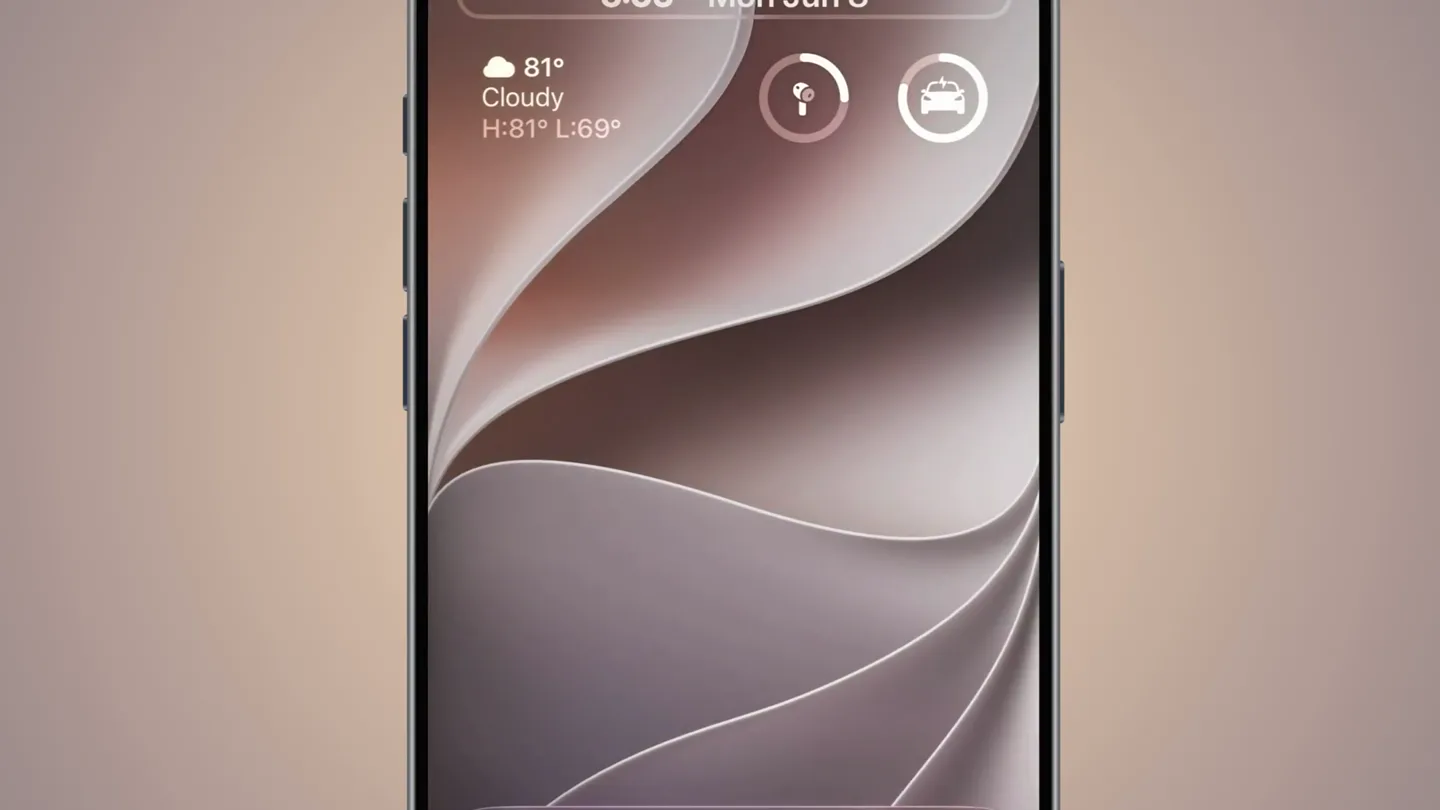
iOS 27 lets you move the clock up into the date bar
Scene-by-scene timeline & spoken transcript
The Hook
Dynamic Island Clock Shift
“(No spoken dialogue — A prominent sub-bass drop/impact occurs, followed by a subtle, high-frequency sweep.)”
- On screen
- 9TO5Mac 27 Mon Jun 8 6:04 81° Cloudy H:81° L:69° Font & Color 12 12 12 12
- Camera
- Static, centered shot of an iPhone with a floating '27' icon above it.
- Motion
- Subtle UI element animation: the clock '6:04' on the iPhone lock screen subtly shifts its position upwards towards the date bar.
Product Reveal
Lock Screen Customization Panel
“(No spoken dialogue — Another sub-bass impact is heard at 0:01.00. The ambient pad sound continues.)”
- On screen
- 9TO5Mac 27 Mon Jun 8 6:05 81° Cloudy H:81° L:69° Font & Color 12 12 12 12 Glass Solid
- Camera
- Static, centered shot. The focus remains on the iPhone's lock screen and its customization interface.
- Motion
- UI element reveal: A 'Glass' and 'Solid' toggle appears at the bottom of the screen, indicating customization options for the lock screen elements. The clock '6:05' also changes its font and color.
Feature Teaser
Dynamic Color & Font Adjustments
“(No spoken dialogue — The sustained, evolving pad sound continues, maintaining an ambient atmosphere.)”
- On screen
- 9TO5Mac 27 Mon Jun 8 6:05 81° Cloudy H:81° L:69° Font & Color 12 12 12 12 Glass Solid
- Camera
- Static, centered shot.
- Motion
- Interactive UI demonstration: The lock screen clock '6:05' dynamically changes its color and font style, showcasing the customization capabilities. The background wallpaper also subtly shifts its hue.
Call to Action
Final Customization State
“(No spoken dialogue — A high-energy riser begins at 0:09.00 and culminates in a final sub-bass impact at 0:10.00.)”
- On screen
- 9TO5Mac 27 Mon Jun 8 6:05 81° Cloudy H:81° L:69° Font & Color 12 12 12 12 Glass Solid
- Camera
- Static, centered shot.
- Motion
- Final state reveal: The lock screen settles on a darker, more saturated purple color scheme for the clock and background, emphasizing the depth of customization. The '27' icon remains prominent.
Motion design primitives
Synthesizable in Remotion · key components of the dynamic-palette-sync-showcase template.
DynamicIslandClockShift
A UI element (clock) smoothly interpolates its vertical position within a confined area, simulating a drag-and-drop or re-arrangement action.
+ Code construction recipe
Utilize Remotion's `interpolate` function with a `spring` or `ease-in-out` curve for the `translateY` property of the clock component. Define start and end Y positions based on the UI layout.
LockScreenCustomizationPanel
A translucent UI panel slides up from the bottom of the screen, revealing interactive controls like toggles, color pickers, and font selectors. Elements within the panel appear with a slight delay.
+ Code construction recipe
Implement a `slide-up` animation for the panel using `translateY` and `opacity` with a `spring` interpolation. Child elements (toggles, color dots) can use `delay` and `stagger` properties for their `opacity` and `scale` animations.
InteractiveUIFeedback
As a user interacts with controls (e.g., color dots, font selectors), the corresponding on-screen elements (clock, background) instantly and smoothly update their visual properties (color, font-family, background hue).
+ Code construction recipe
Bind UI control states to CSS variables or React state. Use `interpolate` or `spring` for `color`, `fontFamily`, and `backgroundColor` properties of the affected elements, ensuring smooth transitions on state changes.
Style DNA & aesthetic system
Visual aesthetic
Typography
Motion
Special effects
Pacing & rhythm
Conceptual story rhythm
- 1
The Intriguing Shift
Purpose. Immediately hooks the viewer by demonstrating a novel, unexpected UI interaction.
Execution. The clock element on the lock screen subtly moves, hinting at new customization possibilities.
- 2
Unveiling the Controls
Purpose. Introduces the mechanism for customization, showing the user how they can achieve the effect.
Execution. A customization panel slides up, revealing options for font, color, and material toggles.
- 3
Dynamic Personalization
Purpose. Showcases the breadth and responsiveness of the customization options.
Execution. The clock and background dynamically change color and font in real-time as if a user is interacting with the controls.
- 4
The Polished Outcome
Purpose. Leaves the viewer with a sense of the aesthetic potential and desirability of the feature.
Execution. The lock screen settles on a final, visually appealing customized state, emphasizing the premium feel.
Remix in Animatiq Studio
Master remix prompt · agent-ready
Sample remix
Objective
Showcase 'Dynamic Palette Sync' in Animatiq Studio, where a user selects a color palette from an image, and it instantly applies across multiple open design files (e.g., a logo, a website mockup, and a video timeline).How the recipe adapts
The 'DynamicIslandClockShift' primitive adapts to 'DynamicPaletteSelection', where a user clicks a color on an image, and that color becomes the primary accent. The 'LockScreenCustomizationPanel' becomes 'PaletteSyncControls', a panel sliding up to show options like 'Apply to All', 'Generate Variants', or 'Export Palette'. The 'InteractiveUIFeedback' becomes 'CrossApplicationPaletteSync', where the selected palette instantly and smoothly updates the colors of elements in three simulated application windows (logo editor, web design tool, video timeline), demonstrating the 'sync' feature with fluid color transitions.Remix blueprint · dynamic-palette-sync-showcase
Scene durations (4 scenes, 11s)
Key Remotion components
Related Consumer & Apps Product Launches
Explore all Consumer & Apps launches →
Grand Theft Auto VI: An Extended Look premieres on Netflix Thursday, August 27.
Polymarket Perps is live with up to 20x leverage on crypto, stocks, commodities, and more. Long BTC, predict the Fed, or short the S&P reaction.

Pump.fun launches GO, a marketplace for posting and completing paid bounties for any task.