
Moonshot AI · Launch Video Breakdown: Hook, Pacing & Motion Design
Remote Control is live in Kimi Work. Leave it running on your computer and keep things moving from your phone, anywhere, anytime.
Scene-by-scene timeline & spoken transcript
The Hook
Introducing Remote Control
“(No spoken dialogue — Subtle riser leads into a driving electronic beat with pizzicato synth melodies and a noticeable sweep at 0:04.)”
- On screen
- Remote control Use your phone to control K
- Camera
- Static overhead shot of a digital interface, then a slight zoom out to reveal more context.
- Motion
- UI element reveal with a mouse cursor interaction, followed by a text-based transition and a mobile app interface slide-up.
Product Reveal
Seamless Device Connection & Task Delegation
“(No spoken dialogue — The driving electronic beat continues, maintaining a consistent rhythm.)”
- On screen
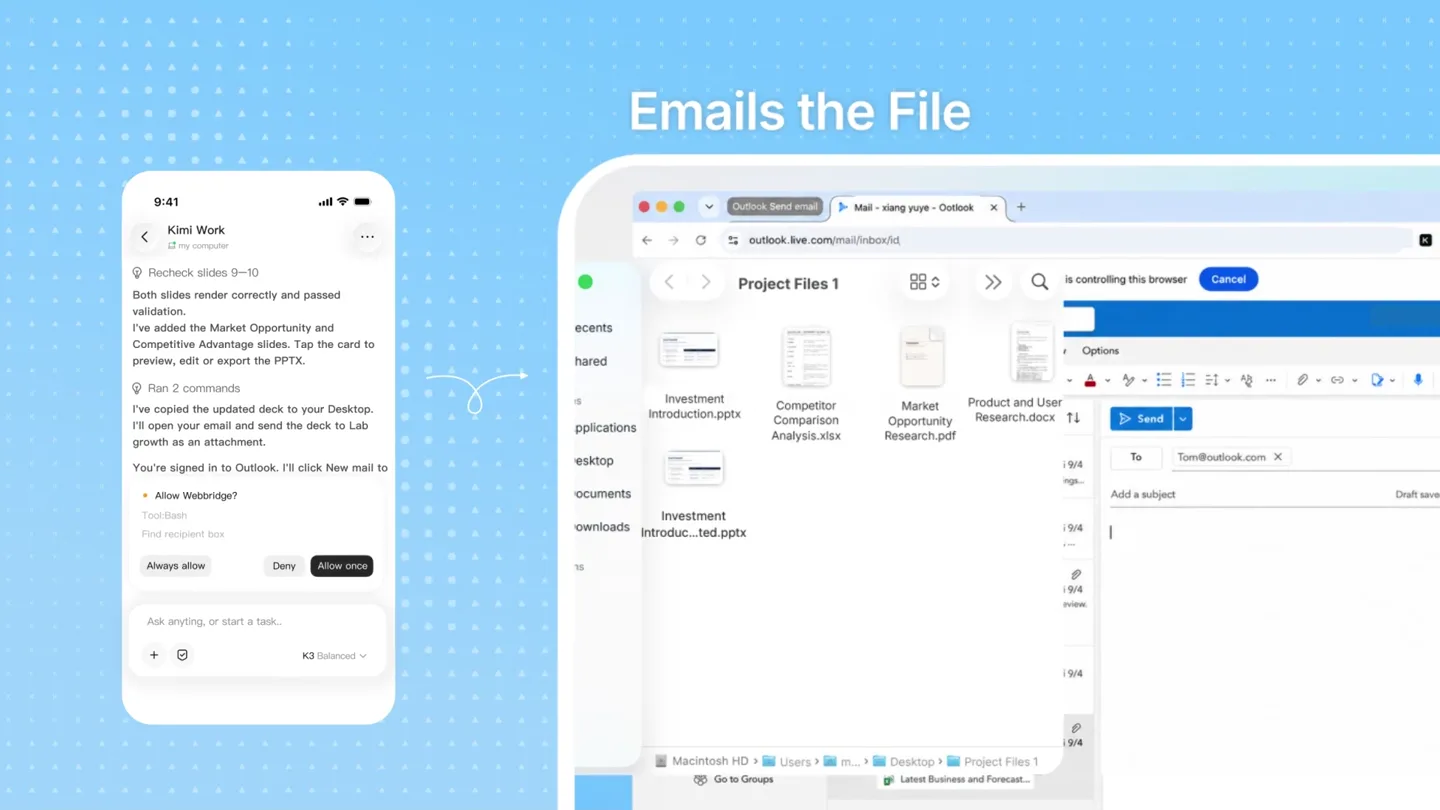
- 9:41 Tom Need latest wearable data by noon And update the deck too. Update the "Investment Introduction" deck on my desktop with the latest wearables market data and competitive analysis, then email it to Tom. Extracts Key Insights Kimi Work my computer Used 4 tools - ran 3 commands I'll use WebBridge to research the latest trends in wearables, then assess the market and our competitive advantages. I'm extracting key data to track growth in the wearables market. Ask anything, or start a task. + K3 Balanced Smart Glasses Move Beyond Concept: Display, Voice and Camera Converge Market Overview Key Trends Finds Your Local Files Writes in Original Sty Writes in Original Style Emai Emails the File Sends it
- Camera
- Dynamic split-screen view, with a mobile phone UI on the left and a desktop browser/application UI on the right. Camera pans and zooms to highlight specific UI elements.
- Motion
- Split-screen composition, UI element highlighting via zoom and pan, text typing animation, data extraction visual cues, and file management simulation.
Feature Teaser
Effortless Workflow Automation
“(No spoken dialogue — A significant sub-bass drop/impact at 0:21 marks a shift in the musical arrangement, followed by a continued driving beat and a sweep at 0:26.)”
- On screen
- Sends it Work Anywhere
- Camera
- Close-up on desktop UI elements, then a quick transition to a full-screen text overlay.
- Motion
- Simulated mouse clicks and drag-and-drop actions, rapid UI transitions, and a full-screen text reveal with a subtle glow effect.
Call to Action
Kimi Work: Your AI Agent
“(No spoken dialogue — A subtle impact at 0:31, leading to the track's conclusion with a final impact at 0:36.)”
- On screen
- KIMI
- Camera
- Static shot of the brand logo, centered.
- Motion
- Logo reveal with a subtle fade-in and scale, concluding the video with a strong brand presence.
Motion design primitives
Synthesizable in Remotion · key components of the ai-agent-workflow-showcase template.
UISplitScreenWorkflow
A dynamic split-screen layout where a mobile phone interface occupies the left side and a desktop application or browser interface occupies the right. Content within each screen updates and interacts, simulating a cross-device workflow.
+ Code construction recipe
Utilize `AbsoluteFill` for the background. Implement two `Sequence` components for the mobile and desktop views, each containing `Img` or `Video` components for UI elements. Use `interpolate` for `x` and `scale` properties to animate the split-screen reveal and content focus. Apply `spring` for button clicks and cursor movements.
TypingHighlightReveal
Text appears as if being typed, with specific keywords or phrases highlighted through a background color change or underline effect. This is often accompanied by a simulated mouse cursor interaction.
+ Code construction recipe
Use `Sequence` and `Series` for character-by-character text reveal. Employ `interpolate` on `opacity` and `width` for the highlight effect. A custom SVG cursor component can be animated with `spring` for realistic mouse movements and clicks.
DataExtractionZoom
A section of a document or webpage is highlighted and then zoomed in, with key data points or phrases visually emphasized (e.g., underlined, bolded, or given a background fill).
+ Code construction recipe
Implement a `Sequence` for the zoom animation. Use `AbsoluteFill` with `scale` and `translateX/Y` for the zoom effect on the document `Img` or `Video`. Overlay `Text` components with `interpolate` on `backgroundColor` or `textDecoration` for highlighting. Masking can be used to simulate content appearing within the zoomed area.
Style DNA & aesthetic system
Visual aesthetic
Typography
Motion
Special effects
Pacing & rhythm
Conceptual story rhythm
- 1
The Remote Hook
Purpose. Immediately establish the core value proposition: remote control from your phone.
Execution. A prominent 'Remote control' button with a mouse cursor click, followed by a quick text reveal about phone control, leading into the mobile app UI.
- 2
Problem-Solution Showcase
Purpose. Demonstrate how the AI agent solves a common workflow problem (e.g., updating a deck, sending emails) across devices.
Execution. Split-screen showing a mobile command and the AI agent executing tasks on a desktop, highlighting research, file access, content creation, and email sending.
- 3
Efficiency & Freedom
Purpose. Emphasize the benefit of working anywhere, unconstrained by physical location.
Execution. A full-screen text overlay 'Work Anywhere' with a subtle, confident animation, reinforcing the product's promise.
- 4
Brand & Call to Action
Purpose. Conclude with strong brand recognition and a clear product identity.
Execution. The Kimi logo reveal, clean and centered, serving as the final brand statement.
Remix in Animatiq Studio
Master remix prompt · agent-ready
Sample remix
Objective
Launch a new AI-powered project management tool called 'FlowState' that automates task assignment and progress tracking across teams.How the recipe adapts
The video would open with a 'Manage Projects Remotely' button click, transitioning to a split-screen. The mobile side would show a user assigning a task via voice command, while the desktop side would show FlowState automatically creating sub-tasks, setting deadlines, and notifying team members in a project dashboard. Typing animations would highlight 'Automated Deadlines' and 'Smart Notifications'. Data extraction zooms would focus on progress charts and resource allocation within the desktop UI. The 'Work Anywhere' text would be replaced with 'Achieve FlowState', followed by the FlowState logo reveal.Remix blueprint · ai-agent-workflow-showcase
Scene durations (4 scenes, 38s)
Key Remotion components
Related AI Agents Product Launches
Explore all AI Agents launches →
To ensure that artificial general intelligence benefits all of humanity

Introducing Claude Fable 5: a Mythos-class model that we’ve made safe for general use. Its capabilities exceed those of any model we’ve ever made generally available. https://t.co/2AvmEjHIX8

To understand the true nature of the universe.