
Klyn · Launch Video Breakdown: Hook, Pacing & Motion Design
Klyn is a free, native, open-source Mac cleaner that shows exactly what it wants to clean — and why — instead of scareware scripts.
Scene-by-scene timeline & spoken transcript
The Hook
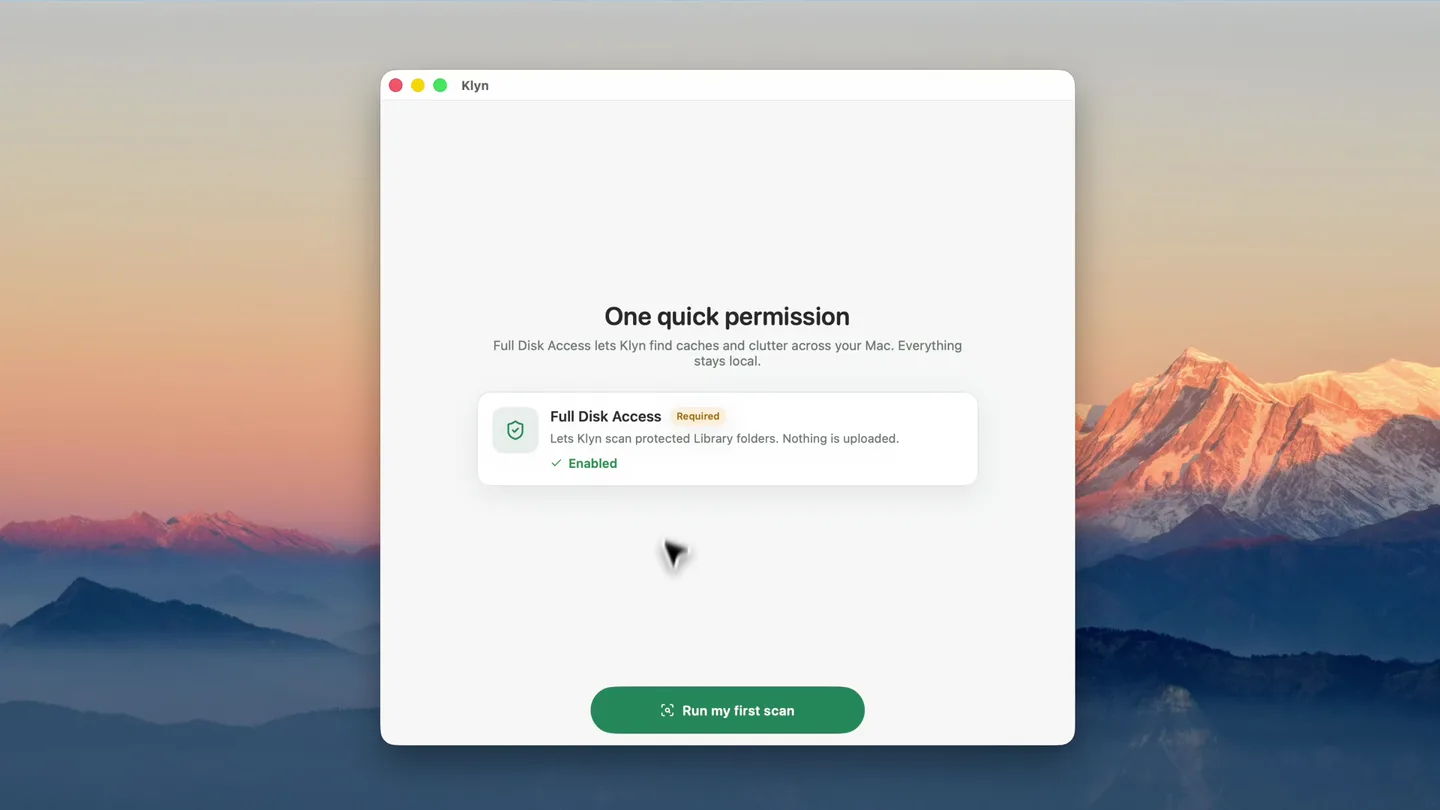
Permission & Initial Scan
“(No spoken dialogue — ambient visual with UI clicks)”
- On screen
- Klyn One quick permission Full Disk Access lets Klyn find caches and clutter across your Mac. Everything stays local. Full Disk Access Required Lets Klyn scan protected Library folders. Nothing is uploaded. Enabled Run my first scan Running your first scan Stop Looking for reclaimable clutter... 141,900 checked /users/muhammadjunaid/Library/Caches/Google/..._efault/Cache/Cache_Data/5d4e9065887d0ef56_0 33.56 GB ready to clean on your Mac That's roughly 10 photos or 8,000 songs Caches 20.86 GB Media 16.81 GB Archives 8.83 GB Node 7.54 GB Your documents, photos, and projects are never touched. Protected app data (VS Code, Cursor, browsers) is never auto-cleaned. Cleaned items move to Trash so you can recover anything. Clean 33.56 GB now Review everything first
- Camera
- Static, full-screen application window view, with a mouse cursor interacting with UI elements.
- Motion
- Rapid UI interaction simulation, quick text reveals, and progress bar animations.
Product Reveal
Detailed Scan Results & Cleaning
“(No spoken dialogue — ambient visual with UI clicks)”
- On screen
- Klyn Free - by xermio Results 16 locations 63.04 GB Found 33.56 GB Safe 29.48 GB Review 3.78 GB Protected SAFE TO CLEAN 33.56 GB Clean 33.56 GB Moves to Trash - empty Trash to reclaim space. Scan Quick Clean Caches & common clutt... Full Disk Scan the entire drive Choose Folder Pick any location Developer Build & package caches Overview Found 63.04 GB Safe 33.56 GB Needs review 29.48 GB Protected 3.78 GB Full Disk Access Granted Empty Trash Settings xermio.com/klyn Search files and paths Safe Review All Clean Safe 6,000 items /users/muhammadjunaid/npm/_cache/content-v2 Safe 3.94 GB /users/muhammadjunaid/npm/_cache/content-v2/sha512 Safe 3.94 GB /users/muhammadjunaid/.npm/_cache/uv Safe 2.69 GB Profile 2 /users/muhammadjunaid/Library/Caches/Google/Chrome/Profile 2 Safe 2.16 GB archive-v0 /users/muhammadjunaid/.npm/_cache/archive-v0 Safe 2.1 GB Xcode_27_3_b.zip /users/muhammadjunaid/Library/Developer/Xcode/De..._efault/Cache/Cache_Data/5d4e9065887d0ef56_0 Review 1.97 GB oss101.mp4 /users/muhammadjunaid/Downloads/oss101.mp4 Safe 1.88 GB Cap 2026-06-02 at 15.05.04.mp4 /users/muhammadjunaid/Downloads/Cap 2026-06-02 at 15.05.04.mp4 Safe 1.83 GB ModuleCache.noindex /users/muhammadjunaid/Library/Developer/Xcode/DerivedData/ModuleCache.noindex Safe 1.79 GB Profile 26 Safe Size 1.73 GB Type Caches Kind Folder Status Safe to clean Modified Jun 13, 2026 at 1:13 AM Path /Users/muhammadjunaid/Library/Caches/Google/Chrome/Profile 26 Recommendation Cache data is recreated by apps. Quit the related app, then move it to Trash. Open Open Location Reveal in Finder Move to Trash Sort by > Type > Ascending All types Caches - 20.86 GB Media - 16.81 GB Archives - 8.83 GB Node - 7.54 GB Docs - 3.6 GB Xcode - 2.69 GB Python - 2.69 GB Homebrew - 339.4 MB Docker - 211.6 MB Rust - 190.4 MB node_modules /users/muhammadjunaid/.npm/_cache/node_modules Safe 210.3 MB 69f9a0b61c37556 /users/muhammadjunaid/.npm/_cache/69f9a0b61c37556/node_modules Safe 206.2 MB /users/muhammadjunaid/.npm/_cache/node_modules Safe 206 MB next /users/muhammadjunaid/.npm/_cache/node_modules/next Safe 177.1 MB dist /users/muhammadjunaid/.npm/_cache/node_modules/dist Safe 176.8 MB aa8e5c70f9d8d161 /users/muhammadjunaid/.npm/_cache/aa8e5c70f9d8d161 Safe 170.9 MB node_modules /users/muhammadjunaid/.npm/_cache/node_modules Safe 170.9 MB esupabase /users/muhammadjunaid/.npm/_cache/esupabase Safe 164.6 MB cli-darwin-arm64 /users/muhammadjunaid/.npm/_cache/cli-darwin-arm64 Safe 164.6 MB Moved to Trash next (177.1 MB) was moved to Trash. Use Undo to put it back. OK
- Camera
- Static, full-screen application window view, with a mouse cursor interacting with UI elements.
- Motion
- Rapid UI navigation, filtering, sorting, and item selection, simulating real-time user interaction with a focus on data transparency.
Feature Teaser
Customization & Settings
“(No spoken dialogue — ambient visual with UI clicks)”
- On screen
- Klyn Free - by xermio Results 16 locations 63.04 GB Found 33.56 GB Safe 29.48 GB Review 3.78 GB Protected SAFE TO CLEAN 33.56 GB Clean 33.56 GB Moves to Trash - empty Trash to reclaim space. Scan Quick Clean Caches & common clutt... Full Disk Scan the entire drive Choose Folder Pick any location Developer Build & package caches Overview Found 63.04 GB Safe 33.56 GB Needs review 29.48 GB Protected 3.78 GB Full Disk Access Granted Empty Trash Settings xermio.com/klyn Search files and paths Safe Review All Clean Safe 3,282 items node_modules /users/muhammadjunaid/.npm/_cache/node_modules Safe 170.9 MB esupabase /users/muhammadjunaid/.npm/_cache/esupabase Safe 164.6 MB cli-darwin-arm64 /users/muhammadjunaid/.npm/_cache/cli-darwin-arm64 Safe 164.6 MB bin /users/muhammadjunaid/.npm/_cache/bin Safe 157.8 MB 191c568aa03d4f8 /users/muhammadjunaid/.npm/_cache/191c568aa03d4f8 Safe 148.6 MB node_modules /users/muhammadjunaid/.npm/_cache/node_modules Safe 148.6 MB 3b /users/muhammadjunaid/npm-store/v10/files3b Safe 127.7 MB Select an item Its path, size, status, and actions appear here. Settings Done Appearance Auto Light Dark Scanning Minimum file size 125 MB Lower finds more clutter. Higher keeps focused. About Replay onboarding xermio.com/klyn Klyn is free. Items always move to Trash first - never permanently deleted by Klyn. 3641bc8f00c7c67 /users/muhammadjunaid/.npm/_cache/3641bc8f00c7c67 Safe 217 MB node_modules /users/muhammadjunaid/Library/Caches/com.microsoft.VSCode/Cache/node_modules Safe 216.8 MB /users/muhammadjunaid/.npm/_cache/node_modules Safe 216.3 MB 69f9a0b61c37556 /users/muhammadjunaid/.npm/_cache/69f9a0b61c37556/node_modules Safe 206.2 MB /users/muhammadjunaid/.npm/_cache/node_modules Safe 206 MB aa8e5c70f9d8d161 /users/muhammadjunaid/.npm/_cache/aa8e5c70f9d8d161 Safe 170.9 MB node_modules /users/muhammadjunaid/.npm/_cache/node_modules Safe 170.9 MB esupabase /users/muhammadjunaid/.npm/_cache/esupabase Safe 164.6 MB aa8e5c70f9d8d161 Safe 170.9 MB Size 170.9 MB Type Node Kind Folder Status Safe to clean Modified Aug 4, 2026 at 3:15 AM Path /users/muhammadjunaid/.npm/_cache/aa8e5c70f9d8d161 Recommendation Build or dependency cache. Tools recreate it on the next build or install. Open Open Location Reveal in Finder Move to Trash
- Camera
- Static, full-screen application window view, with a mouse cursor interacting with UI elements.
- Motion
- Overlaying modal windows, slider interaction, and toggling appearance settings, demonstrating user control and customization.
Motion design primitives
Synthesizable in Remotion · key components of the klyn-inspired-ui-showcase template.
UIMouseInteraction
Simulates a mouse cursor moving across the screen, hovering over elements, and performing clicks, highlighting interactive UI components.
+ Code construction recipe
Use `interpolate` for cursor position and `spring` for click animations. Implement `Sequence` to chain mouse movements and click events. Utilize `AbsoluteFill` for the application window and `Img` for the background.
DynamicDataReveal
Displays numerical data and file lists populating dynamically, often with a subtle fade-in or slide-up effect, emphasizing transparency and real-time scanning.
+ Code construction recipe
Employ `spring` for numerical count-ups and `interpolate` for list item fade-ins/slide-ups. Use `Map` to render dynamic lists from data arrays. SVG filters can be used for subtle glow effects on highlighted data.
ModalOverlayTransition
A modal window smoothly fades in or slides up from the bottom, often with a slight background blur, to present settings or confirmation dialogs.
+ Code construction recipe
Utilize `spring` for the modal's scale and opacity, and `interpolate` for background blur. Implement `AbsoluteFill` for the overlay and `View` for the modal content. Ensure z-index management for proper layering.
Style DNA & aesthetic system
Visual aesthetic
Typography
Motion
Special effects
Pacing & rhythm
Conceptual story rhythm
- 1
Initial Engagement
Purpose. Quickly onboard the user and demonstrate the core scanning capability.
Execution. Rapid sequence of permission granting, scan initiation, and immediate display of results.
- 2
Transparency & Control
Purpose. Showcase the detailed breakdown of files and user's ability to review and manage.
Execution. Scrolling through file lists, filtering, sorting, and selecting individual items for action.
- 3
Action & Confirmation
Purpose. Illustrate the cleaning process and provide reassurance of safe operation.
Execution. Clicking 'Move to Trash', displaying a confirmation dialog, and showing the updated file count.
- 4
Customization & Trust
Purpose. Highlight advanced settings and reinforce the product's commitment to user safety.
Execution. Opening settings, adjusting parameters, and displaying key trust-building messages about data handling.
Remix in Animatiq Studio
Master remix prompt · agent-ready
Sample remix
Objective
A new secure cloud storage solution called 'VaultSync'.How the recipe adapts
The UIMouseInteraction primitive will simulate uploading files and setting sharing permissions. DynamicDataReveal will show real-time encryption progress and file version history. ModalOverlayTransition will be used for secure login prompts and sharing configuration dialogs. The color palette will shift to include more blues for cloud branding, while retaining green for security confirmations.Remix blueprint · klyn-inspired-ui-showcase
Scene durations (6 scenes, 68.5s)
Key Remotion components
Related Productivity Product Launches
Explore all Productivity launches →
Don't type, just speak. Flawless voice-to-text across every app at 240 WPM.

One workspace for knowledge scattered across Slack, email, Docs, and Notion. Connect your tools and build apps and agents that stay live with your data.

Notion positions itself as the backbone of your dock — a brand film of the Notion icon among everyday apps, ending on “Works with everything.”