
Kudu · Launch Video Breakdown: Hook, Pacing & Motion Design
Kudu is an open-source CCleaner-style desktop app for Windows, Mac, and Linux. It scans temps, logs, and caches, then lets you choose what to delete.
Scene-by-scene timeline & spoken transcript
The Hook
Dashboard Overview & Initial Scan
“(No spoken dialogue — Ambient visual with a subtle, rhythmic background pulse at 110 BPM.)”
- On screen
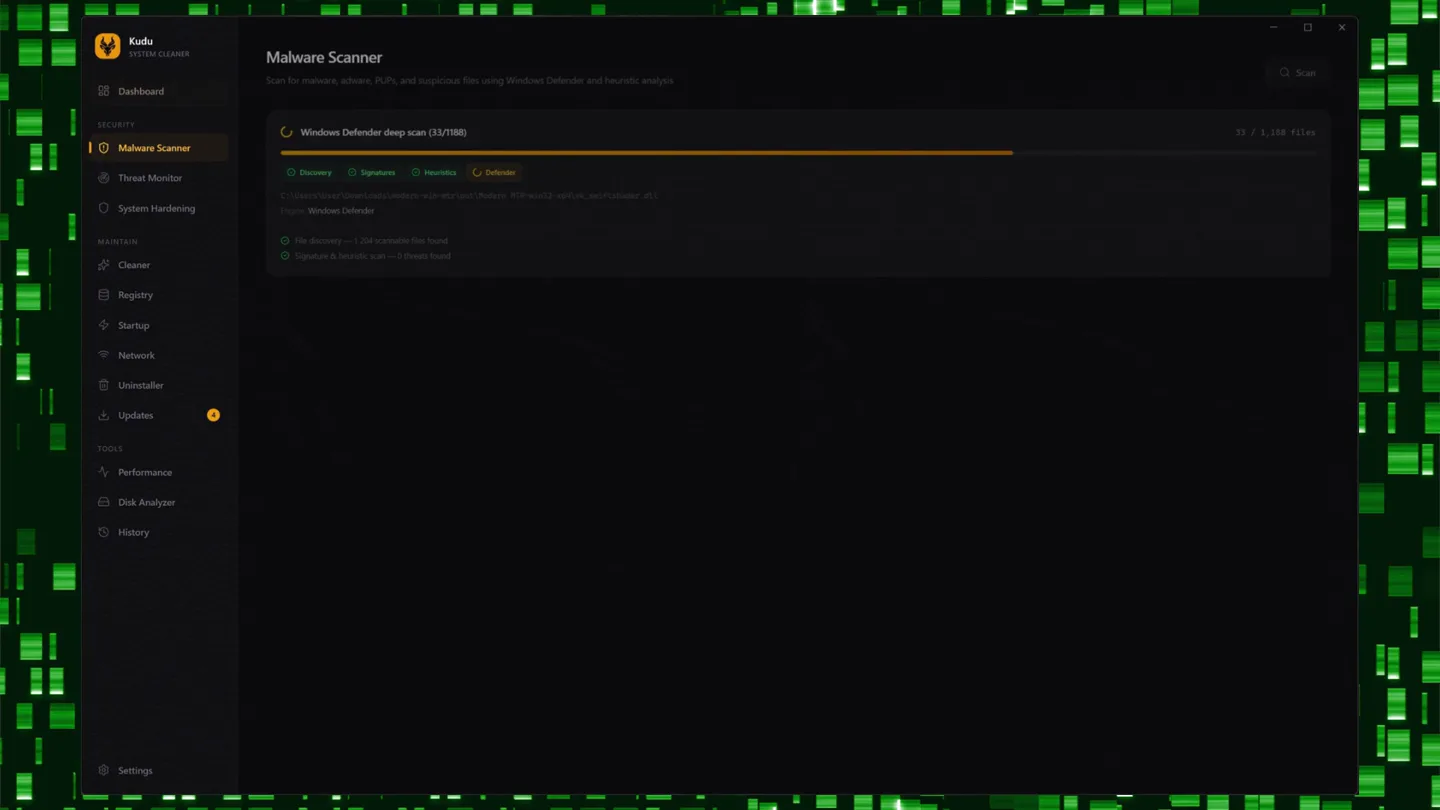
- Kudu SYSTEM CLEANER, Dashboard, System overview and quick actions, HEALTH, 75, 5.64 GB, Space Recovered, 2,288, Files Cleaned, 20h ago, Last Scan, Quick Clean, Scan junk files and fix registry issues, Full Clean, Optimize & Protect, Clean + Registry + Startup + Malware + Privacy + Updates, QUICK ACTIONS, Cleaner, Registry, Network, Disk Map, RECENT ACTIVITY, Q software-update: 0 items, System Clean: 0 items, Q software-update: 1 items, STORAGE OVERVIEW, C: Main, E: Secondary, G: Google Drive, SECURITY, Malware Scanner, Threat Monitor, System Hardening, MAINTAIN, Cleaner, Registry, Startup, Network, Uninstaller, Updates, TOOLS, Performance, Disk Analyzer, History, Settings, Malware Scanner, Scan for malware, adware, PUPs, and suspicious files using Windows Defender and heuristic analysis, Windows Defender deep scan (33/198), Discovery, Signatures, Heuristics, Defender, C:\Users\User\Downloads\malware-x2-x87-x99\test\malware.exe_x87-x92-x99_test\malware.dll, Engine: Windows Defender, For discovery — 1,004 scanable files found, Signatures & heuristic scan — 0 threats found, Q Scan, 33 / 1,108 files, Threat Monitor, Real-time monitoring of network connections against known threat lists, No threats detected, All clear, No suspicious connections or DNS entries have been detected. The monitor continues scanning in the background.
- Camera
- Static, wide shot of the desktop application window, with subtle background animation.
- Motion
- Rapid UI navigation via sidebar clicks, instant screen transitions, and progress bar animations.
Feature Teaser
System Hardening & Cleaning Deep Dive
“(No spoken dialogue — Ambient visual with a subtle, rhythmic background pulse at 110 BPM.)”
- On screen
- Kudu SYSTEM CLEANER, Dashboard, SECURITY, Malware Scanner, Threat Monitor, System Hardening, MAINTAIN, Cleaner, Registry, Startup, Network, Uninstaller, Updates, TOOLS, Performance, Disk Analyzer, History, Settings, System Hardening, Stop-down Windows — remove telemetry, bloatware, and unnecessary services, Privacy, Telemetry, ads, tracking, Bloatware, Pre-installed apps, Services, Unnecessary services, Q Scan, Protect All (2), 94, Privacy Score, All protected, 2 Unprotected, 33/39, Categories, Telemetry, Ads, Search, Sync, Telemetry, Scheduled, Telemetry & Data Collection, All protected, Limited diagnostics and usage data collection, Ads & Suggestions, All protected, Block promoted apps, ad suggestions, and lock screen spotlight, Search & Cortana, All protected, Keep searches local and disable web-based search features, Sync & Cloud, 2 Unprotected, Protect All, Clipboard Cloud Sync, ADMIN, Disable clipboard history that stores copied text and images, Clipboard History, Settings Sync, ADMIN, Stop-syncing Windows settings, themes, and passwords to your Microsoft account, Find My Device, ADMIN, Disable location-based device tracking by Microsoft, Scanning..., Enumerating services..., System Cleaner, Scan and clean junk files from your system, Q Scan, Clean, System, User Temp Files, Windows Logs, Thumbnail & Icon Cache, Font Cache, DirectX Shader Cache, Windows Update Cache, Crash Dumps, Event Log Archives, Defender Scan History, Browsers, Applications, Gaming, Recycle Bin, Total Recoverable, 2.92 GB, Registry & System, Clean broken issues and harden your system, Q Scan, Fix (20), Advanced Feature — A registry backup (.reg) will be created before any modifications, Registry Cleanup, Security, All clear, (Present) Broken: 154 (30%), (Avg) Some: (react) security issues, Performance, All clear, (Present) Broken: 0 (0%), (Avg) Some: (react) performance, Network, All clear, (Present) Broken: 0 (0%), (Avg) Some: (react) network, Services, All clear, (Present) Broken: 0 (0%), (Avg) Some: (react) services, Scheduled Tasks, All clear, (Present) Broken: 0 (0%), (Avg) Some: (react) scheduled tasks
- Camera
- Static, wide shot of the desktop application window, with subtle background animation.
- Motion
- Fast-paced UI navigation, content reveal animations, and progress bar fills.
Feature Teaser
Startup & Network Optimization
“(No spoken dialogue — Ambient visual with a subtle, rhythmic background pulse at 110 BPM.)”
- On screen
- Kudu SYSTEM CLEANER, Dashboard, SECURITY, Malware Scanner, Threat Monitor, System Hardening, MAINTAIN, Cleaner, Registry, Startup, Network, Uninstaller, Updates, TOOLS, Performance, Disk Analyzer, History, Settings, Startup Manager, Manage programs that run on startup, All Items, Sort by Impact, Startup Impact Analysis, Total Impact, 39.1s, High Impact Apps, Impact Now, 39.1s, 2.9m, 21, 2.8m, Root Time Impact by Application, Startup Apps, Other, Docker Desktop, Mozilla Firefox, LGHUB, GoogleDriveFS, Proton Drive, Clair Zero Terminal, NextDNS, Network Cleanup, Clear DNS cache, saved Wi-Fi profiles, and sessions history, Q Scan, Clean, DNS Cache, Wi-Fi Profiles, ARP Cache, Network History, Q Start Scan, No scan results, Discover network issues that can be cleaned
- Camera
- Static, wide shot of the desktop application window, with subtle background animation.
- Motion
- Dynamic bar chart animations, toggle switch interactions, and content loading states.
Product Reveal
Comprehensive System Management & Performance Monitoring
“(No spoken dialogue — Ambient visual with a subtle, rhythmic background pulse at 110 BPM.)”
- On screen
- Kudu SYSTEM CLEANER, Dashboard, SECURITY, Malware Scanner, Threat Monitor, System Hardening, MAINTAIN, Cleaner, Registry, Startup, Network, Uninstaller, Updates, TOOLS, Performance, Disk Analyzer, History, Settings, Program Uninstaller, Uninstall programs and automatically clean leftover files, Refresh, To Name, Safe uninstall — Kudu will watch program's uninstaller, then automatically scan for and clean leftover files and folders, Installed Programs (85), Awe Colony, Battle.net, BleachBit, Chrome Remote Desktop, Clair Zero Terminal 1.0.0, Claude, Curveforge 1.38.0.31883, Cursor (User), DataGrip 2023.3.5, Disco Elysium, Unknown, Uninstall, 40.7 MB, Uninstall, 508.6 MB, Uninstall, 15.1 MB, Uninstall, 507.6 MB, Uninstall, 399.3 MB, Uninstall, Updates, Keep your software and drivers up to date, Software, Third-party apps are exempt, Drivers, Windows & 3rd-party, Re-check, All, Name, 3, 0, 1, 2, Major Updates, Minor Updates, Problems, Update Selected (4), Epic Games Launcher, Microsoft Edge, Terminus 9.17.2, Windows Package Manager Modified Creator, Up to date (184), Update, Update, Update, Update, Performance Monitor, Live system resource monitoring with per-process breakdown, Intel Gen Intel® Core™ i9-12900KS, 63.8 GB, Microsoft Windows 11 Pro 10.0.22000, 3d 4m 10s, Play, Pause, 41, CPU, 24 threads, 75, Memory, 63.8 GB, 0, Disk I/O, 0 B/s / 0 B/s, 0, Network, 0 B/s / 0 B/s, CPU Usage, Memory Usage, Disk I/O, Disk Health (S.M.A.R.T.), Samsung SSD 970 EVO Plus 2TB, Healthy, 44°C, 100%, Samsung SSD 870 EVO 2TB, Healthy, 0°C, 3.1y, 100%, Processes, msmpeng.exe, CPU, 32, 75, 0, 0
- Camera
- Static, wide shot of the desktop application window, with subtle background animation.
- Motion
- Scrolling content, interactive toggles, and real-time data visualization with graphs and metrics.
Motion design primitives
Synthesizable in Remotion · key components of the kudu-system-cleaner-style template.
ProgressRingFill
Circular progress indicators animate their fill level, often accompanied by a numerical percentage count-up. The ring segment grows smoothly clockwise.
+ Code construction recipe
Implement using an SVG `circle` with a `stroke-dasharray` and `stroke-dashoffset` property. Animate the `stroke-dashoffset` using `interpolate` from the starting value to the target value. The numerical count-up can be achieved with `useCurrentFrame` and `interpolate`.
DynamicBarChartReveal
Horizontal bar charts dynamically grow from left to right, revealing data values. Individual bars can have a slight delay or staggered animation for a more engaging effect.
+ Code construction recipe
Render each bar as a `div` or SVG `rect`. Animate the `width` property using `spring` or `interpolate` with a `delay` based on the bar's index. Text labels can fade in or slide with the bars.
Style DNA & aesthetic system
Visual aesthetic
Typography
Motion
Special effects
Pacing & rhythm
Conceptual story rhythm
- 1
Initial System Scan
Purpose. Introduce the product's core function and immediate value proposition.
Execution. The video opens on the Kudu dashboard, quickly navigating to a malware scan and showing a progress bar fill, demonstrating active system analysis.
- 2
Deep Cleaning & Hardening
Purpose. Showcase advanced features for system optimization and privacy.
Execution. Rapid-fire transitions through 'System Hardening' and 'Cleaner' sections, highlighting privacy scores, protected items, and recoverable disk space with dynamic numbers and lists.
- 3
Performance & Startup Control
Purpose. Emphasize performance improvement and user control over system resources.
Execution. Demonstrates 'Startup Manager' with animated bar charts showing impact, followed by 'Network Cleanup' and 'Program Uninstaller' to illustrate comprehensive control.
- 4
Real-time Monitoring & Updates
Purpose. Conclude by showing continuous system health and maintenance capabilities.
Execution. The final scenes display 'Updates' management and the 'Performance Monitor' with live CPU/Memory graphs, reinforcing Kudu as an ongoing system guardian.
Remix in Animatiq Studio
Master remix prompt · agent-ready
Sample remix
Objective
Showcase 'Aura', a cloud-based project management tool, emphasizing its intuitive interface and powerful features for task tracking, team collaboration, and progress monitoring.How the recipe adapts
The dark theme and high-contrast UI will be applied to Aura's interface. The 'matrix' background will be replaced with a subtle, animated cloud or network pattern. SidebarNavigationHighlight will be used for navigating between 'Projects', 'Tasks', and 'Team' sections. ProgressRingFill will animate task completion percentages and project health scores. DynamicBarChartReveal will visualize team workload distribution and project timelines. The fast-paced editing will highlight quick task creation, drag-and-drop reordering, and real-time collaboration updates.Remix blueprint · kudu-system-cleaner-style
Scene durations (4 scenes, 29s)
Key Remotion components
Related Productivity Product Launches
Explore all Productivity launches →
Don't type, just speak. Flawless voice-to-text across every app at 240 WPM.

One workspace for knowledge scattered across Slack, email, Docs, and Notion. Connect your tools and build apps and agents that stay live with your data.

Notion positions itself as the backbone of your dock — a brand film of the Notion icon among everyday apps, ending on “Works with everything.”