
Scene-by-scene timeline & spoken transcript
The Hook
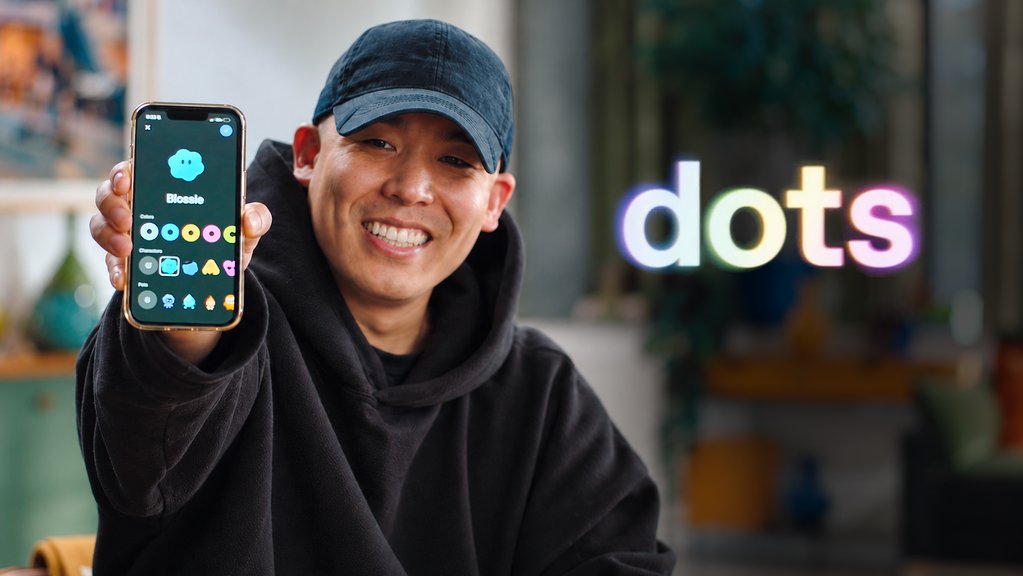
Introduction to Mobile Dots
“Hey what's up, I'm Alex. I work on dots for mobile. Dots are always-on proactive agents that just take s*** off your plate. Previously, you could only claim a dot on desktop and web, but you can now set up dots on mobile as well. It'll be available on both iOS and Android and honestly, very, very easy to set up. We designed it so that basically it sets itself up.”
- On screen
- Alex Ma OpenAI
- Camera
- Static medium shot with subtle handheld drift
- Motion
- Censored audio bleep overlaid with dot icon animation
Product Reveal
Mobile Setup & Thread Creation
“So all you have to do is open the ChatGPT app. In the top left corner, you'll see an entry point that says Meet Dot. Once you hit that button, it'll basically create a thread with your dot. From there, your dot just gets to work. It might ask you for calendar access, might ask you for to connect your email. Highly recommend connecting both calendar and email because it just gives your dot more context. The more context that your dot has, the more it can kind of take off your plate. The other thing you can do with your dot is actually personalize it. You can give it a name, you can give it an avatar, so let's go ahead and do that.”
- On screen
- Say hello to your dot | Hey! I'm your dot. Message or call me anytime... | Customize your dot
- Camera
- Over-the-shoulder insert cut to phone screen, returning to medium shot
- Motion
- Floating UI mockup graphic popping into upper right
Feature Teaser
Personalization & Computer Access
“I'm going to name my dot Blossie and there's a couple options to choose from. I can do an avatar or I can do use my Codex pet. I'm actually going to create a custom avatar. All right, so my favorite color is blue. I'm going to make him blue. I'm going to keep things simple for now so no accessories, but yep, this is Blossie. So your dot also has access to its own computer, and it also has access to your computer, which is really cool for doing complex tasks like coding, prototyping, etc. So let's give Blossie a call and see if we can prototype something quickly.”
- On screen
- Your dot | Blossie | Blossie's computer | Alex's computer
- Camera
- Close-up macro shot of smartphone interface and avatar builder
- Motion
- Direct tactile mobile interaction and UI preview
Feature Teaser
Live Voice Agent Collaboration
“Hey Alex, good evening. What's on your mind? Hey Blossie, can you actually prototype me an iOS widget so that you can live on my home screen? I want the widget to have your avatar, your name, and then also like a short status on what you're working on. Let me check on that. Just like kick off a Codex thread and start building it. While you do that, also just check Slack to see if anybody else is working on this widget. I want to make sure I'm collaborating with the right people. Good call. Brian Somerset and Gavin Nelson are the folks to sync with. They're already pushing toward a widget MVP... Awesome. Why don't you just, can you like get me into a Slack thread with them? And also, when you're done with the prototype, send me a screenshot so I can give you some comments. Uh-huh, yeah, on it. I'll loop you in with Brian and Gavin, and get you a screenshot as soon as it's ready. I'm on that same prototype thread, and I'll draft a Slack reply tagging them for you to approve.”
- On screen
- Blossie 0:06 | Blossie 0:44 | Blossie 0:58
- Camera
- Alternating close-up of incoming voice call screen and medium talking head
- Motion
- Interactive real-time audio visualizer waveform on mobile screen
Call to Action
Call to Action & Brand Outro
“All right, awesome. Thank you. Cool. Just going to let Blossie cook for a little bit. Going to check back in when I'm back home in front of my computer on the latest progress. If you're watching this video right now on your phone, switch over to the ChatGPT app and get your dot set up. Can't wait to see what you build with your dot. See ya. (No spoken dialogue — subtle digital chime)”
- On screen
- OpenAI
- Camera
- Medium shot zoom hold followed by clean cut to centered logo card
- Motion
- Minimalist vector logo scale-in and spinning geometric glyph resolving
Motion design primitives
Synthesizable in Remotion · key components of the mobile-agent-launch-demo template.
CallPulseOrb
Centered circular orb expanding and contracting based on audio frequency during voice call.
+ Code construction recipe
Use interpolate and spring on frame numbers to modulate scale between 0.95 and 1.15 driven by voice volume.
FloatingUiCard
Rounded black card sliding in from upper edge with smooth spring deceleration.
+ Code construction recipe
Animate translateY from -100 to 0 using spring({ damping: 15, mass: 0.8 }) with opacity 0 to 1 fade.BrandLogoResolve
Clean centered brand mark fading in, followed by single-color geometric rosette spinning into place.
+ Code construction recipe
Sequence Sequence delay for 15 frames, apply interpolate(frame, [0, 20], [0, 360]) on rotation with cubic-bezier easing.
Style DNA & aesthetic system
Visual aesthetic
Typography
Motion
Special effects
Pacing & rhythm
Conceptual story rhythm
- 1
Hook & Value Prop
Purpose. Explain what dots are and announce mobile availability.
Execution. Presenter speaking directly to camera while holding smartphone.
- 2
Onboarding & Customization
Purpose. Show ease of creation and emotional attachment via styling.
Execution. Over-the-shoulder macro shots of character builder.
- 3
Autonomous Agent Demo
Purpose. Demonstrate cross-app orchestration via voice control.
Execution. Live call speakerphone dialogue detailing tasks.
- 4
Wrap & Direct CTA
Purpose. Urge viewers to immediately try the feature.
Execution. Presenter wave followed by stark minimalist logo resolving on white.
Remix in Animatiq Studio
Master remix prompt · agent-ready
Sample remix
Objective
Showcasing an AI research agent mobile companionHow the recipe adapts
Replace the home widget request with a literature review task, retaining the natural presenter pacing, over-the-shoulder mobile setup, and voice call audio pulse interface.Remix blueprint · mobile-agent-launch-demo
Scene durations (5 scenes, 166s)
Key Remotion components
Related AI & ML Product Launches
Explore all AI & ML launches →
Introducing Griffin, the first AI to pass the video Turing test

The most emotive and controllable TTS model

Always-on agents built to handle everything