
Lava · Launch Video Breakdown: Hook, Pacing & Motion Design
Lava Desktop turns a conversation into a routine the agent runs for people still doing by hand what AI should do.
Scene-by-scene timeline & spoken transcript
The Hook
Agent Workflow Selection
“(No spoken dialogue — The track begins with a slow, evolving synth pad, creating an ethereal atmosphere.)”
- On screen
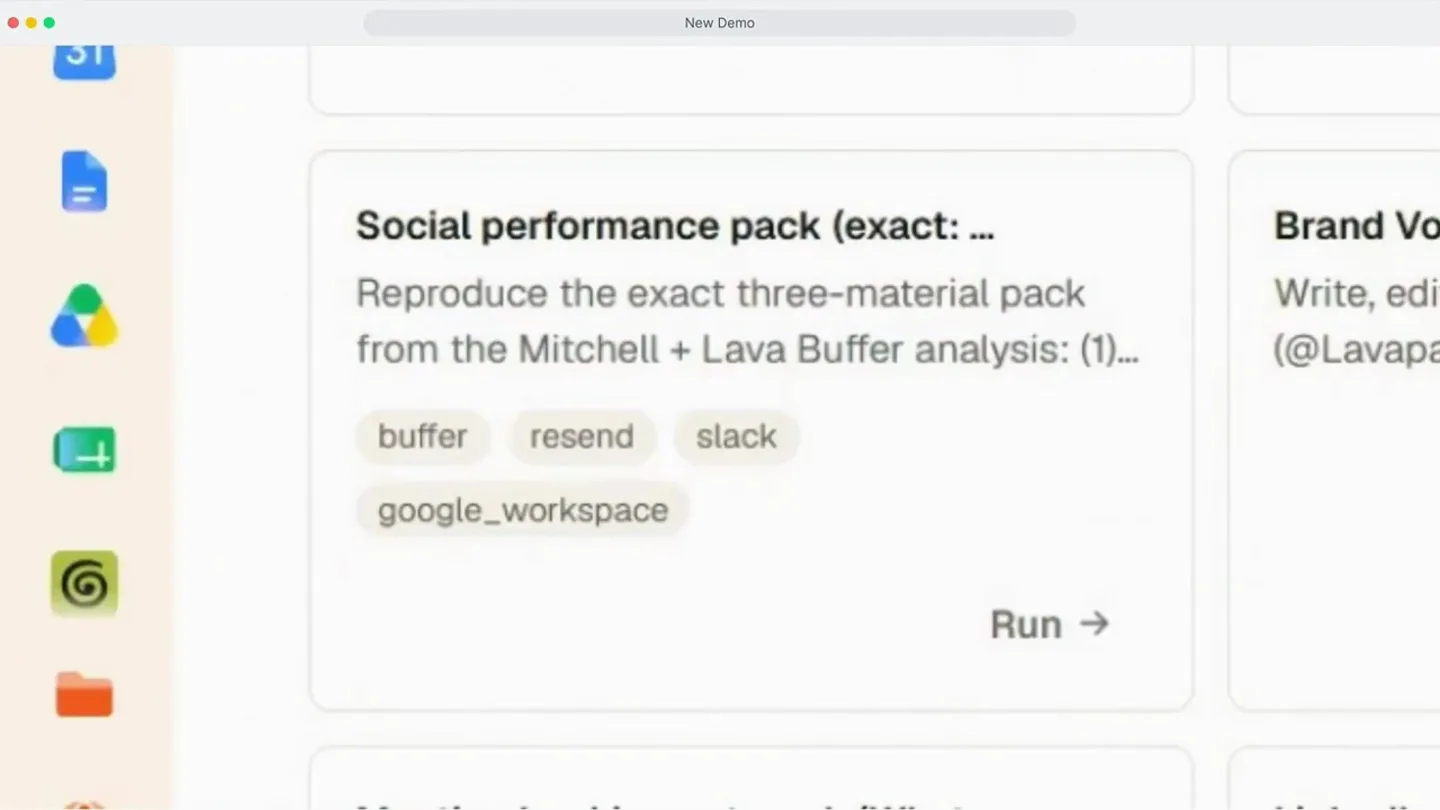
- Social performance pack (exact: ... Reproduce the exact three-material pack from the Mitchell + Lava Buffer analysis: (1)... buffer resend slack google_workspace Run →
- Camera
- Static wide shot of a desktop application, focusing on a workflow selection interface.
- Motion
- Subtle UI element highlighting and a quick zoom-in on a specific workflow card.
Problem Agitation
Agent Execution & Output
“(No spoken dialogue — The synth pad continues, maintaining an ethereal atmosphere.)”
- On screen
- Lava Agent Running workflow: Social performance pack (exact: Mitchell + Lava) Thought for 7s I'll rebuild all three materials (Buffer report, Resend email template, Slack announce) from the locked configuration. Let me start by pulling the provider details I need in parallel. Working 4s Finished searching providers Finished searching providers Finished searching providers Finished searching providers Send a message to the running agent (Enter)
- Camera
- Split-screen view, with the left side showing the workflow selection and the right side revealing the 'Lava Agent' chat interface.
- Motion
- Horizontal split-screen reveal, with text dynamically appearing in the chat window, simulating real-time AI agent activity.
Product Reveal
Comprehensive Report Generation
“(No spoken dialogue — A subtle high-energy riser builds, leading into a more rhythmic section at 0:17 with a driving sub-bass and arpeggiated synth melodies.)”
- On screen
- Social Performance Report: Mitchell and Lava Internal window: Jun 4 to Jul 28, 2026 | Agency comparison: Apr 10 to Jun 3, 2026 Channels: Mitchell LinkedIn, Mitchell X, Lava LinkedIn, Lava X | Source: Buffer analytics Executive Summary What improved Lava LinkedIn engagement rate rose from 2.79% to 6.72%, with comments increasing from 1 to 34 and shares from 0 to 34 Lava X engagement rate jumped from 7.38% to 20%, with post volume increasing from 2 to 17 Mitchell X impressions grew 365% (838 to 2,968) with post volume tripling from 7 to 21 Posting volume increased across all four channels under in-house management What needs attention Mitchell LinkedIn impressions declined 46% (48,380 to 26,249) despite 61% more posts Three of the top five Mitchell LinkedIn posts by impressions were hiring posts, not strategic content Mitchell list-POV posts are absent from the mix (target: 25%) Lava product updates are under-indexed at 15% of non-hiring posts (target: 20%) No case studies were published during the period (target: approximately one per month) Made with Lava Report Share
- Camera
- The left panel expands to full screen, showcasing a detailed performance report, while the right panel (Lava Agent) remains visible but minimized.
- Motion
- Smooth panel expansion and content scrolling, revealing a rich, data-dense report with clear headings and bullet points. The 'Made with Lava' button subtly animates.
Feature Teaser
Multi-Channel Content Distribution
“(No spoken dialogue — A significant sub-bass drop/impact occurs at 0:34, marking a transition to a more intense and layered soundscape with additional synth textures and a slightly more pronounced beat.)”
- On screen
- Lava Mensajes Actividad Archivos Más tarde Inicio Directos N Mitchell LinkedIn 29 posts | 26,249 impressions 1.83% engagement | 382 reactions | 98 comments Lava LinkedIn 18 posts | 4,581 impressions 6.72% engagement | 76 reactions | 34 comments Mitchell X 21 posts | 2,968 impressions 6.67% engagement | 42 reactions | 13 reposts Lava X 17 posts | 750 impressions 20% engagement | 35 reactions | 19 reposts Three operating moves: 1. Protect Mitchell's feed: Hiring posts captured 25% of impressions from only 10% of posts. Separate them from the content cadence. 2. Make Lava the curriculum: Listicle/education content is driving engagement gains (2.79% to 6.72%) on LinkedIn. Add product updates and a monthly case study. 3. Promote product on Mitchell: Product posts are the top engagement performers (3.13% and 2.91%). Increase from 28% toward 30 to 35% of non-hiring content. Full report with top posts, content mix charts, and tracker recommendations. Open report Lava Agent DM is open with Jaqueline on channel '08838918F8'. Let me update the announcement JSON with her DM channel and send it. Worked for 4s - 2 steps Message posted successfully. Let me grab the permalink so I can link to it. Worked for 9s - 1 step Done. The Slack announcement preview is posted in Jaqueline's DM only. No message was sent to the group DM, and the Resend email template was not sent to anyone. The preview includes the Block Kit header, summary, per-channel KPI fields, the three operating moves, a button linking to the full report, and the context note about data source and caveats. You can view it here in your Slack DM with Jaqueline. Let me know if you'd like any edits to the Slack message, the report page, or the email template before sending to the group or to recipients. Worked for 34s Ask the agent - Enter to send. Type '/' to trigger a workflow
- Camera
- Dynamic split-screen, showing the detailed report on the left and the Lava Agent chat on the right, with the agent actively posting to Slack.
- Motion
- Rapid content scrolling and text generation in the chat window, demonstrating the agent's ability to synthesize and distribute information across platforms. The UI elements are crisp and responsive.
Motion design primitives
Synthesizable in Remotion · key components of the ai-agent-desktop-workflow template.
DualPanelAgentSplit
A desktop application interface is split vertically, revealing a primary content panel on the left and a dynamic AI agent chat panel on the right. The agent panel animates text in real-time.
+ Code construction recipe
Use Remotion's <AbsoluteFill> with two child <Div> components for the panels. Animate the width of the right panel using `interpolate` for a smooth reveal. For the agent text, use a `Sequence` and `spring` for each line or word to simulate typing, with a `delay` for sequential appearance.
WorkflowCardHighlight
Individual workflow cards within a grid layout subtly highlight and zoom in when selected, indicating user interaction or agent activation.
+ Code construction recipe
Apply a `spring` animation to the `scale` and `boxShadow` properties of the selected card. Use `interpolate` for a subtle `opacity` change on surrounding cards to draw focus. Implement a `delay` for the zoom-in effect after a simulated click.
DynamicReportScroll
A detailed, multi-section report scrolls smoothly and rapidly, showcasing various data points, charts, and executive summaries.
+ Code construction recipe
Utilize a `scroll` animation on a container `Div` with `overflow: hidden`. Control the `scrollTop` property using `interpolate` over a specific duration. Individual report sections can fade in or slide up using `spring` or `interpolate` with `translateY` as they enter the viewport.
Style DNA & aesthetic system
Visual aesthetic
Typography
Motion
Special effects
Pacing & rhythm
Conceptual story rhythm
- 1
Initiate Workflow
Purpose. Introduce the product's core function: automating complex tasks via AI agents.
Execution. A user selects a workflow from a clean desktop interface, triggering the AI agent.
- 2
Agent in Action
Purpose. Demonstrate the AI agent's processing power and real-time execution.
Execution. The screen splits, showing the agent's chat interface actively generating and processing information.
- 3
Result & Insight
Purpose. Showcase the tangible, high-value output generated by the AI agent.
Execution. A comprehensive, data-rich report is displayed, highlighting key findings and improvements.
- 4
Seamless Integration
Purpose. Illustrate how the AI agent integrates with existing tools for distribution and collaboration.
Execution. The agent posts the generated report to a communication platform (Slack), demonstrating end-to-end automation.
Remix in Animatiq Studio
Master remix prompt · agent-ready
Sample remix
Objective
A new AI-powered legal document analysis tool that summarizes contracts and identifies risks.How the recipe adapts
The dual-panel layout will feature a document viewer on the left and the AI analysis agent on the right. The agent will dynamically type out summaries and risk assessments. Workflow cards will represent different document types or analysis routines. The comprehensive report will be a detailed risk breakdown with legal citations, scrolling smoothly. The final integration will show the agent drafting an email with the summary.Remix blueprint · ai-agent-desktop-workflow
Scene durations (4 scenes, 47s)
Key Remotion components
Related AI Agents Product Launches
Explore all AI Agents launches →
To ensure that artificial general intelligence benefits all of humanity

Gopuff introduces Go, an AI shopping assistant built with SpaceXAI: say what you need and the order is placed.

Iliad (Troy) trailer made by Grok Imagine 1.5, which was just released