
Brad Smith · Launch Video Breakdown: Hook, Pacing & Motion Design
Today we’re introducing a new Legal Agent in @Microsoft Word, built to support the precision and rigor legal work demands. Every clause matters. Every redline tells a story. That’s why this agent w…
Scene-by-scene timeline & spoken transcript
The Hook
Introducing the Legal Agent
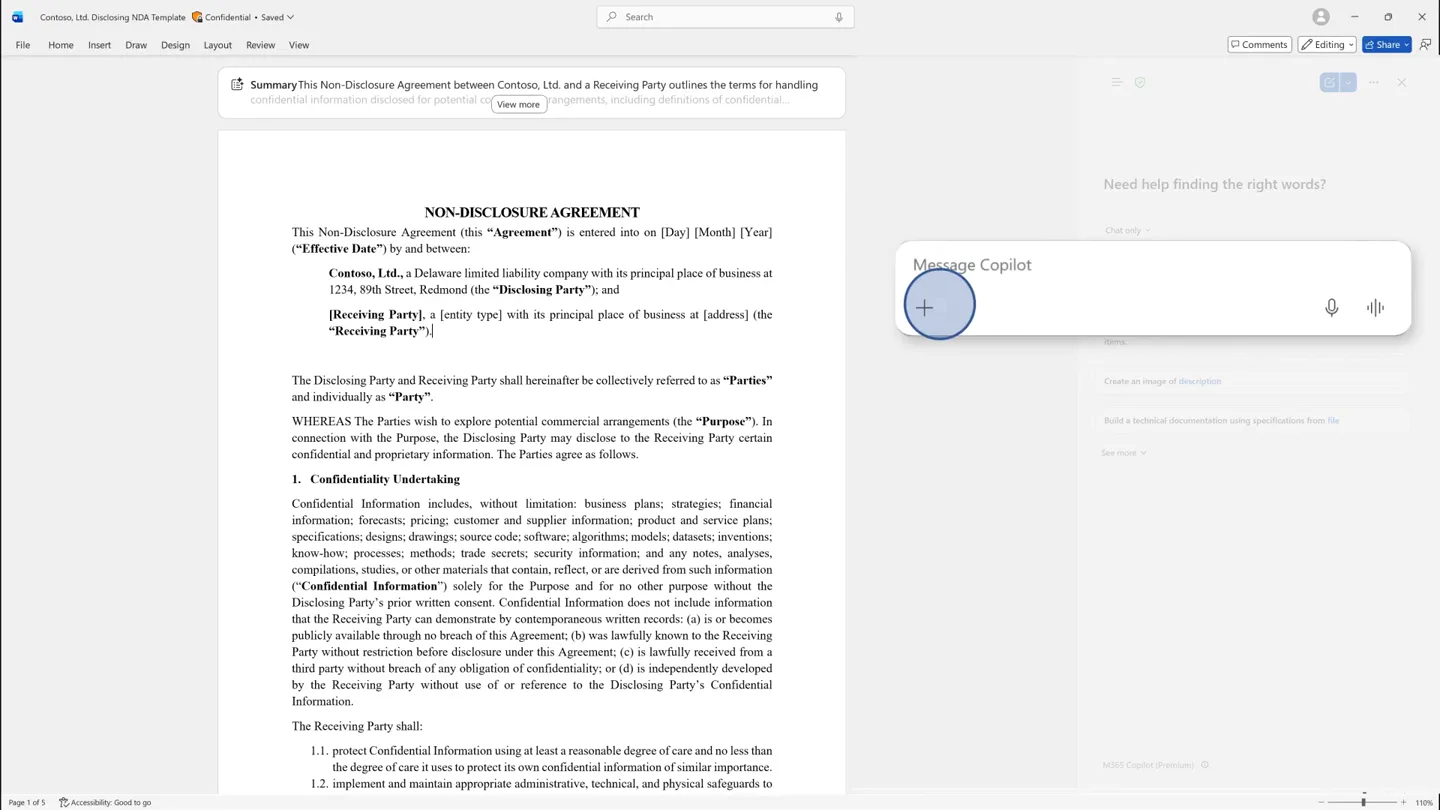
“Today we're introducing a new Legal Agent in Microsoft Word, built to support the precision and rigor legal work demands.”
- On screen
- Message Copilot Legal Agent (Frontier) Legal Agent Get verifiable answers, draft precise edits, and complete full legal document reviews. How can I help? Using a playbook? Review and redline against your standard positions. Not a substitute for advice from a qualified legal professional.
- Camera
- Static overhead view of a Microsoft Word document, with a sidebar UI appearing and expanding from the right.
- Motion
- UI element reveal with a subtle zoom-in on the interactive elements, followed by text pop-in.
Product Reveal
Intelligent Contract Review
“Every clause matters. Every redline tells a story. That's why this agent will help you review and redline contracts against your internal standards.”
- On screen
- Does the contract contain any restrictions on sharing information internally? Legal Agent (Frontier) Yes. The Receiving Party may only share Confidential Information internally with its and its affiliates' directors, officers, employees, professional advisers, contractors, and consultants ("Representatives") who (a) have a need to know for the Purpose, and (b) are bound by confidentiality obligations at least as protective as those in this Agreement. The Receiving Party is responsible for any breach by its Representatives. How can I help? Review with playbook My files - OneDrive Pick a file My files Home Shared Favorites Desktop Documents Meetings Microsoft Teams Chat files Receiving NDA Playbook - 2026.docx 42.1 KB 1 selected X Select Cancel Legal Agent (Frontier) Review with playbook General guidelines Definition of Confidential Information Exceptions to the definition of Confidential Information Definition of Purpose Permitted Disclosure Disclosure Required By Law Return & Destruction Terms Governing Law Jurisdiction Non-Contact Non-Solicit Indemnity Trade Secrets Equitable Relief Entire Agreement + Add topic Cancel Start document review Legal Agent (Frontier) Reviewing your document... Permitted Disclosure Disclosure Required By Law Governing Law Jurisdiction Non-Contact Non-Solicit Indemnity Trade Secrets Equitable Relief Entire Agreement Edit Non-Solicit Dismiss This edit overlaps with Non-Contact Show rules For a period of twelve (12) months, the Receiving Party shall not, directly or indirectly, solicit, entice, or induce (or attempt to solicit, entice, or induce) any senior employee, contractor, or consultant of the Disclosing Party (or its affiliates) with whom the Receiving Party had contact in connection with the Purpose to terminate or reduce their relationship with the Disclosing Party (or its affiliates), or any customer, prospective customer, supplier, or other business partner of the Disclosing Party (or its affiliates) with whom the Receiving Party had contact in connection with the Purpose to cease doing business with, or materially reduce business with, the Disclosing Party (or its affiliates). Comment The non-solicitation clause has a duration of twelve (12) months, whereas the skill requires a maximum of six (6) months. The clause also applies to all emp Scroll to clause Apply Acceptable Hide rules A non-solicit clause can be accepted, but only with the following carve-outs (a) limit to senior employees, (b) limit duration to 6 months. Edit applied Show
- Camera
- The camera remains static, focusing on the Word document and the expanding/contracting sidebar. UI elements animate in and out, highlighting specific text within the document.
- Motion
- Interactive UI animations, text highlighting, and content pop-ups. Smooth transitions between different states of the legal agent's workflow.
Feature Teaser
Collaborative Redlining
“It can also help you generate redlines and comments, making it easier to collaborate with your team.”
- On screen
- Make sure the indemnity doesn't apply to our Reps' breaches and is for direct losses only. Legal Agent (Frontier) Edit Language Dismiss The Receiving Party shall indemnify, defend, and hold harmless the Disclosing Party and its affiliates, officers, directors, employees, and agents from and against any and all losses, damages, liabilities, costs, and expenses (including reasonable legal fees) arising out of or relating to any breach of this Agreement by the Receiving Party or its Representatives. Comment The indemnity currently extends to breaches by Representatives, which exposes us to liability for third-party conduct outside our direct control. Limiting the indemnity to our Scroll to clause Apply Edit applied Show Beca Davies The indemnity currently extends to breaches by Representatives, which exposes us to liability for third-party conduct outside our direct control. Limiting the indemnity to our @mention or reply
- Camera
- Static view of the Word document and sidebar. Focus shifts to a new interactive comment box appearing over the document.
- Motion
- Comment box reveal with text input animation, simulating real-time interaction.
Call to Action
Microsoft 365 Copilot Integration
“(No spoken dialogue — The audio track features an ambient electronic score with a consistent, driving rhythm. Instrumentation includes pizzicato synths, a subtle sub-bass, and light percussion.)”
- On screen
- Microsoft 365 Copilot Microsoft
- Camera
- Full screen logo reveal, fading from the product name to the company logo.
- Motion
- Cross-fade transition between two full-screen logos, with a subtle scale animation.
Motion design primitives
Synthesizable in Remotion · key components of the ai-agent-ui-demo-template template.
SidebarReveal
A vertical sidebar UI element slides in from the right edge of the screen, revealing interactive content. It can expand or contract to show more or less detail.
+ Code construction recipe
Use `interpolate` for `translateX` property, animating from `100%` to `0%` of the viewport width. Apply a `spring` animation for a smooth, slightly bouncy feel. Content within the sidebar can use `opacity` and `scale` transitions for individual element reveals.
TextHighlightPop
Specific text within a document is highlighted with a colored background, often accompanied by a small, subtle pop-up or tooltip providing additional information.
+ Code construction recipe
Implement a `Sequence` of `interpolate` animations. First, animate the `backgroundColor` of the text. Simultaneously, animate the `opacity` and `scale` of a tooltip-like component from `0` to `1` with a slight `spring` effect for the 'pop'.
InteractiveCommentBox
A rectangular comment box appears over the document, allowing for text input and displaying user avatars. It can animate in from a specific point or slide up from the bottom.
+ Code construction recipe
Utilize `interpolate` for `translateY` and `opacity` to make the box slide up and fade in. The text input can be simulated with a `typewriter` effect on a `Text` component. User avatars can use a simple `scale` and `opacity` reveal.
Style DNA & aesthetic system
Visual aesthetic
Typography
Motion
Special effects
Pacing & rhythm
Conceptual story rhythm
- 1
The Problem & Solution Introduction
Purpose. Immediately establish the core problem legal professionals face and introduce the AI agent as the direct solution.
Execution. Start with a familiar document interface, then introduce the AI sidebar, showing it actively engaging with the document.
- 2
Guided Feature Demonstration
Purpose. Showcase the agent's key functionalities through a step-by-step, interactive walkthrough.
Execution. Animate UI elements, highlight text, and simulate user input to demonstrate contract review, playbook application, and redlining.
- 3
Collaborative Workflow Enhancement
Purpose. Illustrate how the agent improves team collaboration and efficiency.
Execution. Introduce the comment generation feature, showing how the agent facilitates communication and feedback within the document.
- 4
Brand Reinforcement & Integration
Purpose. Conclude by linking the new agent to the broader product ecosystem and brand.
Execution. Transition from the detailed UI to a clean, full-screen logo reveal of Microsoft 365 Copilot and then Microsoft.
Remix in Animatiq Studio
Master remix prompt · agent-ready
Sample remix
Objective
Launch an AI-powered financial analysis add-in for Google Sheets.How the recipe adapts
The SidebarReveal primitive would be adapted for a Google Sheets interface, sliding in from the right. The TextHighlightPop would highlight specific cells or ranges in the spreadsheet, showing AI-generated insights or warnings. The InteractiveCommentBox would be used to demonstrate collaborative feedback on financial data, with AI suggestions for improvements. The overall pacing would remain slow and deliberate, focusing on clear feature demonstration within the familiar Google Sheets environment, concluding with the add-in's logo and the Google brand.Remix blueprint · ai-agent-ui-demo-template
Scene durations (5 scenes, 89s)
Key Remotion components
Related AI Agents Product Launches
Explore all AI Agents launches →
To ensure that artificial general intelligence benefits all of humanity

Gopuff introduces Go, an AI shopping assistant built with SpaceXAI: say what you need and the order is placed.

Iliad (Troy) trailer made by Grok Imagine 1.5, which was just released