
Locus · Launch Video Breakdown: Hook, Pacing & Motion Design
Locus Pro is now a plugin on Vercel for the EVE agent. Tell EVE to add the skill, attach an email, and fund your account.
Scene-by-scene timeline & spoken transcript
The Hook
Locus Pro & EVE Agent Integration
“(No spoken dialogue — Dynamic orchestral synth melody builds, high-energy audio transition at 0:02, sub-bass drop/impact at 0:03.)”
- On screen
- LOCUS PRO EVE NOW ON SKILLS.SH INSTALL IN 5 MINUTES → [ PLUGIN v0.2.1 ]
- Camera
- Static, then rapid zoom-in and text reveal.
- Motion
- Kinetic typography with glitch effects, rapid text reveals, and a strong audio-visual sync on impacts.
Product Reveal
Seamless Installation via CLI
“(No spoken dialogue — Evolving synth pads and arpeggiated sequences maintain a driving rhythmic pulse.)”
- On screen
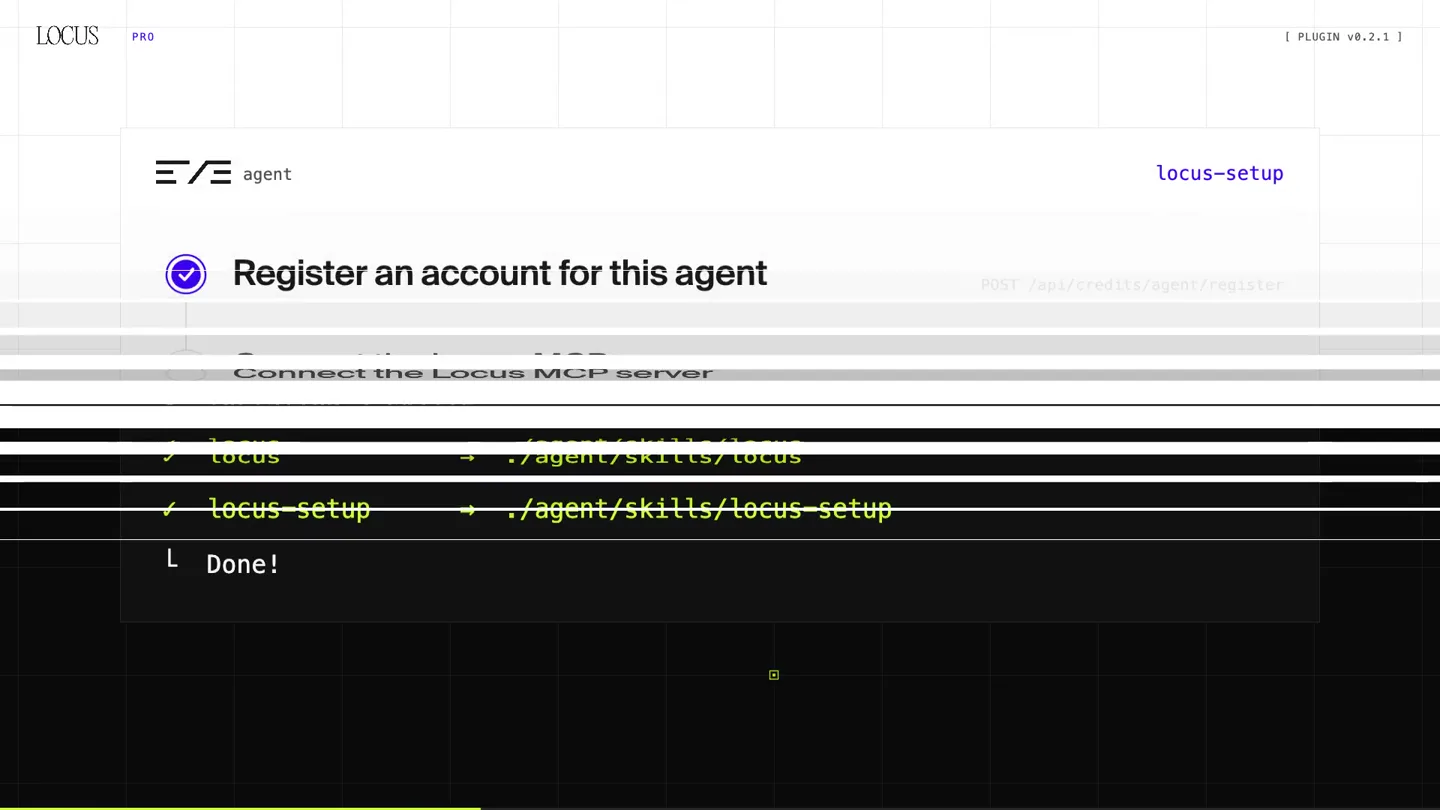
- LOCUS PRO $ npx skills add locus-technologies/locus-pro-plugin Found 2 skills Installed 2 skills locus → ./agent/skills/locus locus-setup → ./agent/skills/locus-setup Done! [ PLUGIN v0.2.1 ]
- Camera
- Static, focused on a terminal interface.
- Motion
- Typing animation, command line output reveal, and checkmark animations for successful installation.
Feature Teaser
Agent Setup & Funding Workflow
“(No spoken dialogue — Rhythmic pulse continues, leading to a significant riser and impact at 0:14.)”
- On screen
- EVE agent locus-setup Register an account for this agent Connect the Locus MCP server Enable the tools it needs Send the human a funding link POST /api/credits/agent/register OAuth api.paywithlocus.com/api/credits/mcp PUT /api/credits/agent/catalog POST /api/credits/agent/funding-sessions STRIPE CHECKOUT Locus Pro credits $10.00 10,000 credits Funded you pay in Stripe, the agent never sees a card onboardingState: ready LOCUS PRO [ PLUGIN v0.2.1 ]
- Camera
- Static, then a rapid horizontal wipe transition.
- Motion
- Checkmark progression animation, UI element reveals, and a rapid horizontal wipe to transition to the funding screen.
Call to Action
Connected Tools & Free Access
“(No spoken dialogue — Driving rhythmic pulse with evolving synth pads and arpeggiated sequences.)”
- On screen
- TOOLS search_apis describe_api execute estimate_cost get_balance list_apis get_call_result cancel_cost_approval web_research Connected locus connected 3,903 PAY-PER-USE APIS ONE BALANCE 3,906 Start free platform.paywithlocus.com @coledermo cole@paywithlocus.com LOCUS PRO [ PLUGIN v0.2.1 ] [ ASCII PORTRAIT / ORIGINAL #3 ]
- Camera
- Rapid horizontal wipe, then static, followed by a final horizontal wipe to the CTA.
- Motion
- Horizontal wipe transitions, list item reveals, counter animation for API count, and a final text reveal for the call to action.
Motion design primitives
Synthesizable in Remotion · key components of the developer-tech-launch-v1 template.
GlitchTextReveal
Text appears with a rapid, pixelated glitch effect, often accompanied by a quick scale or position shift, syncing with an audio impact.
+ Code construction recipe
Utilize Remotion's `interpolate` for `opacity`, `x` translation, and a `filter: blur()` or `filter: saturate()` effect. Combine with `spring` for a snappy final position. Implement a `Shader` for pixelation or scanline effects during the glitch.
TerminalTypewriter
Command line text is typed out character by character, followed by a blinking cursor and subsequent output lines appearing with a slight delay.
+ Code construction recipe
Use `Sequence` and `AbsoluteFill` for text layers. Animate `textLength` or `clipPath` for the typing effect. A `loop` animation for the cursor's `opacity` creates the blink. Stagger `delay` for subsequent output lines.
HorizontalWipeTransition
A scene transitions to the next by a rapid horizontal wipe, often with a subtle distortion or pixelation effect at the wipe edge.
+ Code construction recipe
Employ a `LinearGradient` or `maskImage` animated across the screen for the wipe. For distortion, apply a `filter: url(#displacementFilter)` using an SVG `feDisplacementMap` or a custom `Shader` for pixel-level manipulation.
Style DNA & aesthetic system
Visual aesthetic
Typography
Motion
Special effects
Pacing & rhythm
Conceptual story rhythm
- 1
The High-Impact Intro
Purpose. Immediately grab attention and establish the core product and its key integration.
Execution. Rapid kinetic typography with glitch effects, strong audio sync, and a bold product name reveal.
- 2
The Technical Walkthrough
Purpose. Demonstrate the ease and efficiency of product installation and setup.
Execution. Clean terminal typing animations, step-by-step UI progression with checkmarks, and clear visual feedback.
- 3
The Feature Showcase
Purpose. Highlight the breadth of capabilities and the seamless user experience.
Execution. Animated lists of tools, dynamic counter for API integrations, and clear 'Connected' status indicators.
- 4
The Direct Call to Action
Purpose. Guide the viewer to the next step and reinforce the product's accessibility.
Execution. Prominent display of the 'Start free' message, URL, and contact information, with a final brand logo reveal.
Remix in Animatiq Studio
Master remix prompt · agent-ready
Sample remix
Objective
Launch a new AI-powered code refactoring tool called 'SyntaxFlow'.How the recipe adapts
The 'SyntaxFlow' logo will appear with the GlitchTextReveal primitive, using a vibrant blue accent instead of neon green. The installation process will be shown via the TerminalTypewriter primitive, demonstrating a 'pip install syntaxflow' command. Feature showcases will use animated code snippets transforming with horizontal wipes, highlighting refactoring capabilities and displaying a 'Lines Optimized' counter. The call to action will feature 'Try SyntaxFlow Free' with a link to the documentation, maintaining the dark grid background.Remix blueprint · developer-tech-launch-v1
Scene durations (4 scenes, 24s)
Key Remotion components
Related Developer Tools Product Launches
Explore all Developer Tools launches →
Agentic CLI for coding, building apps, and automating workflows.

New in Claude Code: your sessions can now message each other. Tell Claude to send a summary (not your history or files), and the other session picks it up mid-task.

Meet Qwen3.8-Max: A New Bar for Coding and Cowork. https://t.co/mJaA8vr6xT