
Abdul Șhakoor · Launch Video Breakdown: Hook, Pacing & Motion Design
Decart just dropped Lucy 2.5 and it completely changes what live video can do. This is their Live AI model that edits video as it streams, no post production needed. > add, replace, or remove anyth…
Scene-by-scene timeline & spoken transcript
The Hook
AI-Powered Face Manipulation Teaser
“(No spoken dialogue — silent video with ambient office sounds implied by visual context.)”
- On screen
- + decart
- Camera
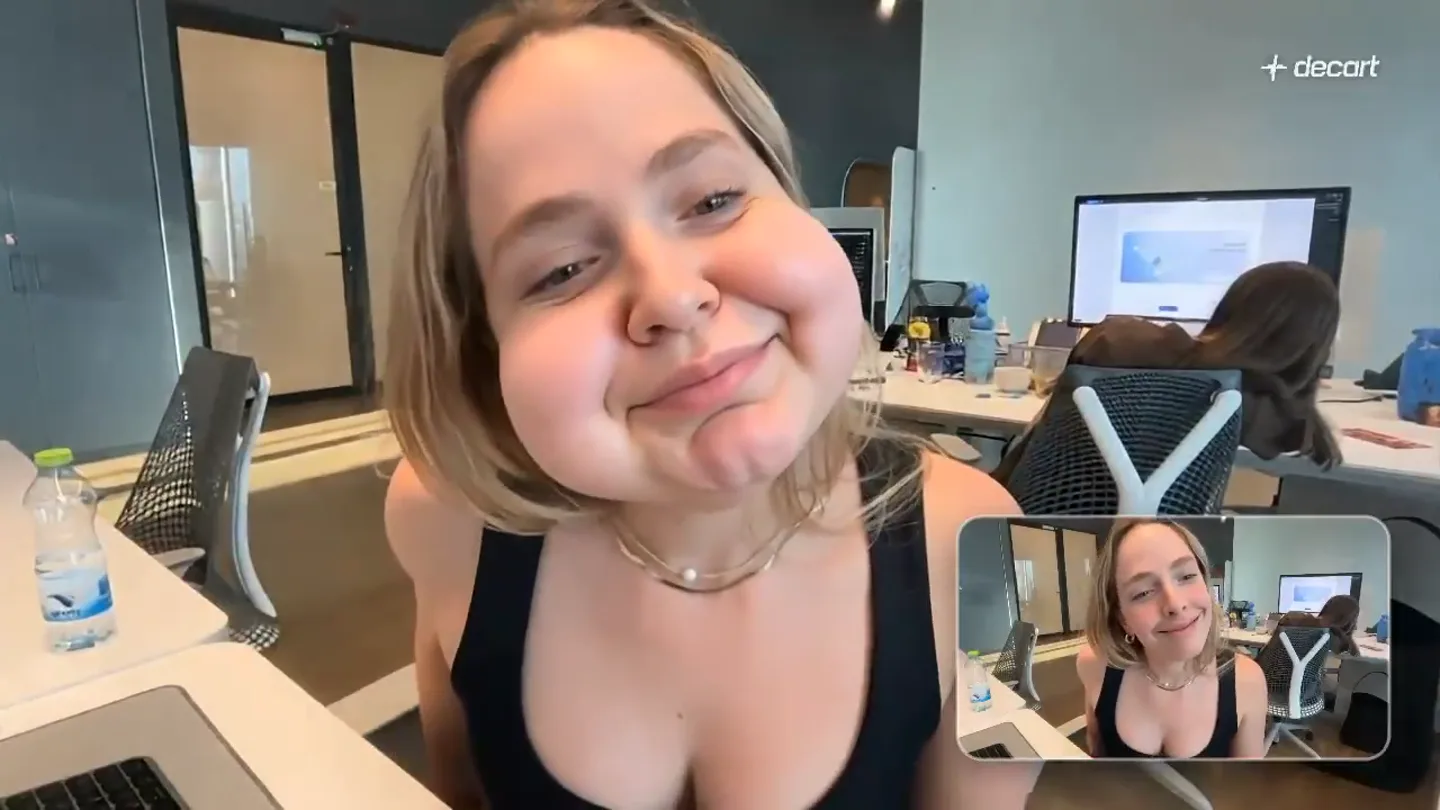
- Static wide shot of a woman at a desk, with a smaller picture-in-picture showing the original, unedited feed.
- Motion
- Real-time AI facial distortion applied to the main video feed, contrasting with a clean reference feed.
Product Reveal
Dynamic Facial Feature Exaggeration
“(No spoken dialogue — silent video with ambient office sounds implied by visual context.)”
- On screen
- + decart
- Camera
- Main camera remains static, focusing on the woman's face as AI effects dynamically alter her features.
- Motion
- Live AI model applying exaggerated facial deformations (e.g., puffed cheeks, stretched mouth) in real-time.
Feature Teaser
Interactive AI Facial Control
“(No spoken dialogue — silent video with ambient office sounds implied by visual context.)”
- On screen
- + decart
- Camera
- Static wide shot, with a male colleague appearing in the background, observing the AI effects.
- Motion
- The AI model responds to the woman's gestures (e.g., touching her face), creating interactive and fluid distortions.
Call to Action
Seamless Live AI Editing Demonstration
“(No spoken dialogue — silent video with ambient office sounds implied by visual context.)”
- On screen
- + decart
- Camera
- The main camera remains static, capturing the woman's continued interaction with the live AI effects.
- Motion
- Continuous, smooth application of AI-driven facial manipulation, showcasing the model's real-time capabilities without lag.
Motion design primitives
Synthesizable in Remotion · key components of the live-ai-demo-showcase template.
LiveFaceDistortion
A subject's face is dynamically distorted and exaggerated in real-time, responding to subtle movements or gestures. Features like cheeks or lips inflate and deflate fluidly.
+ Code construction recipe
Utilize Remotion's `<Video>` component with a custom WebGL shader or Canvas filter. Implement a face-tracking library (e.g., MediaPipe) to get facial landmarks, then use `interpolate()` to map landmark changes to shader uniform values for distortion effects (e.g., 'bulge' or 'pinch' filters).
PictureInPictureReference
A smaller, unedited video feed is displayed concurrently with the main, processed video, providing a clear comparison of the applied effects.
+ Code construction recipe
Render two `<Video>` components. Position the main video full-screen and the reference video in a smaller, rounded-rectangle container using CSS `position: absolute`, `border-radius`, and `box-shadow`. Ensure both videos are synchronized using `useCurrentFrame()` and `continueRender()`.
RealtimeTextOverlay
A subtle, static text overlay (e.g., company name) is present in the corner of the screen throughout the video.
+ Code construction recipe
Use a `<AbsoluteFill>` with a `<Text>` component. Apply `position: absolute`, `top`, `right` CSS properties for placement. Use a simple, clean font and a semi-transparent background if needed for readability.
Style DNA & aesthetic system
Visual aesthetic
Typography
Motion
Special effects
Pacing & rhythm
Conceptual story rhythm
- 1
The Uncanny Introduction
Purpose. Immediately grab attention by showcasing the AI's core capability in a surprising and slightly humorous way.
Execution. A woman's face is instantly and dramatically distorted, with a clear reference video showing the original.
- 2
Interactive Exploration
Purpose. Demonstrate the responsiveness and control of the AI model.
Execution. The woman interacts with her face, and the AI effects respond in real-time, showing dynamic changes.
- 3
Social Validation & Real-World Context
Purpose. Show the AI in a natural, collaborative setting, implying ease of use and broad applicability.
Execution. A colleague appears, reacting to the AI effects, grounding the technology in a relatable office environment.
- 4
Seamless Performance Showcase
Purpose. Reinforce the AI's stability and advanced capabilities for live applications.
Execution. Continued, fluid AI manipulation without glitches, emphasizing the 'no post-production needed' aspect.
Remix in Animatiq Studio
Master remix prompt · agent-ready
Sample remix
Objective
Launch a new live AI voice modulation software called 'VocalForge'.How the recipe adapts
The 'LiveFaceDistortion' primitive adapts to 'LiveVoiceModulation', where the audio stream is processed by AI in real-time, changing the speaker's voice. The 'PictureInPictureReference' now shows the original, unmodulated audio feed. The 'RealtimeTextOverlay' remains for the 'VocalForge' brand. The visual style maintains the static camera and raw demo feel, but the focus shifts from facial distortion to auditory transformation, with the presenter's mouth movements subtly indicating the live processing.Remix blueprint · live-ai-demo-showcase
Scene durations (4 scenes, 22s)
Key Remotion components
Related AI Agents Product Launches
Explore all AI Agents launches →
To ensure that artificial general intelligence benefits all of humanity

Gopuff introduces Go, an AI shopping assistant built with SpaceXAI: say what you need and the order is placed.

Iliad (Troy) trailer made by Grok Imagine 1.5, which was just released