
Einar · Launch Video Breakdown: Hook, Pacing & Motion Design
today i’m launching my first open source project and my first product hunt launch it’s called Lumowrite, and it's a place to write freely, explore ideas, and then reflect with AI. i built it because i wanted this as a web app with dark mode https://t.co/RQ93caNmjV
Scene-by-scene timeline & spoken transcript
The Hook
Introducing Lumowrite: Freeform Writing & AI Reflection
“(No spoken dialogue — ambient visual with text appearing)”
- On screen
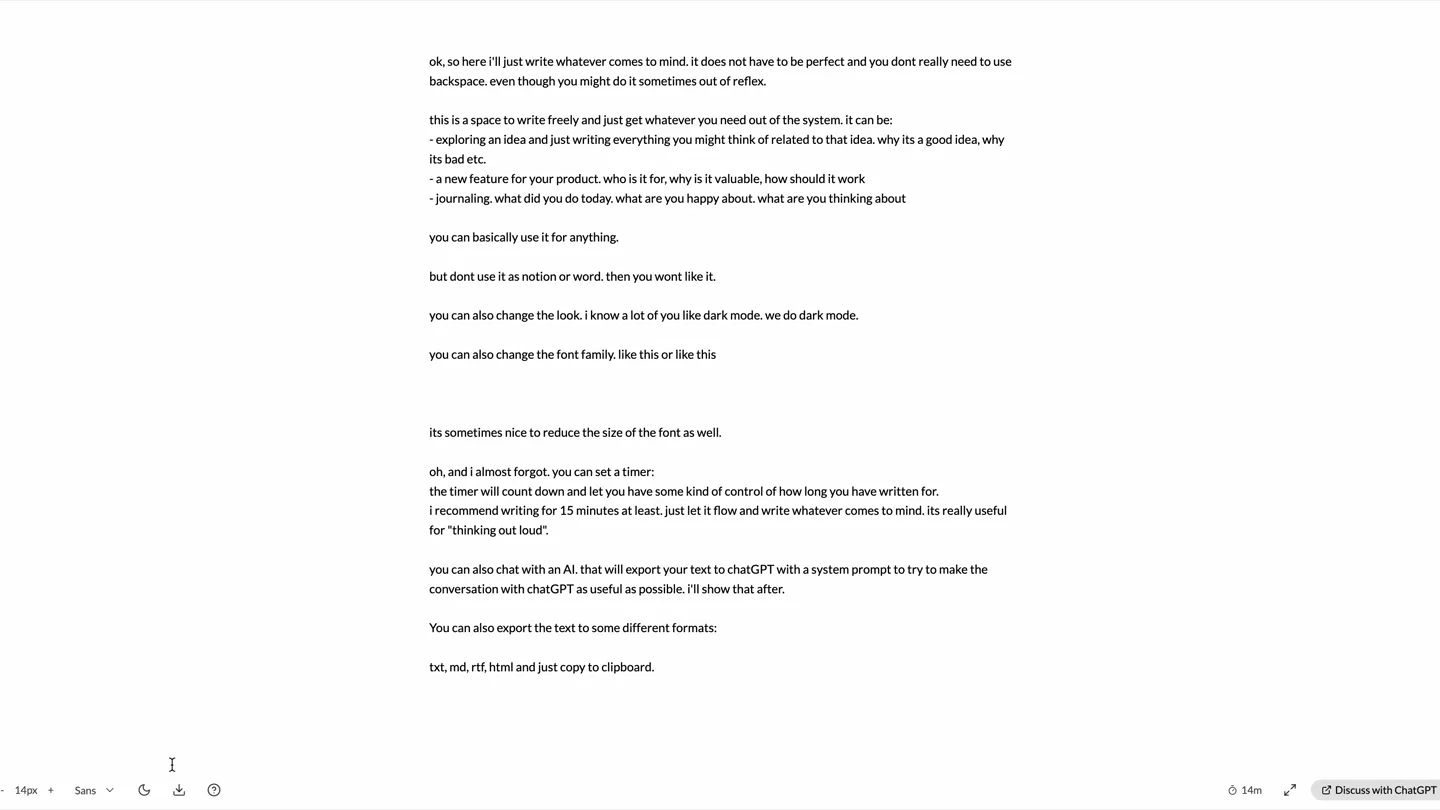
- ok, so here i'll just write whatever comes to mind. it does not have to be perfect and you dont really need to use backspace. even though you might do it sometimes out of reflex. this is a space to write freely and just get whatever you need out of the system. it can be: - exploring an idea and just writing everything you might think of related to that idea. why its a good idea, why its bad etc. - a new feature for your product. who is it for, why is it valuable, how should it work - journaling. what did you do today. what are you happy about. what are you thinking about you can basically use it for anything. but dont use it as notion or word. then you wont like it. you can also change the look. i know a lot of you like dark mode. we do dark mode. you can also change the font family. like this or like this its sometimes nice to reduce the size of the font as well. oh, and i almost forgot. you can set a timer: the timer will count down and let you have some kind of control of how long you have written for. i recommend writing for 15 minutes at least. just let it flow and write whatever comes to mind. its really useful for "thinking out loud". you can also chat with an AI. that will export your text to chatGPT with a system prompt to try to make the conversation with chatGPT as useful as possible. i'll show that after. You can also export the text to some different formats: txt, md, rtf, html and just copy to clipboard.
- Camera
- Static, wide shot of a text editor interface.
- Motion
- Text typing animation, simulating real-time input.
Feature Teaser
Dark Mode & Font Customization
“(No spoken dialogue — UI interaction sounds implied)”
- On screen
- ok, so here i'll just write whatever comes to mind. it does not have to be perfect and you dont really need to use backspace. even though you might do it sometimes out of reflex. this is a space to write freely and just get whatever you need out of the system. it can be: - exploring an idea and just writing everything you might think of related to that idea. why its a good idea, why its bad etc. - a new feature for your product. who is it for, why is it valuable, how should it work - journaling. what did you do today. what are you happy about. what are you thinking about you can basically use it for anything. but dont use it as notion or word. then you wont like it. you can also change the look. i know a lot of you like dark mode. we do dark mode. you can also change the font family. like this or like this its sometimes nice to reduce the size of the font as well. oh, and i almost forgot. you can set a timer: the timer will count down and let you have some kind of control of how long you have written for. i recommend writing for 15 minutes at least. just let it flow and write whatever comes to mind. its really useful for "thinking out loud". you can also chat with an AI. that will export your text to chatGPT with a system prompt to try to make the conversation with chatGPT as useful as possible. i'll show that after. You can also export the text to some different formats: txt, md, rtf, html and just copy to clipboard.
- Camera
- Static, wide shot. Focus on UI elements at the bottom.
- Motion
- UI element interaction, dark mode toggle, font family dropdown.
Feature Teaser
Font Size & Style Adjustments
“(No spoken dialogue — UI interaction sounds implied)”
- On screen
- ok, so here i'll just write whatever comes to mind. it does not have to be perfect and you dont really need to use backspace. even though you might do it sometimes out of reflex. this is a space to write freely and just get whatever you need out of the system. it can be: - exploring an idea and just writing everything you might think of related to that idea. why its a good idea, why its bad etc. - a new feature for your product. who is it for, why is it valuable, how should it work - journaling. what did you do today. what are you happy about. what are you thinking about you can basically use it for anything. but dont use it as notion or word. then you wont like it. you can also change the look. i know a lot of you like dark mode. we do dark mode. you can also change the font family. like this or like this its sometimes nice to reduce the size of the font as well. oh, and i almost forgot. you can set a timer: the timer will count down and let you have some kind of control of how long you have written for. i recommend writing for 15 minutes at least. just let it flow and write whatever comes to mind. its really useful for "thinking out loud". you can also chat with an AI. that will export your text to chatGPT with a system prompt to try to make the conversation with chatGPT as useful as possible. i'll show that after. You can also export the text to some different formats: txt, md, rtf, html and just copy to clipboard.
- Camera
- Static, wide shot. Focus on UI elements at the bottom.
- Motion
- Font size adjustment, font style change (Mono, Serif, Sans).
Product Reveal
AI Reflection & Export Capabilities
“(No spoken dialogue — UI interaction sounds implied)”
- On screen
- ok, so here i'll just write whatever comes to mind. it does not have to be perfect and you dont really need to use backspace. even though you might do it sometimes out of reflex. this is a space to write freely and just get whatever you need out of the system. it can be: - exploring an idea and just writing everything you might think of related to that idea. why its a good idea, why its bad etc. - a new feature for your product. who is it for, why is it valuable, how should it work - journaling. what did you do today. what are you happy about. what are you thinking about you can basically use it for anything. but dont use it as notion or word. then you wont like it. you can also change the look. i know a lot of you like dark mode. we do dark mode. you can also change the font family. like this or like this its sometimes nice to reduce the size of the font as well. oh, and i almost forgot. you can set a timer: the timer will count down and let you have some kind of control of how long you have written for. i recommend writing for 15 minutes at least. just let it flow and write whatever comes to mind. its really useful for "thinking out loud". you can also chat with an AI. that will export your text to chatGPT with a system prompt to try to make the conversation with chatGPT as useful as possible. i'll show that after. You can also export the text to some different formats: txt, md, rtf, html and just copy to clipboard. very nice, right?
- Camera
- Static, wide shot. Focus on UI elements at the bottom and text content.
- Motion
- UI element interaction, text content changes, cursor animation.
Motion design primitives
Synthesizable in Remotion · key components of the lumowrite-ui-showcase template.
DynamicTypewriter
Text appears character by character, simulating real-time typing, with a blinking cursor at the end of the input.
+ Code construction recipe
Use `interpolate` to control the `text-content` property, revealing characters sequentially. A `spring` animation can be applied to the cursor's `opacity` for a natural blink effect.
ThemeToggleFade
The entire application interface smoothly transitions between a light and dark color scheme.
+ Code construction recipe
Animate `backgroundColor` and `color` properties of root elements using `interpolate` with an `ease-in-out` curve for a smooth crossfade. Ensure all relevant UI components inherit or react to the theme change.
DropdownMenuReveal
A dropdown menu expands from a UI button, revealing a list of options with a subtle slide-in effect.
+ Code construction recipe
Utilize `interpolate` on `height` and `opacity` for the dropdown container. Individual menu items can have a staggered `translateY` animation for a more dynamic reveal.
Style DNA & aesthetic system
Visual aesthetic
Typography
Motion
Special effects
Pacing & rhythm
Conceptual story rhythm
- 1
Introduction to Freeform Writing
Purpose. Establish the core value proposition of Lumowrite as a space for uninhibited thought and idea exploration.
Execution. Typing animation of the introductory text, setting the stage for the product's purpose.
- 2
Customization & Comfort
Purpose. Highlight user-centric features like dark mode and font options that enhance the writing experience.
Execution. Interactive UI demonstrations of toggling dark mode, changing font families (Sans, Serif, Mono), and adjusting font sizes.
- 3
Productivity & Reflection Tools
Purpose. Showcase advanced features like timers and AI integration for deeper engagement and utility.
Execution. Visual cues for timer functionality and the mention of AI chat, followed by text export options.
- 4
Seamless Export & Conclusion
Purpose. Emphasize the practical utility of exporting content in various formats and conclude with a positive affirmation.
Execution. Demonstration of text export options and a final, positive on-screen text message.
Remix in Animatiq Studio
Master remix prompt · agent-ready
Sample remix
Objective
Launch a new code editor called 'SyntaxFlow' that emphasizes customizable themes, intelligent auto-completion, and seamless multi-language support.How the recipe adapts
The DynamicTypewriter primitive would showcase code being written with intelligent auto-completion suggestions appearing and being accepted. ThemeToggleFade would demonstrate switching between light and dark coding themes. DropdownMenuReveal would highlight language selection or plugin management. The overall video would maintain the instructional, silent demonstration style, focusing on crisp UI interactions and clear on-screen text to explain features like 'Smart Auto-Complete' and 'Multi-Language Support'.Remix blueprint · lumowrite-ui-showcase
Scene durations (4 scenes, 27s)
Key Remotion components
Related Productivity Product Launches
Explore all Productivity launches →
Anthropic introduces Cowork, which brings the Claude Code way of delegating tasks to everyday, non-technical work.

Don't type, just speak. Flawless voice-to-text across every app at 240 WPM.

One workspace for knowledge scattered across Slack, email, Docs, and Notion. Connect your tools and build apps and agents that stay live with your data.