
Meta · Launch Video Breakdown: Hook, Pacing & Motion Design
The Meta AI macOS app is live, with high-accuracy dictation anywhere on the computer (hold fn to speak) plus screen sharing and context.
Scene-by-scene timeline & spoken transcript
The Hook
AI-Powered Performance Analysis
“(No spoken dialogue — Typing sound effects and subtle UI clicks.)”
- On screen
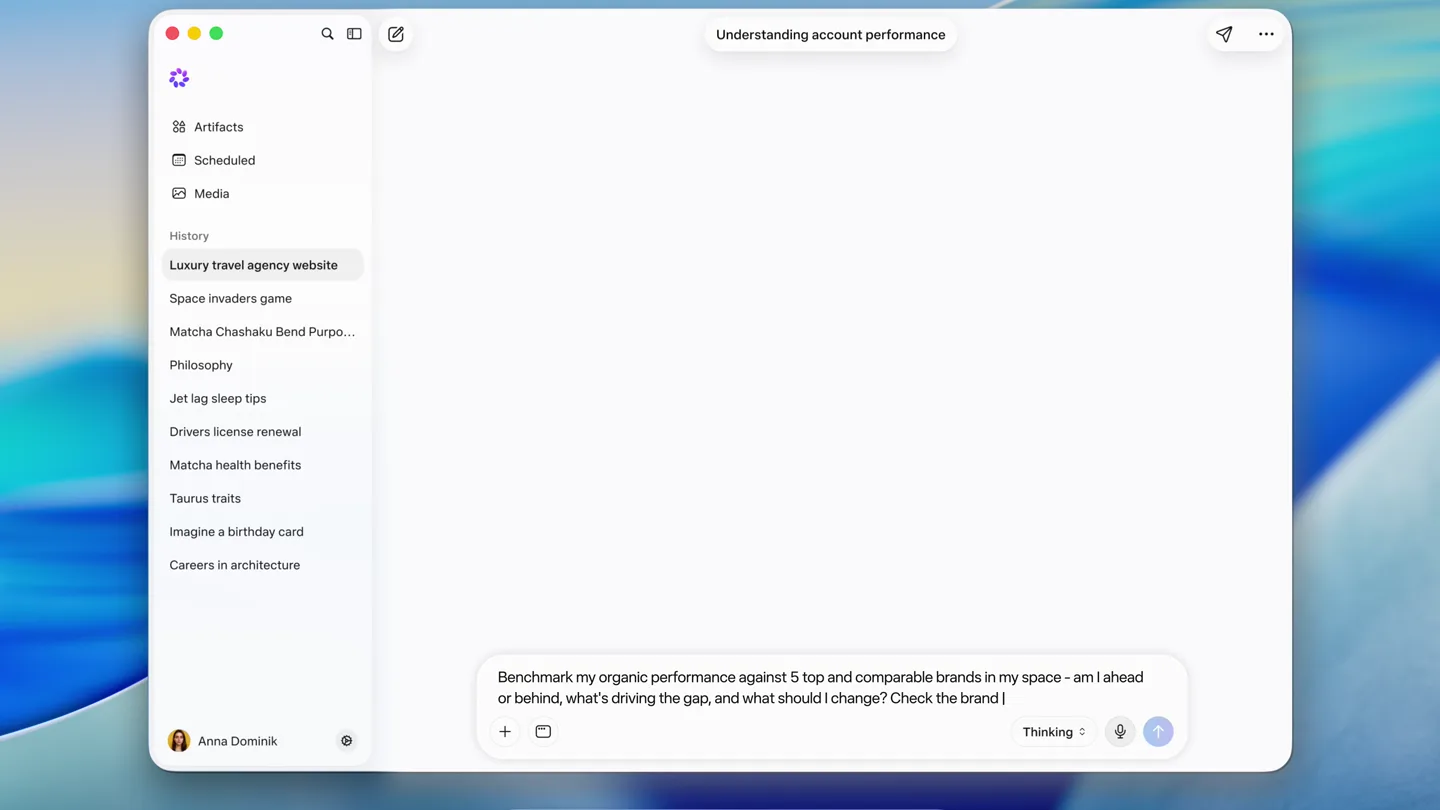
- Meta AI Edit View Window Help Artifacts Scheduled Media History Luxury travel agency website Space invaders game Matcha Chashaku Bend Purpo... Philosophy Jet lag sleep tips Drivers license renewal Matcha health benefits Taurus traits Imagine a birthday card Careers in architecture Anna Dominik Understanding account performance Benchmark my organic perfol Thinking Mon Jun 10 9:41 AM
- Camera
- Static, full-screen capture of a macOS desktop with the Meta AI app window centered.
- Motion
- Real-time typing animation within a text input field, simulating user interaction.
Product Reveal
Detailed Benchmark Generation
“(No spoken dialogue — Subtle UI element transitions and content loading sounds.)”
- On screen
- Meta AI Edit View Window Help Artifacts Scheduled Media History Luxury travel agency website Space invaders game Matcha Chashaku Bend Purpo... Philosophy Jet lag sleep tips Drivers license renewal Matcha health benefits Taurus traits Imagine a birthday card Careers in architecture Anna Dominik Understanding account performance Benchmark my organic performance against 5 top and comparable brands in my space - am I ahead or behind, what's driving the gap... Show thinking You're benchmarked as @fieldstonekitchen — 512K followers, bio reading "Heirloom cookware, made in Ohio. Cast iron, enamel, and the recipes to go with them." — so your space is direct-to-consumer cookware with a recipe and technique audience. I pulled comparable accounts carrying the same terms in their own bios — cookware, cast iron, enamel, kitchen: Proposed 5-brand benchmark set for Fieldstone Kitchen Ovenbird Cookware @ovenbirdcookware - 780K - Largest in your space - broadest catalo... Salt Cellar Co @saltcellarco - 430K - Scale peer - overlapping audience, similar pric... Ask Meta AI... Thinking Mon Jun 10 9:41 AM
- Camera
- Static, full-screen capture. Content within the app window scrolls and expands.
- Motion
- Smooth vertical scrolling of content, revealing AI-generated analysis and benchmark suggestions. Cards animate into view.
Feature Teaser
User Confirmation & AI Execution
“(No spoken dialogue — Typing sound effects and a subtle confirmation chime.)”
- On screen
- Meta AI Edit View Window Help Artifacts Scheduled Media History Luxury travel agency website Space invaders game Matcha Chashaku Bend Purpo... Philosophy Jet lag sleep tips Drivers license renewal Matcha health benefits Taurus traits Imagine a birthday card Careers in architecture Anna Dominik Understanding account performance Confirm and I'll run it. Reply "yes, use those 5", or tell me which to swap and for what — @millhousegoods, @stovetopstudio and @claypotcollective all qualified but didn't make the cut. Or give me your own five handles. I'll pull the last 28 days across Instagram, Facebook and Threads and show you engagement, posting cadence, formats, top posts and where the gaps are. yes, use those 5. Ask Meta AI... Thinking Mon Jun 10 9:41 AM
- Camera
- Static, full-screen capture. User input field is active.
- Motion
- Typing animation in the input field, followed by a quick content update indicating user confirmation.
Call to Action
Actionable Insights & Recommendations
“(No spoken dialogue — Content loading sounds and subtle UI animations.)”
- On screen
- Meta AI Edit View Window Help Artifacts Scheduled Media History Luxury travel agency website Space invaders game Matcha Chashaku Bend Purpo... Philosophy Jet lag sleep tips Drivers license renewal Matcha health benefits Taurus traits Imagine a birthday card Careers in architecture Anna Dominik Understanding account performance Yes, use those 5. Show thinking Instagram, Facebook, Threads - last 28 days You're ahead of every account in this set except one — and the one ahead of you is smaller than you. @themakerskitchen has a base a little over half your size and added more followers this month than anyone here, including the 780K account. What they're doing is a format nobody else in the set publishes. Follower growth, last 28 days: Followers 512,000 +21,700 vs prior 28d Median Engagement 7,850 across 23 posts Posts Published 23 vs 58 for @ovenbird Top Post 22,500 19.4K likes 3.1K comments How you stack up vs the 5 confirmed: Brand @themakerskitchen @fieldstonekitchen @ovenbirdcookware @saltcellarco @hearthandtinware @copperandclayco Followers 295,000 512,000 780,000 430,000 168,000 140,000 Gain 28d +34,200 +21,700 +18,400 +6,900 +5,100 +3,400 Median Eng. Finding 1 - you outperform the largest account in your space on every post Your median post drew 7,850 likes and comments across 23 posts. @ovenbirdcookware drew 5,120 across 58 posts — a bigger audience, more output, less response per post. Against everyone except @themakerskitchen, you are the strongest account in this set on a per- post basis. That is the position you're defending, and it is worth being explicit that most brands at your scale don't have it. Finding 2 - one account is growing on a format none of you make @themakerskitchen published 42 posts in the window, 28 of them over three minutes — single- take technique videos teaching a method, with product incidental to the lesson. Across the other five accounts, including yours, the longest post published in the window was 74 seconds. They added 34,200 followers on a 295K base. The next-closest added 21,700 on a base nearly twice the size. Finding 3 - you already make this content, in the wrong container Your highest-engagement post this window is the cast-iron seasoning carousel at 19,400 likes and 3,100 comments, the most comments any @fieldstonekitchen post drew in the window. @themakerskitchen's highest is "Restoring a rusted pan", a 4:12 single take at 61,300 likes and 8,900 comments. Same subject. Same audience question. One is eight slides someone swipes through; the other is four minutes someone watches to the end and then asks a question underneath. What to change: Turn the technique carousels into long-form video. Cast-iron seasoning is already your most- commented post. The instruction is identical; only the container changes, and the container is what the set's fastest-growing account is winning on. Publish fewer, longer. You're at 23 posts against @ovenbirdcookware's 58, and you're ahead of them on every post. Volume is not your constraint; depth is your opening. Keep the recipes short. Your recipe posts sit mid-pack on engagement and don't need the same treatment. The long-form case is specific to technique, where the audience has a problem to solve. What to change: Compare @fieldstonekitchen (Instagram) with @themakerskitchen (Instagram) on posting times and days Show me @themakerskitchen (Instagram) posts over three minutes from the last 28 days ranked by engagement Turn what @themakerskitchen is doing into a test for my brand Ask Meta AI... Thinking Mon Jun 10 9:41 AM
- Camera
- Static, full-screen capture. Content within the app window scrolls to reveal extensive AI-generated analysis and recommendations.
- Motion
- Rapid, smooth vertical scrolling to reveal a comprehensive report, emphasizing the depth of AI analysis. Text appears to 'type' or 'generate' in sections.
Motion design primitives
Synthesizable in Remotion · key components of the ai-mac-app-report-reveal template.
TypingTextReveal
Text appears character by character in an input field or as generated content, mimicking real-time typing or AI output. This creates a sense of live interaction and content generation.
+ Code construction recipe
Use `interpolate` with `spring` or `ease-in-out` for character opacity and position. Each character's appearance is staggered based on its index in the string. For input fields, combine with a blinking cursor animation.
ContentCardSlideIn
Information cards or sections smoothly slide into view from the bottom or side, often with a slight bounce, indicating new content loading or being presented.
+ Code construction recipe
Implement with `spring` animation for `translateY` or `translateX` and `opacity`. Cards can be staggered to appear sequentially, using `delay` based on their order in the list.
DynamicVerticalScroll
The content within a scrollable area moves smoothly and rapidly upwards, revealing new information as if a user is quickly reviewing a long document or report.
+ Code construction recipe
Animate the `scrollTop` property of a scrollable container using `ease-in-out` or `linear` interpolation for a controlled, fast scroll. Can be combined with `TypingTextReveal` for content that appears as it scrolls into view.
Style DNA & aesthetic system
Visual aesthetic
Typography
Motion
Special effects
Pacing & rhythm
Conceptual story rhythm
- 1
User Input & Query
Purpose. Establish the user's intent and the AI's ability to understand complex requests.
Execution. Typing animation in the input field, showing a user formulating a detailed query.
- 2
AI Processing & Initial Output
Purpose. Demonstrate the AI's rapid comprehension and generation of relevant data.
Execution. Quick reveal of benchmark suggestions and initial contextual analysis, with content cards sliding in.
- 3
Refinement & Confirmation
Purpose. Highlight the interactive and iterative nature of the AI, allowing user guidance.
Execution. User typing a confirmation, followed by a swift update indicating the AI is proceeding with the refined task.
- 4
Comprehensive Report & Insights
Purpose. Showcase the depth and actionable nature of the AI's final output.
Execution. Fast vertical scrolling through a detailed report, revealing multiple findings and strategic recommendations.
Remix in Animatiq Studio
Master remix prompt · agent-ready
Sample remix
Objective
A new financial analytics platform that uses AI to generate investment reports.How the recipe adapts
The TypingTextReveal primitive would show a user inputting a query like 'Analyze Q3 performance for tech stocks with market cap > $1B'. ContentCardSlideIn would present initial data points like 'Top 5 Performers' and 'Market Trends'. DynamicVerticalScroll would then rapidly display a comprehensive investment report with charts and detailed recommendations, all within a clean, macOS-like application interface.Remix blueprint · ai-mac-app-report-reveal
Scene durations (4 scenes, 24.8s)
Key Remotion components
Related AI Agents Product Launches
Explore all AI Agents launches →
To ensure that artificial general intelligence benefits all of humanity

Gopuff introduces Go, an AI shopping assistant built with SpaceXAI: say what you need and the order is placed.

Iliad (Troy) trailer made by Grok Imagine 1.5, which was just released