
MiniMax · Launch Video Breakdown: Hook, Pacing & Motion Design
MiniMax Agent ships H3-based plugins for dynamic images and white-model rendering.
Scene-by-scene timeline & spoken transcript
The Hook
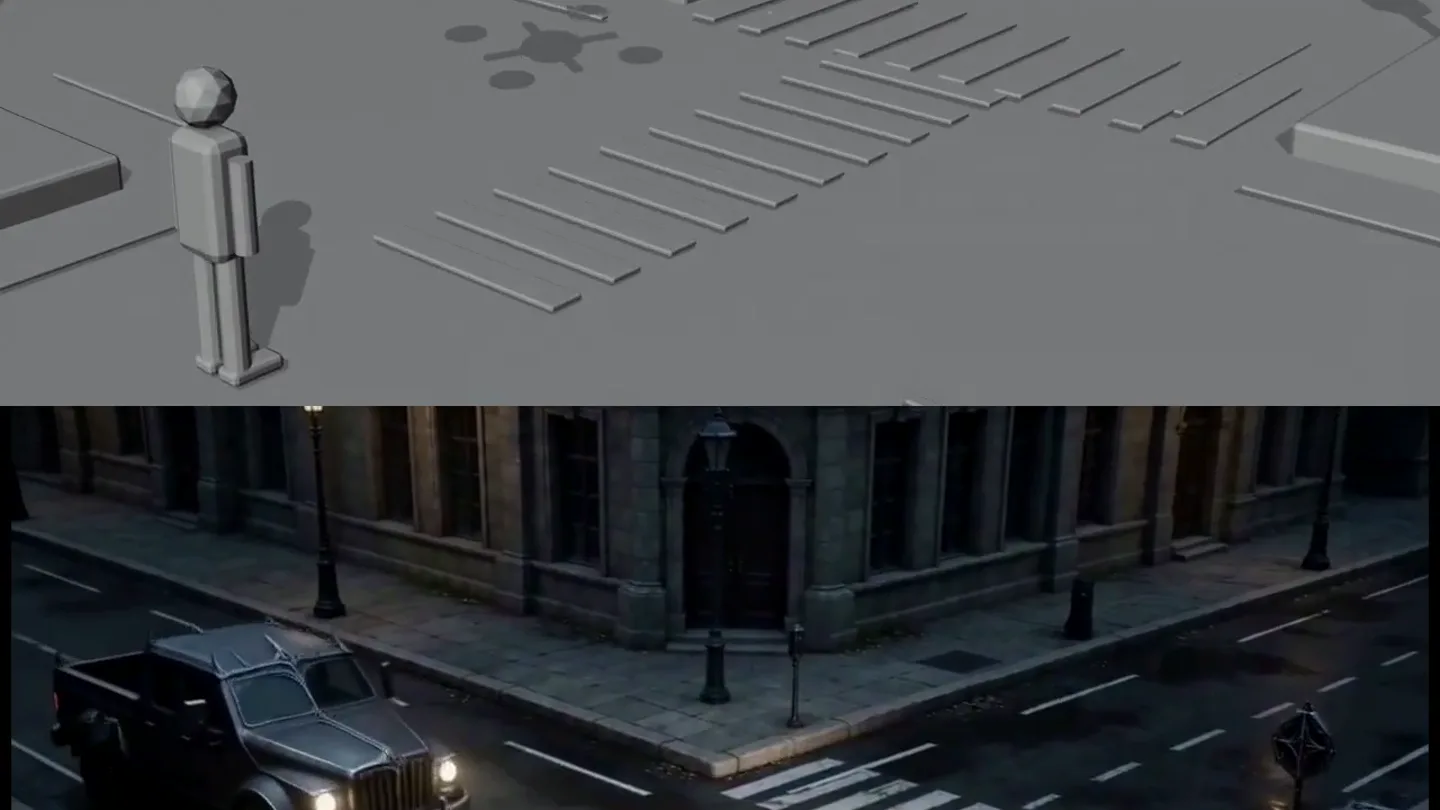
Wireframe to Rendered Cityscape Reveal
“(No spoken dialogue — A sustained, low-frequency drone builds with a prominent 'riser' effect, culminating in a subtle 'sub-bass drop' around 00:03.)”
- On screen
- (No on-screen text)
- Camera
- High-angle, slightly tilted perspective of a city intersection. The camera slowly zooms out and pans slightly to reveal more of the street.
- Motion
- Split-screen reveal, with a 3D wireframe model transitioning to a fully rendered, photorealistic scene. Elements like cars and pedestrians appear and animate.
Product Reveal
Agent's Perspective Shift
“(No spoken dialogue — The drone continues, maintaining a tense, anticipatory mood.)”
- On screen
- (No on-screen text)
- Camera
- The camera shifts from an overhead view to a slightly lower, more direct perspective, following the main character (the 'Agent') as they walk across the crosswalk.
- Motion
- Dynamic camera movement, character animation, and environmental detailing (wet streets, reflections, streetlights) are emphasized.
Feature Teaser
Dynamic Image & White-Model Rendering in Action
“(No spoken dialogue — The atmospheric drone fades slightly, leaving a lingering sense of mystery.)”
- On screen
- (No on-screen text)
- Camera
- The camera continues to follow the Agent from behind, revealing a long street with distant cars and buildings, showcasing the depth and detail of the rendered environment.
- Motion
- Seamless integration of the 'white-model' (wireframe) concept with the fully rendered scene, demonstrating the H3-based plugins' capability for dynamic image generation.
Motion design primitives
Synthesizable in Remotion · key components of the wireframe-render-split-reveal template.
WireframeToRenderSplit
A horizontal split-screen effect where the top half displays a simplified 3D wireframe or white-model scene, and the bottom half reveals the fully textured and lit rendered version. Objects animate in sync across both halves.
+ Code construction recipe
Utilize Remotion's <AbsoluteFill> for the overall scene. Implement two <Composition> components, one for the wireframe (using a custom WebGL shader or SVG filters for outlines) and one for the rendered scene (importing a 3D model via Three.js or R3F). Use <ClipPath> or CSS `clip-path` to create the horizontal split, animating the split position with `interpolate()` or `spring()`.
DynamicScenePopulate
Environmental elements like cars, pedestrians, and street furniture appear and animate within the scene, transitioning from a static or empty state to a bustling, dynamic one.
+ Code construction recipe
Manage object visibility and position using `interpolate()` or `spring()` for smooth entry and movement. For 3D elements, animate their `position` and `rotation` properties. Use `delay` props on individual components to stagger their appearance, creating a natural flow.
AgentFollowCam
The camera maintains a consistent perspective relative to a moving character, smoothly tracking their movement through the environment, often with subtle zooms or pans to maintain framing.
+ Code construction recipe
Link the camera's `position` and `lookAt` properties to the character's animated coordinates. Use `spring()` for camera movements to achieve a natural, slightly delayed follow effect, avoiding rigid attachment. Implement subtle `noise()` or `perlinNoise()` for a handheld feel if desired.
Style DNA & aesthetic system
Visual aesthetic
Typography
Motion
Special effects
Pacing & rhythm
Conceptual story rhythm
- 1
The Technical Unveiling
Purpose. To immediately showcase the core technological breakthrough: the ability to transform abstract models into rich, dynamic renders.
Execution. The split-screen wireframe-to-render reveal, demonstrating the H3-based plugins' power.
- 2
The Agent's Arrival
Purpose. To introduce the 'MiniMax Agent' as the central figure or embodiment of the AI's capabilities.
Execution. The character walking across the crosswalk, becoming the focal point of the rendered scene.
- 3
Environmental Immersion
Purpose. To demonstrate the depth and realism of the dynamic images and white-model rendering in a complex, living environment.
Execution. The camera following the Agent down the street, revealing a detailed urban landscape with moving vehicles and atmospheric effects.
- 4
Anticipation of Future
Purpose. To leave the viewer with a sense of the product's potential and the advanced nature of its AI.
Execution. The final shot of the Agent walking away into the detailed, yet slightly mysterious, cityscape.
Remix in Animatiq Studio
Master remix prompt · agent-ready
Sample remix
Objective
Launch a new smart home device, 'AuraSync', which seamlessly integrates into any living space.How the recipe adapts
The video would open with a split-screen showing a technical CAD drawing of the AuraSync device on top, and a beautifully rendered, minimalist living room interior on the bottom. As the split animates, the CAD drawing transforms into the physical AuraSync device, which then seamlessly integrates into the rendered living room scene. The camera would then smoothly track around the AuraSync, showcasing its design and how it subtly enhances the environment, with soft ambient lighting changes and reflections. The sound design would feature a gentle electronic hum and a subtle 'click' or 'chime' as the device fully renders.Remix blueprint · wireframe-render-split-reveal
Scene durations (3 scenes, 8.1s)
Key Remotion components
Related AI Agents Product Launches
Explore all AI Agents launches →
To ensure that artificial general intelligence benefits all of humanity

Gopuff introduces Go, an AI shopping assistant built with SpaceXAI: say what you need and the order is placed.

Iliad (Troy) trailer made by Grok Imagine 1.5, which was just released