
Minirouter · Launch Video Breakdown: Hook, Pacing & Motion Design
Presets on Minirouter let you save a model and system prompt, then call it with an alias like @preset/mobile-qa. Create it once, use it forever.
Scene-by-scene timeline & spoken transcript
The Hook
Defining the Preset
“(No spoken dialogue — Silent video with ambient visual cues.)”
- On screen
- minirouter.sh Presets Save it once as a preset. Web QA web-qa "deepseek/..." REQUEST "google/..." curl api.minirouter.sh/v1/chat/completions -d '{ "models": [ "google/gemini-3.8-flash", "alibaba/qwen3-coder-plus"], "system": "You are a web QA engineer," "messages": [{"role": "user", "content": "Review checkout"}] }'
- Camera
- Static, top-down view of a UI element, focusing on a code editor and input fields.
- Motion
- Text typing animation, UI element expansion, and content reveal.
Product Reveal
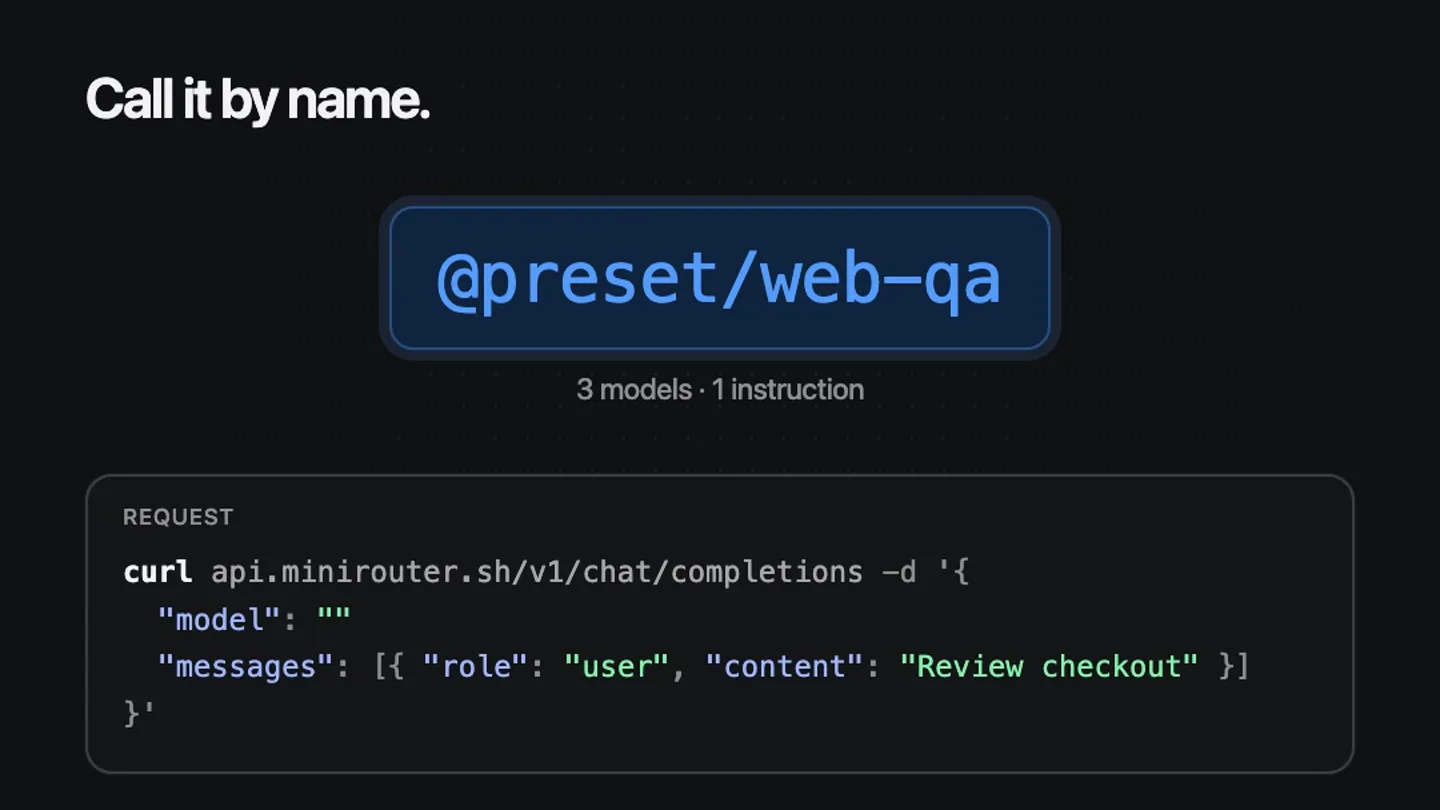
Calling the Preset
“(No spoken dialogue — Silent video with ambient visual cues.)”
- On screen
- minirouter.sh Presets Call it by name. @preset/web-qa 3 models • 1 instruction REQUEST curl api.minirouter.sh/v1/chat/completions -d '{ "model": "@preset/web-qa", "messages": [{"role": "user", "content": "Review checkout"}] }'
- Camera
- Static, maintaining the same UI perspective.
- Motion
- Text replacement animation, highlighting of a specific UI element, and content update within the code block.
Feature Teaser
Instant Execution and Results
“(No spoken dialogue — Silent video with ambient visual cues.)”
- On screen
- minirouter.sh Presets Create it once, use it forever. @preset/web-qa 3 models • 1 instruction RESPONSE • Routed to deepseek/deepseek-v4.1-flash 412 ms Three issues on the checkout page: The submit button has no accessible name. Error text is announced visually only. minirouter.sh
- Camera
- Static, focusing on the UI interaction.
- Motion
- Response text typing animation, progress indicator, and dynamic content generation.
Call to Action
Brand Reinforcement
“(No spoken dialogue — Silent video with ambient visual cues.)”
- On screen
- (No on-screen text)
- Camera
- Quick fade to black.
- Motion
- Simple fade out.
Motion design primitives
Synthesizable in Remotion · key components of the devtool-preset-workflow-demo template.
CodeBlockTypewriter
Text within a code editor or terminal block appears character by character, simulating live typing. Specific lines or values can be highlighted or replaced dynamically.
+ Code construction recipe
Utilize Remotion's <Sequence> and <AbsoluteFill> components. Implement character-by-character text reveal using `interpolate` on `frame` to control `substring` length. Use `spring` for subtle cursor blinks or highlight animations.
UIPanelExpandCollapse
UI panels or dropdowns expand to reveal more content, then collapse or transition to a new state. This includes lists of options appearing or disappearing.
+ Code construction recipe
Animate `height` and `opacity` properties using `spring` or `interpolate` with an `easeOutCubic` curve. Use `overflow: hidden` on the container. Child elements can animate in with a slight delay using `delayRender`.
DynamicContentHighlight
Specific text or UI elements are highlighted with a subtle glow or background change, drawing attention to key information or actions, often followed by a content update.
+ Code construction recipe
Apply a `box-shadow` or `background-color` animation using `interpolate` or `spring` for a smooth transition. For text, animate `color` or apply a `text-shadow`. Combine with `delayRender` for sequential highlights.
Style DNA & aesthetic system
Visual aesthetic
Typography
Motion
Special effects
Pacing & rhythm
Conceptual story rhythm
- 1
The Setup
Purpose. Introduce the concept of saving a preset with its underlying configuration.
Execution. A UI showing a 'Web QA' preset being defined with models and a system prompt in a code block, using typing animation.
- 2
The Alias
Purpose. Demonstrate how the saved preset is referenced and called.
Execution. The UI transitions to show '@preset/web-qa' being used in a `curl` command, replacing the verbose model list.
- 3
The Execution
Purpose. Show the immediate result of calling the preset.
Execution. A 'RESPONSE' block appears, showing the routing and then the generated output (QA issues) typing out.
- 4
The Payoff
Purpose. Reinforce the core value proposition of efficiency and reusability.
Execution. The final output is fully displayed, emphasizing the 'Create it once, use it forever' tagline, followed by a quick fade to black.
Remix in Animatiq Studio
Master remix prompt · agent-ready
Sample remix
Objective
Demonstrate a new CLI tool that automates cloud resource provisioning.How the recipe adapts
The CodeBlockTypewriter primitive would show a `cloud-provision init` command, followed by a `cloud-provision deploy --preset/dev-env` command. The UIPanelExpandCollapse would reveal a list of resources being provisioned. DynamicContentHighlight would emphasize the successful deployment message and the generated resource URLs. The overall dark theme and rapid visual progression would be maintained.Remix blueprint · devtool-preset-workflow-demo
Scene durations (4 scenes, 7.6s)
Key Remotion components
Related Developer Tools Product Launches
Explore all Developer Tools launches →
Agentic CLI for coding, building apps, and automating workflows.

New in Claude Code: your sessions can now message each other. Tell Claude to send a summary (not your history or files), and the other session picks it up mid-task.

Meet Qwen3.8-Max: A New Bar for Coding and Cowork. https://t.co/mJaA8vr6xT