
Sophia Yang, Ph.D. · Launch Video Breakdown: Hook, Pacing & Motion Design
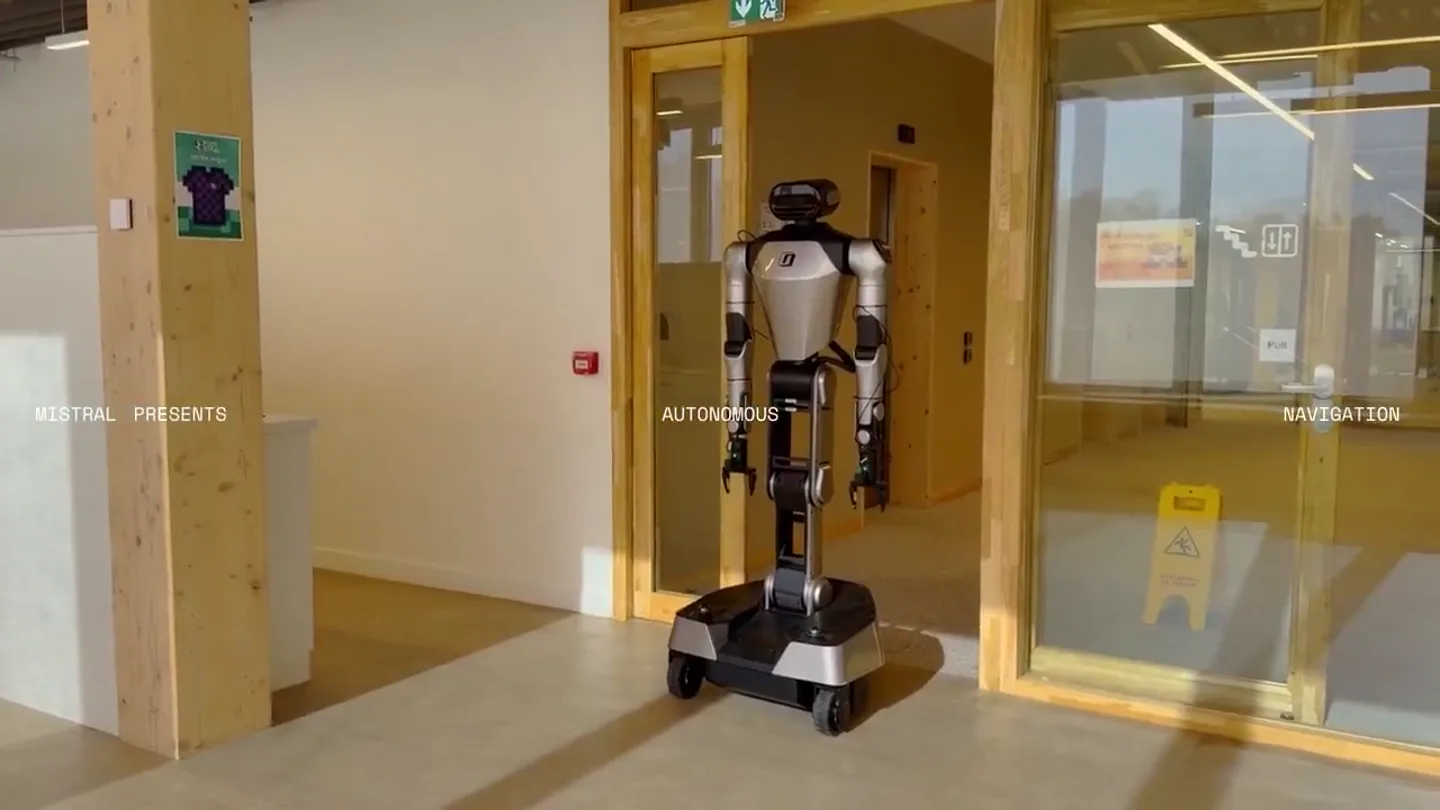
Introducing @MistralAI Robostral Navigate Our first model built for embodied navigation. It's an 8B model that takes RGB images and a plain-language instruction and moves a robot through an environ…
Scene-by-scene timeline & spoken transcript
The Hook
Introducing Robostral: Embodied Navigation
“(No spoken dialogue — The track features a driving, four-on-the-floor kick drum, a prominent sub-bass line, and a variety of synthesized percussion including claps, hi-hats, and shakers. The main melodic elements are provided by a heavily processed, rhythmic vocal sample of the word 'best' and a bright, arpeggiated synth lead.)”
- On screen
- MISTRAL PRESENTS AUTONOMOUS NAVIGATION SOTA VISION MODEL FOR COMPLEX NAVIGATION TASK 1 Long horizon task Move toward the water dispenser then turn right to go through the kitchen and enter the working area. Turn right again just before the lockers, then turn left and go straight to the orange couch. Turn right and walk through the long corridor to reach the glass door. Finally, go through the d INSTRUCTIONS Move toward the water dispenser then turn right to go through the kitchen and enter the working area. Turn right again just before the lockers, then turn left and go straight to the orange couch. Turn right and walk through the long corridor to reach the glass door. Finally, go through the doorway and stop to face the elevator door. POV SPEED 2x INSTRUCTIONS Move forward into the next room and turn right between the two phone INSTRUCTIONS Enter the working area and turn right between the two phone booths. Stop next to the man sitting with a pink shirt. TASK 4 Great at everyday ubt l t
- Camera
- Medium shot of the robot navigating an office environment, often following it from behind or slightly to the side. Occasional close-ups on the robot's movement or interactions. POV shots from the robot's perspective are inset.
- Motion
- Split-screen for comparative robot models, dynamic text overlays for instructions and speed indicators, subtle camera tracking, and a soft blur effect on background elements when text is prominent.
Product Reveal
Robostral's Advanced Navigation Capabilities
“(No spoken dialogue — The track maintains a consistent, energetic groove with a clean, punchy mix. A sub-bass drop/impact occurs at 0:28.)”
- On screen
- MISTRAL PRESENTS AUTONOMOUS NAVIGATION INSTRUCTIONS Move toward the water dispenser then turn right to go through the kitchen and enter the working area. Turn right again just before the lockers, then turn left and go straight to the orange couch. Turn right and walk through the long corridor to reach the glass door. Finally, go through the doorway and stop to face the elevator door. POV SPEED 2x INSTRUCTIONS Move forward into the next room and turn right between the two phone INSTRUCTIONS Enter the working area and turn right between the two phone booths. Stop next to the man sitting with a pink shirt.
- Camera
- Tracking shots following the robot through various office scenarios, including navigating around obstacles and interacting with people. The camera often maintains a consistent distance from the robot.
- Motion
- Smooth camera tracking, dynamic speed indicators (1x, 2x, 4x), and clear instruction overlays that highlight the robot's task execution. Split-screen views continue to show different robot models or perspectives.
Feature Teaser
Real-world Embodied AI in Action
“(No spoken dialogue — A riser builds at 0:46, leading into a sub-bass drop/impact at 0:47. The processed vocal sample 'best' continues rhythmically.)”
- On screen
- MISTRAL PRESENTS AUTONOMOUS NAVIGATION INSTRUCTIONS Move toward the water dispenser then turn right to go through the kitchen and enter the working area. Turn right again just before the lockers, then turn left and go straight to the orange couch. Turn right and walk through the long corridor to reach the glass door. Finally, go through the doorway and stop to face the elevator door. POV SPEED 2x INSTRUCTIONS Move forward into the next room and turn right between the two phone INSTRUCTIONS Enter the working area and turn right between the two phone booths. Stop next to the man sitting with a pink shirt.
- Camera
- Varied camera angles, including shots from the robot's perspective (inset POV), wide shots showing the environment, and medium shots focusing on the robot's interaction with objects or people.
- Motion
- Seamless transitions between different robot models and environments, with consistent UI elements for instructions and speed. The motion emphasizes the robot's fluid and precise movements.
Call to Action
Mistral AI: The Future of Embodied Navigation
“(No spoken dialogue — The energetic groove continues, building towards a conclusion.)”
- On screen
- MISTRAL PRESENTS AUTONOMOUS NAVIGATION INSTRUCTIONS Move toward the water dispenser then turn right to go through the kitchen and enter the working area. Turn right again just before the lockers, then turn left and go straight to the orange couch. Turn right and walk through the long corridor to reach the glass door. Finally, go through the doorway and stop to face the elevator door. POV SPEED 2x INSTRUCTIONS Move forward into the next room and turn right between the two phone INSTRUCTIONS Enter the working area and turn right between the two phone booths. Stop next to the man sitting with a pink shirt.
- Camera
- Dynamic cuts showcasing the robot's capabilities in diverse settings, culminating in a final shot that reinforces the brand and product. The camera often highlights the robot's autonomy.
- Motion
- Fast-paced editing, impactful visual text reveals, and a strong brand presence through consistent logo and text styling. The overall motion reinforces the product's advanced capabilities.
Motion design primitives
Synthesizable in Remotion · key components of the ai-robot-navigation-showcase template.
DynamicInstructionOverlay
A semi-transparent, dark rectangular box appears with a soft fade-in, containing multi-line text instructions. The text highlights key phrases as the robot executes them.
+ Code construction recipe
Use Remotion's <AbsoluteFill> for positioning, <Rect> for the background with `opacity` and `backgroundColor`, and <Text> for instructions. Animate `opacity` and `y` position with `spring()` for a subtle bounce. Use `interpolate()` to highlight specific words by changing their `color` or `fontWeight` based on the current frame.
RobotPOVInset
A smaller, rounded-corner video feed is inset in the bottom right, displaying the robot's first-person perspective. A 'POV' label and 'SPEED' indicator with a numerical value are positioned above and below it.
+ Code construction recipe
Implement with <AbsoluteFill> and <Video> components. Apply `borderRadius` to the video element for rounded corners. Use <Text> for 'POV' and 'SPEED' labels. Animate the numerical speed value using `interpolate()` or `spring()` to reflect changes in robot speed, ensuring smooth transitions between values.
SplitScreenComparison
The screen dynamically splits vertically, showcasing two different robot models or perspectives side-by-side, maintaining a consistent aspect ratio for each half.
+ Code construction recipe
Utilize <AbsoluteFill> with two nested <Video> components. Animate the `width` and `x` position of each video using `spring()` or `interpolate()` to create the split effect. Ensure responsive scaling for both video feeds within their respective halves of the screen.
Style DNA & aesthetic system
Visual aesthetic
Typography
Motion
Special effects
Pacing & rhythm
Conceptual story rhythm
- 1
The Challenge Introduction
Purpose. Establish the problem of complex navigation and introduce the robot's ability to understand long-horizon tasks.
Execution. Opening shots of the robot in a real-world office, overlaid with multi-step instructions, immediately demonstrating the complexity it can handle.
- 2
Demonstrating Autonomy
Purpose. Showcase the robot's independent movement and decision-making in various scenarios.
Execution. Tracking shots of the robot navigating hallways, around obstacles, and through different rooms, often with a POV inset to highlight its perception.
- 3
Real-world Interaction & Precision
Purpose. Highlight the robot's ability to interact with its environment and people with accuracy.
Execution. Scenes where the robot performs specific tasks like delivering a cup or stopping precisely next to a person, emphasizing its practical utility.
- 4
Comparative Advantage & Scale
Purpose. Illustrate the superior performance or versatility of the featured model compared to others.
Execution. Split-screen comparisons of different robot models or speeds, visually reinforcing the advanced capabilities of Robostral.
Remix in Animatiq Studio
Master remix prompt · agent-ready
Sample remix
Objective
Launch a new smart home security camera with advanced object recognition and autonomous tracking.How the recipe adapts
The DynamicInstructionOverlay primitive would show instructions like 'Identify package delivery' or 'Track suspicious activity'. The RobotPOVInset would become a CameraPOVInset, displaying the camera's real-time feed with detected objects highlighted. SplitScreenComparison could show the new camera's tracking capabilities versus a previous model, or demonstrate its performance in different lighting conditions. The overall aesthetic would maintain the clean, high-tech feel, adapted to a home environment.Remix blueprint · ai-robot-navigation-showcase
Scene durations (6 scenes, 118.7s)
Key Remotion components
Related AI Agents Product Launches
Explore all AI Agents launches →
To ensure that artificial general intelligence benefits all of humanity

Gopuff introduces Go, an AI shopping assistant built with SpaceXAI: say what you need and the order is placed.

Iliad (Troy) trailer made by Grok Imagine 1.5, which was just released