
Mobile Dev · Launch Video Breakdown: Hook, Pacing & Motion Design
Full mobile-dev tooling in your Codex app, with a live iOS simulator beside the chat.
Scene-by-scene timeline & spoken transcript
The Hook
Introducing the Dev Environment
“(No spoken dialogue — Sustained synth pad, high-frequency riser, sub-bass drop at 0:01, rhythmic arpeggiated synth melody, another sub-bass impact at 0:04.)”
- On screen
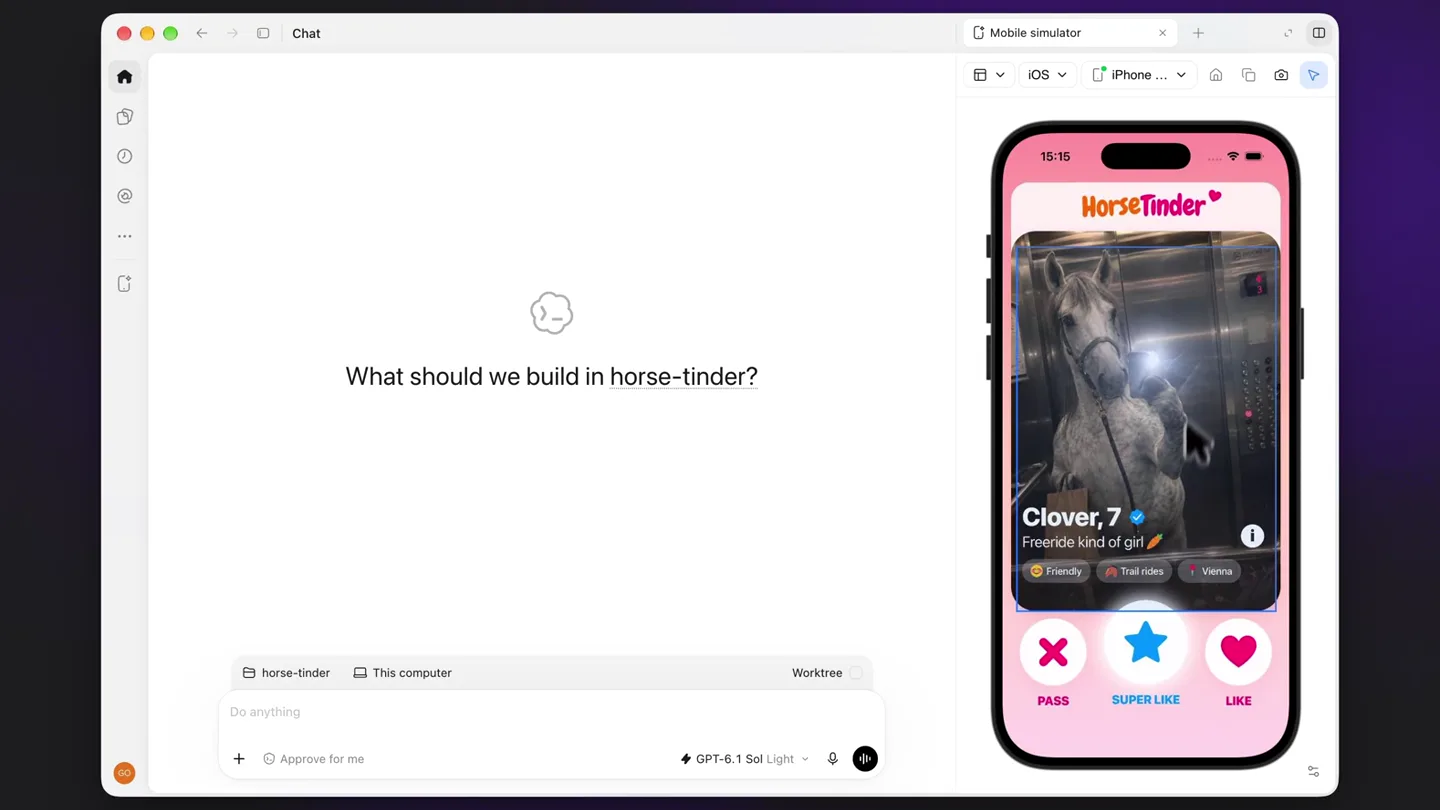
- Mobile simulator iOS iPhone... HorseTinder Clover, 7 Freeride kind of girl Friendly Trail rides Vienna PASS SUPER LIKE LIKE What should we build in horse-tinder? horse-tinder This computer Worktree Do anything GPT-6.1 Sol Light
- Camera
- Static wide shot of a desktop application with a chat interface on the left and an iOS simulator on the right. The camera slightly zooms in on the simulator.
- Motion
- Subtle zoom, cursor interaction with UI elements (clicking 'SUPER LIKE').
Product Reveal
Live Code Modification
“(No spoken dialogue — Rhythmic arpeggiated synth melody continues.)”
- On screen
- What should we build in horse-tinder? change to Mega Carrot change to Mega Carrot and make it org change to a carro 1 note Send to chat PASS SUPER LIKE LIKE Worktree GPT-6.1 Sol Light
- Camera
- Close-up on the iOS simulator and the chat input field. The camera pans slightly to follow the text input.
- Motion
- Text typing animation, cursor interaction, UI element expansion (note input field).
Feature Teaser
Real-time UI Update
“(No spoken dialogue — Rhythmic arpeggiated synth melody continues, high-energy sweep/riser builds from 0:16, culminating in a sub-bass drop at 0:18.)”
- On screen
- Apply these annotations. Context: 2 Thinking Apply AGENTS.md instructions Working for 7s I'll change the selected action to "Mega Carrot", make it orange, and replace its icon with a carrot. I'm using the mobile-dev skill and the unislop anfling rules. Running git status --short && sed -i '1,210p' App.tsx && cat src/components/UIIcon.tsx && cat package.json Working for 14s Thinking Working for 20s Thinking 2 files changed +7 -5 Mobile simulator iOS iPhone... HorseTinder Clover, 7 Freeride kind of girl Friendly Trail rides Vienna PASS Mega Carrot LIKE GPT-6.1 Sol Light
- Camera
- The camera holds a wide shot, showing the chat output and the iOS simulator. It then zooms in slightly on the simulator as the UI updates.
- Motion
- Text output animation (simulating code execution), UI element transformation (star icon changing to carrot, text changing).
Call to Action
Instantaneous Results
“(No spoken dialogue — Final impactful sub-bass drop at 0:18, followed by the sustained synth pad fading out.)”
- On screen
- Apply AGENTS.md instructions Working for 24s Changed the selected action to "Mega Carrot" in orange and replaced its star with an orange carrot with green leaves. No swipe action stays the same. No checks were run, per your instructions. Edited 2 files +5 -4 src/components/UIIcon.tsx +2 -1 App.tsx Undo View changes Mobile simulator iOS iPhone... HorseTinder Clover, 7 Freeride kind of girl Friendly Trail rides Vienna PASS Mega Carrot LIKE GPT-6.1 Sol Light
- Camera
- Static wide shot, highlighting the final state of the updated UI on the iOS simulator.
- Motion
- Instantaneous visual update, subtle glow/highlight on the changed UI element.
Motion design primitives
Synthesizable in Remotion · key components of the ai-web-design-tool-launch template.
DualScreenDevFlow
A split-screen layout showcasing a chat-based development environment on one side and a live mobile simulator on the other, with interactive elements synchronized across both.
+ Code construction recipe
Use `AbsoluteFill` for the main container. Implement two child `AbsoluteFill` components with `left` and `right` properties for the split. Use `Sequence` and `interpolate` for cursor movement and text typing. `spring` for UI element interactions like button presses and transformations.
LiveCodeTyping
Text appears character by character in a chat input field, simulating real-time typing, followed by a response that also types out character by character.
+ Code construction recipe
Utilize `Sequence` and `spring` for character reveal. Each character can be rendered with a slight delay and a subtle `opacity` and `scale` animation. `measureText` can help with dynamic layout adjustments.
InstantUIUpdate
A UI element on the simulated mobile screen instantly transforms its icon and text based on the code execution shown in the development environment.
+ Code construction recipe
Employ `spring` for the icon and text `opacity` and `scale` transitions. Use `AbsoluteFill` and `z-index` to layer the old and new UI states, cross-fading or scaling between them. SVG path morphing could be used for icon transformation.
Style DNA & aesthetic system
Visual aesthetic
Typography
Motion
Special effects
Pacing & rhythm
Conceptual story rhythm
- 1
The Setup
Purpose. Introduce the dual-screen environment and the initial problem/task.
Execution. Wide shot of the desktop app, showing the chat and simulator. Cursor interaction with a UI element.
- 2
The Input
Purpose. Demonstrate the user's interaction with the AI/tooling to define a change.
Execution. Close-up on the chat input, showing text being typed out, suggesting a command or request.
- 3
The Processing
Purpose. Show the system's intelligence and execution of the requested change.
Execution. Chat output displaying system messages, including code snippets and progress indicators, while the simulator remains static.
- 4
The Resolution
Purpose. Reveal the immediate and successful outcome of the command on the live simulator.
Execution. The UI element on the simulator instantly transforms, reflecting the changes described in the chat output, synchronized with a sound design impact.
Remix in Animatiq Studio
Master remix prompt · agent-ready
Sample remix
Objective
A new AI-powered web design tool that generates and modifies website layouts based on natural language commands.How the recipe adapts
The DualScreenDevFlow primitive adapts by replacing the iOS simulator with a live web browser preview. The LiveCodeTyping primitive remains the same for user input in the chat. The InstantUIUpdate primitive is adapted to show a website button changing its color and icon, or a text block reformatting, based on the AI's output. The color palette would shift to reflect the new product's branding, perhaps using a vibrant teal as the accent color. The overall clean aesthetic and precise motion language would be maintained to convey efficiency and innovation.Remix blueprint · ai-web-design-tool-launch
Scene durations (4 scenes, 20.1s)
Key Remotion components
Related Developer Tools Product Launches
Explore all Developer Tools launches →
Agentic CLI for coding, building apps, and automating workflows.

New in Claude Code: your sessions can now message each other. Tell Claude to send a summary (not your history or files), and the other session picks it up mid-task.

Meet Qwen3.8-Max: A New Bar for Coding and Cowork. https://t.co/mJaA8vr6xT