
Kavsoft · Launch Video Breakdown: Hook, Pacing & Motion Design
Introducing Mockview 5.0 (macOS) https://apps.apple.com/us/app/mockview-mockup-generator/id1592728145?itscg=30200&itsct=apps_box_link&mttnsubad=1592728145 This update packs many new updates such as: 1. Animated video mockups (keyframes) 2. Artboard for multi-mockups 3. Brand new app UI and layout 4. Now export mockup up to 2x scaling 5. Faster export times and much more.
Scene-by-scene timeline & spoken transcript
The Hook
Dynamic Mockup Generation
“(No spoken dialogue — Upbeat, driving electronic music with a consistent 110 BPM.)”
- On screen
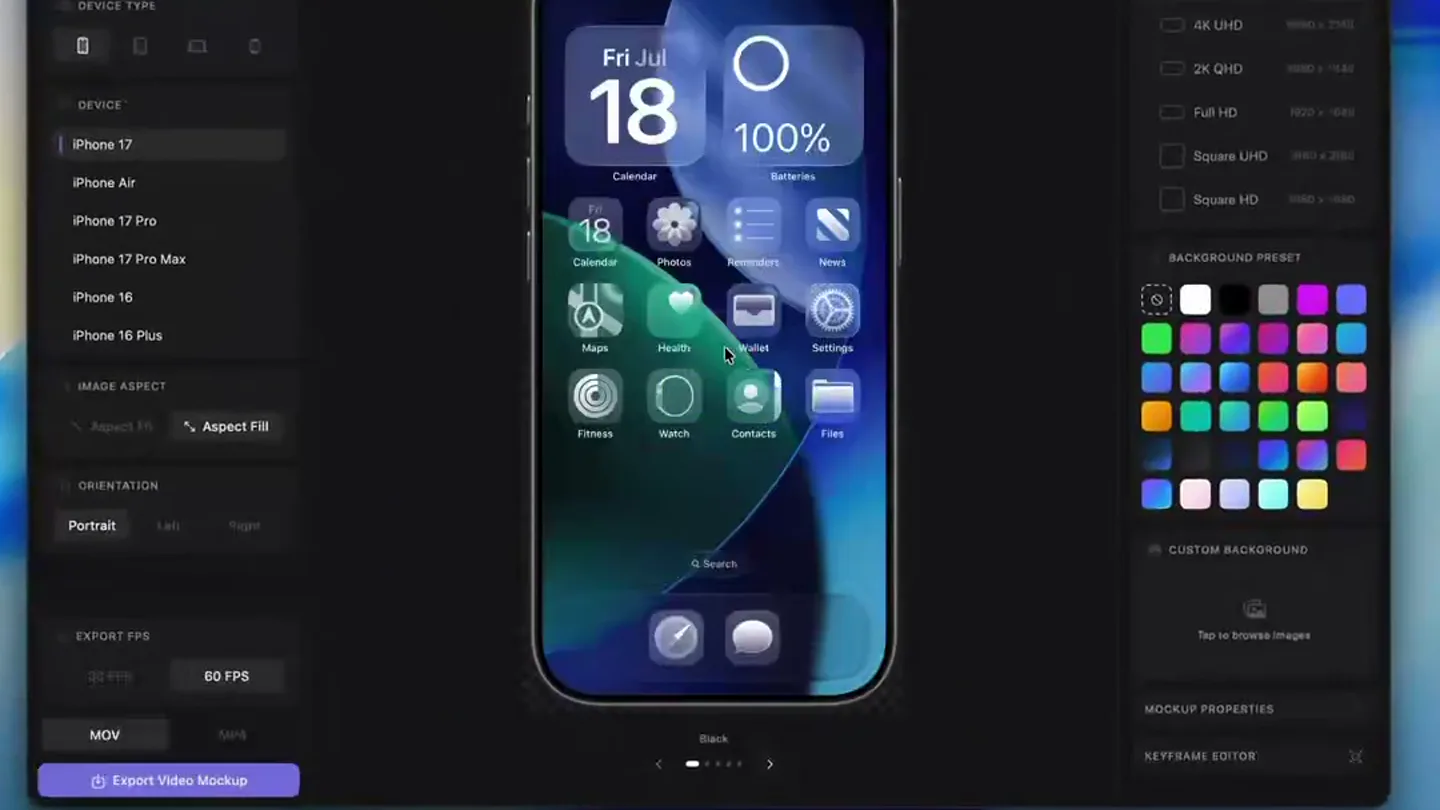
- Mockview 3D, DEVICE TYPE, iPhone 17, iPhone Air, iPhone 17 Pro, iPhone 17 Pro Max, iPhone 16, iPhone 16 Plus, IMAGE ASPECT, Aspect Fill, ORIENTATION, Portrait, Left, Right, EXPORT SCALE, 0.5X, 1X, 2X, PNG, Export Mockup, Add Photo or Video, Tap to select video from your Mac, Simulator Screen Record...3.26.mov, RENDER SIZE, None, 4K UHD, 2K QHD, Full HD, Square UHD, Square HD, BACKGROUND PRESET, CUSTOM BACKGROUND, Tap to browse images, MOCKUP PROPERTIES, KEYFRAME EDITOR, EXPORT FPS, 30 FPS, 60 FPS, MOV, MP4, KEYFRAME EDITOR (BETA), KEYFRAME, ZOOM, ZOOM ANIMATION, Linear, EaseIn, EaseOut, Spring, ZOOM ANCHOR, X: 0.50 | Y: 0.50, Add Frame, Reset, Delete Keyframe, SIMULATOR SCREEN RECORDING - IPHONE 17 PRO - 2026-08-30 AT 00:13:21
- Camera
- Static, wide shot of the macOS application interface, focusing on the central iPhone mockup area.
- Motion
- Rapid UI interaction simulation with cursor movements, clicks, and dropdown selections, demonstrating core features like device selection, background color changes, and video import.
Feature Teaser
Keyframe Animation & Artboard
“(No spoken dialogue — Upbeat, driving electronic music with a consistent 110 BPM.)”
- On screen
- KEYFRAME EDITOR (BETA), KEYFRAME, ZOOM, ZOOM ANIMATION, Linear, EaseIn, EaseOut, Spring, ZOOM ANCHOR, X: 0.50 | Y: 0.50, Add Frame, Reset, Delete Keyframe, SIMULATOR SCREEN RECORDING - IPHONE 17 PRO - 2026-08-30 AT 00:13:21, Mockview 3D, DEVICE TYPE, iPhone 17, iPhone Air, iPhone 17 Pro, iPhone 17 Pro Max, iPhone 16, iPhone 16 Plus, IMAGE ASPECT, Aspect Fill, ORIENTATION, Portrait, Left, Right, EXPORT SCALE, 0.5X, 1X, 2X, PNG, Export Mockup, RENDER SIZE, None, 4K UHD, 2K QHD, Full HD, Square UHD, Square HD, BACKGROUND PRESET, CUSTOM BACKGROUND, Tap to browse images, MOCKUP PROPERTIES, KEYFRAME EDITOR, EXPORT FPS, 30 FPS, 60 FPS, MOV, MP4, ARTBOARD, Add Artboard, Delete Artboard, Duplicate Artboard, Export Artboard, ARTBOARD PROPERTIES, BACKGROUND, COLOR, IMAGE, GRADIENT, EXPORT, EXPORT ARTBOARD, EXPORT VIDEO, EXPORT IMAGE
- Camera
- Static, wide shot of the macOS application interface, with a focus shift to the keyframe editor timeline and then the artboard feature.
- Motion
- Demonstration of keyframe creation and manipulation, showing zoom and pan animations within the mockup, followed by the introduction and interaction with the multi-mockup artboard feature.
Product Reveal
New UI & Export Options
“(No spoken dialogue — Upbeat, driving electronic music with a consistent 110 BPM.)”
- On screen
- Mockview 3D, DEVICE TYPE, iPhone 17, iPhone Air, iPhone 17 Pro, iPhone 17 Pro Max, iPhone 16, iPhone 16 Plus, IMAGE ASPECT, Aspect Fill, ORIENTATION, Portrait, Left, Right, EXPORT SCALE, 0.5X, 1X, 2X, PNG, Export Mockup, RENDER SIZE, None, 4K UHD, 2K QHD, Full HD, Square UHD, Square HD, BACKGROUND PRESET, CUSTOM BACKGROUND, Tap to browse images, MOCKUP PROPERTIES, KEYFRAME EDITOR, EXPORT FPS, 30 FPS, 60 FPS, MOV, MP4, ARTBOARD, Add Artboard, Delete Artboard, Duplicate Artboard, Export Artboard, ARTBOARD PROPERTIES, BACKGROUND, COLOR, IMAGE, GRADIENT, EXPORT, EXPORT ARTBOARD, EXPORT VIDEO, EXPORT IMAGE, Mockview 5.0, New UI & Layout, Export up to 2x Scaling, Faster Export Times
- Camera
- Static, wide shot of the macOS application interface, transitioning to full-screen text overlays.
- Motion
- Smooth UI navigation showcasing the redesigned interface, followed by animated text reveals highlighting key new features like UI, scaling, and export speed.
Call to Action
Download Mockview 5.0
“(No spoken dialogue — Upbeat, driving electronic music with a consistent 110 BPM.)”
- On screen
- Mockview 5.0, Download on the App Store, Available for macOS, Kavsoft
- Camera
- Static, full-screen text overlays with a final shot of the app icon and company logo.
- Motion
- Clean, direct text animations revealing the call to action and platform availability, concluding with a brand identity display.
Motion design primitives
Synthesizable in Remotion · key components of the mac-app-feature-showcase template.
UIDraggablePanel
A UI panel that can be dragged open and closed, revealing or hiding content, often with a subtle bounce or ease-out effect.
+ Code construction recipe
Implement using `useCurrentFrame` and `interpolate` for `x` or `y` translation, combined with a `spring` animation for the final position to create a natural, responsive feel. Use `GestureHandler` for drag interactions.
KeyframeTimelineScrubber
A horizontal timeline component with draggable markers representing keyframes, allowing for precise control over animation timing and properties.
+ Code construction recipe
Construct with an SVG path for the timeline, `map` over an array of keyframe objects to render draggable `Circle` or `Rect` elements. Use `useVideoConfig` for total duration and `interpolate` to map marker positions to frame numbers. Implement `onDrag` for marker movement.
DynamicMockupZoomPan
An animation where the content within a device mockup (e.g., iPhone screen) smoothly zooms in/out and pans across different areas, simulating interactive screen recording.
+ Code construction recipe
Apply `scale` and `translate` CSS properties to the content layer within the mockup. Use `interpolate` with `easeOut` or `spring` curves to animate these properties between defined keyframe values, creating smooth transitions.
Style DNA & aesthetic system
Visual aesthetic
Typography
Motion
Special effects
Pacing & rhythm
Conceptual story rhythm
- 1
Feature Introduction
Purpose. Showcase the core functionality of creating mockups and importing media.
Execution. Initial screen recording demonstrating device selection, media import, and basic mockup customization.
- 2
Advanced Capabilities
Purpose. Highlight the new, powerful features like animated keyframes and multi-mockup artboards.
Execution. Detailed walkthrough of the keyframe editor and the artboard feature, showing complex animations and multi-device layouts.
- 3
Product Evolution
Purpose. Emphasize the significant improvements in the new version, such as UI and performance.
Execution. Animated text overlays summarizing 'New UI & Layout', 'Export up to 2x Scaling', and 'Faster Export Times'.
- 4
Call to Action
Purpose. Direct users to download the product and reinforce brand identity.
Execution. Clear on-screen text 'Download on the App Store', 'Available for macOS', and the Kavsoft logo.
Remix in Animatiq Studio
Master remix prompt · agent-ready
Sample remix
Objective
Launch a new macOS code editor with real-time collaboration features.How the recipe adapts
The 'UIDraggablePanel' primitive would be used for opening and closing sidebars like file explorers or collaboration chat. 'KeyframeTimelineScrubber' could be adapted to show version history or code changes over time. 'DynamicMockupZoomPan' would become 'DynamicCodeEditorZoomPan', focusing on specific code blocks or UI elements within the editor. The overall aesthetic of a static wide shot of the application, with cursor interactions and text overlays, would be maintained to showcase the code editor's features and new UI.Remix blueprint · mac-app-feature-showcase
Scene durations (4 scenes, 60s)
Key Remotion components
Related Developer Tools Product Launches
Explore all Developer Tools launches →
Agentic CLI for coding, building apps, and automating workflows.

Sakana AI launches Fugu, a multi-agent orchestration system served through a single model API, led by its Fugu Ultra model.
Get paid to wait The Claude Code spinner might be the most watched line on Earth. So I turned it into an ad marketplace. Advertisers bid on it. You keep 50% of the money. Install the extension → ge…