
Monid · Launch Video Breakdown: Hook, Pacing & Motion Design
Agents search 1,300+ APIs and tools, compare providers, check pricing, then call and pay at runtime.
Scene-by-scene timeline & spoken transcript
The Hook
Introducing Monid Discover
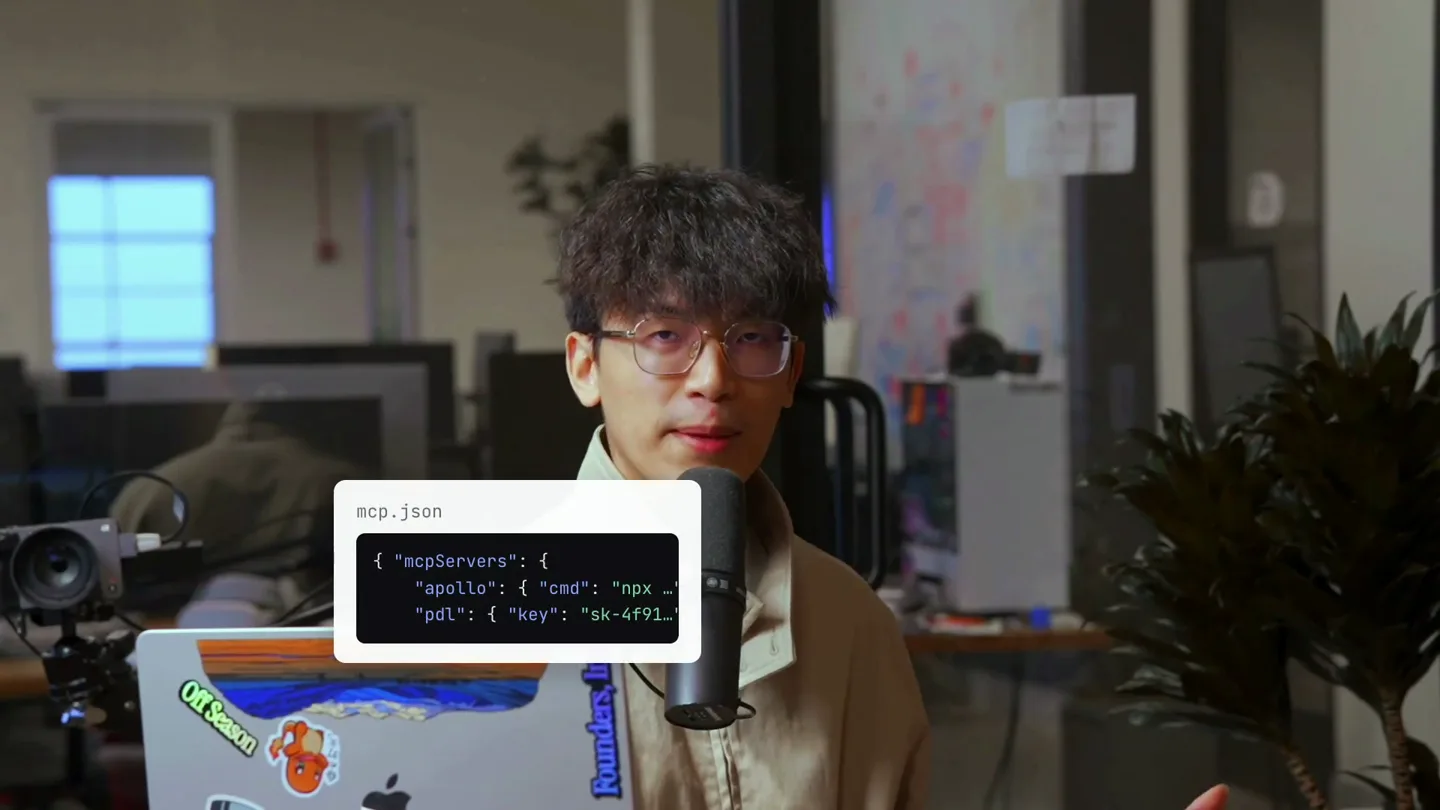
“So we're launching a new feature called Discover. And what Discover allows you to do is for your AI agent to automatically find and use tools without you having to set them up.”
- On screen
- mcp.json "mcpServers": { "apollo": { "cmd": "npx ... "pdl": { "key": "sk-4f91... one more API key... export APOLLO_API_KEY=sk-9c2e... export PDL_API_KEY=sk-77b1.03... export EXA_API_KEY=sk-c5a8.91... /discover
- Camera
- Medium shot of the presenter, slightly zoomed in. The camera remains static.
- Motion
- On-screen code snippets and text elements animate in with a subtle fade and slide, then transition out. A large '/discover' text animates in with a quick scale and fade.
Product Reveal
Agent Autonomously Finds Tools
“So for example, if I wanted to find manufacturers and their emails, I could just tell my agent, 'Hey, find me manufacturers and their emails.' And then the agent would use Monid Discover Endpoint to find tools like Apollo and People Data Labs.”
- On screen
- Apollo People Data Labs 01 give your agent a task Sessions Messages Total tokens Active days 97 27,201 23.4M 44 Current streak Longest streak Peak hour Favorite model 0d 12d 8 PM Fable 5 You've used ~32x more tokens than War and Peace. Local Monid find CNC shops in the bay| Bypass permissions Opus 5 High 02 it discovers the tools on monid Bay area CNC manufacturers Found tools Monid discover Request "limit": 8, "query": "company email finder domain" } Response "provider": "api.strained.io", "providerName": "Straine", "endpoint": "/v402/solutions/lew... email-verify", "description": "your agent found a prospect's email - is it real? Deliverability check, DNS, and domain reputation in one call.", "price": "type": "PER_CALL", "amount": "value": 0.05, "currency": "USD"}, "score": 0.664478818209316, "tags": "verified"], "scoreBreakdown": "querierScore": 0.5332802, "verified_tag": 0.35, "pricing_predictability": 0.2, "performance": null "provider": "api.strained.io", "providerName": "Straine", "endpoint": "/v402/mx... Monid Inspect Monid balance Monid discover "provider": "apollo", "providerName": "Apollo", "endpoint": "/mixed_companies/search", "d... companies by headcount, location, revenue, funding, keywords, and technology.", "price": {"type": "PER_CALL", "amount": "value": 0.05, "currency": "USD"}, "score": 0.664478818209316, "tags": "verified"], "scoreBreakdown": "querierScore": 0.5332802, "pricing_predictability": 0.2, "performance": null {"provider": "apollo", "endpoint": "/v1/organizations/enrich", "input": "body": "sC800x", "queryParams": "QUERY PARAMS", "pathParams": "PATH PARAMS"} Monid Inspect Monid balance Monid run Added task: Scrape Bay Area CNC shops from Google Maps Monid run Request "endpoint": "/damilo/google-maps-scraper", "input": { "body": { "language": "en", "location": "San Jose, CA, USA", "max_results": 60, } Write a message...
- Camera
- The presenter is framed in a vertical split screen, with the product UI occupying the larger left portion. The camera on the presenter is static.
- Motion
- UI elements slide in from the left, showcasing agent interaction and code output. A search bar animates with a typing effect, and tool icons appear with a subtle bounce. Scrolling animations within the UI demonstrate data discovery.
Feature Teaser
Inspect and Run at Runtime
“And then it can inspect the descriptions, the endpoint details, and then run the tools at runtime. And this is really powerful because it saves you a lot of time. And it's also really surprising to see the agent discover tools that I didn't even know existed.”
- On screen
- b2b company data api Apollo People Data Labs Exa Apollo POST /mixed_companies/search { "query": string, "limit": int } schema pricing ok mcp.json "mcpServers": { "apollo": { ... }, "pdl": { ... } }
- Camera
- The presenter is centered, with the background slightly blurred. The camera remains static.
- Motion
- Search bar animation with typing effect, followed by tool icons appearing. A detailed API endpoint description box slides in, then a red 'X' animates over the previous code snippet, indicating its obsolescence.
Call to Action
Simple Setup for Autonomous Agents
“And the way you set this up is really simple. You just copy a URL to your agent and tell it what you want it to do, and then it'll autonomously search for tools.”
- On screen
- ? ? ? $ set up htt $ set up https://monid.ai/SKILL.md
- Camera
- The presenter is centered, with the background slightly blurred. The camera remains static.
- Motion
- Three question mark boxes animate in, then transition to a terminal-like interface with a typing animation for the setup command. Various tool icons appear below the command line.
Motion design primitives
Synthesizable in Remotion · key components of the founder-tech-reveal template.
CodeSnippetSlideIn
A rectangular code snippet box slides in from the side (e.g., right or bottom) with a slight fade, often accompanied by a subtle bounce or overshoot effect. It typically contains syntax-highlighted code or JSON.
+ Code construction recipe
Use `spring()` for position and opacity. Animate `translateX` or `translateY` from an off-screen value to 0, and `opacity` from 0 to 1. Apply a `delay` for staggered entry if multiple snippets appear.
SearchBarTypingEffect
A search bar appears, and text within it is revealed character by character, simulating a user typing. This is often followed by the appearance of search results or related icons.
+ Code construction recipe
Utilize `Sequence` and `AbsoluteFill` for timing. For the typing effect, use `split()` on the text string and map over characters, animating `opacity` and `width` for each character with a small `delay` between them. The cursor can be a blinking `Rectangle` component.
IconBounceReveal
Small, distinct icons (e.g., tool logos, question marks) appear on screen with a quick, spring-like bounce or pop animation, often in a staggered sequence.
+ Code construction recipe
Wrap each icon in a `spring()` animation for `scale` (from 0 to 1) and `translateY` (for a slight bounce). Use `delay` for each icon to create a staggered reveal effect across multiple icons.
Style DNA & aesthetic system
Visual aesthetic
Typography
Motion
Special effects
Pacing & rhythm
Conceptual story rhythm
- 1
The 'Aha!' Moment
Purpose. Immediately introduce the core problem and the innovative solution, grabbing attention with a clear value proposition.
Execution. Presenter introduces 'Discover' with a large, impactful text overlay, followed by quick, illustrative code snippets that highlight the 'before' state.
- 2
Demonstration & Detail
Purpose. Showcase the product in action, detailing its functionality and user experience through a practical example.
Execution. Split-screen view with the presenter and a dynamic UI demonstration, featuring typing animations, scrolling code, and tool discovery flows.
- 3
Benefit Amplification
Purpose. Reinforce the value proposition by explaining the benefits and impact of the new feature.
Execution. Presenter emphasizes time-saving, while on-screen graphics highlight key features like 'inspect' and 'run at runtime', contrasting with the old manual setup.
- 4
Empowerment & Simplicity
Purpose. Conclude by simplifying the setup process and empowering the viewer to easily adopt the solution.
Execution. A terminal-like interface demonstrates the simple URL-based setup, followed by a visual representation of autonomous tool searching.
Remix in Animatiq Studio
Master remix prompt · agent-ready
Sample remix
Objective
Launch a new API gateway product called 'Nexus' that simplifies microservice orchestration.How the recipe adapts
The video would open with the founder introducing Nexus, with a large '/nexus' text overlay. CodeSnippetSlideIn would showcase complex API configurations being simplified. SearchBarTypingEffect would demonstrate searching for microservices, followed by IconBounceReveal for discovered services. The split-screen UI would show Nexus's dashboard orchestrating services, with the founder explaining the benefits of reduced latency and improved scalability. The Call to Action would feature a terminal setup for integrating Nexus into an existing infrastructure.Remix blueprint · founder-tech-reveal
Scene durations (4 scenes, 72s)
Key Remotion components
Related AI Agents Product Launches
Explore all AI Agents launches →
To ensure that artificial general intelligence benefits all of humanity

Gopuff introduces Go, an AI shopping assistant built with SpaceXAI: say what you need and the order is placed.

Iliad (Troy) trailer made by Grok Imagine 1.5, which was just released