
wevm · Launch Video Breakdown: Hook, Pacing & Motion Design
monoshot is a code image editor for humans and agents: create, annotate, theme, export, and share code images on the web, CLI, MCP, or API.
Scene-by-scene timeline & spoken transcript
The Hook
Dynamic Wallpaper & Theme Cycling
“(No spoken dialogue — ambient visual with rapid theme changes)”
- On screen
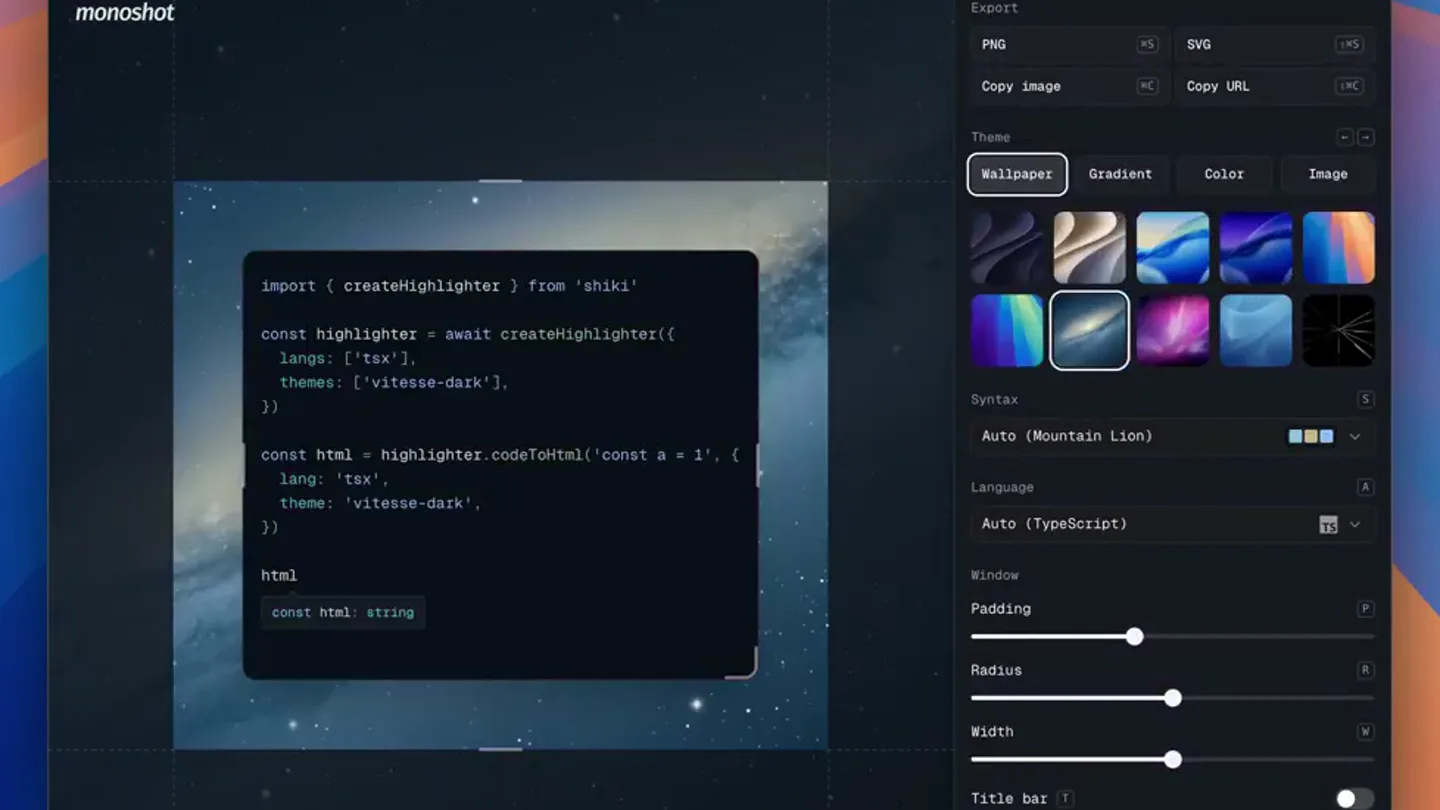
- monoshot.dev monoshot Export PNG SVG Copy Image Copy URL Theme Wallpaper Gradient Color Image Syntax Auto (Golden Gate Dark) Auto (Tahoe Dark) Auto (Mountain Lion) Auto (Tempo) Language Auto (TypeScript) Window Padding Radius Width Title bar Types import { createHighlighter } from 'shiki' const highlighter = await createHighlighter({ langs: ['tsx'], themes: ['vitesse-dark'], }) const html = highlighter.codeToHtml('const a = 1', { lang: 'tsx', theme: 'vitesse-dark', }) html const html: string
- Camera
- Static, full-screen desktop capture of the monoshot application.
- Motion
- Rapid, seamless cycling through various wallpaper and syntax themes within the application UI, highlighting customization options.
Product Reveal
Gradient Background Exploration
“(No spoken dialogue — ambient visual with rapid gradient changes)”
- On screen
- monoshot.dev monoshot Export PNG SVG Copy Image Copy URL Theme Wallpaper Gradient Color Image #8F4C81 #4FC3F7 #7C2B12 #F8923C #334155 #94A3B8 Syntax Auto (Houston) Auto (Horizon) Auto (GitHub Dark Default) Language Auto (TypeScript) Window Padding Radius Width Title bar Types import { createHighlighter } from 'shiki' const highlighter = await createHighlighter({ langs: ['tsx'], themes: ['vitesse-dark'], }) const html = highlighter.codeToHtml('const a = 1', { lang: 'tsx', theme: 'vitesse-dark', }) html const html: string
- Camera
- Static, full-screen desktop capture.
- Motion
- Fast-paced, dynamic transitions between different gradient background options, showcasing the breadth of visual styles.
Feature Teaser
Solid Color & Syntax Theme Variety
“(No spoken dialogue — ambient visual with rapid color and syntax changes)”
- On screen
- monoshot.dev monoshot Export PNG SVG Copy Image Copy URL Theme Wallpaper Gradient Color Image Syntax Auto (Vitesse Dark) Auto (GitHub Light) Auto (Horizon Bright) Auto (Noid) Language Auto (TypeScript) Window Padding Radius Width Title bar Types import { createHighlighter } from 'shiki' const highlighter = await createHighlighter({ langs: ['tsx'], themes: ['vitesse-dark'], }) const html = highlighter.codeToHtml('const a = 1', { lang: 'tsx', theme: 'vitesse-dark', }) html const html: string
- Camera
- Static, full-screen desktop capture.
- Motion
- Quick cuts and fades demonstrating various solid background colors and syntax highlighting themes, emphasizing customization.
Motion design primitives
Synthesizable in Remotion · key components of the insightflow-viz-cycle template.
ThemeCycleCarousel
The application UI rapidly cycles through different visual themes (wallpapers, gradients, solid colors, syntax highlighting) in quick succession. Each theme is presented for a very brief duration before transitioning to the next.
+ Code construction recipe
Utilize a sequence of <Sequence> components, each rendering the application UI with a different theme prop. Animate the 'theme' prop using `interpolate` or `spring` with a very low damping ratio for quick, snappy transitions. Ensure each sequence has a short duration (e.g., 0.5-1 second) and fades in/out or cuts sharply.
CodeBlockHighlight
A code block is displayed within a stylized editor window, with syntax highlighting dynamically changing to reflect different themes. The code content remains static while its visual presentation shifts.
+ Code construction recipe
Render the code block using a syntax highlighter library (e.g., `react-syntax-highlighter`). The `theme` prop of this component should be driven by an `interpolate` function that cycles through an array of theme names over time, synchronized with the `ThemeCycleCarousel`.
UIPanelInteraction
The right-hand settings panel of the application UI shows active selections changing (e.g., 'Wallpaper', 'Gradient', 'Color' tabs, and specific theme thumbnails) as the background and code themes update.
+ Code construction recipe
Overlay SVG or React components that simulate UI clicks and selections. Use `spring` animations for subtle button presses or `interpolate` for highlighting active tabs/thumbnails, synchronized with the theme changes to visually reinforce the customization being applied.
Style DNA & aesthetic system
Visual aesthetic
Typography
Motion
Special effects
Pacing & rhythm
Conceptual story rhythm
- 1
Customization Showcase
Purpose. Immediately demonstrate the product's core value proposition: extensive visual customization.
Execution. Rapid cycling through diverse wallpaper and gradient backgrounds, highlighting the visual flexibility.
- 2
Theme Variety
Purpose. Expand on customization by showing solid color options and syntax theme changes.
Execution. Quick cuts between different solid background colors and syntax highlighting styles within the code editor.
- 3
Interactive Control
Purpose. Implicitly show the user's control over these options through UI element changes.
Execution. The right-hand panel's active selections (tabs, thumbnails) update in sync with the visual changes, suggesting user interaction.
- 4
Feature Density
Purpose. Convey the richness of features and options in a short timeframe.
Execution. The entire video is a continuous, fast-paced montage of different visual states, packing many features into a brief duration.
Remix in Animatiq Studio
Master remix prompt · agent-ready
Sample remix
Objective
Launch a new AI-powered data visualization tool, 'InsightFlow', highlighting its rapid customization and diverse visualization options.How the recipe adapts
The 'ThemeCycleCarousel' primitive adapts to 'VisualizationCycleCarousel', rapidly switching between bar charts, line graphs, and scatter plots. 'CodeBlockHighlight' becomes 'DataVizPaletteSwap', where the data visualization's color scheme changes instantly. 'UIPanelInteraction' simulates clicks on 'Chart Type', 'Color Palette', and 'Layout' tabs in InsightFlow's settings panel, synchronized with the visualization changes.Remix blueprint · insightflow-viz-cycle
Scene durations (3 scenes, 10.8s)
Key Remotion components
Related Developer Tools Product Launches
Explore all Developer Tools launches →
xAI opens voice cloning on its API: build a custom voice in about two minutes or pick from 80+ voices in 28 languages.

Agentic CLI for coding, building apps, and automating workflows.
Sakana AI launches Fugu, a multi-agent orchestration system served through a single model API, led by its Fugu Ultra model.