
Motion · Launch Video Breakdown: Hook, Pacing & Motion Design
Motion launches Claude for launch videos: drop a prompt or product URL and get a full launch-team film you can restyle in chat.
Scene-by-scene timeline & spoken transcript
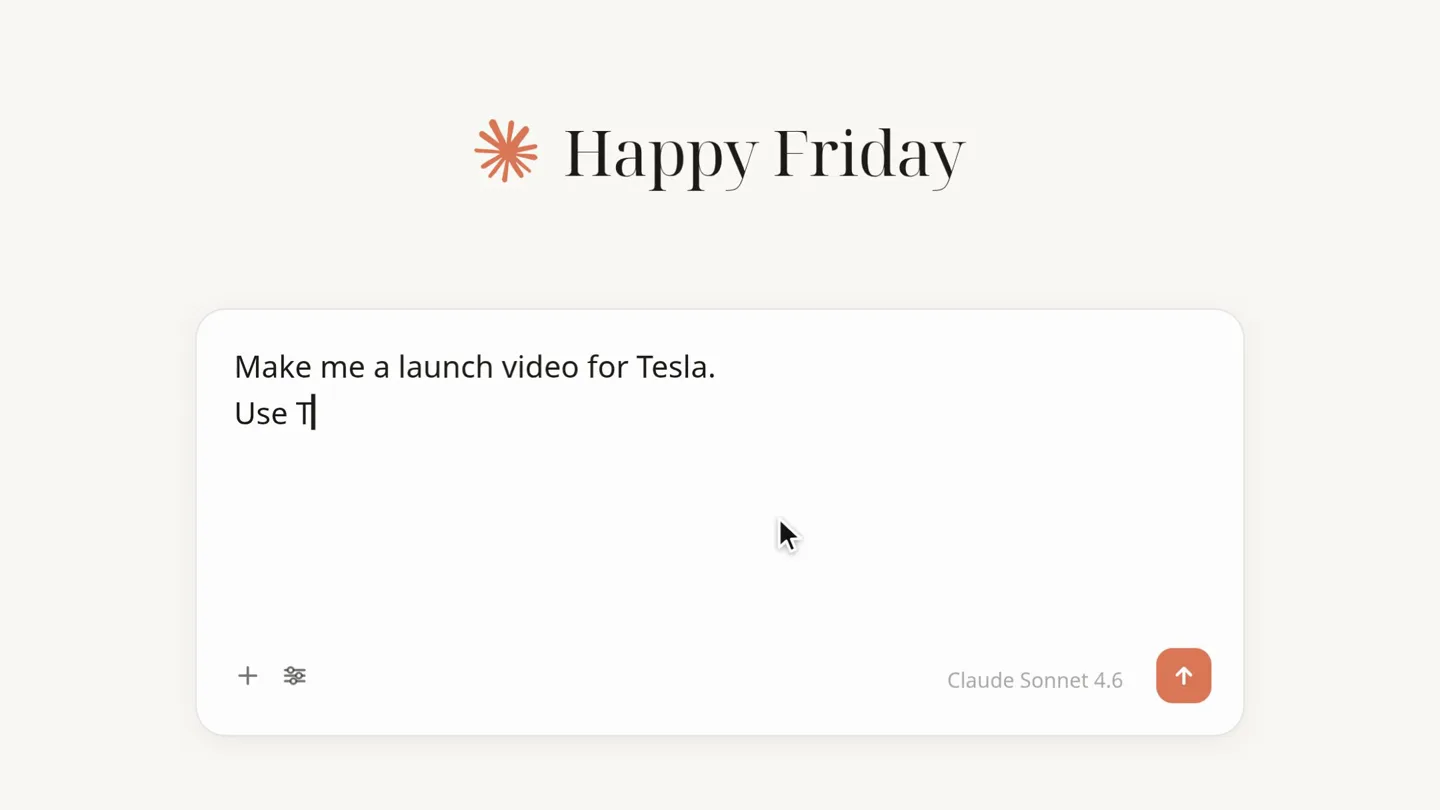
The Hook
Prompting the AI for a Launch Video
“(No spoken dialogue — A rhythmic electronic score with a sub-bass pulse and percussive synth elements begins, building a modern, impactful atmosphere.)”
- On screen
- Claude Happy Friday How can I help you today? Make me a launch video for Tesla. Use Tesla's branding. 30 seconds. Modern. Bold. Voiceover. Claude Sonnet 4.6
- Camera
- Static, top-down view of a chat interface, simulating user input.
- Motion
- Typing animation, UI element reveals, and a subtle cursor movement.
Product Reveal
AI Agent Generates Video Assets
“(No spoken dialogue — The electronic score continues to build tension with a sustained synth pad, leading to a significant sub-bass drop/impact at 0:13.)”
- On screen
- Claude Motion · create_launch_video company Tesla brand colors extracted script writing launch voiceover generating Creating launch video 0:30 · rendering understanding brand writing script recording voiceover complete PERFORMANCE, ZERO COMPROMISE. TESLA Claude Sonnet 4.6
- Camera
- Static, top-down view of the chat interface, revealing AI agent actions.
- Motion
- Progress bar animations, checklist reveals, and dynamic thumbnail generation, all within the chat UI.
Feature Teaser
Generated Tesla Launch Video Playback
“Performance redefined. Tesla. The future delivered.”
- On screen
- PERFORMANCE, TESLA PRESENTS REDEFINED. ZERO COMPROMISE. ZERO EMISSIONS. 0-60 MPH - 2.6 S TESLA THE FUTURE — DELIVERED 0:30
- Camera
- Full-screen takeover by the generated video, with dynamic camera movements within the video content (e.g., tracking shots of the Cybertruck).
- Motion
- Fast cuts, bold typography reveals with subtle text animations (e.g., underlines appearing), and product shots with dramatic lighting.
Problem Agitation
Iterating on the Video via Chat
“(No spoken dialogue — The electronic score maintains its rhythmic energy, underscoring the rapid iteration process.)”
- On screen
- Claude launch-video-v1 · made with Motion 0:30 Make it shorter. Use darker colors. More energy. Motion · update_launch_video — No timeline. just chat. Updating launch video MODEL S PLAID 0-60 IN 1.9S TRI MOTOR 1,020 HP TESLA tesla-logo.svg tesla-product.mp4 Use these inste Claude Sonnet 4.6 Reply to Claude...
- Camera
- Returns to the chat interface, showing the generated video playing within the UI, then updates with a new version.
- Motion
- Typing animation, progress bar, and a seamless transition to a new, shorter, and more energetic video version with updated statistics and visuals.
Call to Action
Motion's Integration with Claude
“(No spoken dialogue — The electronic score resolves with a final impactful synth chord.)”
- On screen
- Claude Motion Launch videos are now in Claude. This one was made with it.
- Camera
- Zoom out to a clean, branded screen with the company logos and a clear message.
- Motion
- Subtle fade-in and scale animation for the logos and text, providing a clean and conclusive end screen.
Motion design primitives
Synthesizable in Remotion · key components of the ai-agent-launch-video-template template.
ChatTypingReveal
Text appears character by character in a chat input field, simulating real-time typing, followed by the submission of the message.
+ Code construction recipe
Use `Sequence` and `spring` for character-by-character opacity and slight Y-offset animations. Implement `interpolate` for the cursor blink effect and input field expansion.
ProgressiveChecklist
A list of tasks animates in, with each item progressively checking off or revealing a status (e.g., 'generating', 'complete') as a progress bar fills.
+ Code construction recipe
Utilize `Sequence` for staggered reveals of list items. Animate a `ProgressBar` component using `interpolate` for its width, triggering `spring` animations for checkmark icons or status text as milestones are met.
BoldTextImpact
Large, bold text appears with a strong, quick animation, often accompanied by an underline or a subtle glow, emphasizing key phrases.
+ Code construction recipe
Employ `spring` with high stiffness and low damping for a snappy scale-in and opacity fade. Use `AbsoluteFill` with `LinearGradient` for the underline effect, animating its width with `interpolate`.
Style DNA & aesthetic system
Visual aesthetic
Typography
Motion
Special effects
Pacing & rhythm
Conceptual story rhythm
- 1
The Prompt
Purpose. Introduces the core functionality: generating content from a simple text prompt.
Execution. Typing animation in a chat interface, showing the user inputting a detailed request for a launch video.
- 2
The Generation
Purpose. Showcases the AI agent's process and capabilities in real-time.
Execution. Progress bars, checklists, and thumbnail previews animating within the chat UI, indicating the AI is actively creating the video.
- 3
The Result
Purpose. Delivers the immediate, high-quality output of the AI.
Execution. Full-screen playback of the generated launch video, featuring dramatic visuals, bold text, and a professional voiceover.
- 4
The Iteration
Purpose. Highlights the ease of refinement and the conversational nature of the AI.
Execution. User provides feedback in chat, and the AI quickly updates the video, demonstrating flexibility and speed.
Remix in Animatiq Studio
Master remix prompt · agent-ready
Sample remix
Objective
A new smart home security camera called 'Guardian Eye' that features AI-powered facial recognition and 24/7 cloud monitoring.How the recipe adapts
The initial prompt would be 'Create a launch video for Guardian Eye smart camera, highlighting AI facial recognition and cloud monitoring. Make it 25 seconds, sleek, and futuristic.' The generated video would feature dynamic shots of the camera, UI overlays showing facial recognition in action, and text like 'UNRIVALED SECURITY. GUARDIAN EYE. ALWAYS WATCHING.' The iteration phase would involve a prompt like 'Make it shorter, emphasize privacy features, and use a more ambient soundtrack,' leading to a refined video with new visuals and messaging.Remix blueprint · ai-agent-launch-video-template
Scene durations (5 scenes, 28s)
Key Remotion components
Related AI Agents Product Launches
Explore all AI Agents launches →
To ensure that artificial general intelligence benefits all of humanity

Gopuff introduces Go, an AI shopping assistant built with SpaceXAI: say what you need and the order is placed.

Iliad (Troy) trailer made by Grok Imagine 1.5, which was just released