
Notion · Launch Video Breakdown: Hook, Pacing & Motion Design
Notion Skills turn a team’s best work into reusable skills for Notion Agent — share them, auto-load them, or export to local agents like Claude Code, Codex, and Cursor.
Scene-by-scene timeline & spoken transcript
The Hook
Introducing Notion Skills
“(No spoken dialogue — Upbeat, jazzy swing music with walking bass, brush snare, and saxophone melody)”
- On screen
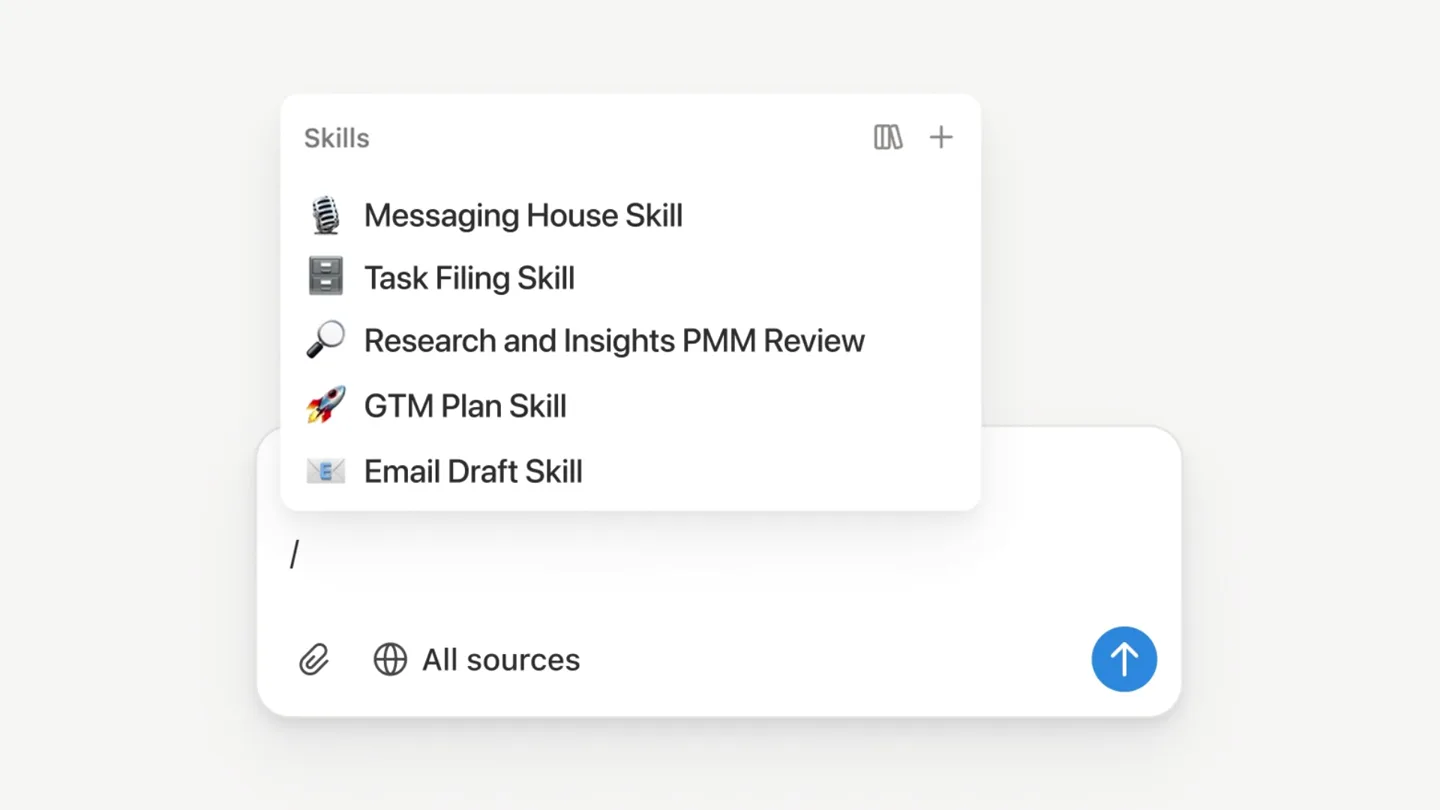
- Turn your best work into a /ski Skills Messaging House Skill Task Filing Skill Research and Insights PMM Review GTM Plan Skill Email Draft Skill / Research and Insights PMM Review / Email Draft Skill All sources Read Email Draft Skill > Opened Gmail > Pulled context from workspace > Drafting replies to 3 emails
- Camera
- Static, centered text, then close-up on UI elements with mouse cursor interaction.
- Motion
- Text reveal with partial word completion, UI element highlighting, and cursor interaction for demonstration.
Product Reveal
Share Skills with Your Team
“(No spoken dialogue — Upbeat, jazzy swing music with walking bass, brush snare, and saxophone melody)”
- On screen
- Share the ski Share the skill with your team Edited 17h ago Share Publish Email or group, separated by commas Share Kai (You) kai@acmein.co Seth seth@acmeinc.co Monthly Business Description Use this skill when you need to reporting pack, including upda questions for human review. This skill is best for repeatable spreadsheet, a prior completed example, and a clear review owner. More people may have access General access Only people invited Advanced 1 Control agent access in Advanced Copy link
- Camera
- Static, centered text, then close-up on UI elements demonstrating sharing functionality.
- Motion
- Text reveal with word completion, UI overlay animations, and cursor interaction.
Feature Teaser
Local Agent Integration
“(No spoken dialogue — Upbeat, jazzy swing music with walking bass, brush snare, and saxophone melody)”
- On screen
- Use skills with local ag Code Review Assistant This page is being used as an AI skill. Learn more. Try now This skill is best for repeatable reporting workflows where the team already has a source spreadsheet, a prior completed example, and a clear review owner. When to use this skill Use this skill when the user asks to: Create or update a monthly business review Actualize a recurring report Prepare budget vs. actual commentary Refresh a metrics pack from a prior period Turn a finance, ops, sales, or growth reporting SOP into a draft deliverable Do not use this skill for one-off analysis with no prior example, unclear source data, or reporting Share Use automatically Move this skill into a skills database to allow it to be used automatically. Show skill Download for local agents Disable for me Unset page as skill Claude Code Codex Cursor Gemini Grok Build Download for default local agent Default download settings Downloaded to Claude Code, Codex, Cursor, Gemini, Grok Build
- Camera
- Static, centered text, then close-up on UI elements showing download options and confirmation.
- Motion
- Text reveal with word completion, dropdown menu animations, and toast notification.
Call to Action
Notion Agent in Action
“(No spoken dialogue — Upbeat, jazzy swing music with walking bass, brush snare, and saxophone melody)”
- On screen
- > implement {feature} gpt-5.5 xhigh ~ > /code-review-ass /code-review-assistant Produces a structured, actionable code review: correctness, security, performance, tests, API/design, and style, with priorit... → /code-review-assistant please review my most rece Composer 2.5 Fast > /code-review-assistant please review my most recent changes workspace (/directory) sandbox no sandbox N Notion
- Camera
- Static, centered text, then terminal-like interface with typing animation, concluding with a brand logo reveal.
- Motion
- Typing animation, command-line interface simulation, and a clean logo fade-in.
Motion design primitives
Synthesizable in Remotion · key components of the notion-skills-launch-template template.
ProgressiveTextReveal
Text appears character by character, often with a partial word completion effect, mimicking typing or a thought process.
+ Code construction recipe
Use `interpolate` on `opacity` and `clipPath` or `width` properties, synchronized with `delay` for character-by-character reveal. Implement a `spring` animation for the cursor blink.
UIDropdownInteraction
UI elements like dropdowns or menus animate into view with a subtle scale and fade, responding to a mouse cursor hover or click.
+ Code construction recipe
Utilize `spring` for `scale` and `opacity` transitions on menu items. Implement `sequence` to animate items in order. Mouse cursor movement can be simulated with `AbsoluteFill` and `Img` components.
TerminalCommandSimulation
A command-line interface is simulated with text input, auto-completion suggestions, and command execution feedback.
+ Code construction recipe
Combine `ProgressiveTextReveal` for typing, `interpolate` for background highlight on suggestions, and `spring` for subtle pop-in of results or status messages. Use `Line` components for the cursor.
Style DNA & aesthetic system
Visual aesthetic
Typography
Motion
Special effects
Pacing & rhythm
Conceptual story rhythm
- 1
The Skill Concept
Purpose. Introduce the core product concept: turning work into reusable 'skills'.
Execution. Progressive text reveal of 'Turn your best work into a /skill', followed by a UI demonstration of selecting and applying a skill.
- 2
Team Collaboration
Purpose. Showcase the collaborative aspect of sharing these skills within a team.
Execution. Text reveal 'Share the skill with your team', followed by a UI demonstration of sharing a Notion page (skill) with team members.
- 3
Agent Integration
Purpose. Highlight the interoperability with external AI agents.
Execution. Text reveal 'Use skills with local agents', followed by a UI demonstration of downloading a skill for various local AI agents.
- 4
Practical Application
Purpose. Demonstrate a skill being used in a real-world, terminal-like scenario.
Execution. A simulated terminal interface showing a 'code-review-assistant' skill being invoked and executed, concluding with the Notion logo.
Remix in Animatiq Studio
Master remix prompt · agent-ready
Sample remix
Objective
Launch a new AI-powered project management tool that automates task creation and resource allocation based on project briefs.How the recipe adapts
The ProgressiveTextReveal primitive would introduce the concept of 'Automate your workflow with AI blueprints'. UIDropdownInteraction would demonstrate selecting an AI blueprint from a menu. TerminalCommandSimulation would show a project brief being processed and tasks being automatically generated in a command-line style interface, concluding with the product's logo.Remix blueprint · notion-skills-launch-template
Scene durations (4 scenes, 36.8s)
Key Remotion components
Related Productivity Product Launches
Explore all Productivity launches →
Anthropic introduces Cowork, which brings the Claude Code way of delegating tasks to everyday, non-technical work.

Don't type, just speak. Flawless voice-to-text across every app at 240 WPM.

One workspace for knowledge scattered across Slack, email, Docs, and Notion. Connect your tools and build apps and agents that stay live with your data.