
Oh-My-Hermes · Launch Video Breakdown: Hook, Pacing & Motion Design
An open-source intelligence plugin for Hermes Agent, with over 110 engineering skills.
Scene-by-scene timeline & spoken transcript
The Hook
Introducing Hermes Agent
“(No spoken dialogue — Pizzicato synths and deep sub-bass create a rhythmic, calm energy.)”
- On screen
- HERMES AGENT
- Camera
- Static wide shot of a desktop environment, focusing on the product name.
- Motion
- Subtle background animation within the desktop UI, primarily text appearing and disappearing.
Product Reveal
Multi-Platform Integration
“(No spoken dialogue — Pizzicato synths and deep sub-bass continue, maintaining a consistent, calm energy.)”
- On screen
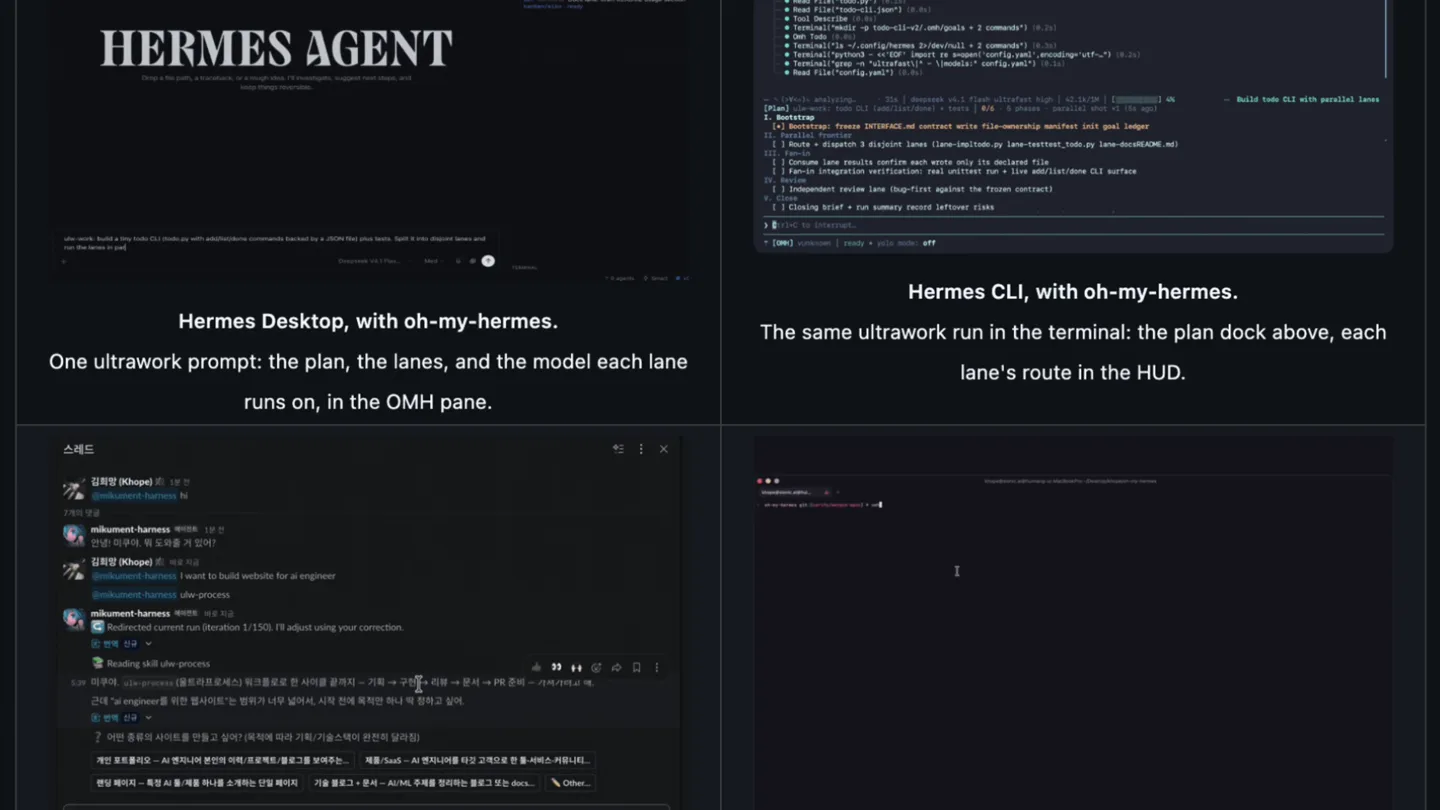
- Hermes Desktop, with oh-my-hermes. One ultrawork prompt: the plan, the lanes, and the model each lane runs on, in the OMH pane. Hermes CLI, with oh-my-hermes. The same ultrawork run in the terminal: the plan dock above, each lane's route in the HUD. Hermes messenger app, with oh-my-hermes. Ask in a thread; the run reports back there. omh setup , one command. Installs the workflows and connects them to Hermes.
- Camera
- Static shot, displaying a 2x2 grid of different application interfaces.
- Motion
- Text typing animation within each application window, simulating real-time interaction.
Feature Teaser
Real-time Workflow Execution
“(No spoken dialogue — Pizzicato synths and deep sub-bass continue, maintaining a consistent, calm energy.)”
- On screen
- Hermes Desktop, with oh-my-hermes. One ultrawork prompt: the plan, the lanes, and the model each lane runs on, in the OMH pane. Hermes CLI, with oh-my-hermes. The same ultrawork run in the terminal: the plan dock above, each lane's route in the HUD. Hermes messenger app, with oh-my-hermes. Ask in a thread; the run reports back there. omh setup , one command. Installs the workflows and connects them to Hermes.
- Camera
- Static shot, maintaining the 2x2 grid view.
- Motion
- Continued text typing and command execution animations across all four screens, showing progress.
Call to Action
Seamless Integration & Control
“(No spoken dialogue — Pizzicato synths and deep sub-bass continue, maintaining a consistent, calm energy.)”
- On screen
- Hermes Desktop, with oh-my-hermes. One ultrawork prompt: the plan, the lanes, and the model each lane runs on, in the OMH pane. Hermes CLI, with oh-my-hermes. The same ultrawork run in the terminal: the plan dock above, each lane's route in the HUD. Hermes messenger app, with oh-my-hermes. Ask in a thread; the run reports back there. omh setup , one command. Installs the workflows and connects them to Hermes.
- Camera
- Static shot, maintaining the 2x2 grid view.
- Motion
- Finalizing text animations and displaying results within the various application interfaces.
Motion design primitives
Synthesizable in Remotion · key components of the multi-screen-dev-showcase template.
TerminalTypewriter
Text appears character by character, simulating real-time typing in a terminal or chat interface. Lines of code or dialogue populate sequentially.
+ Code construction recipe
Utilize Remotion's 'Sequence' and 'interpolate' functions to reveal text characters over time. Apply a monospace font and a subtle blinking cursor effect using a 'spring' animation for realism.
MultiScreenGridDisplay
Four distinct application interfaces are presented simultaneously in a 2x2 grid layout, each operating independently but contributing to a unified narrative.
+ Code construction recipe
Implement using Remotion's 'AbsoluteFill' and 'Div' components with CSS Grid or Flexbox for layout. Each grid cell can host a separate 'Sequence' for its specific content and animations.
CodeHighlightScroll
Sections of code or text within a terminal window are highlighted or scrolled, drawing attention to specific commands or output.
+ Code construction recipe
Use Remotion's 'interpolate' to animate the 'background-color' or 'transform: translateY' property of text lines. Combine with 'Sequence' to control the timing of highlights and scrolls.
Style DNA & aesthetic system
Visual aesthetic
Typography
Motion
Special effects
Pacing & rhythm
Conceptual story rhythm
- 1
The Introduction
Purpose. Establish the product name and its core identity.
Execution. A static shot of the product logo 'HERMES AGENT' on a dark background, setting a serious and technical tone.
- 2
The Ecosystem Overview
Purpose. Showcase the product's versatility across different platforms and interfaces.
Execution. A 2x2 grid displaying Hermes Agent running on desktop, CLI, messenger app, and during setup, each with active typing animations.
- 3
The Workflow in Action
Purpose. Demonstrate the product's real-time functionality and problem-solving capabilities.
Execution. Continued animation within the 2x2 grid, showing commands being executed, code being processed, and results appearing dynamically.
- 4
The Integrated Solution
Purpose. Reinforce the seamless integration and comprehensive nature of the product.
Execution. The 2x2 grid remains, with all interfaces actively displaying completed or ongoing tasks, highlighting the product's end-to-end solution.
Remix in Animatiq Studio
Master remix prompt · agent-ready
Sample remix
Objective
Launch a new AI-powered data analytics platform called 'QuantumFlow'.How the recipe adapts
The 2x2 grid layout will be used to display QuantumFlow's dashboard, query editor, real-time data stream, and integration panel. The TerminalTypewriter primitive will animate data queries and results in the query editor, while CodeHighlightScroll will draw attention to key metrics on the dashboard. The overall dark-mode aesthetic and calm electronic soundtrack will be retained to convey sophistication and precision, suitable for a data analytics tool.Remix blueprint · multi-screen-dev-showcase
Scene durations (4 scenes, 13s)
Key Remotion components
Related Developer Tools Product Launches
Explore all Developer Tools launches →
Agentic CLI for coding, building apps, and automating workflows.

New in Claude Code: your sessions can now message each other. Tell Claude to send a summary (not your history or files), and the other session picks it up mid-task.

Meet Qwen3.8-Max: A New Bar for Coding and Cowork. https://t.co/mJaA8vr6xT