
Spaces · Launch Video Breakdown: Hook, Pacing & Motion Design
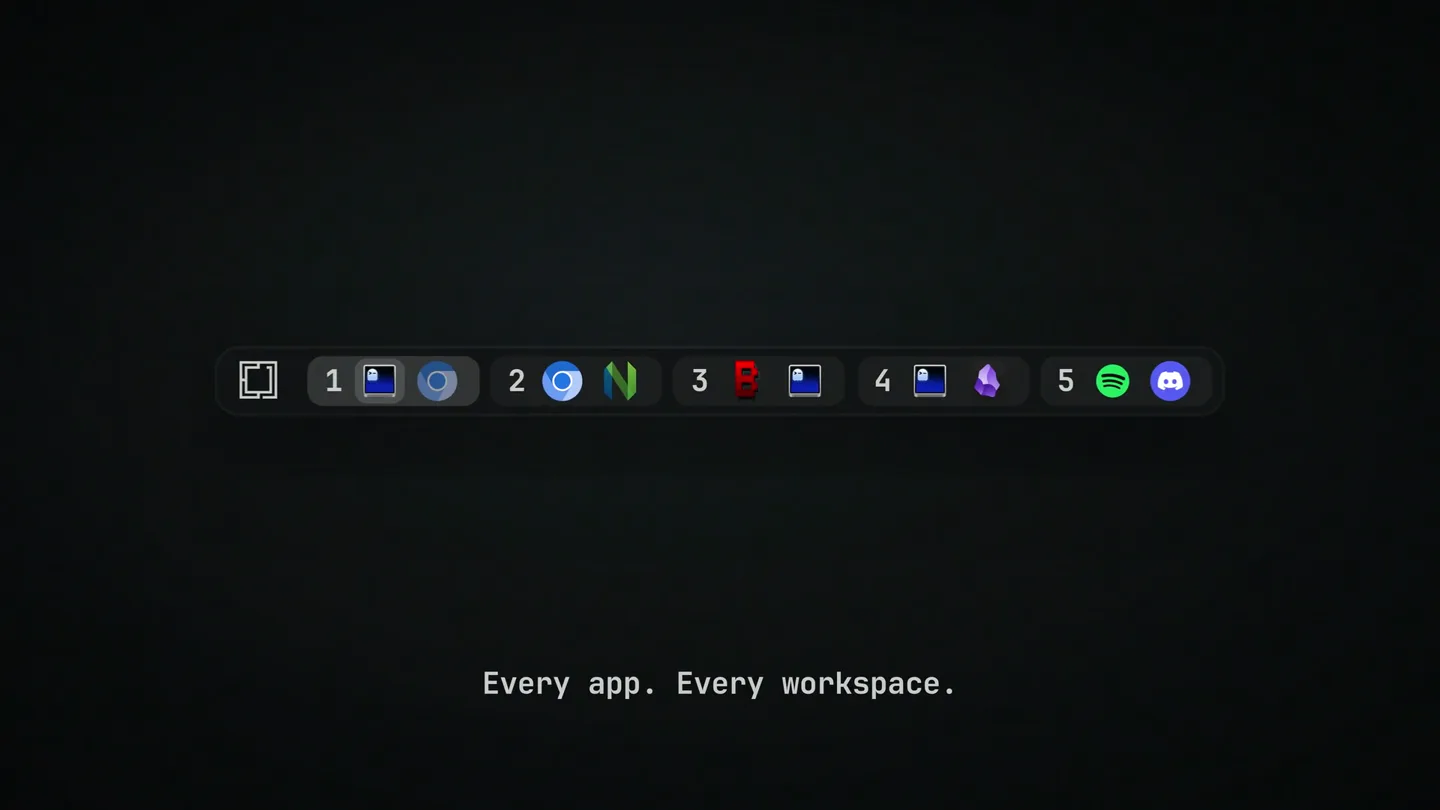
Spaces is a plugin for Omarchy that shows the opened app in every workspace, with a live preview on hover. Terminals running Claude Code get a badge, a spinner while the agent works, and a pulsing mark when it needs input.
Scene-by-scene timeline & spoken transcript
The Hook
Workspace Overview
“(No spoken dialogue — A high-energy audio riser with a 'whoosh' effect occurs, followed by a bright, shimmering synth impact.)”
- On screen
- (No on-screen text)
- Camera
- Static, centered on the workspace bar.
- Motion
- Subtle glow and highlight animation on the active workspace icon.
Product Reveal
Every App, Every Workspace
“(No spoken dialogue — A subtle riser leads into a second, more pronounced synth impact.)”
- On screen
- Every app. Every workspace.
- Camera
- Static, centered on the workspace bar, then text fades in below.
- Motion
- Icons for open applications animate into view within the workspace bar. Text fades in with a slight bounce.
Feature Teaser
Live Preview on Hover
“(No spoken dialogue — The sustained, evolving pad sound with a prominent sub-bass layer continues.)”
- On screen
- Workspace 2 2 WINDOWS OMARCHY Beautiful, fun & agentic Linux by DMR Click a window to jump to it Peek before you jump.
- Camera
- Static, then zooms out slightly to reveal the preview window, then quickly zooms back in on the workspace bar.
- Motion
- A detailed live preview window animates in from the top, showing application content. The window then quickly animates out with a blur effect.
Feature Teaser
Agent Status Indicators
“(No spoken dialogue — The sustained, evolving pad sound with a prominent sub-bass layer continues.)”
- On screen
- Your agent is working. Your agent needs you.
- Camera
- Static, focused on the workspace bar, specifically on workspace 4.
- Motion
- A spinner animation appears over the Claude Code terminal icon, followed by a pulsing mark. Text fades in and out below.
Call to Action
Spaces for Omarchy
“(No spoken dialogue — A final, sustained synth pad with a gentle decay concludes the track.)”
- On screen
- Spaces . for Omarchy github.com/tornikegomareli/omarchy-spaces
- Camera
- Static, centered on the screen, then zooms out slightly to reveal the full product name and call to action.
- Motion
- The workspace bar shrinks and moves to the bottom, while the product name 'Spaces' animates in with a subtle dot. Call to action text fades in.
Motion design primitives
Synthesizable in Remotion · key components of the dev-tool-minimalist-reveal template.
WorkspaceBarReveal
The workspace bar appears with a subtle glow, and application icons animate into their respective workspace slots with a quick, bouncy motion.
+ Code construction recipe
Use `spring()` for icon entry animation with a slight overshoot. Implement a `linear-gradient` or `radial-gradient` for the bar's subtle glow, animating its opacity and position. Icons can use `interpolate()` for scaling and translation.
LivePreviewWindow
A detailed application preview window slides in from the top with a slight bounce, displaying dynamic content, then quickly blurs and slides out.
+ Code construction recipe
Employ `spring()` for the window's entry and exit, with `translateY` and `scale`. Apply an SVG `feGaussianBlur` filter for the blur effect during exit, animating its `stdDeviation` property. Content within the window can be a `Canvas` or `Image` component.
AgentStatusIndicator
A circular spinner animates over an application icon, followed by a pulsing dot that changes color, indicating agent activity and input needs.
+ Code construction recipe
Use `interpolate()` for the spinner's `rotate` property. The pulsing dot can be a `Circle` component animating its `scale` and `opacity` with `spring()` or `loop()` for a continuous pulse. Color changes can be handled with `interpolateColor()`.
Style DNA & aesthetic system
Visual aesthetic
Typography
Motion
Special effects
Pacing & rhythm
Conceptual story rhythm
- 1
Initial Glimpse
Purpose. Introduce the core UI element (workspace bar) and hint at its functionality.
Execution. The workspace bar appears, and a single workspace is highlighted, setting an anticipatory tone.
- 2
Feature Unveiling
Purpose. Demonstrate the primary benefit: visibility of all apps across workspaces.
Execution. Application icons populate the workspace bar, accompanied by a clear, concise tagline.
- 3
Interactive Detail
Purpose. Showcase advanced features like live previews and agent status indicators.
Execution. A detailed preview window animates in, followed by dynamic status badges on specific app icons.
- 4
Product Identity
Purpose. Conclude with the product name and call to action.
Execution. The UI elements gracefully rearrange to reveal the product name and a GitHub link.
Remix in Animatiq Studio
Master remix prompt · agent-ready
Sample remix
Objective
A new CLI tool called 'FlowState' that visualizes active processes and their resource consumption across multiple server instances.How the recipe adapts
The workspace bar would be adapted into a 'Server Instance Bar' at the top, showing active server IDs. Instead of app icons, small 'process bubbles' would appear within each server slot, indicating running tasks. Hovering over a server ID would trigger a 'Live Resource Monitor' window to slide in, displaying CPU/RAM usage graphs and log snippets, similar to the app preview. Critical process alerts would use the 'Agent Status Indicator' primitive, showing a pulsing red dot over a server ID when resource thresholds are exceeded. The final screen would display 'FlowState.' with a link to its documentation.Remix blueprint · dev-tool-minimalist-reveal
Scene durations (4 scenes, 10s)
Key Remotion components
Related Developer Tools Product Launches
Explore all Developer Tools launches →
Agentic CLI for coding, building apps, and automating workflows.

New in Claude Code: your sessions can now message each other. Tell Claude to send a summary (not your history or files), and the other session picks it up mid-task.

Meet Qwen3.8-Max: A New Bar for Coding and Cowork. https://t.co/mJaA8vr6xT