
kyzo · Launch Video Breakdown: Hook, Pacing & Motion Design
One is a toolbar to talk with your agents. It connects to Codex and Claude Code, shows agent statuses, sees your screen, and routes messages.
Scene-by-scene timeline & spoken transcript
The Hook
Introducing the Agent Toolbar
“(No spoken dialogue — The track begins with a sustained, ethereal synth pad, gradually building in intensity. At [00:01], a subtle electronic 'click' sound is introduced, followed by a deeper, resonant 'thump' at [00:02].)”
- On screen
- Listening... Thinking... (Esc or tap the mic to cancel) Talking to main agent Type a command... Release the new version of one. Screenshot a region, then ask about it Sent to one-33 to handle the new release request.
- Camera
- Static wide shot of a desktop environment. The 'One' toolbar appears from the right edge, expanding to reveal a chat interface. A browser window slides in from the left.
- Motion
- Smooth, synchronized UI element reveals with subtle easing. The toolbar and browser window animate in from off-screen, creating a clean, focused introduction.
Product Reveal
Seamless Agent Interaction & Task Management
“(No spoken dialogue — The ambient synth pad continues, maintaining a calm, focused atmosphere.)”
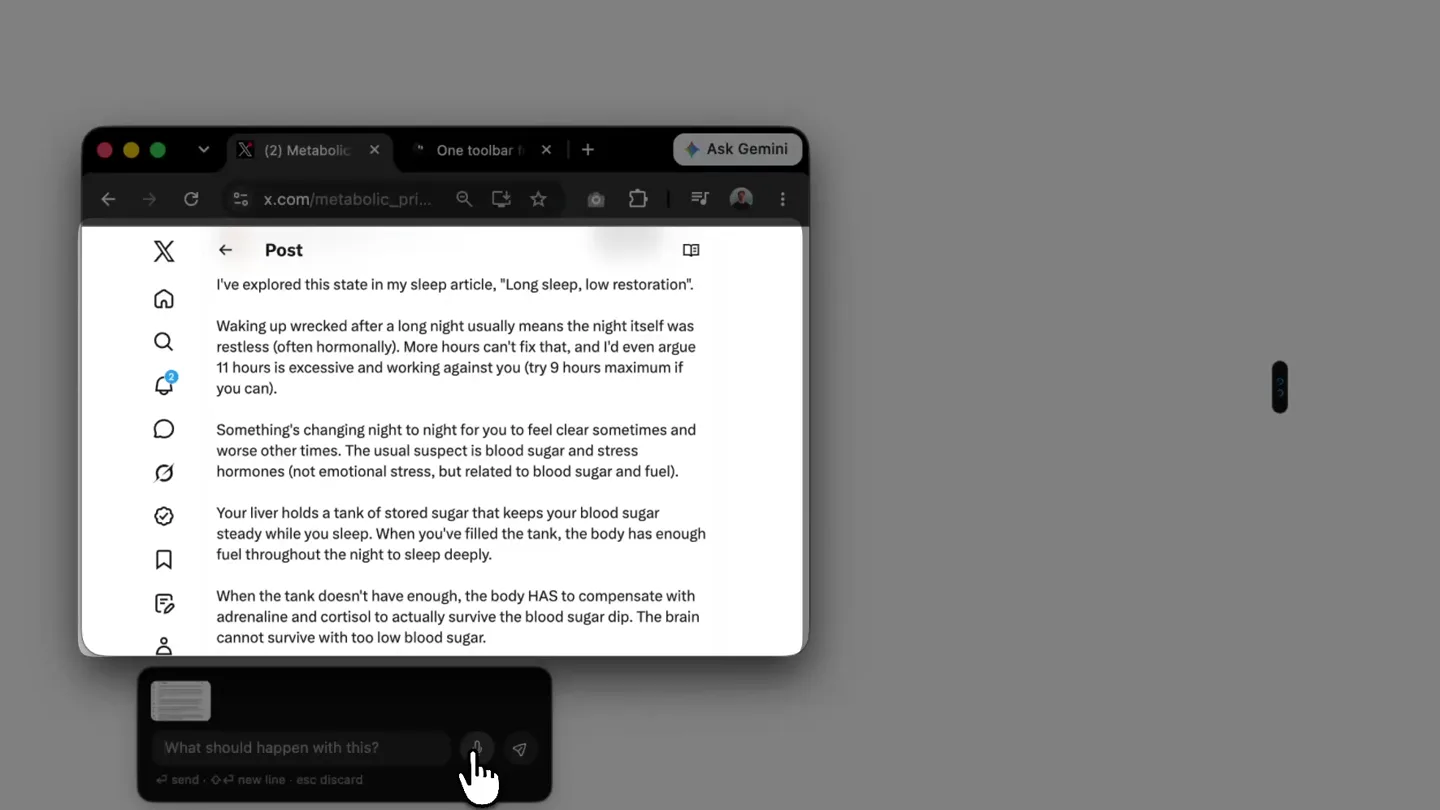
- On screen
- add this to my notes on sleep remembered (Projects): Life notes — "Long sleep, low restoration": waking wrecked after a long night suggests the night was restless; consider keeping sleep to ~9 hours; night-to-night changes may relate to blood sugar and stress hormones; liver glycogen ("tank") keeps blood sugar steady, and low fuel triggers adrenaline/cortisol compensation. SLAGNET Run Bash Command The agent runs a bash command... LIFE Find Affordable Hairdr... The user asks for an inexpensive hairdresser. ONE Destroy Kumo Fly Apps The user authorized deleti... Check Release State The user asks to release a... Redraw Open Graph I... The user asked to commit... Assess Chronic Mornin... The user asks whether yes... Dock Controls Update The user asked for app rel... Ship App Release Find More Removable Items Tell me which of those to remove and I'll do it. A teammate session asked me to find more removable items. I'll do a broader survey and report candidates without deleting anything. Message Find More Start recording Reply to Find Affordable open chrome with hairdresser website/gmap What should happen with add this guy as potential investor in my obsidian Sent to the Life agent in the ChatGPT app. You may need to reopen that thread to see it. 1 screenshot attached The ChatGPT app doesn't refresh live: reopen the
- Camera
- Primarily static, with slight camera pushes and pulls to reframe the active UI elements. The focus shifts between the browser, the 'One' toolbar, and various pop-up chat windows.
- Motion
- Layered UI animations. New chat windows and tooltips slide in and out with smooth transitions. Cursor movements are precise and deliberate, guiding the viewer's eye. Text typing and message sending are animated in real-time.
Feature Teaser
Advanced Agent Capabilities & Screen Integration
“(No spoken dialogue — The synth pad continues. At [00:22] and [00:23], the subtle electronic 'click' and resonant 'thump' sounds repeat, marking transitions or key actions.)”
- On screen
- Toolkit for talking to your agents in terminal Download for Mac macOS 10.15+ Apple Silicon Works with I've built this and I want you to try it Change the colour of this button to blue. Download for Mac @one: The background colors are wrong Make this website get one, uh, more scalable on mobile. Got it—I'll pass that straight to the most relevant agent working on the One project. Start recording Screenshot a region, then ask about it you can do the ting! believ in yourslef
- Camera
- Dynamic camera movements, including zooms into specific UI elements and pans across the desktop to highlight different interactions. The perspective occasionally shifts to a slightly closer view of the 'One' toolbar.
- Motion
- Zoom and pan animations are used to direct attention. UI elements like the 'One' toolbar expand and contract, and new windows appear with a subtle 'pop' effect, indicating responsiveness and interactivity. Cursor interactions are emphasized.
Call to Action
Empowering Developers with kyzo
“(No spoken dialogue — A high-energy riser effect starts at [00:47] and culminates in a powerful sub-bass drop/impact at [00:49], followed by a sustained, deep synth note that fades out.)”
- On screen
- kyzo One is a toolbar to talk with your agents. It connects to Codex and Claude Code, shows agent statuses, sees your screen, and routes messages. getone.one
- Camera
- The camera pulls back to reveal the full desktop, then transitions to a clean, abstract background. The 'kyzo' logo and product tagline animate into view, followed by the call to action.
- Motion
- Dramatic reveal of the brand name and tagline. Text animates in with a subtle glow and scale effect. The final call to action appears with a clean, confident fade-in. The overall pacing accelerates towards the end, matching the audio riser.
Motion design primitives
Synthesizable in Remotion · key components of the kyzo-devtool-launch template.
ToolbarChatReveal
A vertical toolbar slides in from the right edge of the screen, then expands horizontally to reveal a chat interface. Subsequent chat bubbles and input fields animate in sequentially.
+ Code construction recipe
Use `spring` for the initial slide-in and horizontal expansion of the toolbar. Animate `opacity` and `y-translate` for individual chat elements using `sequence` and `delay` to create a staggered, conversational flow. Utilize `interpolate` for smooth cursor movement.
LayeredWindowStack
Multiple application windows (browser, terminal, chat) appear and overlap on the desktop, with the active window brought to the foreground. Windows can slide, scale, or fade into view.
+ Code construction recipe
Implement `spring` for window entry animations (e.g., `x-translate`, `y-translate`, `scale`). Manage `z-index` to control layering. Use `delay` and `sequence` to orchestrate the appearance of multiple windows, simulating a multi-tasking environment.
ContextualTooltipHighlight
Small, informative tooltips or contextual menus appear near the cursor or specific UI elements, often accompanied by a subtle highlight or glow on the target element.
+ Code construction recipe
Animate `opacity` and `scale` for tooltip appearance using `spring` with a low damping ratio for a 'pop' effect. Apply a temporary `box-shadow` or `border` animation to the target UI element to draw attention, using `interpolate` for smooth color/size transitions.
Style DNA & aesthetic system
Visual aesthetic
Typography
Motion
Special effects
Pacing & rhythm
Conceptual story rhythm
- 1
The Agent Awakens
Purpose. Introduce the core product (the 'One' toolbar) and its immediate utility in a developer's workflow.
Execution. The toolbar slides in, revealing its chat interface. A browser window appears, setting the context for agent interaction.
- 2
Workflow Orchestration
Purpose. Demonstrate the 'One' toolbar's ability to manage diverse tasks, from code deployment to note-taking, across multiple applications.
Execution. Rapid-fire demonstrations of various agent commands: sending release requests, adding notes, running bash commands, and managing tasks, with windows appearing and disappearing.
- 3
Intelligent Integration
Purpose. Showcase the advanced capabilities, such as screen interaction, contextual understanding, and seamless integration with other tools.
Execution. The toolbar interacts with web content (e.g., changing button colors, analyzing images), demonstrating its 'seeing' and 'understanding' capabilities.
- 4
The kyzo Vision
Purpose. Conclude with the brand identity and a clear call to action, reinforcing the product's value proposition.
Execution. A grand reveal of the 'kyzo' brand, tagline, and website, accompanied by a powerful audio climax, leaving a lasting impression.
Remix in Animatiq Studio
Master remix prompt · agent-ready
Sample remix
Objective
A new AI-powered code refactoring assistant called 'SyntaxFlow'.How the recipe adapts
The 'ToolbarChatReveal' primitive would be adapted for SyntaxFlow's IDE-integrated sidebar, showing code suggestions and refactoring options. 'LayeredWindowStack' would demonstrate SyntaxFlow interacting with multiple code files and a terminal for running tests. 'ContextualTooltipHighlight' would be used to show inline code suggestions and explanations. The color palette would shift to a dark mode theme with vibrant accent colors for code highlighting. The final reveal would feature the SyntaxFlow logo animating with a similar glow and scale effect, accompanied by a powerful synth-driven audio climax.Remix blueprint · kyzo-devtool-launch
Scene durations (4 scenes, 52.9s)
Key Remotion components
Related Developer Tools Product Launches
Explore all Developer Tools launches →
Agentic CLI for coding, building apps, and automating workflows.

New in Claude Code: your sessions can now message each other. Tell Claude to send a summary (not your history or files), and the other session picks it up mid-task.

Meet Qwen3.8-Max: A New Bar for Coding and Cowork. https://t.co/mJaA8vr6xT