
Onlight · Launch Video Breakdown: Hook, Pacing & Motion Design
Onlight is a native macOS menu bar app for controlling Philips Hue lights. It is free to download.
Scene-by-scene timeline & spoken transcript
The Hook
Effortless Menu Bar Access
“(No spoken dialogue — Ambient visual with subtle UI interaction sounds implied.)”
- On screen
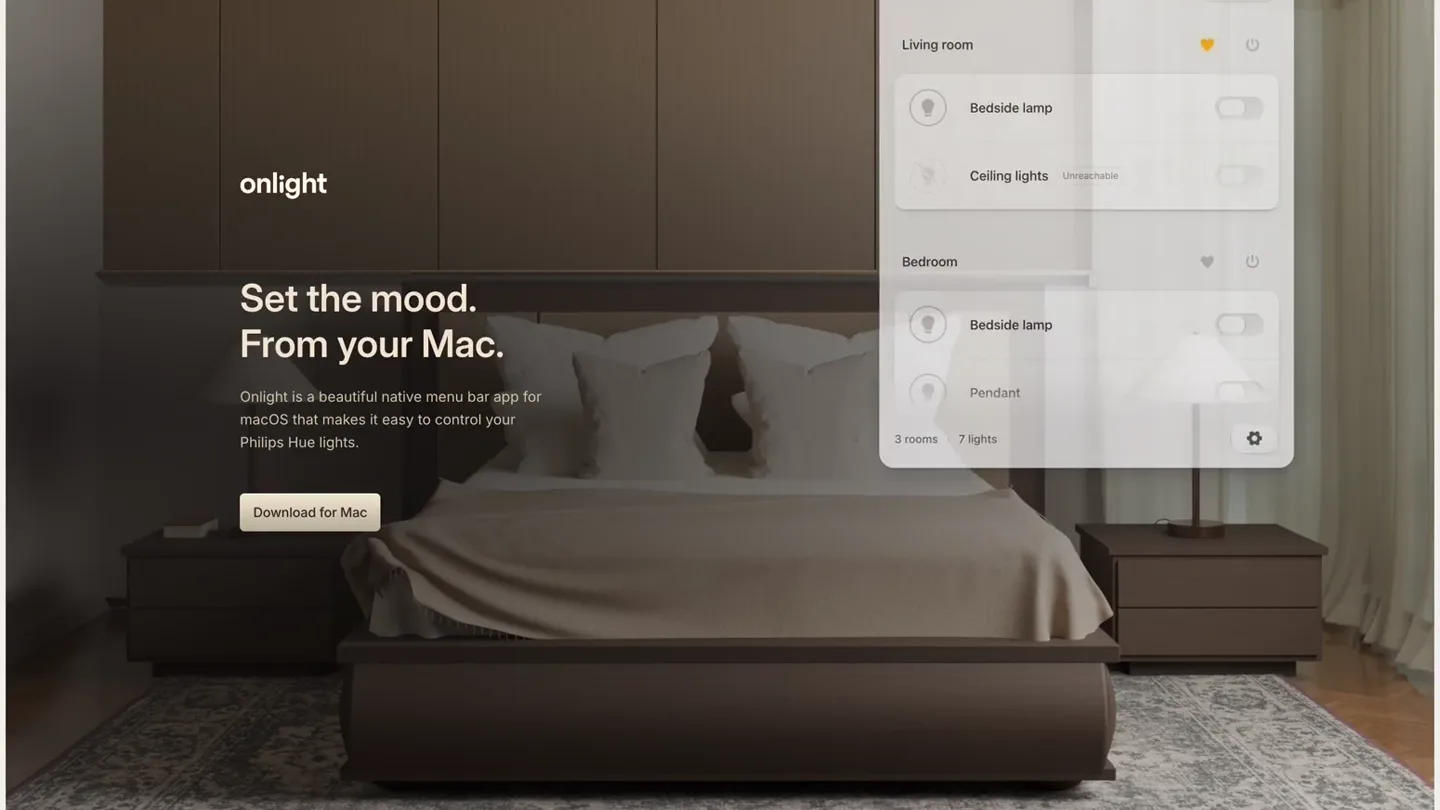
- onlight File Edit View Window Help Set the mood. From your Mac. Onlight is a beautiful native menu bar app for macOS that makes it easy to control your Philips Hue lights. Download for Mac Mon Jun 10 9:41 AM All on Living room Bedside lamp Ceiling lights Unreachable Bedroom Bedside lamp Pendant 3 rooms 7 lights
- Camera
- Static wide shot of a bedroom with a macOS desktop overlay. The camera remains fixed.
- Motion
- UI element reveal (menu bar icon click) with a smooth fade-in and scale-up of the dropdown panel.
Product Reveal
Intuitive Light Control
“(No spoken dialogue — Ambient visual with subtle UI interaction sounds implied.)”
- On screen
- onlight File Edit View Window Help Your room. In a new light. Onlight is a beautiful native menu bar app for macOS that makes it easy to control your Philips Hue lights. Download for Mac Mon Jun 10 9:41 AM All off Living room Bedside lamp Ceiling lights Unreachable Bedroom Bedside lamp Pendant 3 rooms 7 lights About onlight Check for updates Preferences... Start at Login Hide unavailable devices Reset connection... Quit
- Camera
- Static wide shot, maintaining the same framing as the previous scene.
- Motion
- Toggle switch animation (on/off) for a light, followed by a settings gear icon click revealing a context menu with a subtle slide-up.
Feature Teaser
Customizable Shortcuts & Colors
“(No spoken dialogue — Ambient visual with subtle UI interaction sounds implied.)”
- On screen
- onlight File Edit View Window Help Set the mood. From your Mac. Onlight is a beautiful native menu bar app for macOS that makes it easy to control your Philips Hue lights. Download for Mac Mon Jun 10 9:41 AM < onlight Keyboard shortcuts Show or hide app Open the menu bar panel. Toggle all lights Turn on or off all lights. Record Shortcut Toggle color All off Living room Bedside lamp Ceiling lights Unreachable Bedroom Bedside lamp Pendant 3 rooms 7 lights
- Camera
- Static wide shot, consistent framing.
- Motion
- Panel transition (slide-left) to reveal a new settings view. Color picker interaction with a highlight animation.
Call to Action
Seamless Integration & Download
“(No spoken dialogue — Ambient visual with subtle UI interaction sounds implied.)”
- On screen
- onlight File Edit View Window Help Your room. In a new light. Onlight is a beautiful native menu bar app for macOS that makes it easy to control your Philips Hue lights. Download for Mac Mon Jun 10 9:41 AM All on Living room Bedside lamp Ceiling lights Unreachable Bedroom Bedside lamp Pendant 3 rooms 7 lights < onlight Keyboard shortcuts Show or hide app Open the menu bar panel. Toggle all lights Turn on or off all lights. Record Shortcut Toggle color
- Camera
- Static wide shot. The camera remains fixed throughout, emphasizing the UI interaction within the real-world context.
- Motion
- Color change animation on the light, followed by a panel transition (slide-right) back to the main control view. Final UI element dismissal (fade-out and scale-down).
Motion design primitives
Synthesizable in Remotion · key components of the macos-menubar-app-showcase template.
MenuBarDropdownReveal
A menu bar icon is clicked, and a rectangular dropdown panel smoothly fades in and scales up from the icon's position, revealing UI elements within.
+ Code construction recipe
Use `spring()` for `opacity` and `scale` properties. Position the dropdown using `absolute` positioning relative to the menu bar icon. Implement a `from` and `to` state for scale (e.g., 0.8 to 1) and opacity (0 to 1).
ToggleSwitchInteraction
A toggle switch animates from an 'off' to 'on' state, accompanied by a visual change in the associated light icon (e.g., dim to bright, grey to colored).
+ Code construction recipe
Animate the `x` position of the toggle's thumb using `interpolate()` or `spring()`. Simultaneously, animate the `backgroundColor` of the track and the `fill` color of the light icon. Use `delay` for sequential light changes.
PanelSlideTransition
A UI panel slides horizontally (left or right) to reveal a new set of controls or settings, creating a sense of depth and navigation.
+ Code construction recipe
Implement two components, one for the outgoing panel and one for the incoming. Animate the `translateX` property of both using `spring()` or `ease-in-out` interpolation. Ensure the incoming panel starts off-screen and slides into view as the outgoing panel slides out.
Style DNA & aesthetic system
Visual aesthetic
Typography
Motion
Special effects
Pacing & rhythm
Conceptual story rhythm
- 1
Contextual Introduction
Purpose. Establish the product's environment and core value proposition immediately.
Execution. A wide shot of a cozy bedroom with the macOS desktop overlay, showing the app's name and tagline.
- 2
Core Functionality Demonstration
Purpose. Showcase the primary use case: controlling lights from the menu bar.
Execution. Clicking the menu bar icon, revealing the dropdown, and toggling a light on/off.
- 3
Advanced Features & Customization
Purpose. Highlight additional capabilities like settings and color control.
Execution. Navigating to settings, demonstrating color toggling, and showing keyboard shortcuts.
- 4
Seamless Integration & Call to Action
Purpose. Reinforce the product's native feel and guide users to download.
Execution. Returning to the main control panel, demonstrating another light change, and ending on the initial landing page with the 'Download for Mac' button.
Remix in Animatiq Studio
Master remix prompt · agent-ready
Sample remix
Objective
Launch a new macOS menu bar app, 'TaskFlow', for project management.How the recipe adapts
The static wide shot would be a modern home office. The MenuBarDropdownReveal primitive would show TaskFlow's task list. ToggleSwitchInteraction would be adapted for marking tasks complete. PanelSlideTransition would show switching between 'Today's Tasks' and 'Upcoming Projects' views. The color palette would shift to a professional, muted scheme, and typography would remain a clean sans-serif. The pacing would stay slow and deliberate to emphasize ease of use.Remix blueprint · macos-menubar-app-showcase
Scene durations (4 scenes, 27s)
Key Remotion components
Related Productivity Product Launches
Explore all Productivity launches →
Don't type, just speak. Flawless voice-to-text across every app at 240 WPM.

One workspace for knowledge scattered across Slack, email, Docs, and Notion. Connect your tools and build apps and agents that stay live with your data.

Notion positions itself as the backbone of your dock — a brand film of the Notion icon among everyday apps, ending on “Works with everything.”