
Benjamin Shafii · Launch Video Breakdown: Hook, Pacing & Motion Design
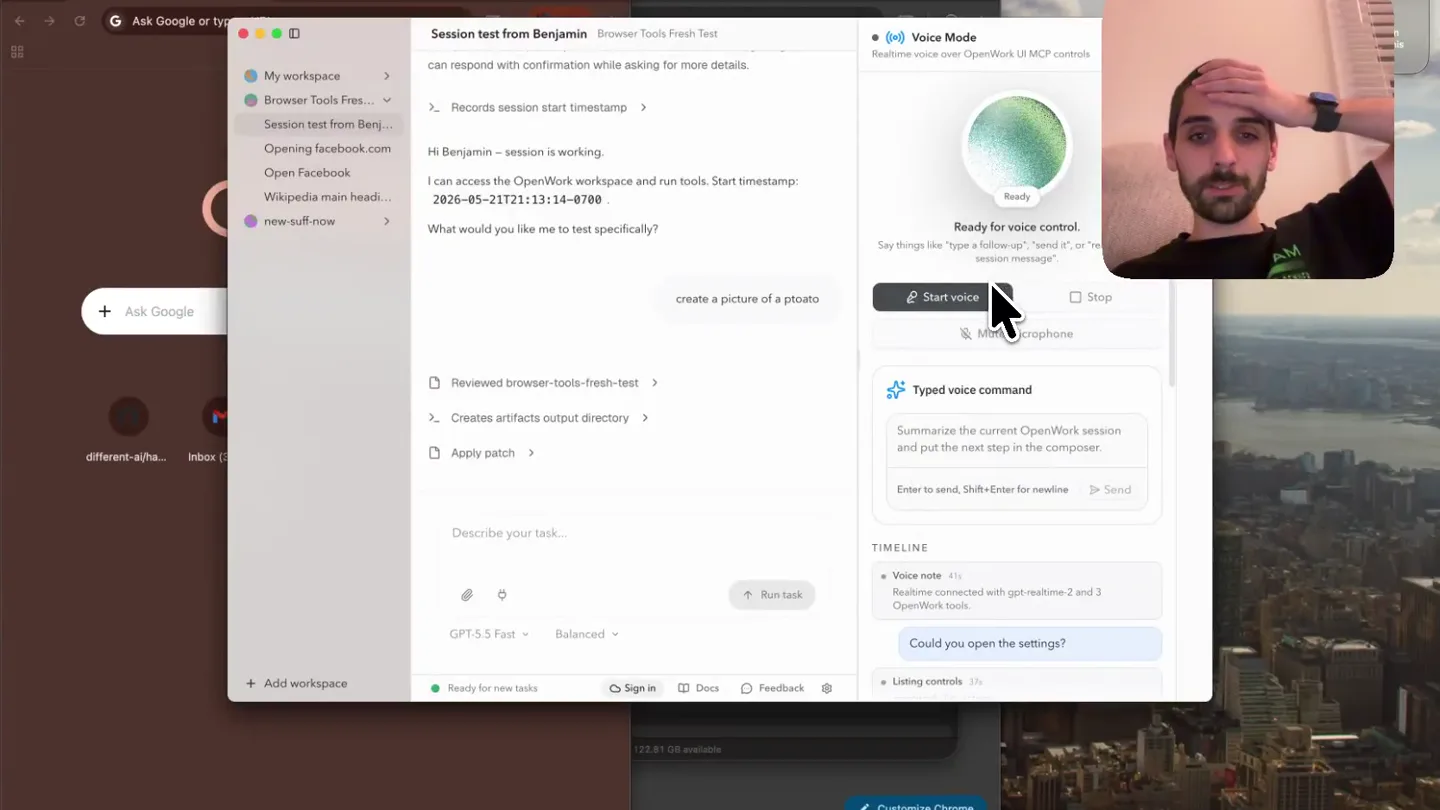
ok sorry guys, but openai realtime is really dope super scrappy demo of how it works inside of openwork shipping tomorrow in the app
Scene-by-scene timeline & spoken transcript
The Hook
Realtime Voice Control & Session Setup
“Okay, sorry guys, but OpenAI real-time is really dope. Super scrappy demo of how it works inside of OpenWork, shipping tomorrow in the app. Could you open the settings? Got it. I'll open the settings now. Settings is open now. If you want, I can jump to a specific section like appearance, providers, extensions, or skills. Hello. Oh, wow, it works really well. Nice! I'm glad that felt smooth. Want to tweak anything else in providers while we're here, or jump back to another settings section? Voice session stopped. Jo, kriere du nye session? Got it, I'll quickly check what's available to start a new session. Done - I created a new session successfully. Want to name it or start drafting the first prompt? Create a task to remind me to send a message to Omar and tell him that real-time works really well. Okay, I'll set that up and get it sent. Cool, while this is happening, let's go into settings.”
- On screen
- Electron File Edit View Window Help Ask Gemini Session test from Benjamin Browser Tools Fresh Test My Workspace Browser Tools Fresh... Session test from Benj... Opening Facebook.com Open Facebook Wikipedia main headl... new-suff-now + Add Workspace Voice Mode Realtime voice over OpenWork UI MCP controls Ready for voice control Say things like "type a follow-up", "send it", or "new session message". Start voice Mute microphone Typed voice command Summarize the current OpenWork session and put the next step in the composer. Enter to send, Shift+Enter for newline Send TIMELINE Voice note Realtime connected with gpt-realtime-2 and 3 OpenWork tools. Could you open the settings? Running UI action openwork_execute_action Got it, I'll open the settings now. Providers is open. Want to review connected providers or change one? Hello. Oh, wow, it works really well. Nice! I'm glad that felt smooth. Want to tweak anything else in providers while we're here, or jump back to another settings section? Voice note Voice session stopped. Voice note Realtime connected with gpt-realtime-2 and 3 OpenWork tools. Listing controls openwork_list_actions Got it, I'll quickly check what's available to start a new session. Running UI action openwork_execute_action Done - I created a new session successfully. Want to name it or start drafting the first prompt? Create a task to remind me to send a message to Omar and tell him that real-time works really well. Running UI action openwork_execute_action Okay, I'll set that up and get it sent. Running UI action openwork_execute_action Sent. Cool, while this is happening, let's go into settings. Customize Chrome Customize Chrome
- Camera
- Static wide shot of a desktop application with a picture-in-picture overlay of the presenter in the top right corner. The camera remains fixed.
- Motion
- Minimal UI animation, primarily showing text appearing in chat bubbles and UI elements highlighting on click. The focus is on the real-time interaction rather than elaborate transitions.
Product Reveal
Navigating AI Provider Settings
“Cool, while this is happening, let's go into settings. Okay, I'm in settings. I'm going to go to AI providers. Okay, I'm in AI providers. I see OpenWork models, Abacus, OpenCode Zen, AI Hub Mix, ableration.ai, and OpenAI. I'm going to connect OpenAI.”
- On screen
- Electron File Edit View Window Help Ask Gemini Settings Browser Tools Fresh Test Back to app Browser Tools Fresh Test Settings Overview of all settings WORKSPACE Preferences Default model, reasoning, and compaction. Permissions Extensions MCPs, skills, plugins, and integrations. Advanced Runtime, engine, and developer options. GLOBAL AI Providers Connect services that provide AI models. Cloud OpenWork's Cloud account and organization. Appearance Theme, font size, and display. Environment Environment variables and paths. Updates App version and update channel. Recovery Reset onboarding and user data. HELP Help shape OpenWork Tell us what feels great and what feels right. Feedback goes straight to the team and helped prioritize what ships next. Send feedback Join Discord Report an issue Customize Chrome AI Providers Browser Tools Fresh Test Connect services that provide AI models. Providers Connect services for models and tools. 5 providers connected Connected OpenWork Models Frontier intelligence, hand picked for your team's most ambitious work. Abacus AI abacus.ai OpenCode Zen AI opencode.ai AIHubMix AI aihubmix.ai ableration.ai AI ableration.ai OpenAI AI openai.ai API keys are stored locally by OpenCode. Environment-backed providers must be changed in the worker environment and then reloaded. Connect pr Subscribe Disconnect Disconnect Disconnect Disconnect Disconnect Customize Chrome
- Camera
- Static wide shot of the desktop application, with the presenter in the top right. The application navigates through menus.
- Motion
- Standard UI navigation, with new panels sliding in or content changing within the existing window. No complex camera movements or visual effects.
Feature Teaser
Reminder Scheduling & Session Summary
“Got it, I'll look for the connect provider option and open it. I don't see a "connect provider" action available from here. You can open the provider settings, which you're already in, but connecting a provider may need a specific button in the interface that isn't exposed as a semantic action. If you want, I can navigate you to related settings like extensions or skills. Hello. Go back to the main app and read out loud what the session told me about in the session view. Got it, I'll switch back to the main session and read what it says. It says: "Considering reminders and scheduling. I think I need to set a reminder since the user is asking to be reminded. I should probably figure out what capabilities the scheduling tool has, so I can use it effectively. It seems important to ask the user when they would like the reminder to make it targeted and useful. Let's clarify that detail before proceeding." Then it asks when to remind you, with options like in 1 hour, tomorrow morning, or tomorrow afternoon.”
- On screen
- Electron File Edit View Window Help Ask Gemini Reminder to message Omar about Realtime Browser Tools Fresh Test I know I need to set a reminder since the user is asking to be reminded. I should probably figure out what capabilities the scheduling tool has, so I can use it effectively. It seems important to ask the user when they would like the reminder to make it targeted and useful. Let's clarify that detail before proceeding. Reminder time Question 1 of 1 When should I remind you to message Omar that "Realtime works really well"? In 1 hour Remind you one hour from now. Tomorrow morning Remind you tomorrow at 9:00 AM local time. Tomorrow afternoon Remind you tomorrow at 2:00 PM local time. Describe your task... GPT-5.5 Fast Balanced Stop Ready for new tasks Sign in Docs Feedback Voice Mode Realtime voice over OpenWork UI MCP controls Can you access Connect provider? Listing controls openwork_list_actions Got it, I'll look for the connect provider option and open it. I don't see a "Connect provider" action available from here. You can open the provider settings, which you're already in, but connecting a provider may need a specific button in the interface that isn't exposed as a semantic action. If you want, I can navigate you to related settings like extensions or skills. Hello. Running UI action openwork_execute_action Go back to the main app and read out loud what the session told me about in the session view. Running UI action openwork_execute_action Got it, I'll switch back to the main session and read what it says. It says: "Considering reminders and scheduling. I think I need to set a reminder since the user is asking to be reminded. I should probably figure out what capabilities the scheduling tool has, so I can use it effectively. It seems important to ask the user when they would like the reminder to make it targeted and useful. Let's clarify that detail before proceeding." Then it asks when to remind you, with options like in 1 hour, tomorrow morning, or tomorrow afternoon. Customize Chrome
- Camera
- Static wide shot of the desktop application, with the presenter in the top right. The application displays a reminder scheduling interface.
- Motion
- UI elements appear and disappear, and text scrolls within chat windows. The primary motion is the interaction with the application's features.
Motion design primitives
Synthesizable in Remotion · key components of the realtime-voice-ui-demo template.
PictureInPictureOverlay
A small, rounded-rectangle video feed of the presenter is consistently displayed in the top-right corner of the screen, overlaid on the main desktop application view.
+ Code construction recipe
Implement using a fixed-position `AbsoluteFill` component for the main screen capture, and a smaller `AbsoluteFill` or `Video` component with `borderRadius` and `top`/`right` positioning for the presenter's feed. Ensure z-index layering is correct.
RealtimeChatBubble
Text messages and AI responses appear dynamically within chat bubbles, simulating a live conversation. User input is typed, and AI responses appear as if generated in real-time.
+ Code construction recipe
Utilize `Sequence` and `spring` or `interpolate` for text opacity and position. Each line of dialogue can be a separate `Text` component, with a delay for appearance. Chat bubbles can use `AbsoluteFill` with `borderRadius` and `backgroundColor`.
Style DNA & aesthetic system
Visual aesthetic
Typography
Motion
Special effects
Pacing & rhythm
Conceptual story rhythm
- 1
Live Demo Introduction
Purpose. To immediately showcase the product's core real-time voice interaction capability and set the stage for a live, unscripted demonstration.
Execution. The presenter appears in a picture-in-picture, directly addressing the audience while interacting with the application via voice commands, showing immediate AI responses.
- 2
Feature Walkthrough
Purpose. To demonstrate specific functionalities like session creation, task management, and reminder setting through natural language interaction.
Execution. The application UI updates in real-time as the presenter issues voice commands, showing chat bubbles with AI responses and corresponding UI actions.
- 3
Settings & Integration Showcase
Purpose. To highlight the product's extensibility and integration capabilities with various AI providers.
Execution. The presenter navigates through the application's settings, specifically to the 'AI Providers' section, visually listing connected services.
- 4
Advanced Interaction & Confirmation
Purpose. To demonstrate the AI's ability to understand complex requests, clarify details, and confirm actions, reinforcing its intelligence.
Execution. The AI assistant asks clarifying questions about reminder scheduling, and the UI presents options, showing a deeper level of conversational intelligence.
Remix in Animatiq Studio
Master remix prompt · agent-ready
Sample remix
Objective
Demonstrate a new AI-powered code generation and debugging tool.How the recipe adapts
The Remotion recipe would adapt by replacing the productivity app's UI with the code generation tool's interface. The presenter in the picture-in-picture would issue voice commands to generate code snippets, debug errors, and refactor functions. Chat bubbles would display the AI's code suggestions and explanations. UI navigation highlights would show the selection of different programming languages or debugging modes. The overall pacing would remain slow and continuous, focusing on the real-time interaction between the developer and the AI assistant.Remix blueprint · realtime-voice-ui-demo
Scene durations (4 scenes, 83s)
Key Remotion components
Related Consumer & Apps Product Launches
Explore all Consumer & Apps launches →
Grand Theft Auto VI: An Extended Look premieres on Netflix Thursday, August 27.

Polymarket Perps is live with up to 20x leverage on crypto, stocks, commodities, and more. Long BTC, predict the Fed, or short the S&P reaction.

Pump.fun launches GO, a marketplace for posting and completing paid bounties for any task.