
Promise · Launch Video Breakdown: Hook, Pacing & Motion Design
P37 Neuro is an open-source robot brain designed to keep working when the body or the task changes.
Scene-by-scene timeline & spoken transcript
The Hook
Introducing P37 Neuro: A Brain for Robots
“(No spoken dialogue — Pizzicato synths, sub-bass drop, and 808 percussion with a high-energy audio transition.)”
- On screen
- Introducing P37 Neuro A brain for robots
- Camera
- Static, centered framing on a text input field animation.
- Motion
- Text typing animation within a UI element, followed by a quick fade-out.
Problem Agitation
Connecting Robot Perception to Action
“(No spoken dialogue — Ambient electronic score with a high-energy audio transition.)”
- On screen
- Perception Connects Robot body Task intent Physical action
- Camera
- Static, centered framing. Elements appear and fade around a central concept.
- Motion
- Sequential text and icon reveals with subtle fades and position shifts, creating a flow diagram effect.
Product Reveal
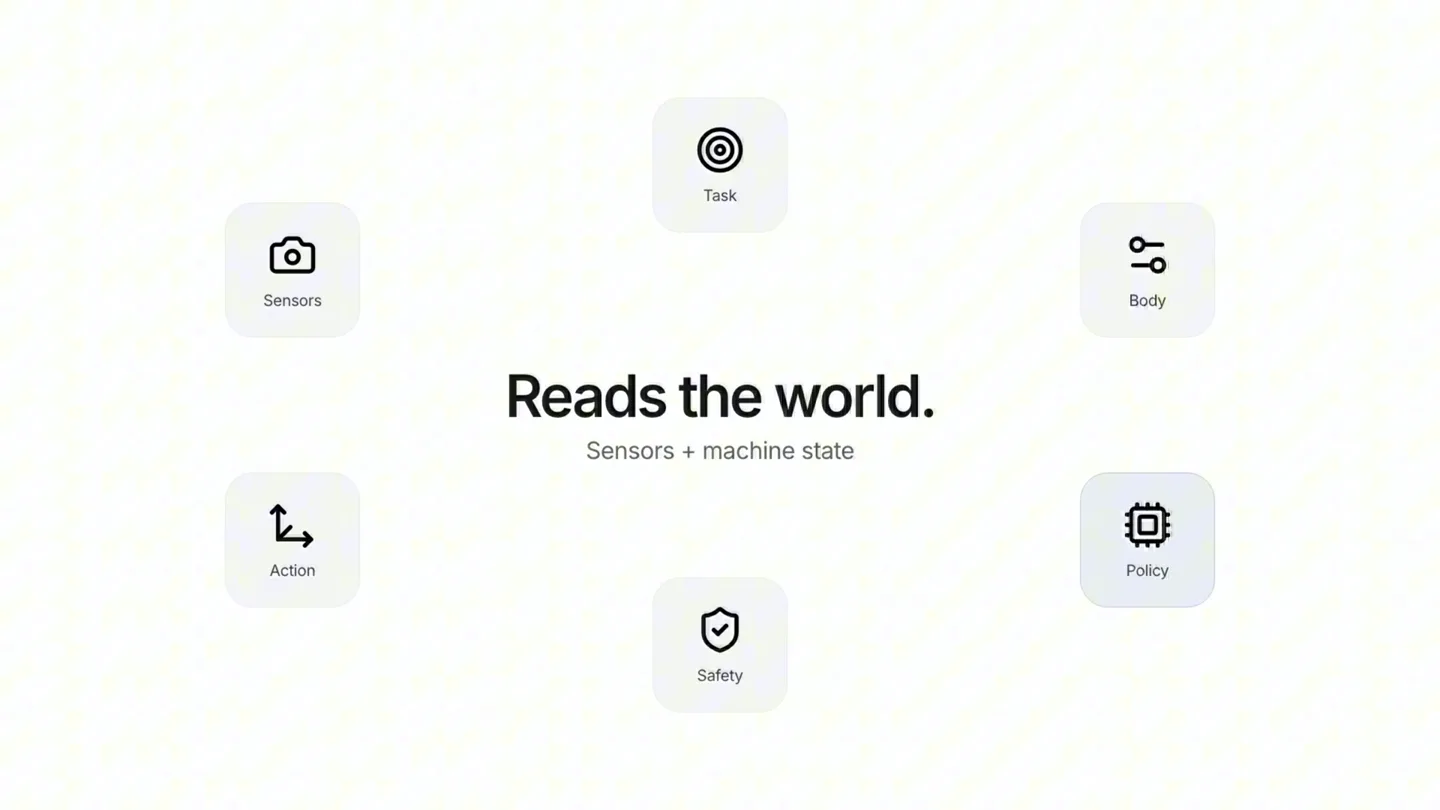
P37 Neuro: Reads the World, Turns Intent into Action
“(No spoken dialogue — Ambient electronic score with a high-energy audio transition.)”
- On screen
- Sensors Task Body Action Safety Policy Reads the world. Sensors + machine state Turns intent into action.
- Camera
- Static, wide shot displaying a circular arrangement of icons and text.
- Motion
- Circular arrangement of icons and text with central headline changes, emphasizing interconnectedness.
Call to Action
A Shared Robot Brain: P37 Neuro by Ontos
“(No spoken dialogue — Ambient electronic score with a final sweep and impact.)”
- On screen
- A shared robot brain. Built for different bodies. P37 Neuro A brain for robots. Ontos
- Camera
- Static, centered framing, then a quick zoom-in on the final logo.
- Motion
- Sequential text reveals with a final brand logo reveal and subtle zoom.
Motion design primitives
Synthesizable in Remotion · key components of the minimalist-ui-tech-launch template.
TypingSearchField
Text appears character by character within a rounded rectangular input field, simulating a user typing. An icon is present at the start of the field.
+ Code construction recipe
Use a sequence of `Text` components with `delay` and `duration` props for character-by-character reveal. Animate the `width` of a `div` to simulate the input field filling. Use `spring` for the initial field appearance.
SequentialIconTextReveal
Icons and associated text labels fade in and out sequentially, often with a slight vertical or horizontal offset, to illustrate a process or connection.
+ Code construction recipe
Employ `interpolate` for `opacity` and `transform` (e.g., `translateY`) on individual `div` or `Text` components. Stagger the `from` and `to` values in `interpolate` to create the sequential effect. Use `spring` for a subtle bounce on appearance.
CircularDiagramHighlight
Multiple icons and text labels are arranged in a circle around a central changing headline. The central text updates while the surrounding elements remain static.
+ Code construction recipe
Position `div` elements with icons and text using absolute positioning and `transform: rotate()` for circular layout. Animate the `opacity` and `text` content of a central `Text` component using `Sequence` and `spring` for smooth transitions.
Style DNA & aesthetic system
Visual aesthetic
Typography
Motion
Special effects
Pacing & rhythm
Conceptual story rhythm
- 1
The Introduction
Purpose. Hook the viewer and introduce the core product concept.
Execution. Typing animation in a search bar, revealing the product name and its primary function.
- 2
The Connection
Purpose. Explain how the product integrates different components or concepts.
Execution. Sequential reveal of icons and text, illustrating the flow from perception to action.
- 3
The Core Function
Purpose. Detail the product's main capabilities and benefits.
Execution. Circular diagram with a central changing headline, highlighting key features and their relationships.
- 4
The Brand Reveal
Purpose. Reinforce the product's unique selling proposition and reveal the company behind it.
Execution. Final text statements about the product's versatility, culminating in the company logo reveal.
Remix in Animatiq Studio
Master remix prompt · agent-ready
Sample remix
Objective
Launch an AI-powered financial analytics platform called 'QuantifyAI'.How the recipe adapts
The TypingSearchField primitive introduces 'QuantifyAI: Your AI Financial Analyst'. The SequentialIconTextReveal shows data ingestion, processing, and insight generation using icons for 'Data Sources', 'AI Engine', and 'Actionable Insights'. The CircularDiagramHighlight features 'Risk Assessment', 'Market Prediction', 'Portfolio Optimization', and 'Compliance' around a central changing headline like 'Unlocking Financial Intelligence'. The final scene highlights 'Adaptive for any market.' and reveals the 'QuantifyAI' logo.Remix blueprint · minimalist-ui-tech-launch
Scene durations (4 scenes, 16.5s)
Key Remotion components
Related Tech & SaaS Product Launches
Explore all Tech & SaaS launches →
Lenny's Newsletter annual subscribers get a free month of Grok Bot — the first deal SpaceXAI has offered anyone.
Own the means of production. Revolt with us.

Say hi to https://t.co/VIWYU64dUI! 👋🏼🌴 https://t.co/gFoZupfqZE