
Bio Protocol · Launch Video Breakdown: Hook, Pacing & Motion Design
Say hello to @peptai_, a fleet of autonomous AI agents for peptide drug discovery, now live on @base Each agent targets a single receptor, runs the full nine-gate pipeline 24/7, and pays for its ow…
Scene-by-scene timeline & spoken transcript
The Hook
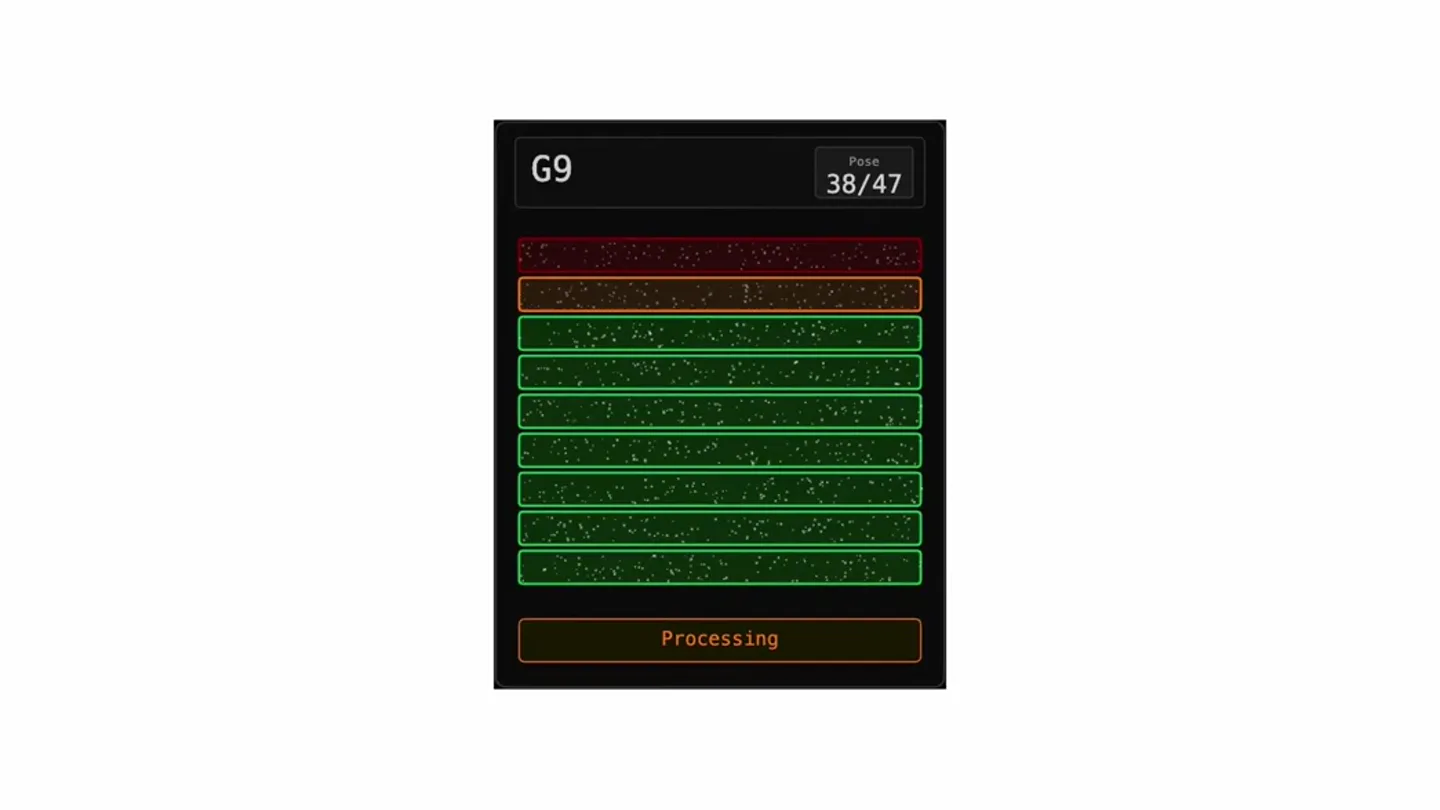
AI Agent Processing Simulation
“(No spoken dialogue — A sustained, high-pitched electronic tone gradually increases in frequency and intensity, accompanied by a low-frequency hum and subtle percussive clicks. A high-energy audio 'riser' effect builds to a sub-bass impact/drop around 0:05.)”
- On screen
- G9 Pose 3/47 Processing
- Camera
- Static, centered view of a UI element, simulating a processing interface.
- Motion
- Progress bar animation, color state changes (red to green), and text updates within a simulated UI window.
Product Reveal
Processing Complete & Live Status
“(No spoken dialogue — The rising electronic tone continues to build, maintaining tension after the sub-bass drop.)”
- On screen
- G9 Pose 47/47 Live Now
- Camera
- Static, centered view of the UI, showing the completion state.
- Motion
- Instantaneous text change ('Processing' to 'Live Now') and full color state transition to green, indicating completion and readiness.
Feature Teaser
Core Value Proposition
“(No spoken dialogue — The electronic tone continues, maintaining a sense of anticipation.)”
- On screen
- Discovering peptides autonomously
- Camera
- Static, centered text on a white background.
- Motion
- Fade-in text animation, simple and direct.
Feature Teaser
Platform Integration
“(No spoken dialogue — The electronic tone persists, building towards a final reveal.)”
- On screen
- Live on base
- Camera
- Static, centered text and logo on a white background.
- Motion
- Fade-in text and logo, with a distinct blue square element for 'base'.
Call to Action
Product Branding
“(No spoken dialogue — The electronic tone reaches its peak and then fades out, concluding the track.)”
- On screen
- Peptai
- Camera
- Static, centered logo and product name on a white background.
- Motion
- Fade-in of the product logo and name, with a subtle glow or shimmer effect on the logo.
Motion design primitives
Synthesizable in Remotion · key components of the ai-processing-reveal template.
ProcessingStateGrid
A grid of rectangular elements dynamically changes color from red to green, accompanied by a numerical counter and status text updating from 'Processing' to 'Live Now'. Small, subtle particle effects are visible within the rectangles.
+ Code construction recipe
Use `interpolate` for color transitions (e.g., `interpolateColors`), `spring` for subtle text and number updates. Implement a `Sequence` component to manage the timing of individual grid element color changes. Particle effects can be achieved with a Canvas component or SVG filters for subtle glow/noise.
DynamicTextReveal
Text appears on screen with a smooth fade-in animation, often accompanied by a subtle scale or position shift. Specific words or elements within the text can have distinct color accents or graphic elements.
+ Code construction recipe
Utilize `spring` or `interpolate` for opacity and `transform` properties (scale, translateY). For accented elements like the 'base' square, use a separate `AbsoluteFill` or `Div` with specific styling and animation.
LogoGlowFade
A product logo and name fade into view, with the logo exhibiting a subtle, ethereal glow or shimmer effect before settling into its final state.
+ Code construction recipe
Apply `interpolate` for opacity and a `filter` property (e.g., `drop-shadow` or `brightness`) for the glow effect. The shimmer can be a subtle `keyframes` animation on a pseudo-element or a gradient overlay.
Style DNA & aesthetic system
Visual aesthetic
Typography
Motion
Special effects
Pacing & rhythm
Conceptual story rhythm
- 1
The Simulation Initiates
Purpose. To immediately immerse the viewer in the product's core function: autonomous processing, building anticipation.
Execution. A dark UI box with 'G9' and 'Processing' text, showing a progress bar filling with red and green segments, accompanied by a rising electronic sound.
- 2
Processing Complete
Purpose. To signify a successful milestone and the product's readiness, culminating the initial tension.
Execution. The UI box turns fully green, 'Pose 47/47' and 'Live Now' appear, coinciding with an audio impact/drop.
- 3
The Core Proposition
Purpose. To clearly state the product's primary benefit and innovation.
Execution. Clean, white screen with 'Discovering peptides autonomously' text fading in.
- 4
Product & Platform Reveal
Purpose. To introduce the product name and its integration, providing a clear call to action.
Execution. Successive fade-ins of 'Live on base' and the 'Peptai' logo with its name, on a clean white background.
Remix in Animatiq Studio
Master remix prompt · agent-ready
Sample remix
Objective
Launch a new AI-driven financial analysis platform called 'FinAI'.How the recipe adapts
The ProcessingStateGrid primitive will be adapted to show financial data streams, changing from red (risk) to blue (stability). The DynamicTextReveal will highlight 'Predicting Market Trends Autonomously' and 'Powered by QuantFlow'. The LogoGlowFade will be used for the 'FinAI' logo, with a digital, data-inspired glow.Remix blueprint · ai-processing-reveal
Scene durations (5 scenes, 15s)
Key Remotion components
Related AI Agents Product Launches
Explore all AI Agents launches →
To ensure that artificial general intelligence benefits all of humanity

Gopuff introduces Go, an AI shopping assistant built with SpaceXAI: say what you need and the order is placed.

Iliad (Troy) trailer made by Grok Imagine 1.5, which was just released