
Perplexity · Launch Video Breakdown: Hook, Pacing & Motion Design
Automations in Perplexity Computer handle ongoing work on a schedule or from an event, using memory, skills, and apps such as Slack, Gmail, Outlook, and Linear.
Scene-by-scene timeline & spoken transcript
The Hook
Event-Driven Automation Setup
“(No spoken dialogue — Sparse, arpeggiated synth melody with a subtle sub-bass pulse. Evolving synth pads and crisp percussion. High-energy audio transition with a rising synth and snare roll at 0:35.)”
- On screen
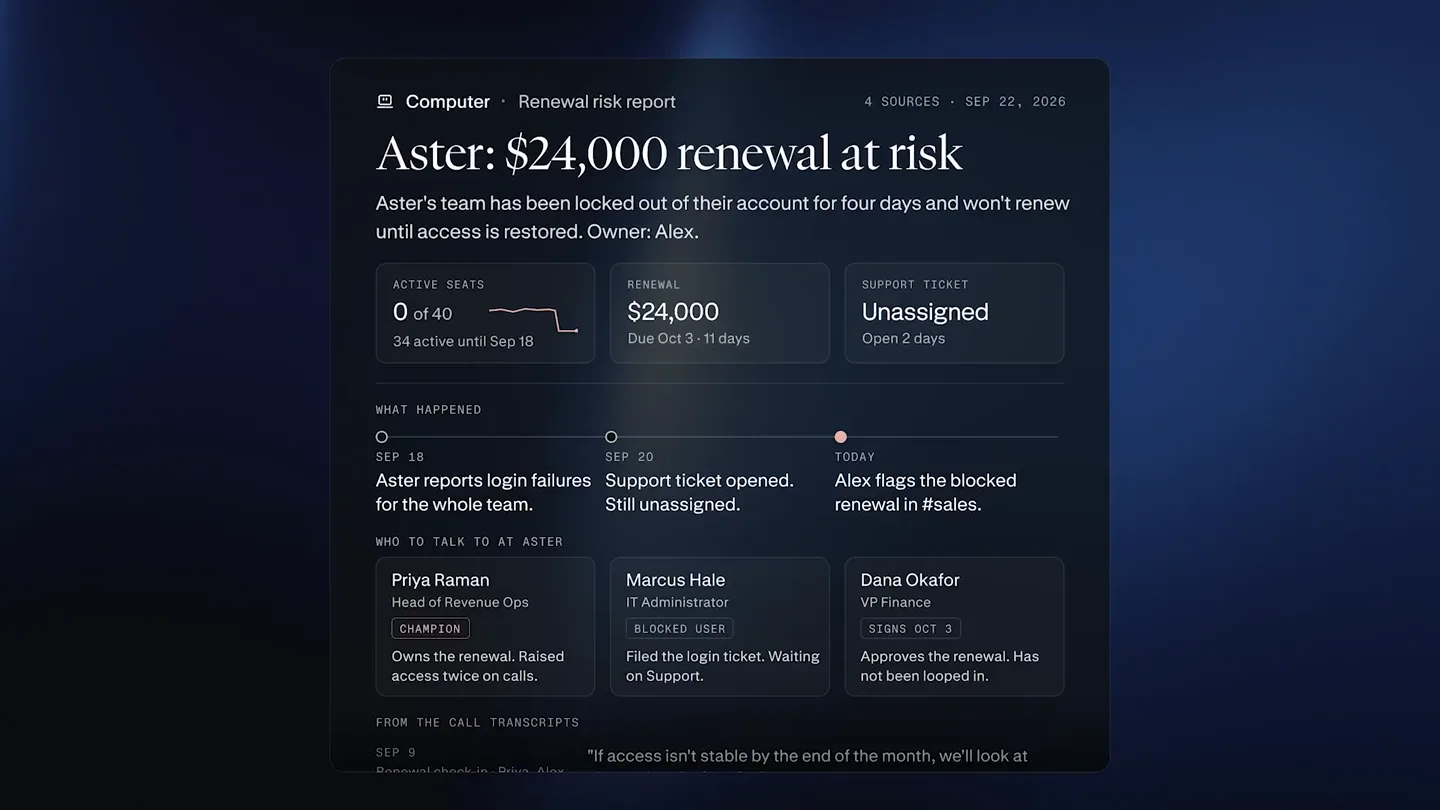
- Create an automation Watch #sales in Slack for cancellations, service issues, or blocked deals of $1000. Review the thread in the account, then write me a report: revenue at risk, what happened, suggested replies, and next steps. High Kick off automations with conditional triggers. Created an automation Sales risk report Active Run now Triggers New message in #sales Instructions Watch #sales in Slack for cancellations, service issues, or blocked deals over $1,000. Review the thread and the account, then write me a report: revenue at risk, what happened, suggested replies, and next steps. Slack New message in #sales Advanced Output Notifications Same session On Alex Just now Aster's team still can't access their account, and they won't renew until it's sorted. Their $24,000 renewal is blocked. Can someone help me get this fixed today? Automation started Reviewing sales thread Assessing renewal urgency Drafting report Finished Aster renewal risk report.pdf Document WHAT HAPPENED SEP 18 Aster reports login failures for the whole team. SEP 20 Support ticket opened. Still unassigned. TODAY Alex flags the blocked renewal in #sales. WHO TO TALK TO AT ASTER. Priya Raman Head of Revenue Ops CHAMPION Owns the renewal. Raised access twice on calls. Marcus Hale IT Administrator BLOCKED USER Filed the login ticket. Waiting on Support. Dana Okafor VP Finance SIGNS OCT 3 Approves the renewal. Has not been looped in. FROM THE CALL TRANSCRIPTS SEP 9 Renewal check-in - Priya, Alex "If access isn't stable by the end of the month, we'll look at alternatives before Q4." Priya AUG 14 Quarterly review - Dana, Priya, Alex "The value is there. Our problem is the seats sitting idle when logins break." Dana RECOMMENDED PLAN Restore Aster's login and confirm all 40 seats with Marcus. Support TODAY Call Priya and answer her Sep 9 concern. Alex THIS WEEK Send Dana a seat recovery summary before she signs. Alex BEFORE OCT 3 Reply to Alex in #sales with the plan. You NOW
- Camera
- The camera maintains a static, slightly off-center perspective, focusing on the UI elements. Subtle background light shifts create depth.
- Motion
- UI elements animate in with smooth, quick fades and subtle scaling. Text typing animation is used for input fields. Information expands and collapses with clean transitions. A timeline visualizes automation steps.
Product Reveal
Scheduled Automation in Action
“(No spoken dialogue — Sub-bass drop/impact at 0:36. Consistent, driving rhythm with melodic and percussive synth elements. Synth riser build-up from 0:50 to 0:51.)”
- On screen
- Run automations on a set schedule. Every Monday at 8am, review my Meta Ads against the previous week. Highlight the three strongest and weakest ads, then create three new static ads using my top performers and competitor examples. High Created an automation Weekly Meta Ads report Active Run now Triggers Monday, 8:00 AM (PDT)
- Camera
- Static camera, centered on the UI. The background light subtly shifts, creating a dynamic yet focused environment.
- Motion
- Similar to the previous beat, UI elements animate in with smooth fades and scaling. Text typing animation is used for input. Information expands to reveal scheduling details.
Feature Teaser
AI-Powered Ad Creative Generation
“(No spoken dialogue — Powerful sub-bass impact at 0:51. Consistent, driving rhythm with melodic and percussive synth elements. High-energy audio transition with a rising synth and snare roll at 1:05.)”
- On screen
- 8:00 AM Automation started Computer • Reviewing Meta Ads SEP 15-21 VS PRIOR SPEND $4,180 ↑ 2% vs prior week CTR 1.8% ↓ 25% - was 2.4% CONVERSIONS 70 ↓ 18% - was 85 CPA $60 ↑ 33% - was $45 CREATIVE CTR CPA VS PRIOR WK CTR - LAST 8 WEEKS STRONGEST 2.7 2.6 2.6 2.5 2.5 2.4 1.8 Hire with confidence 3.1% $38 +4.0 JUL 28 SEP 15 Your next great hire 2.7% $41 +2.0 Fieldwork for teams 2.5% $44 ±0.0 Frequency 4.8 ↑ from 3.1 WEAKEST First-time reach 22% ↓ from 41% Find your next hire. 1.2% $78 -0.9 Audience overlap Unchanged Now hiring 1.4% $71 -0.6 Recruiting, simplified 1.5% $66 -0.5 Drafting variation 1 Drafting variation 2 Drafting variation 3 fieldwork RECRUITING fieldwork RECRUITING fieldwork RECRUITING Big role. Right person. Build the team. A shortlist. Not a long shot. Specialist recruiting. For the people you need next. Engineering Expertise Product Ambition Leadership Team fit Let's talk hiring. A considered search. A personal approach. fieldwork-01.png fieldwork-02.png fieldwork-03.png
- Camera
- The camera remains static, centered on the UI. The background light continues its subtle, dynamic shifts.
- Motion
- A timeline visualizes automation steps. Data dashboards animate in with subtle reveals. Image cards slide into view, showcasing AI-generated creative variations. Content within cards animates with text reveals and icon movements.
Call to Action
Perplexity: Automate Recurring Research
“(No spoken dialogue — Sub-bass drop/impact at 1:06. Consistent, driving rhythm with melodic and percussive synth elements. Track fades out with evolving synth pads.)”
- On screen
- Automate recurring research perplexity
- Camera
- The camera remains static, centered. The background light continues its subtle, dynamic shifts, culminating in a bright, central glow.
- Motion
- A full-screen text overlay appears with a smooth fade. The Perplexity logo and wordmark animate in with a subtle glow and fade, emphasizing the brand.
Motion design primitives
Synthesizable in Remotion · key components of the ai-agent-automation-showcase template.
DynamicQueryInput
A rounded rectangular input field appears, and text types out smoothly within it. As the query expands, the input field dynamically resizes to accommodate the content.
+ Code construction recipe
Use `spring` for the input field's initial appearance and `interpolate` for text typing. Implement a `measureText` utility to dynamically adjust the input field's width and height based on content, using `spring` for the resize animation.
ExpandingInformationCard
A compact UI element expands to reveal more detailed information, such as triggers or instructions. This expansion is accompanied by a subtle scaling and opacity change.
+ Code construction recipe
Utilize `spring` for the card's expansion and `interpolate` for opacity changes. Nested components within the card (e.g., text, icons) should animate in with staggered delays and `spring` for a natural reveal.
ProcessTimelineReveal
A vertical line appears, and circular nodes or text labels animate along it, indicating steps in an automation process. Each step reveals with a subtle fade and slide.
+ Code construction recipe
Draw the vertical line using an SVG path with `stroke-dasharray` and `stroke-dashoffset` for a drawing effect. Animate the nodes/text using `interpolate` for position and opacity, with staggered delays for each step.
Style DNA & aesthetic system
Visual aesthetic
Typography
Motion
Special effects
Pacing & rhythm
Conceptual story rhythm
- 1
The Prompt
Purpose. Introduce the core interaction: natural language input for complex automation.
Execution. A clean input field appears, and a detailed, multi-line prompt is typed out, demonstrating the agent's understanding of complex instructions.
- 2
The Execution
Purpose. Showcase the agent's ability to perform tasks and generate outputs.
Execution. A visual timeline illustrates the agent's steps (reviewing, assessing, drafting), culminating in a generated report or creative assets.
- 3
The Schedule
Purpose. Highlight the agent's capability for recurring, scheduled tasks.
Execution. A new prompt for a scheduled report is typed, followed by a UI showing the automation configured to run at a specific time.
- 4
The Result
Purpose. Demonstrate the tangible value and output of the scheduled automation.
Execution. A dashboard with data analysis and multiple AI-generated creative variations are presented, showcasing the agent's comprehensive output.
Remix in Animatiq Studio
Master remix prompt · agent-ready
Sample remix
Objective
A new AI-powered project management tool that automates task delegation and progress reporting.How the recipe adapts
The DynamicQueryInput primitive would be used for users to describe a project, which then expands into an ExpandingInformationCard showing delegated tasks and deadlines. The ProcessTimelineReveal would visualize the project's progress, with each node representing a completed milestone or generated report. The overall dark aesthetic and smooth transitions would convey sophistication, while the slow pacing allows users to understand the intricate automation of project workflows.Remix blueprint · ai-agent-automation-showcase
Scene durations (6 scenes, 92s)
Key Remotion components
Related AI Agents Product Launches
Explore all AI Agents launches →
To ensure that artificial general intelligence benefits all of humanity

Introducing Claude Fable 5: a Mythos-class model that we’ve made safe for general use. Its capabilities exceed those of any model we’ve ever made generally available. https://t.co/2AvmEjHIX8

To understand the true nature of the universe.