
Phonon · Launch Video Breakdown: Hook, Pacing & Motion Design
Phonon is fast, local, open-source voice typing with Parakeet and Gemma 4. Uses OCR for screen context and stays minimal so you can talk to models.
Scene-by-scene timeline & spoken transcript
The Hook
Introducing Phonon: Fast, Local, Sovereign Voice Typing
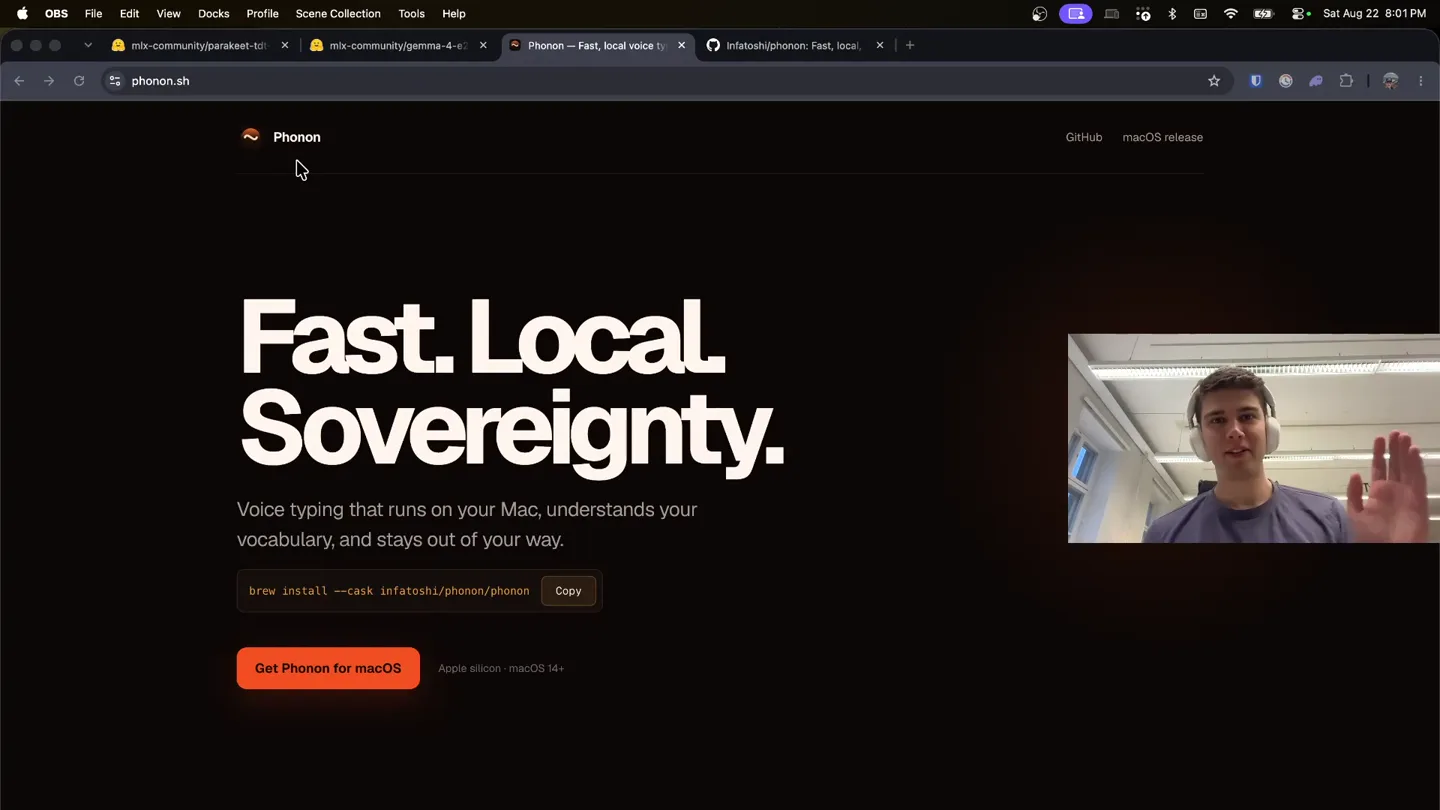
“Hey everyone, I'm excited to introduce a side project of mine called Phonon. Phonon is pure, fast, local ownership and control over your voice dictation setup.”
- On screen
- Phonon Fast. Local. Sovereignty. Voice typing that runs on your Mac, understands your vocabulary, and stays out of your way. brew install --cask infatosh/phonon/phonon Copy Get Phonon for macOS Apple silicon macOS 14+ GitHub macOS release
- Camera
- Static wide shot of presenter in bottom right, screen capture of Phonon website in main frame.
- Motion
- Minimal UI animation, cursor hover effect on 'Get Phonon for macOS' button.
Product Reveal
Installation and Initial Setup
“It brings everything completely local with the best possible quality. It's a work in progress, but I'm really excited about it. Let's go ahead and download it.”
- On screen
- Phonon Applications Preparing Phonon Home History Dictionary Settings 0 words RPM 0 words today 0 total words Microphone priority Permissions and health Refresh Granted Settings Granted Settings Granted Settings What Phonon may keep Dictation runs entirely on this Mac either way. These two features store or read more than the transcript, so they start off. Keep recordings and transcripts Save paired WAV and text after insertion so History, the dictionary, and accuracy work. Read the active window Read text on the active (frontmost) window to spell technical terms correctly. Nothing leaves the Mac. Both can be changed any time in Settings, and History has a Clear all button. Continue Microphone Accessibility Input Monitoring Screen Recording Your activity 0 dictations 0s Speaking time 0 words Average length 0 Dictionary repairs 0 Active days DICTATION Streaming Run acoustic models partially while you speak. Screen context Run local OCR and use only relevant dictionary terms. Local history Retain paired WAV and metadata after insertion. Instant microphone Keep CoreAudio warm for near-instant key-to-recording latency. Recording cues Play a short bleep when a recording opens and closes. STORED RECORDINGS Keep recordings for Until I delete them Clear all history Move every stored recording and transcript to the Trash. SHORTCUT Active shortcut Right Option hold + Control Space toggle SYSTEM Launch at login Phonon Fast. Local. Sovereignty. Voice typing that runs on your Mac, understands your vocabulary, and stays out of your way. brew install --cask infatosh/phonon/phonon Copy Get Phonon for macOS Apple silicon macOS 14+ GitHub macOS release
- Camera
- Static wide shot, screen capture shows Finder window opening, then Phonon app setup windows, navigating through Home and Settings.
- Motion
- Standard OS window animations, UI element highlighting on click/hover, smooth scrolling within app settings.
Feature Teaser
Live Dictation Demonstration
“So I can go ahead and press this function key down here and as you'll see the little bulb down there opens up. Testing, one, two, three.”
- On screen
- Phonon Search for apps and commands... Show More Testing, one, two, three! Ask AI Tab Use "Testing, one, two, three" with... Search Files File Search Store Raycast Search Google Google Chrome Search Snippets Snippets Define Word Dictionary Ask AI Raycast AI Search Emoji & Symbols Emoji & Symbols Open Command Actions Phonon
- Camera
- Static wide shot, screen capture shows desktop with Raycast search bar appearing, then live dictation text appearing.
- Motion
- Real-time text input animation, subtle UI pop-up for Raycast, cursor interaction.
Call to Action
Under the Hood & Future Updates
“So that's using Parakeet 0.6V2 and Gemma 4 E2B instruction tune 4-bit for MLX. This is the first version of Phonon. It's got a GitHub repo. I'm going to be updating it frequently. It's got customizable settings and functionality.”
- On screen
- Hugging Face Search models, datasets, users... Models Datasets Spaces Docs Enterprise Pricing mlx-community/gemma-4-e2b-it-4bit Image-Text-to-Text MLX Safetensors gemma4 mlv-vlm conversational 4-bit precision license: gemma Model card Files and versions Community 4 Edit model card Downloads last month 58,082 Safetensors Model size 1B params Tensor type MLX MLX Hardware compatibility 4-bit MLX 3.55 GB Inference Providers Image-Text-to-Text This model isn't deployed by any Inference Provider. Model tree for mlx-community/gemma-4-e2b-it-4bit Base model google/gemma-4-e2b infatosh/phonon Code Issues 1 Pull requests Actions Projects Wiki Security and quality Insights Settings Pin Watch 0 Fork 0 Star 2 main 2 branches 7 tags Go to file Add file Code infatosh and claude Note the Bluetooth routing issue in the README .github/workflows assets bar crates doc/prototype fixtures prompts scripts sidecar tests third_party/uv website .gitignore .vercelignore Cargo.lock Cargo.toml Fix CI Ruff installation Phonon 0.1.6 (#8) Phonon 0.1.6 (#8) Archive the GPU prototype this app was designed against Replace the FluidVoice helper with a bundled Gemma side... Replace the FluidVoice helper with a bundled Gemma side... Phonon 0.1.6 (#8) Open source Phonon Ship notarized macOS release (#5) Remove personal setup from public repo (#4) Scope Vercel deployment inputs Phonon 0.1.6 (#8) Phonon 0.1.6 (#8) About Fast, local, simple voice typing for macOS. phonon.sh local-ai maces speech-to-text Readme GPU-3.0 license Activity 2 stars 0 watching 0 forks Releases 7 Phonon 0.1.6 latest 1 hour ago +6 releases Deployments 20 Production 1 hour ago Preview 1 hour ago Packages No packages published Publish your first package History Dictionary Settings Home Phonon Search transcriptions Aug 22, 2026 at 8:03 PM Final Testing, one, two, three. Raw ASR Testing, one, two, three. Intended transcription Testing, one, two, three. Saving this creates ground truth for future evaluation. Save info TTFT 128 ms 48 toks/s Add a term Written term Blackwell Replace spoken phrase Optional exact output Other comma separated spoken forms Leave replacement empty for a spelling term. Add a replacement for a spoken form should deterministically become different written text. Add
- Camera
- Static wide shot, screen capture transitions between Hugging Face model page, GitHub repository, and Phonon app's History and Dictionary settings.
- Motion
- Browser tab switching, smooth scrolling within web pages, UI element highlighting on click/hover within the Phonon app.
Motion design primitives
Synthesizable in Remotion · key components of the founder-dev-tool-launch template.
ScreenContextOverlay
A screen recording of a desktop or web application is presented as the primary visual, with a small picture-in-picture video of the presenter in the bottom right corner. UI elements within the screen recording are interactable and highlighted by the cursor.
+ Code construction recipe
Use a <Video> component for the screen recording, a <AbsoluteFill> for the presenter's webcam feed positioned with CSS. Implement cursor movement and UI highlights using <Sequence> and <interpolate> for position and opacity, triggered by specific timestamps.
DynamicUIScroll
Content within an application window or web page scrolls smoothly to reveal new information or settings, mimicking user interaction. Specific UI elements are clicked or hovered over, showing their active states.
+ Code construction recipe
Utilize <Sequence> to define scroll start and end points. Animate the 'scrollTop' property of a scrollable container using <spring> for natural easing. Implement hover/click states with CSS transitions or <interpolate> for opacity/scale changes on target elements.
TabSwitchTransition
The video seamlessly transitions between different browser tabs or application windows, maintaining the overall screen capture context. This is achieved by showing the browser's tab bar and then switching to a new tab's content.
+ Code construction recipe
Employ multiple <Video> components for each screen capture segment. Use <AbsoluteFill> and <Sequence> to layer and reveal these videos. A quick cross-fade or a hard cut can simulate tab switching, with a brief moment showing the browser's tab bar for context.
Style DNA & aesthetic system
Visual aesthetic
Typography
Motion
Special effects
Pacing & rhythm
Conceptual story rhythm
- 1
The Personal Introduction
Purpose. To establish the founder's credibility and introduce the product as a passion project, building trust and relatability.
Execution. Founder's face in a picture-in-picture, directly addressing the camera, while the product's landing page is displayed prominently.
- 2
The Practical Walkthrough
Purpose. To demonstrate the product's core functionality and ease of use through a step-by-step installation and setup guide.
Execution. Detailed screen recording of the installation process, navigating through app settings, and granting permissions, all guided by the founder's voice.
- 3
The Live Proof
Purpose. To showcase the product's immediate value and performance with a real-time demonstration of its primary feature.
Execution. Live dictation on the desktop, showing text appearing instantly, reinforcing the 'fast' aspect of the product.
- 4
The Technical Deep Dive & Future Vision
Purpose. To appeal to a technically savvy audience by revealing the underlying technology and outlining future development, fostering community engagement.
Execution. Displaying technical details on Hugging Face and GitHub, followed by a quick tour of advanced app settings like History and Dictionary.
Remix in Animatiq Studio
Master remix prompt · agent-ready
Sample remix
Objective
Launch a new local-first, open-source code editor with AI-powered refactoring.How the recipe adapts
The video would open with the founder introducing the code editor, showing its landing page. Then, a screen recording would demonstrate downloading and installing the editor, configuring local AI models, and setting up project directories. The live demo would involve the founder coding, using voice commands for refactoring, and showcasing the local AI's real-time suggestions. The conclusion would highlight the editor's GitHub repository, the specific AI models used, and the community-driven development roadmap.Remix blueprint · founder-dev-tool-launch
Scene durations (5 scenes, 152.9s)
Key Remotion components
Related Productivity Product Launches
Explore all Productivity launches →
Bolt v2 pairs Claude Code and Codex agents with built-in hosting, database and storage so apps ship without setup.
Anthropic introduces Cowork, which brings the Claude Code way of delegating tasks to everyday, non-technical work.

Making life multiplanetary