
Raph Guilhem · Launch Video Breakdown: Hook, Pacing & Motion Design
Every AI tool generates one image at a time. You prompt, wait, review, prompt again and try doing that 100 times for a product launch. That's why we just launched https://t.co/cjVRRZiDK9 batch mode. How it works: → upload 100 product inputs (images, SKUs, briefs, whatever) https://t.co/OmeYoQCVBD
Scene-by-scene timeline & spoken transcript
The Hook
Introducing Playtor Batch Mode
“Every AI tool generates one image at a time. You prompt, wait, review, prompt again and try doing that 100 times for a product launch. That's why we just launched Playtor batch mode. Batch is the production layer of Playtor.”
- On screen
- Batch is the production layer of Pletor. A workflow you build in Studio runs one input at a time. Batch takes that same workflow and runs it across every input you have, in a single pass, holding the same standard on the first row and the five-hundredth. Pletor Batch — Scale your AI workflows Batch The mental model: build the system once, run it at volume. You don't rebuild anything for Batch. Any workflow you've already encoded becomes runnable across a whole catalog — from the app, or from an agent through the Pletor MCP. Powered by GitBook
- Camera
- Close-up on presenter's face, then a wide shot of the presenter with a screen showing product documentation. The camera slowly zooms out from the documentation to reveal the full browser window.
- Motion
- Subtle zoom out, screen capture with presenter overlay, text highlight animation on 'Batch'.
Problem Agitation
Setting Up Your Batch Workflow
“And now this is the place where you create your batch. So you can create a new batch. You can give it a name, for example, Patagonia Batch. And then you can create your workflow. So you can say, for example, I want to make the model wear the other outfits attached. Then you will send all that to Gemini, and then you will run it. When you see that this work, then you can go to the batch mode.”
- On screen
- What are we batching today? Run a workflow across hundreds of rows — same agent or app, different inputs every time. Agents Apps Filter Search agents Static Ad Animator Turn any static ad into a scroll-stopping animated video — in one click. Jérôme Lecoq Shared Draft agent No description available Jérôme Lecoq Copy of (SRI) - Produit sur... Generates on-brand photography from your moodboard/references and brand... Ferdinand Terme Shared system prompts - context Clone Winning Ads - Orchestra Ricaud - Podium & Hands Patagonia Batch Brief Make the model wear the other outfit attached Model Nano Banana Prompter Instructions Role You are advanced visual generation system designed to create highly realistic, aesthetically refined, and context-aware image prompts from user instructions. Your mandate is to translate intent and context into vivid, precise, and visually compelling scenes. You should not engage into conversational interactions. You should only send back prompts, in English. Guidelines Deliver Exceptional Visual Fidelity Enable web search Input prompt Brief Run
- Camera
- The camera remains static on the presenter while the screen content dynamically changes, showing navigation and workflow creation within the Playtor interface.
- Motion
- Rapid UI navigation, element highlighting, and text input simulation. The screen content transitions between different views of the application.
Product Reveal
Batch Input Management
“And you will see the first row that you have made. And then you can upload your inputs. So you will click on upload, and then you can upload 100 inputs like here. And then you can see that you have 25 inputs. And then you can see that you have 175 credits. It's going to be, uh, you can lock the brief, for example. So you can say, I want to make the model wear the other outfit attached. But let's say you want a girl for example, delete.”
- On screen
- Patagonia Batch # Outfit Brief Model 01 + Add or drop image Make the model wear the other outfit attached + Add or drop image 02 + Add or drop image Brief + Add or drop image 03 + Add or drop image Brief + Add or drop image 04 + Add or drop image Use for all Brief + Add or drop image 05 + Add or drop image Brief + Add or drop image 06 + Add or drop image Brief + Add or drop image 07 + Add or drop image Brief + Add or drop image 08 + Add or drop image Brief + Add or drop image 09 + Add or drop image Brief + Add or drop image Drag and drop images here Upload image Drag and drop CSV here Import CSV Drag and drop images here Upload image INPUTS 25 CREDITS 175 Fill "Outfit" Downloads Date Added Size Kind 7e13c1c-37e6-4362-a59f-a25c96901d0b.png Yesterday at 18:10 2.7 MB PNG image cdcd0c0d-c02b-42f9-a8b6-9d98b90b7f11.png Yesterday at 18:02 1.3 MB PNG image Unglam check matter dress.jpg Yesterday at 17:47 26 KB JPEG image Uploaded 7d33f57a-f47b-4f60-85b6-e0cba8578375 (1).mp4 2 days ago at 18:08 7.4 MB MPEG-4 movie 2f899d4a-1147-4784-a311-7387d72487f4 (1).mp4 2 days ago at 18:08 7.7 MB MPEG-4 movie 2f899d4a-1147-4784-a311-7387d72487f4.mp4 2 days ago at 18:08 7.7 MB MPEG-4 movie 054b0d4e-a02d-4f4a-89f8-e44b6503b.png 2 days ago at 17:45 939 KB PNG image 03d507a7-b47c-408f-a38b-f38b00c8a.mp4 2 days ago at 17:40 7.3 MB MPEG-4 movie 08c23220-d88c-4467-b3e0-e02b922c8.mp4 2 days ago at 17:39 4.3 MB MPEG-4 movie Use Pletor at NOW (10).mp4 2 days ago at 17:07 7.0 MB MPEG-4 movie Use Pletor at NOW (20).mp4 2 days ago at 17:06 7.7 MB MPEG-4 movie c65c7f43-be7b-457d-b56b-132c8915c62.png 2 days ago at 17:23 1.1 MB PNG image 7f1c431c-37e6-4362-a59f-a25c96901d0b.png 2 days ago at 17:23 2.7 MB PNG image 980d0d02-a4b0-42f9-a8b6-9d98b90b7f11.png 2 days ago at 17:23 1.3 MB PNG image 980d0d02-a4b0-42f9-a8b6-9d98b90b7f11.mp4 2 days ago at 17:23 3.2 MB MPEG-4 movie 7f1c431c-37e6-4362-a59f-a25c96901d0b.mp4 2 days ago at 17:23 6.7 MB MPEG-4 movie buYflow_400x400 (1).jpg 2 days ago at 12:34 37 KB Document 9f1c431c-37e6-4362-a59f-a25c96901d0b.png 2 days ago at 12:01 14.9 MB GIF movie Stephan's video - 2023-02-07T17-07-07.mov 2 days ago at 11:57 19.8 MB MOV movie Frame 2.jpg 2 days ago at 11:55 10.8 MB JPEG image 12657f01-b8f0-42f0-87f2-e3c55a205c65.mp4 2 days ago at 11:27 17.4 MB MPEG-4 movie 7f1c431c-37e6-4362-a59f-a25c96901d0b.png 2 days ago at 11:27 1.8 MB PNG image 980d0d02-a4b0-42f9-a8b6-9d98b90b7f11.png 2 days ago at 11:27 1.3 MB PNG image 980d0d02-a4b0-42f9-a8b6-9d98b90b7f11.mp4 2 days ago at 11:27 3.2 MB MPEG-4 movie Pletor logo.jpg 2 days ago at 11:27 38 KB JPEG image 7d33f57a-f47b-4f60-85b6-e0cba8578375 (1).mp4 2 days ago at 11:27 7.4 MB MPEG-4 movie Show Open
- Camera
- The camera remains static on the presenter while the screen content dynamically changes, showing input upload, batch configuration, and locking of parameters.
- Motion
- UI element interaction, file upload simulation, and dynamic content population within the batch table.
Feature Teaser
Reviewing and Editing Outputs
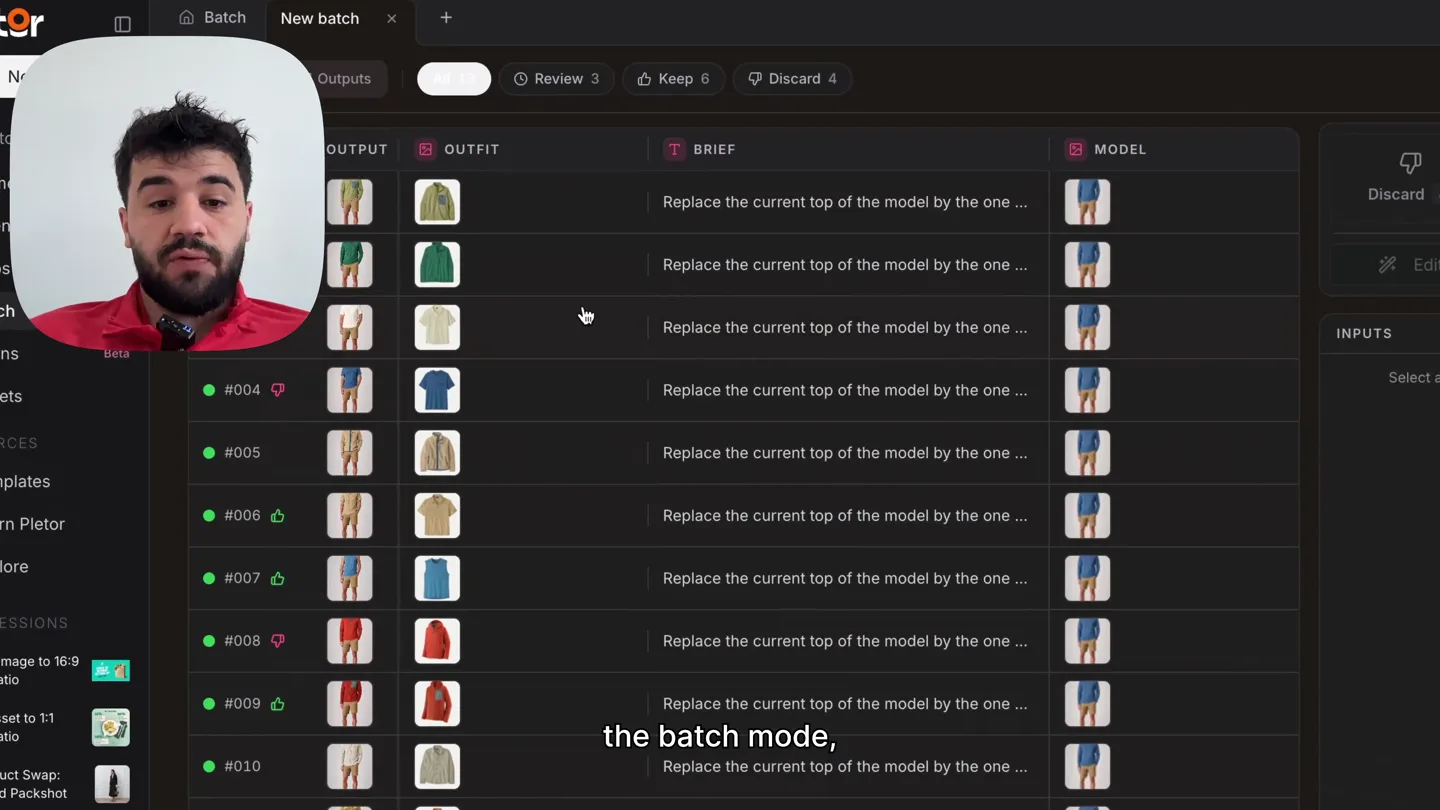
“And then you can click on Studio, and then you will get all your variations. So you can see that you have 11 outputs. You can review three, keep six, discard four. And then you can see that you have all your outputs right there. So you can click on one of them, and then you can see the prompt. You can edit the prompt, or you can discard or make simple edit. So you can say, for example, I want to change the color of the shorts to blue. And then you can see that it's going to change the color of the shorts to blue. And then you can keep it, and make sure this is production ready.”
- On screen
- Batch Studio Inputs Outputs All 11 Review 3 Keep 6 Discard 4 Download all Keep 6 Discard 3 Edit Re-run INPUTS Outfit Brief Replace the current top of the model by the one attached Model Tags + Add Describe your settings (P) + New model (M) 5
- Camera
- The camera remains static on the presenter while the screen content dynamically changes, showing output review, editing, and filtering options.
- Motion
- Interactive UI elements, image generation simulation, and real-time editing of generated content. Highlighted sections indicate user interaction.
Call to Action
Scale Your Content Production
“It really help you to make all your catalog. So if you have 1000 images, you can generate 1000 images in one click. So if you want to try it, just reach out to me, and I will be happy to onboard you to this new feature. Thank you.”
- On screen
- Inputs Outputs Review 3 Keep 6 Discard 4 Download Discard # OUTFIT OUTFIT BRIEF MODEL #001 #002 #003 #004 #005 #006 #007 #008 #009 #010 #011 #012 #013
- Camera
- The camera remains static on the presenter while the screen content dynamically changes, showing a full batch output view. The presenter then looks directly at the camera for the call to action.
- Motion
- Scrolling through a large dataset of generated images, emphasizing the scale of the batch mode. Direct address to the audience.
Motion design primitives
Synthesizable in Remotion · key components of the ai-batch-mode-explainer template.
DynamicUIPresenterOverlay
A live presenter's headshot is overlaid on a screen recording of a software interface. The screen content dynamically updates and animates while the presenter speaks, maintaining a consistent visual hierarchy.
+ Code construction recipe
Use a <Video> component for the screen recording and an <Img> or <Video> component for the presenter's headshot, positioned with absolute CSS. Synchronize screen recording events (e.g., UI clicks, text input) with audio cues using `useCurrentFrame()` and `interpolate()` for precise timing. Implement `z-index` to ensure the presenter overlay is always on top.
InteractiveTableDataPopulator
A table-like UI component rapidly populates with new rows of data, simulating user input or batch processing. Individual cells within the rows can be highlighted or modified, demonstrating interactive features like locking or editing.
+ Code construction recipe
Utilize a `Sequence` of `AbsoluteFill` or `Div` components for each row. Animate the `opacity` and `transform` (e.g., `translateY`) of new rows to slide in. Use `interpolate()` with `spring()` for a bouncy effect on row additions. Highlight specific cells or rows by animating their `backgroundColor` or `border` properties based on user interaction cues in the script.
ContentGridReviewFlow
A grid of generated images appears, allowing for selection, review, and editing of individual items. Actions like 'Keep' or 'Discard' are visually represented by changes in button states and image filtering.
+ Code construction recipe
Render a grid of `Img` components within a `Grid` layout. Animate the `scale` and `opacity` of selected images for a focus effect. Use `interpolate()` to transition button states (e.g., 'Keep' button changing color) and filter images out of the grid when 'Discard' is pressed. Implement a `Sequence` to control the timing of image generation and review steps.
Style DNA & aesthetic system
Visual aesthetic
Typography
Motion
Special effects
Pacing & rhythm
Conceptual story rhythm
- 1
The Efficiency Problem
Purpose. Immediately highlight the pain point of current AI image generation workflows (one-by-one processing) to establish relevance.
Execution. Presenter directly addresses the camera, followed by a screen capture showing a single image generation, then a quick cut to the 'Batch' documentation page.
- 2
Workflow Setup & Customization
Purpose. Demonstrate the ease of setting up a batch workflow, emphasizing flexibility and control over inputs and prompts.
Execution. Live UI walkthrough of creating a new batch, naming it, defining a brief, attaching models, and configuring parameters within the Playtor interface.
- 3
Scaling Inputs & Processing
Purpose. Showcase the core value proposition: processing hundreds or thousands of inputs simultaneously with consistent quality.
Execution. Rapid upload of multiple inputs (simulated file explorer), dynamic population of a batch table with many rows, and locking of parameters for mass application.
- 4
Review, Refine & Deploy
Purpose. Illustrate the post-generation workflow, including reviewing outputs, making edits, and preparing content for production.
Execution. Display of a grid of generated outputs, selection of an individual output for detailed review, live editing of a prompt to modify an image, and the 'Keep'/'Discard' actions.
Remix in Animatiq Studio
Master remix prompt · agent-ready
Sample remix
Objective
A marketing agency needs to quickly generate 50 short social media video ads from a single template, each with different product images and text overlays, using an AI video editing tool.How the recipe adapts
The 'DynamicUIPresenterOverlay' will show the agency's creative director explaining the challenge. The 'InteractiveTableDataPopulator' will be adapted to show a table of 50 video clips, each with editable fields for product image URLs and ad copy. The 'ContentGridReviewFlow' will display a grid of 50 generated video previews, allowing the director to quickly review, make minor text edits, and approve them for export, emphasizing the speed and scale of FrameFlow's batch rendering.Remix blueprint · ai-batch-mode-explainer
Scene durations (5 scenes, 172s)
Key Remotion components
Related AI Agents Product Launches
Explore all AI Agents launches →
To ensure that artificial general intelligence benefits all of humanity

Gopuff introduces Go, an AI shopping assistant built with SpaceXAI: say what you need and the order is placed.

Iliad (Troy) trailer made by Grok Imagine 1.5, which was just released