
Plop Studio · Launch Video Breakdown: Hook, Pacing & Motion Design
Plop is an iOS focus timer: the minutes you focus drip into a jar as water, and a broken session can be finished and mended.
Scene-by-scene timeline & spoken transcript
The Hook
Traditional Timer Setup
“(No spoken dialogue — Pizzicato synths and sub-bass introduce a ticking timer sound effect.)”
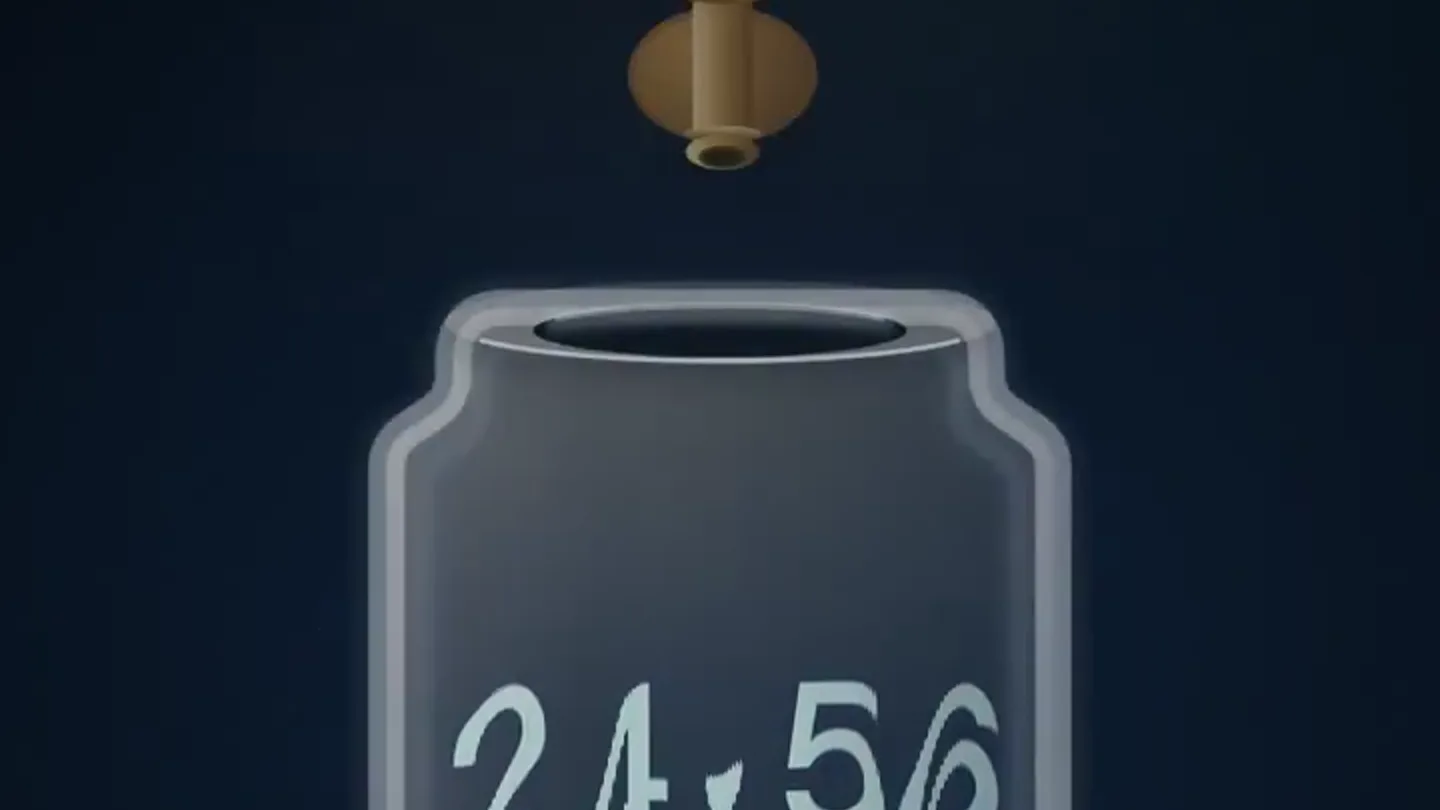
- On screen
- Most timers just count down. 24:59
- Camera
- Static, centered view of a digital timer.
- Motion
- Subtle text fade-in, digital numbers counting down.
Problem Agitation
Focus as Collected Water
“(No spoken dialogue — High-energy audio transition with a riser and sweep at 0:02, leading into a sub-bass drop/impact at 0:03. Pizzicato synths continue.)”
- On screen
- Focus isn't counted. It's collected.
- Camera
- Static, centered view of a jar and faucet.
- Motion
- Digital timer morphs into a water jar. Water drips from a faucet, filling the jar with a fluid simulation. Text animates in with a subtle bounce and color change.
Product Reveal
Mending Broken Focus
“(No spoken dialogue — Significant riser and sweep at 0:07, culminating in a sub-bass drop/impact at 0:08. Pizzicato synths continue.)”
- On screen
- Your effort isn't erased.
- Camera
- Static, centered view of the jar.
- Motion
- Jar cracks with a visual effect, then a golden repair animation mends the crack, symbolizing effort preservation. Text animates in with a subtle bounce and color change.
Call to Action
Plop App Interface & Download
“(No spoken dialogue — Final riser and sweep at 0:11 followed by a sub-bass drop/impact at 0:12. Pizzicato synths conclude.)”
- On screen
- Come back. Finish. Repaired. The flow was interrupted 10 min kept · 2 min spilled Finish the rest · 13:00 Leave it for now Plop Visual progress for deep work Download on the App Store Plop: Focus & Study Timer
- Camera
- Zoom out to reveal the jar within an iPhone frame, then a final zoom to the app icon and call to action.
- Motion
- Jar shrinks and integrates into an iPhone screen. UI elements animate into view. App icon appears with radiating circles. Call to action button animates with a glow effect.
Motion design primitives
Synthesizable in Remotion · key components of the abstract-metaphor-product-launch template.
DigitalToFluidMorph
A digital countdown timer visually distorts and transforms into a stylized water jar filling with liquid, symbolizing a shift from rigid counting to fluid collection.
+ Code construction recipe
Utilize SVG path morphing for the container shape transition. Implement a WebGL shader or Canvas API for the fluid simulation, animating the water level and surface ripples. Interpolate opacity and position for the faucet and water drops.
KintsugiCrackRepair
A visual crack appears on the water jar, then a golden, glowing line animates along the crack, mending it and restoring the jar's integrity.
+ Code construction recipe
Employ SVG stroke animation for the crack path, with a `stroke-dasharray` and `stroke-dashoffset` transition. Animate a gradient or glow effect along the stroke to simulate the golden repair. Use `spring` for the initial crack appearance and final repair snap.
AppIconRadiantCTA
The product's app icon appears, centered, with concentric circles radiating outwards, followed by a call-to-action button animating in with a subtle glow.
+ Code construction recipe
Render the app icon as an image or SVG. Use `interpolate` for scaling and fading multiple `div` elements or SVG circles to create the radiating effect. Animate the CTA button's `opacity`, `transform` (scale/translate), and a `box-shadow` for the glow effect.
Style DNA & aesthetic system
Visual aesthetic
Typography
Motion
Special effects
Pacing & rhythm
Conceptual story rhythm
- 1
The Conventional Timer
Purpose. Establish the baseline and the 'problem' with traditional focus tracking.
Execution. A simple digital timer counting down, representing the common, uninspired approach.
- 2
The Plop Metaphor
Purpose. Introduce Plop's unique value proposition: focus as a collected, not counted, resource.
Execution. The timer transforms into a jar filling with water, visually embodying the 'collection' concept.
- 3
Resilience & Repair
Purpose. Address a common user pain point (broken focus sessions) and highlight Plop's solution.
Execution. The jar cracks, then is mended with a golden repair, symbolizing the ability to recover and preserve effort.
- 4
Product in Action & CTA
Purpose. Showcase the app's interface and drive user acquisition.
Execution. The jar integrates into an iPhone screen, revealing the app's UI, followed by the app icon and a clear call to download.
Remix in Animatiq Studio
Master remix prompt · agent-ready
Sample remix
Objective
Launch a new meditation app, 'ZenFlow', that helps users cultivate inner peace and recover from distractions.How the recipe adapts
The 'DigitalToFluidMorph' primitive would become a 'ChaoticToCalmSphere' morph, where a swirling, fragmented visual transforms into a smooth, glowing orb. The 'KintsugiCrackRepair' primitive would adapt to a 'DistractionRecenterPulse', where the orb briefly flickers or distorts, then re-centers and stabilizes with a gentle, expanding pulse. The 'AppIconRadiantCTA' would remain similar, but the radiating circles would be softer, more ethereal, and the CTA button would have a serene, gradient glow.Remix blueprint · abstract-metaphor-product-launch
Scene durations (4 scenes, 15s)
Key Remotion components
Related Productivity Product Launches
Explore all Productivity launches →
Don't type, just speak. Flawless voice-to-text across every app at 240 WPM.

One workspace for knowledge scattered across Slack, email, Docs, and Notion. Connect your tools and build apps and agents that stay live with your data.

Notion positions itself as the backbone of your dock — a brand film of the Notion icon among everyday apps, ending on “Works with everything.”