
Post for Site · Launch Video Breakdown: Hook, Pacing & Motion Design
A complete walkthrough of Post for Site, a newly launched SaaS.
Scene-by-scene timeline & spoken transcript
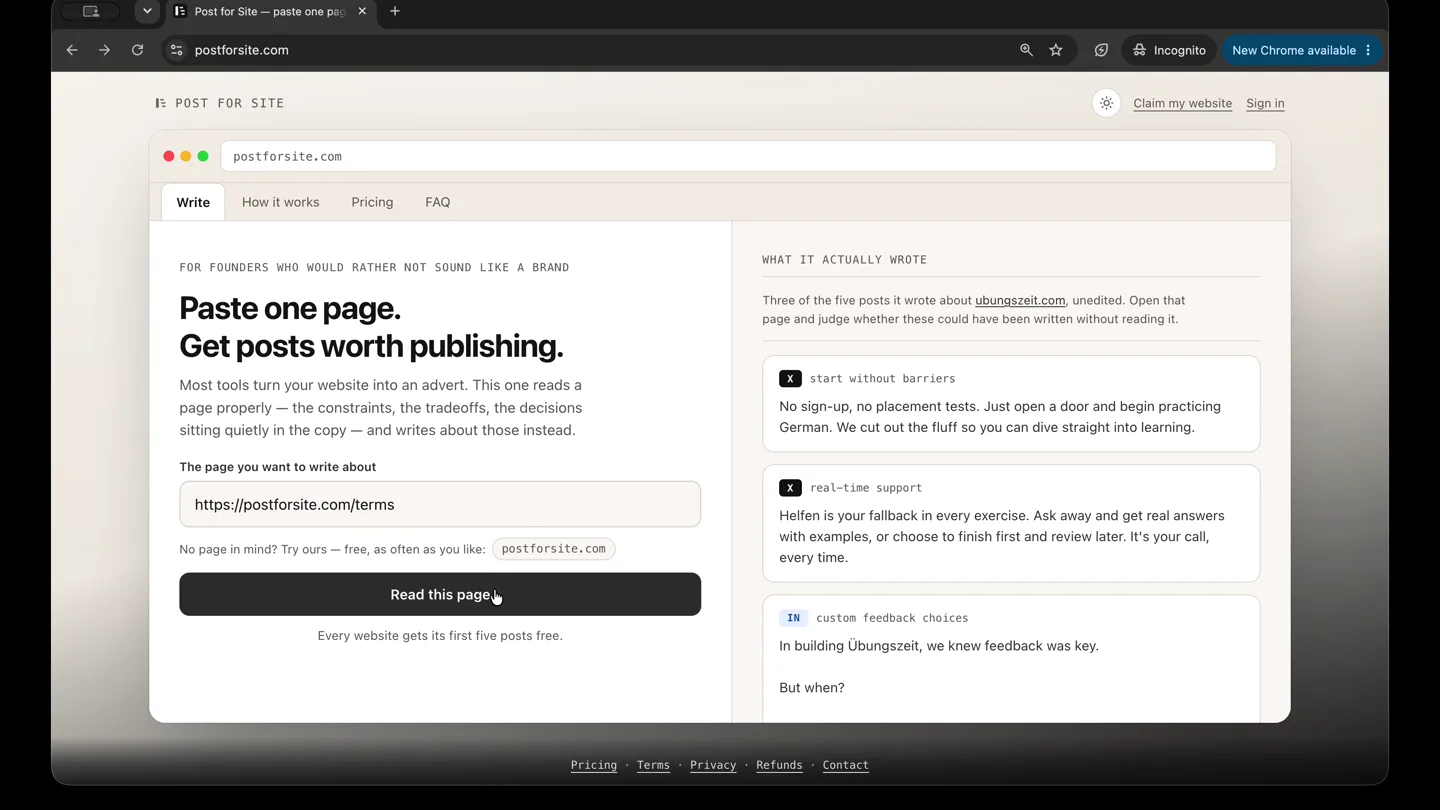
The Hook
Effortless Content Generation Setup
“(No spoken dialogue — ambient visual, silent video)”
- On screen
- Paste one page. Get posts worth publishing. The page you want to write about https://postforsite.com/terms Read this page. Every website gets its first five posts free. FOR FOUNDERS WHO WOULD RATHER NOT SOUND LIKE A BRAND WHAT IT ACTUALLY WROTE Three of the five posts it wrote about ubungszeit.com unedited. Open that page and judge whether these could have been written without reading it. X start without barriers No sign-up, no placement tests. Just open a door and begin practicing German. We cut out the fluff so you can dive straight into learning. X real-time support Helfen is your fallback in every exercise. Ask away and get real answers with examples, or choose to finish first and review later. IN custom feedback choices In building Übungszeit, we knew feedback was key. But when? What you get, and what it costs Free - one set of five posts per website, once. No payment, no account. Pro (Monthly) - 30 sets a month for one website, billed monthly. Pro (3 months) - the same allowance, billed every three... What the service is You give us the address of one page. We fetch that page, work out what it says, and write five social posts about it - some for X, some for LinkedIn. You choose the idea, the audience, the purpose... We do not disclose who is paying If someone else enters your website address, they are told only that it is already in use - which looks the same whether your free set has been used or you are on a plan. Not whether you pay, which... Buying a plan A plan may only be bought for a website you have claimed and are signed in to. Buying applies the plan to the website on your account, so it lands the right site, a mistyped address cannot be... Sign-in Claiming a website means proving you own it - a meta tag or a DNS record - and giving your name and email. From then on you sign in with a one-time link sent to that email, on any device, with no... One plan, one website A plan unlocks one registered domain and everything under it. yoursite.com, www.yoursite.com and blog.yoursite.com are all the same website. Anyone on your team can use it, on any device. The plan... Cancelling and changing plan Cancel from the billing-page button under Pricing -> Your plan, from the manage link in your purchase or renewal email, or ask us and we will do it. You keep access until the end of the period you... ← A different page Continue → Who are you writing for? Founders and operators Engineers Designers Marketers and growth Investors Potential customers A general professional audience What should the post do? Build credibility Announce something new Explain a decision Attract customers Attract good people Start a conversation How should it sound? Direct and sharp Short sentences. Story-driven Open inside a specific moment. Personal and honest First person. Calm and considered Measured and unhurried. Contrarian Analytical Take issue with something the reader probably believes. Reason it through in the open. Warm and encouraging Generous and human. Dry and understated Deadpan. How long? Recommended Short Medium Long Recommended lets each post run to whatever length suits its platform. It is the right answer more often not. Em dashes Keep them Remove them A lot of readers now treat the em dash - this one - as a sign something was written by a machine. It is only punctuation, and plenty of good writers use it, but if your audience reads it that way we would rather not hand you one. Choose Remove and the posts are written without them. Anything you want to get across? OPTIONAL We spent three months on this and almost cut it twice. Please don't make it sound like a launch announcement. Your words outrank the page. What to emphasise, what to avoid, or something the page never mentions. Read them before you publish. Length, hashtags, emoji and machine-sounding phrases are all checked. That is a filter, not a promise - it cannot tell whether a claim is true. Anything stated as fact is yours to verify. ← Back Write five posts → This is our own page, so run it as often as you like - It uses nothing. Paste your own page next to see it on your writing.
- Camera
- Static, eye-level browser window perspective. The camera remains fixed, simulating a user's desktop view.
- Motion
- Rapid, seamless UI navigation via simulated clicks and scrolls. Elements appear and disappear instantly, mimicking a fast user interaction without explicit transitions.
Product Reveal
AI Content Generation in Progress
“(No spoken dialogue — ambient visual, silent video)”
- On screen
- Working out what is genuinely unusual here... Usually twenty to forty seconds. Every post is checked before it reaches you. Finding five different angles. Usually twenty to forty seconds. Every post is checked before it reaches you. Checking length and phrasing... Usually twenty to forty seconds. Every post is checked before it reaches you.
- Camera
- Static, eye-level browser window perspective. The camera remains fixed, simulating a user's desktop view.
- Motion
- Subtle loading animations with text changes. A spinning circular loader indicates processing, while descriptive text updates to reflect different stages of AI content generation.
Feature Teaser
Reviewing AI-Generated Posts
“(No spoken dialogue — ambient visual, silent video)”
- On screen
- Your posts postforsite.com what the service is Write about another page What we noticed on this page Read each one before it goes out under your name. Checked for the usual machine tells - but accuracy is yours to confirm. X URL-driven content Give us one page. We'll extract its essence and craft five tailored social posts. Your choices guide us-idea, audience, tone. It's an AI-driven tool, not a promise of perfection. That's the tradeoff we made for flexibility. This post highlights the unique URL-driven process, emphasizing user choice and the AI-driven nature. Copy Open in X Refine Undo X AI writing tool constraints An AI writes your posts, but it's your vision that shapes them. From the page you choose, we craft content around your needs. Our promise? A tool shaped by your input, not a perfect result. A deliberate choice for creative freedom. It explains the AI's role while reinforcing user influence, which aligns with the founder's intent. Copy Open in X Refine Undo IN User-driven creativity 798 characters Imagine having a page that perfectly encapsulates your ideas. Now, imagine turning it into social media content that speaks directly to your audience. That's where we step in. You provide the page URL, set your goals, and select the tone. We deliver five crafted posts that align with your vision. This isn't a generic content generator. It's an AI tool designed to respect your choices, adapting to your input. You guide the ship; we're just the wind in your sails. We've made a calculated tradeoff: flexibility over guarantees. This means each post is a blend of AI capability and your strategic input. By choosing this path, we've prioritized creative freedom and user influence. It's not about perfection; it's about empowerment. A tool that serves the unique narratives you create. Opening line fits above LinkedIn's "see more" fold. It captures the collaborative essence of the service and the intentional tradeoff for flexibility, appealing to founders. Copy Open in LinkedIn Refine Undo IN Tailored social posts 854 characters Founders know the challenge of aligning content with vision. We took that challenge and flipped it. By allowing you to select a page URL and customize the idea, audience, purpose, tone, and length, we've opened a new avenue for social media strategy. Our AI crafts five posts based on your directives. This isn't about handing off work but enhancing your ability to project your voice. Why the AI approach? To offer a flexible, user-driven tool that adapts to your strategic needs. It's about creating a narrative that resonates, without the constraints of a one-size-fits-all solution. This tool wasn't designed to promise specific outcomes but to empower users with the creative control they seek. In a world full of cookie-cutter solutions, we're offering something different- an opportunity for true personalization in your social media presence. Opening line fits above LinkedIn's "see more" fold. This post addresses the uniqueness of the service and how it empowers founders to control their narrative. Copy Open in LinkedIn Refine Undo
- Camera
- Static, eye-level browser window perspective. The camera remains fixed, simulating a user's desktop view.
- Motion
- Smooth scrolling within content panels. Text and UI elements animate into view as the user scrolls, revealing more details about the generated posts and their features.
Call to Action
Pricing and Call to Action
“(No spoken dialogue — ambient visual, silent video)”
- On screen
- Pricing Free $0 5 posts, once Judge the writing before you pay for it. ✓ A mix of X and LinkedIn ✓ Copy and publish anywhere ✓ No card needed - Refining - A second set for the same site MOST POPULAR Pro Monthly 3 months $19 $9 /month 53% off Launch price 150 posts a month Billed monthly ✓ Any page on your site, as often as you like ✓ Refine any post, in your own words ✓ Every tone, purpose, audience and length ✓ Cancel whenever you like Choose monthly Lifetime $149 $79 once 47% off Launch price 125 posts a month, forever Pay once. Keep it as long as the product exists. ✓ Everything in Pro ✓ One payment, nothing to renew ✓ Future improvements included Choose lifetime
- Camera
- Static, eye-level browser window perspective. The camera remains fixed, simulating a user's desktop view.
- Motion
- Subtle hover effects and button presses. Pricing tiers are highlighted with a soft glow or slight scale on hover, and a click animation confirms selection, guiding the user to a clear call to action.
Motion design primitives
Synthesizable in Remotion · key components of the saas-ui-walkthrough-template template.
RapidUIScroll
Simulates quick, natural scrolling within a web browser, revealing new content sections smoothly. The scroll is fast but readable, ensuring information is absorbed without abrupt cuts.
+ Code construction recipe
Use `interpolate` with `scrollPosition` to animate `translateY` of content containers. Apply a `cubic-bezier` easing function for a natural, non-linear scroll feel. Ensure content is pre-rendered to avoid pop-in.
DynamicTextReveal
Text elements appear and disappear instantly or with a subtle fade, mimicking user input or system updates. This is often paired with UI element changes like button states or form field updates.
+ Code construction recipe
Implement `spring` animations for `opacity` and `scale` on text elements. For instant changes, use conditional rendering based on `frame` or `currentScene` props. Utilize `Sequence` for precise timing of multiple text reveals.
InteractiveButtonHighlight
Buttons and interactive elements respond to simulated clicks and hovers with subtle visual feedback, such as a background color change, a slight scale, or a shadow effect.
+ Code construction recipe
Use `spring` for `backgroundColor`, `scale`, and `boxShadow` properties. Define `hover` and `active` states using `useCurrentFrame` and `interpolate` to simulate user interaction. Ensure `durationInFrames` is short for snappy feedback.
Style DNA & aesthetic system
Visual aesthetic
Typography
Motion
Special effects
Pacing & rhythm
Conceptual story rhythm
- 1
Problem Introduction & Solution Tease
Purpose. Quickly introduces the core problem of content creation and hints at an effortless solution through a direct UI interaction.
Execution. A user pastes a URL and clicks 'Read this page', immediately setting up the product's core function.
- 2
Customization & Configuration
Purpose. Demonstrates the flexibility and control users have over the AI-generated content.
Execution. Rapid scrolling through various options for audience, tone, length, and specific content directives.
- 3
AI Processing & Output
Purpose. Showcases the AI's capability to process information and generate diverse content angles.
Execution. Loading screens with changing text indicating different stages of AI analysis, followed by the presentation of multiple generated posts.
- 4
Value Proposition & Call to Action
Purpose. Highlights the benefits of the service and guides the user towards subscription.
Execution. Scrolling through detailed explanations of generated posts, followed by a clear display of pricing tiers and calls to action.
Remix in Animatiq Studio
Master remix prompt · agent-ready
Sample remix
Objective
A new project management SaaS called 'TaskFlow' that simplifies task delegation and progress tracking.How the recipe adapts
The TaskFlow remix would feature a browser window showing the TaskFlow dashboard. The RapidUIScroll primitive would demonstrate scrolling through project lists and task details. DynamicTextReveal would show new tasks being added or status updates appearing. InteractiveButtonHighlight would be used for clicking 'Assign Task' or 'Mark Complete' buttons, with subtle animations. The overall aesthetic would remain clean and functional, focusing on the intuitive flow of managing projects within the application.Remix blueprint · saas-ui-walkthrough-template
Scene durations (4 scenes, 83.8s)
Key Remotion components
Related Productivity Product Launches
Explore all Productivity launches →
Don't type, just speak. Flawless voice-to-text across every app at 240 WPM.

One workspace for knowledge scattered across Slack, email, Docs, and Notion. Connect your tools and build apps and agents that stay live with your data.

Notion positions itself as the backbone of your dock — a brand film of the Notion icon among everyday apps, ending on “Works with everything.”