
Railway · Launch Video Breakdown: Hook, Pacing & Motion Design
Railway Sandboxes lets you spin up thousands of VMs next to your infra. Run, checkpoint, and fork so agents and code can execute right beside the rest of the stack.
Scene-by-scene timeline & spoken transcript
The Hook
Dynamic Text Intro & Product Name Reveal
“(No spoken dialogue — Ambient electronic score with pizzicato synths and rhythmic pulse. High-energy audio transition at 0:03.)”
- On screen
- Railway Sandbox0& your run.
- Camera
- Static, centered framing on text. Subtle background parallax.
- Motion
- Kinetic typography with character-level glitch and reveal effects. Text scales and fades in/out rapidly.
Product Reveal
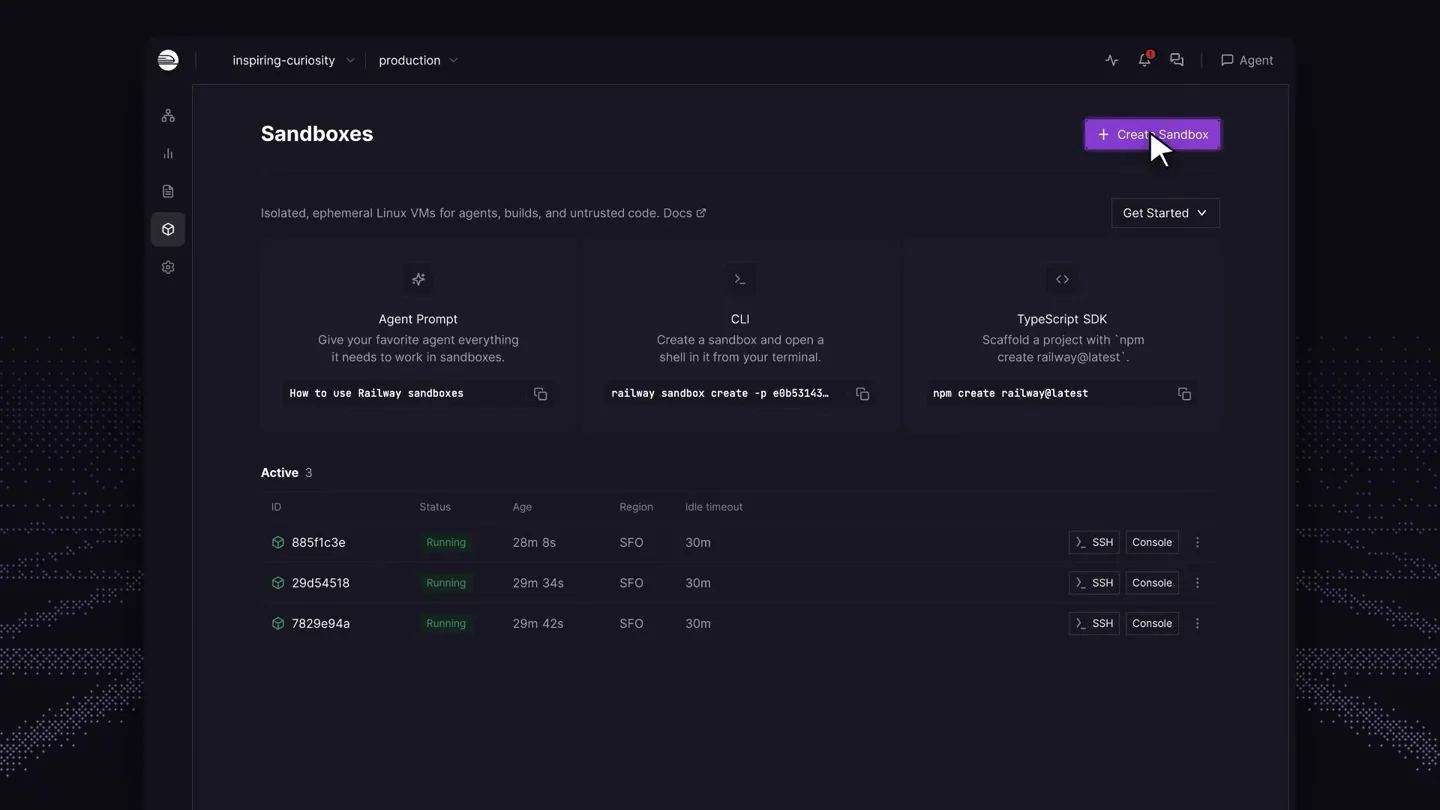
UI Demonstration: Sandboxes & Agent Integration
“(No spoken dialogue — Driving electronic score continues, building intensity.)”
- On screen
- Sandboxes Isolated, ephemeral Linux VMs for agents, builds, and untrusted code. Docs Get Started + Create Sandbox Agent Prompt Give your favorite agent everything it needs to work in sandboxes. How to use railway sandboxes CLI Create a sandbox and open a shell in it from your terminal. railway sandbox create -p e8b5314j TypeScript SDK Scaffold a project with `npm create railway@latest` npm i Active 3 ID Status Region Idle timeout 885f1c3e Running 28m 8s SFO 30m SSH Console 29d54518 Running 29m 34s SFO 30m SSH Console 7829e94a Running 29m 42s SFO 30m 29d54518 Running Created 29m ago Region SFO Idle timeout 30m Console Network Flow Logs 29d54518 / console-auto-5dl shell Continue in SSH Full screen Connected Railway Sandbox - | workspace launch-demo Upload Railway Sandbox - live execution Linux x86_64 Building a sample artifact... File: result.json 1 {"status":"ready","platform":"Railway Sandboxes"} Workspace files: Permissions Size User Date Modified Name -rw-r--r-- 8B root 1s Sep 22:16 result.json Coding agents built in Grok by xAI Claude by Anthropic ChatGPT by OpenAI
- Camera
- Zoom-in and pan across the UI, focusing on key elements. Static shots for agent logos.
- Motion
- Seamless UI animation, highlighting interactive elements and data flow. Icon reveals with subtle bounce.
Feature Teaser
Core Features: Checkpoint & Fork
“(No spoken dialogue — Rhythmic pulse intensifies with percussive elements. High-energy audio transition at 0:12.)”
- On screen
- Checkpoint7/ Checkpoint. railway - zsh # capture the active sandbox $ railway sandbox checkpoint create deps-ready ✓ checkpoint deps-ready saved 412 MB 1.8 s # list checkpoints $ railway | F93@\ Fork. Fork. Fork. Fork. Fork. Fork. Fork. Fork. Break. Begin again.
- Camera
- Static, centered framing on text. Rapid cuts between text and UI elements.
- Motion
- Kinetic typography with glitch and reveal. UI elements animate in, demonstrating CLI commands. Repetitive text animation for 'Fork'.
Call to Action
Benefit-Oriented Messaging & Final CTA
“(No spoken dialogue — Score builds to a climax with risers and sweeps, culminating in a sub-bass drop/impact at 0:19.)”
- On screen
- For agents. For >9%] For you. SDK agent.ts import { Sandbox } from "railway"; await using sandbox = await Sandbox.create(); // small files are one-liners await sandbox.files.write("/app/config.json", | CLI zsh # boot a fresh sandbox from it $ railway sandbox create \ --checkpoint deps-ready ✓ sandbox-b21c running 1.2 s JSON.stringify({ ok: true })); const text = await sandbox.files.read("/app/config.json"); Railway Sandboxes Room to run. docs.railway.com< 10)1&4
- Camera
- Static framing on text, then a subtle zoom out to reveal the final product screen.
- Motion
- Text reveals with a subtle glow. Code snippets animate in. Final logo and tagline reveal with a strong impact.
Motion design primitives
Synthesizable in Remotion · key components of the developer-tool-launch-glitch-ui template.
KineticGlitchText
Text characters rapidly cycle through random symbols and numbers before resolving to the correct letter, often accompanied by a subtle glow or distortion effect. The text then scales or fades out quickly.
+ Code construction recipe
Use `interpolate` for character-level opacity and transform (scale/skew) based on frame. Implement a `random` function for character substitution during the glitch phase. Apply SVG filters for glow and distortion.
DynamicUIHighlight
Specific UI elements, such as buttons, text fields, or data rows, are highlighted with a subtle glow, color change, or animated border, drawing attention to their functionality or data updates.
+ Code construction recipe
Utilize `spring` for smooth highlight animations. Apply `opacity` and `backgroundColor` changes to target UI components. Use `clipPath` or `mask` for animating borders or reveals on specific sections.
RadialDotField
A background of small, subtly glowing dots that emanate from the center or a specific point, creating a sense of depth and movement. The dots may subtly shift color or intensity.
+ Code construction recipe
Render a grid of small `Dot` components. Animate their `opacity` and `scale` based on their distance from a central point using `interpolate`. Apply a `radial-gradient` or `box-shadow` for the glow effect.
Style DNA & aesthetic system
Visual aesthetic
Typography
Motion
Special effects
Pacing & rhythm
Conceptual story rhythm
- 1
The Glitchy Hook
Purpose. Immediately grab attention and introduce the product name with a high-energy, tech-forward visual.
Execution. Rapidly appearing and glitching text ('Railway Sandboxes', 'your', 'run.') against a dark, dotted background, synchronized with a rising electronic score.
- 2
Seamless Sandbox Demo
Purpose. Showcase the core functionality of Railway Sandboxes and its integration with AI agents through a live UI demonstration.
Execution. Smooth pans and zooms across the Railway UI, highlighting sandbox creation, live execution, and the integration of Grok, Claude, and ChatGPT logos.
- 3
Feature Power-Up
Purpose. Emphasize key developer features like 'Checkpoint' and 'Fork' with quick, impactful visual metaphors.
Execution. Kinetic typography for 'Checkpoint' and 'Fork' with glitch effects, interspersed with CLI command demonstrations and a rapid, multi-instance 'Fork' animation.
- 4
Agent-Centric Call to Action
Purpose. Reinforce the product's value proposition for agents and developers, culminating in a clear call to action.
Execution. Text reveals ('For agents. For you.') alongside code snippets, leading to the final 'Railway Sandboxes: Room to run.' tagline and website URL, synchronized with a powerful audio impact.
Remix in Animatiq Studio
Master remix prompt · agent-ready
Sample remix
Objective
Launch a new AI-powered code refactoring tool called 'SyntaxSculpt'.How the recipe adapts
The video would open with 'SyntaxSculpt' revealed using KineticGlitchText, followed by a DynamicUIHighlight on a code editor showing real-time refactoring suggestions. The RadialDotField background would subtly animate behind code snippets and architectural diagrams. Key features like 'Refactor', 'Analyze', and 'Automate' would be introduced with rapid text animations. The pacing would remain fast, culminating in a call to action like 'Craft perfect code. syntaxsculpt.dev' with a strong audio impact.Remix blueprint · developer-tool-launch-glitch-ui
Scene durations (4 scenes, 40s)
Key Remotion components
Related Developer Tools Product Launches
Explore all Developer Tools launches →
Agentic CLI for coding, building apps, and automating workflows.

New in Claude Code: your sessions can now message each other. Tell Claude to send a summary (not your history or files), and the other session picks it up mid-task.

Meet Qwen3.8-Max: A New Bar for Coding and Cowork. https://t.co/mJaA8vr6xT