
Readwise · Launch Video Breakdown: Hook, Pacing & Motion Design
A ground-up rebuild of the Readwise app: fresh design, faster search, paper-book scanning, voice capture, smoother Daily Review, and AI chat with your highlights.
Scene-by-scene timeline & spoken transcript
The Hook
Daily Review & Rebuild Tease
“(No spoken dialogue — Ambient electronic score with pizzicato synths and sub-bass. High-energy audio transition at 0:03.)”
- On screen
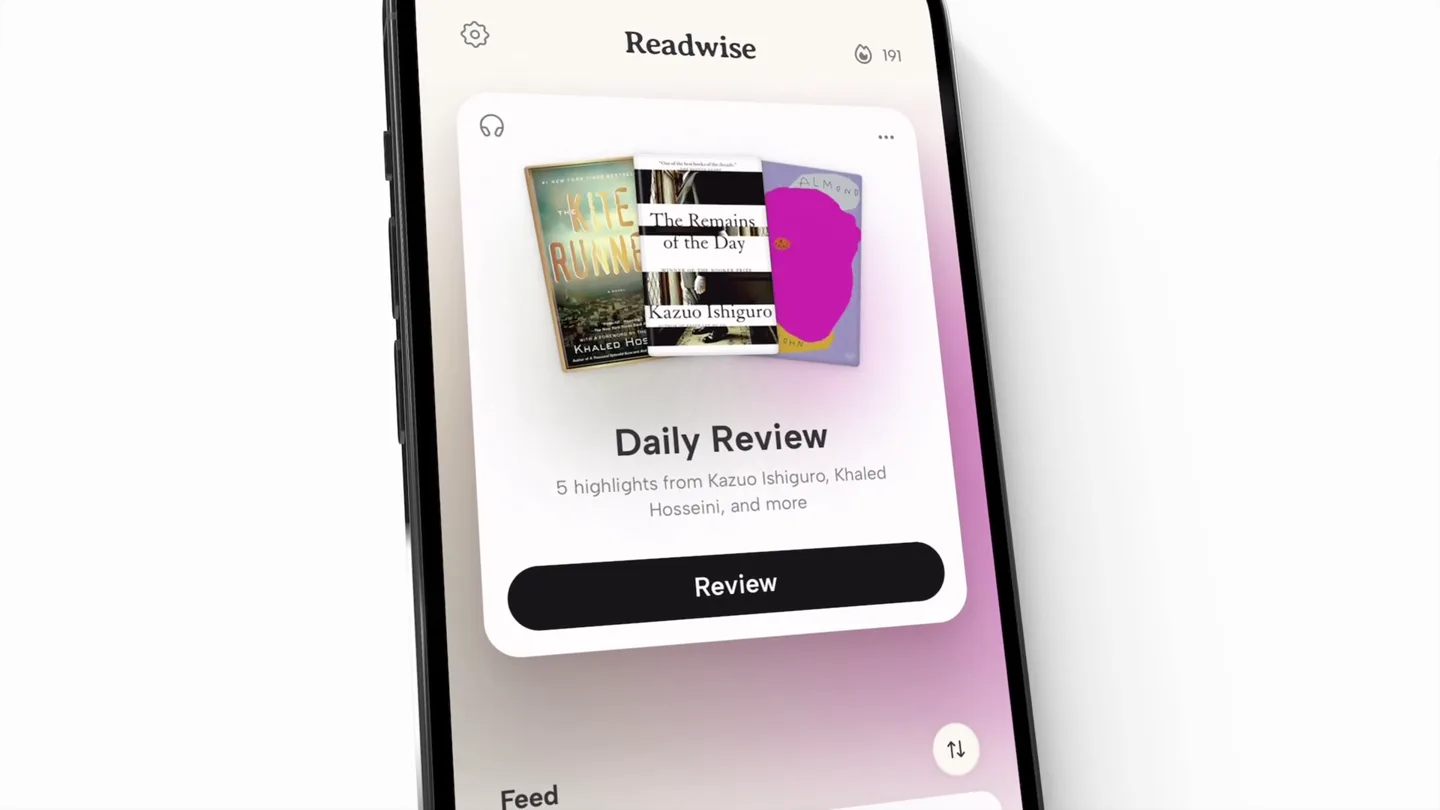
- Daily Review 5 highlights from Kazuo Ishiguro, Khaled Hosseini, and more Review Now rebuilt.
- Camera
- Dynamic close-up on iPhone screen, then a quick zoom out and pan to reveal text on a gradient background.
- Motion
- App UI animation with subtle parallax, followed by a hard cut to full-screen text with a soft gradient background reveal.
Product Reveal
Core Features Showcase: Daily Review & Streaks
“(No spoken dialogue — Driving tech-house beat with 808-style percussion. Sub-bass drops and risers punctuate scene changes.)”
- On screen
- 9:41 Daily Review Added to favorites The Well of Ascension Brandon Sanderson A man can only stumble for so long be-fore he either falls or stands up straight. sanderson Discord Master Frequency Done Great job! You just Reviewed 5 highlights and completed your Daily Readwise. Daily streak 191 days Continue to Consistency -> Tweets From Reader @ReadwiseReader on Twitter Save anything, your AI now knows it. Too much to read? Your AI can now help triage for you: your manual save as well as newsletters/RSS feeds. Now available via MCP in any/every AI app! https://t.co/Ost3OXA64I Slow Productivity Cal Newport Don't rush your most important work. Allow it instead to unfold along a sustainable timeline, with variations in intensity, in settings conducive to brilliance. productivity Statistics Streak 193 current streak, days 193 longest streak, days 2,750th global streak rank July 2026 Today Mon Tue Wed Thu Fri Sat Sun 29 30 1 2 3 4 5 6 7 8 9 10 11 12 13 14 15 16 17 18 19 20 21 22 23 24 25 26 27 28 29 30 31 1
- Camera
- Isometric perspective on iPhone, showcasing app interactions. Camera subtly rotates and zooms to highlight specific UI elements.
- Motion
- Precise UI animation, micro-interactions, and content transitions within the app. Smooth camera moves follow user flow.
Feature Teaser
AI Chat & Physical Book Scanning
“(No spoken dialogue — Beat maintains energy, with subtle synth swells and percussive accents during feature reveals.)”
- On screen
- Hi! I'm Ghostreader, your highlights' librarian. You can ask me to explain certain passages. What do my highlights reveal about Fast New chat What do my highlights reveal about my relationship to productivity? Ask follow up... Home Library Add Ask My relationship to productivity Your relationship with productivity is now tied to agency and boundaries. You appear to admire the capacity to set rigid boundaries-like ending the workday at 6 p.m. or observing a Sabbath-which challenges the traditional, conformist definition of 'working hard.' 3. Productivity as "Value Management" Perhaps the most notable theme in your highlights is that productivity is about choosing what matters rather than just clearing a queue. Your highlights suggest: The 'Do Something' Principle: When stuck, your approach is to avoid overthinking and simply start working, believing Relevant Highlights See all Feel-Good Productivity... Ali Abdaal Atomic James C Highlighting Mode Select the exact passage Take a photo of any page, then drag your finger to select text you want to save Scan your physical highlights Highlight text with a marker, then we'll automatically detect and extract it Next Think of microshifts as tiny increments of change in your day-to-day life. A microshift is changing what you eat for one part of one meal just one time. Then it's doing that a second time and a third. Before you even realize what's happening, you've adopted a pattern of behavior. Analyzing Save Highlights Think of microshifts as tiny increments of change in your day-to-day life. A microshift is changing what you eat for one part of one meal just one time. Then it's doing that a second time and a third. Before you even realize what's happening, you've adopted a pattern of behavior. Add a note... Save your highlight to Quick Passages Notes not attached to any specific book The Mountain Is You Brianna Wiest Atomic Habits James Clear Feel-Good Productivity: How to Do... Ali Abdaal
- Camera
- Close-up on iPhone, simulating user typing and receiving AI responses. Transitions to a real-world book scan, then back to app UI.
- Motion
- Realistic typing animation, dynamic content loading, and seamless integration of real-world footage (book scanning) into the app context.
Call to Action
Ecosystem & Availability
“(No spoken dialogue — Music builds with increased intensity, culminating in a final sub-bass impact and synth flourish.)”
- On screen
- 9:15 Books Library 238 LET THEM HABITS Articles 192 Podcasts 74 Tweets 17 Home Library Add Ask 9:15 Readwise 3 highlights from R. Sutherland, L. Lowndes, and more Review 0 of 2 Reviews done for today Mastery 293 flashcards Feed Tweets From Amir Salim @miramirac on Twitter Home Library Add Ask 9:15 Daily Review Alchemy Rory Sutherland For a business to be truly customer- focused, it needs to ignore what people say. Instead it needs to concentrate on what people feel. customer-dev product IOS and Android. R Readwise
- Camera
- Multiple iPhones arranged in a grid, showcasing different app screens simultaneously. Final shot is a full-screen logo reveal.
- Motion
- Multi-device montage with synchronized UI animations. The final logo reveal uses a subtle zoom and fade-in effect.
Motion design primitives
Synthesizable in Remotion · key components of the tech-product-launch-montage template.
DynamicAppCardReveal
A UI card or element slides into view with a slight bounce, often accompanied by a subtle background blur or depth shift, simulating a modal or new content appearing.
+ Code construction recipe
Use `interpolate` for position (y-axis) and opacity, with a `spring` function for the bounce effect. Apply a `backdropFilter` for blur on the background element.
IsometricDeviceCarousel
Multiple device mockups (e.g., iPhones) are arranged in an isometric grid, rotating or sliding to reveal different app screens in a synchronized, rhythmic fashion.
+ Code construction recipe
Utilize `rotateY` and `translateX` with `interpolate` for device positioning and rotation. Synchronize `Sequence` components for each device's internal UI animation.
ContentDrivenCameraPan
The camera smoothly pans and zooms across the device screen, focusing on specific UI elements or text as new content appears or user interaction occurs.
+ Code construction recipe
Animate `scale` and `translate` properties of the main camera or a parent container using `interpolate` with `ease-in-out` curves to follow the narrative flow of the UI.
Style DNA & aesthetic system
Visual aesthetic
Typography
Motion
Special effects
Pacing & rhythm
Conceptual story rhythm
- 1
The 'Rebuilt' Promise
Purpose. Immediately hook the viewer by highlighting the core product update and its fresh appeal.
Execution. Quick cuts between the old and new UI, culminating in a bold 'Now rebuilt.' text reveal on a vibrant gradient background.
- 2
Feature Immersion
Purpose. Demonstrate key functionalities through realistic, interactive app simulations.
Execution. Isometric device views with animated UI elements, simulating user taps, scrolls, and content loading, guided by dynamic camera work.
- 3
Innovation Spotlight
Purpose. Showcase the unique, advanced features that differentiate the product.
Execution. Dedicated scenes for AI chat interaction with typing animations and a seamless transition to real-world physical book scanning.
- 4
Ecosystem & Availability
Purpose. Reinforce the product's broad utility and accessibility across platforms.
Execution. A multi-device montage displaying various app screens simultaneously, followed by a clear call to action with platform availability and logo reveal.
Remix in Animatiq Studio
Master remix prompt · agent-ready
Sample remix
Objective
Launch a new AI-powered financial planning app, 'WealthFlow', targeting young professionals.How the recipe adapts
The 'DynamicAppCardReveal' primitive would be used for showing personalized financial insights or budget breakdowns. 'IsometricDeviceCarousel' would display WealthFlow across iOS, Android, and web interfaces. 'ContentDrivenCameraPan' would highlight specific AI recommendations or investment opportunities within the app. The color palette would shift to cool blues and greens, maintaining the clean aesthetic. The energetic music and fast cuts would emphasize the app's efficiency and modern appeal.Remix blueprint · tech-product-launch-montage
Scene durations (4 scenes, 60s)
Key Remotion components
Related Productivity Product Launches
Explore all Productivity launches →
Anthropic introduces Cowork, which brings the Claude Code way of delegating tasks to everyday, non-technical work.

Don't type, just speak. Flawless voice-to-text across every app at 240 WPM.

One workspace for knowledge scattered across Slack, email, Docs, and Notion. Connect your tools and build apps and agents that stay live with your data.