
Replit ⠕ · Launch Video Breakdown: Hook, Pacing & Motion Design
Replit apps are now available in Meta VR.
Scene-by-scene timeline & spoken transcript
The Hook
AI-Powered VR Game Creation Prompt
“(No spoken dialogue — Typing sound effects with a subtle electronic beat underscore the prompt entry.)”
- On screen
- Find emails needing my reply Organize my Google Drive Turn my notes into a slide deck Build a Meta Quest VR game where players slice flying fruits with swords for poil
- Camera
- Static, close-up shot of a text input field, simulating a user typing.
- Motion
- Text typing animation with a blinking cursor, simulating real-time input.
Product Reveal
Replit IDE & Publishing Flow
“(No spoken dialogue — The electronic beat intensifies with a high-energy audio transition and a sub-bass drop as the UI appears.)”
- On screen
- replit.com Fruit Slice VR Design Build Created your Quest game workspace Moved to project Preparing for artifact creation I'm building the playable Quest version: a first-person fruit-slicing arena with tracked sword swings, scoring, combos, and a timed round. I'll also make the browser view usable as a preview and keep the immersive Quest activation marker in the served game. 27 actions Use a more capable model when needed for this request? Worked for 2 minutes Checkpoint made 7 minutes ago The interface is in place. Next I'm connecting it to the actual 3D game loop: fruit launch arch, sword collision checks, slice effects, the round timer, and a score display visible inside the headset. Message Agent... Power Plan Tools Preview Chat replit.dev/ Preview on your Meta device Open this app on Quest 1 Choose a device Select where you want to open the app: Quest 2 Scan the QR code Use Quest Browser to scan the code and open your app. Enable public preview to scan Anyone with the link can open this preview. META QUEST ARCADE A FIRST-PERSON SLICING CHALLENGE FRUIT SLICE Swing fast. Keep the chain alive. Your best run starts now. ROUND 60 sec RECORD 0 PLAY IN BROWSER Desktop preview: drag across to pan, keyboard and pointer ready. Who can access your app Public Anyone on the internet with the URL Engagement tools Enable feedback widget Review security Publish Checkpoint made just now Publish changes automatically from now on? Turn on auto-publish Publishing Published! App Storage Setup Integrations Git Secrets Agent Skills
- Camera
- Zoom out and pan across the Replit IDE, showcasing the code generation, preview, and publishing options.
- Motion
- Smooth camera pan and zoom, highlighting key UI elements. UI elements animate into view with subtle fades and slides.
Feature Teaser
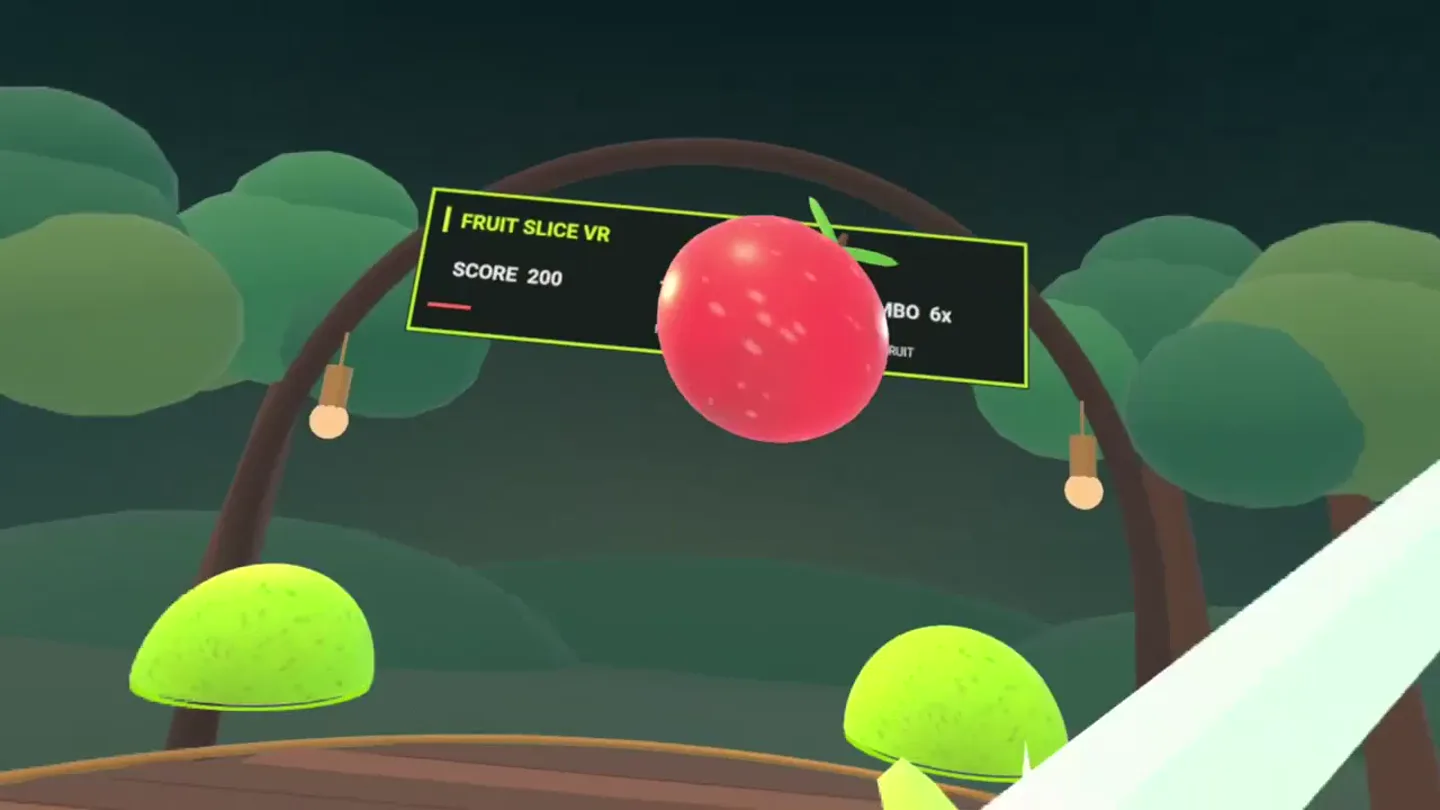
VR Gameplay Demonstration
“(No spoken dialogue — Energetic electronic music with percussive hits and sound effects from the VR game (fruit slicing, score updates) drive the scene.)”
- On screen
- fruit-slice-vr.replit. fruit-slice-vr.replit.app Fruit Slice VR https://fruit-slice-vr.replit.app/ META QUEST ARCADE A FIRST-PERSON SLICING CHALLENGE FRUIT SLICE Swing fast. Keep the chain alive. Your best run starts now. ROUND 60 sec RECORD 1,950 ENTER QUEST FRUIT SLICE VR SCORE 150 TIME 55s COMBO 5x HOLD EITHER TRIGGER + SWIPE ACROSS FRUIT SCORE 300 TIME 53s COMBO 8x SCORE 3400 TIME 23s COMBO 70x
- Camera
- First-person perspective within a VR headset, transitioning from a virtual browser to immersive gameplay.
- Motion
- Seamless transition from a virtual desktop environment to a full VR game experience. Dynamic camera movement simulating head turns and gameplay action. On-screen score and combo updates animate rapidly.
Call to Action
Replit x Meta Branding
“(No spoken dialogue — The electronic beat resolves with a final impactful sub-bass drop and a sustained synth pad.)”
- On screen
- Make your own Meta VR apps on Replit Replit | Meta
- Camera
- Static, centered shot of text and logos.
- Motion
- Text wipe-on animation, followed by a logo reveal with a subtle scale and fade effect.
Motion design primitives
Synthesizable in Remotion · key components of the ai-dev-launch-fast-cut template.
AITypingReveal
Text appears character by character in an input field, simulating AI-driven typing, accompanied by a blinking cursor. Suggested prompts appear above the input field.
+ Code construction recipe
Use `Sequence` and `spring` for character reveal, `interpolate` for cursor blink opacity. Implement a `map` over an array of suggested prompts, animating their opacity and Y-position with `spring`.
IDEFlowZoom
A dynamic camera pan and zoom across a complex UI, highlighting specific interactive elements and text, with elements fading and sliding into view.
+ Code construction recipe
Utilize `AbsoluteFill` with `scale` and `translateX/Y` for camera movement. Animate individual UI components using `spring` for opacity and position, orchestrating their appearance within a `Sequence`.
VRGameTransition
A seamless transition from a virtual browser window displaying a game preview to an immersive first-person view of the actual VR game, with dynamic gameplay elements.
+ Code construction recipe
Employ `AbsoluteFill` with `scale` and `opacity` to transition the browser window out. Render the VR game scene using 3D transforms and `Canvas` or `WebGL` components, animating game elements with `spring` and `interpolate`.
Style DNA & aesthetic system
Visual aesthetic
Typography
Motion
Special effects
Pacing & rhythm
Conceptual story rhythm
- 1
The Prompt
Purpose. Introduce the core capability: AI-powered development.
Execution. Typing animation in a minimalist UI, building anticipation for the output.
- 2
The Creation
Purpose. Showcase the product's development environment and ease of publishing.
Execution. Dynamic pan and zoom across the Replit IDE, highlighting key features and the 'Published!' confirmation.
- 3
The Experience
Purpose. Demonstrate the end-user experience of the created application.
Execution. First-person VR gameplay footage, emphasizing immersion and interactivity.
- 4
The Partnership
Purpose. Reinforce the brand collaboration and call to action.
Execution. Clean text and logo reveal, clearly stating the product's value proposition and partnership.
Remix in Animatiq Studio
Master remix prompt · agent-ready
Sample remix
Objective
Launch video for 'Animatiq AI Code Assistant', demonstrating AI-powered animation code generation.How the recipe adapts
The AITypingReveal primitive will show a user prompting Animatiq AI to 'Generate a complex SVG morph animation for a hero section'. The IDEFlowZoom will showcase the Animatiq IDE with AI-generated code snippets appearing and being integrated, followed by a 'Deploy to Production' button click. The VRGameTransition will be replaced by a 'BrowserAnimationPreview' primitive, showing a full-screen, complex SVG animation running smoothly in a browser, with dynamic camera moves highlighting different parts of the animation. The final CTA will be 'Build stunning animations with Animatiq AI' alongside the Animatiq logo.Remix blueprint · ai-dev-launch-fast-cut
Scene durations (4 scenes, 20s)
Key Remotion components
Related Developer Tools Product Launches
Explore all Developer Tools launches →
Agentic CLI for coding, building apps, and automating workflows.

New in Claude Code: your sessions can now message each other. Tell Claude to send a summary (not your history or files), and the other session picks it up mid-task.

Meet Qwen3.8-Max: A New Bar for Coding and Cowork. https://t.co/mJaA8vr6xT