
Scene-by-scene timeline & spoken transcript
The Hook
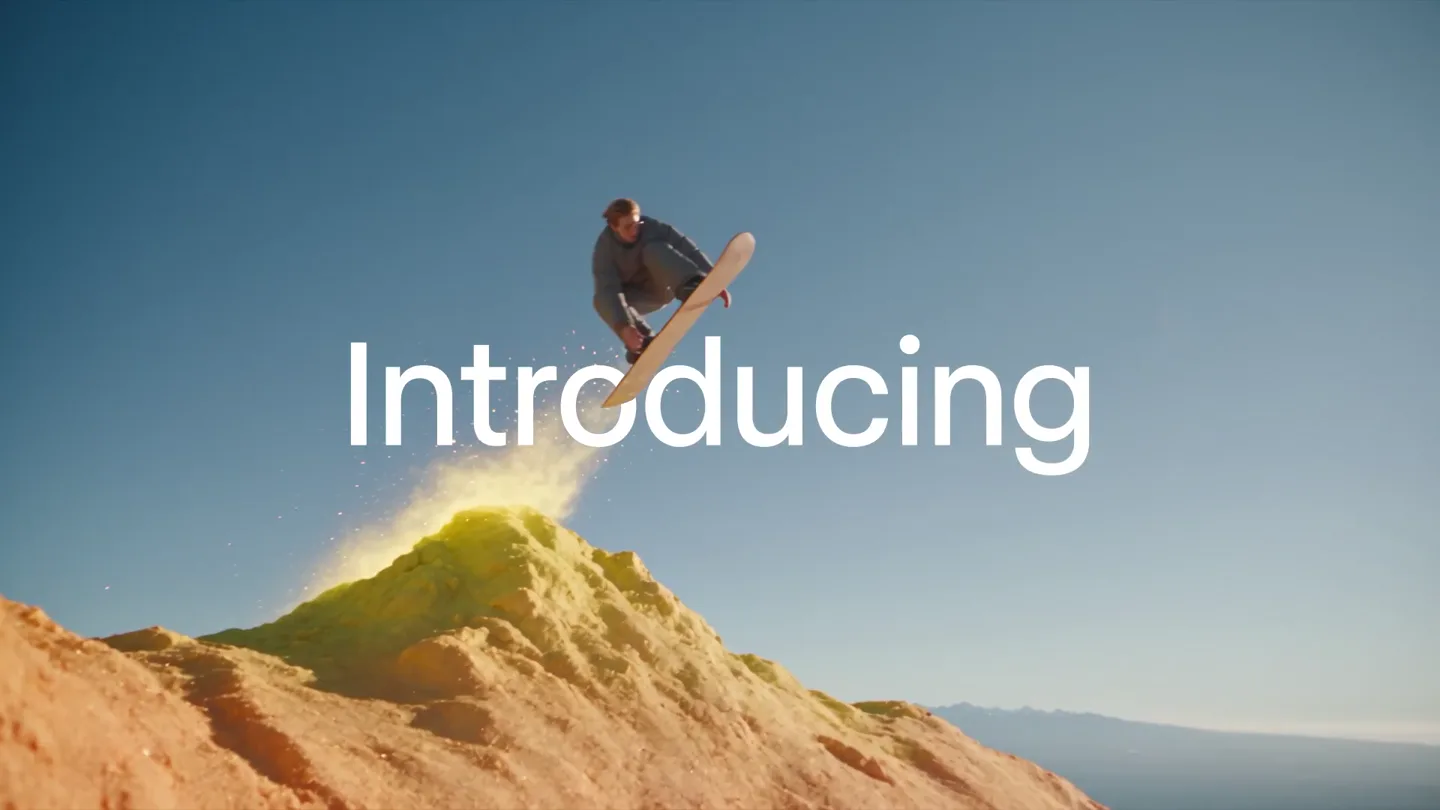
Surreal AI-Generated Landscape Surfing
“(No spoken dialogue — Dramatic, high-energy audio transition with metallic clang and deep sub-bass impact, followed by jazzy electronic score.)”
- On screen
- Introducing
- Camera
- Dynamic, low-angle tracking shots following a snowboarder across fantastical, color-shifting landscapes. Quick cuts between different environments.
- Motion
- Fast-paced, high-energy montage with vibrant, AI-generated visual effects and seamless environment transitions.
Product Reveal
ACES Standard Introduction
“(No spoken dialogue — Jazzy, upbeat electronic score continues with pizzicato synths and walking bassline.)”
- On screen
- ACES
- Camera
- Wide shot of a snowboarder on a rainbow-colored mountain ridge, slowly zooming out to reveal the vast landscape.
- Motion
- Text overlay with a subtle zoom-out, emphasizing the 'ACES' standard against a visually striking, color-graded landscape.
Feature Teaser
ACEScg 1.3 & 2.0 Selection in UI
“(No spoken dialogue — Jazzy, upbeat electronic score continues with prominent saxophone-like synth lead.)”
- On screen
- Image Video Audio Output format HDR10 HEVC PQ MP4 HLG HEVC HLG MP4 ProRes BT.2020 PQ MOV Linear BT.2020 Display-referred Half-float EXR ZIP ACEScg 1.3 Scene-referred Half-float EXR ZIP ACEScg 2.0 Scene-referred Half-float EXR ZIP Apps Ruby Generate
- Camera
- Screen capture of the Runway UI, with a mouse cursor navigating and selecting 'ACEScg 1.3'.
- Motion
- UI demonstration with precise cursor movements, highlighting the new ACES export options. Subtle glow effect on the 'Generate' button.
Feature Teaser
ACES Color Grading Comparison
“(No spoken dialogue — Jazzy, upbeat electronic score continues with a driving drum beat and clean electric guitar.)”
- On screen
- 100% Your video is generating to Untitled session. Tip: Experiment with abstract and surreal prompts for unexpected results. sRGB ACES
- Camera
- Split-screen comparison shots, showcasing the visual difference between sRGB and ACES color spaces in a fantastical boat scene.
- Motion
- Dynamic split-screen reveal, with a clear visual distinction between the two color profiles. The 'ACES' side appears more vibrant and detailed.
Call to Action
Runway URL and Logo Reveal
“(No spoken dialogue — Audio track fades out with the jazzy electronic score.)”
- On screen
- find it at app.runwayml.com runway
- Camera
- Static shot of white text on a white background, then a black background with the Runway logo.
- Motion
- Simple text fade-in and fade-out, followed by a clean logo reveal on a solid background.
Motion design primitives
Synthesizable in Remotion · key components of the runway-ruby-style-launch template.
DynamicLandscapeSurfer
A character on a snowboard glides across a procedurally generated, undulating landscape that shifts colors and emits glowing particles. The camera dynamically tracks the surfer, maintaining a sense of speed and immersion.
+ Code construction recipe
Utilize Remotion's Canvas API for procedural terrain generation and particle effects. Implement `interpolate` for smooth camera movements and color transitions based on scroll or time. Use `spring` for subtle board and character physics.
ACESColorSplit
A split-screen effect dynamically reveals the visual difference between two color profiles (sRGB and ACES) on the same video footage. The transition is sharp and impactful, highlighting enhanced vibrancy and detail.
+ Code construction recipe
Employ Remotion's `AbsoluteFill` and `Img` components. Use `Clip` or `Mask` to create the split-screen. Apply `CSS filters` or custom `WebGL shaders` to one side of the image to simulate the ACES color grading, while the other side remains sRGB. Animate the split position with `interpolate`.
Style DNA & aesthetic system
Visual aesthetic
Typography
Motion
Special effects
Pacing & rhythm
Conceptual story rhythm
- 1
The Fantastical Journey
Purpose. Immediately captivate the audience with visually stunning, AI-generated content, showcasing the creative potential and advanced capabilities of Runway.
Execution. Rapid montage of a snowboarder traversing vibrant, impossible landscapes, emphasizing dynamic motion and surreal aesthetics.
- 2
The Technical Introduction
Purpose. Introduce the core technical feature (ACES) in a clear, impactful way, bridging the gap between the abstract visuals and the product's utility.
Execution. A wide shot of a rainbow-colored mountain with 'ACES' text overlay, providing a moment of clarity after the initial visual onslaught.
- 3
The Practical Application
Purpose. Demonstrate the ease of use and the tangible benefits of the new feature within the Runway platform.
Execution. A clean UI walkthrough showing the selection of ACES export options, followed by a dramatic split-screen comparison highlighting the superior color fidelity.
- 4
The Resolution & Call to Action
Purpose. Conclude the video with a clear directive, guiding viewers to where they can access the product.
Execution. Minimalist text overlay revealing the product URL, followed by the Runway logo on a black background, ensuring a memorable brand impression.
Remix in Animatiq Studio
Master remix prompt · agent-ready
Sample remix
Objective
Launch a new AI-powered video upscaling tool called 'PixelPerfect'.How the recipe adapts
The DynamicLandscapeSurfer primitive would be adapted to show a drone flying through a low-resolution, pixelated cityscape that dynamically transforms into a high-resolution, photorealistic version. The ACESColorSplit primitive would become a 'ResolutionSplit' showing a side-by-side comparison of 720p footage versus 4K upscaled footage, emphasizing detail and clarity. The InteractiveUINavigator would demonstrate selecting '4K Upscale' and 'Enhance Details' options within the PixelPerfect UI, with a progress bar filling up. The overall pacing would maintain the high-energy hook and clear feature demonstration.Remix blueprint · runway-ruby-style-launch
Scene durations (5 scenes, 25s)
Key Remotion components
Related AI Agents Product Launches
Explore all AI Agents launches →
To ensure that artificial general intelligence benefits all of humanity

Gopuff introduces Go, an AI shopping assistant built with SpaceXAI: say what you need and the order is placed.

Iliad (Troy) trailer made by Grok Imagine 1.5, which was just released