
Toby · Launch Video Breakdown: Hook, Pacing & Motion Design
A new text-to-speech web app template just shipped in Shadcn UI Kit.
Scene-by-scene timeline & spoken transcript
The Hook
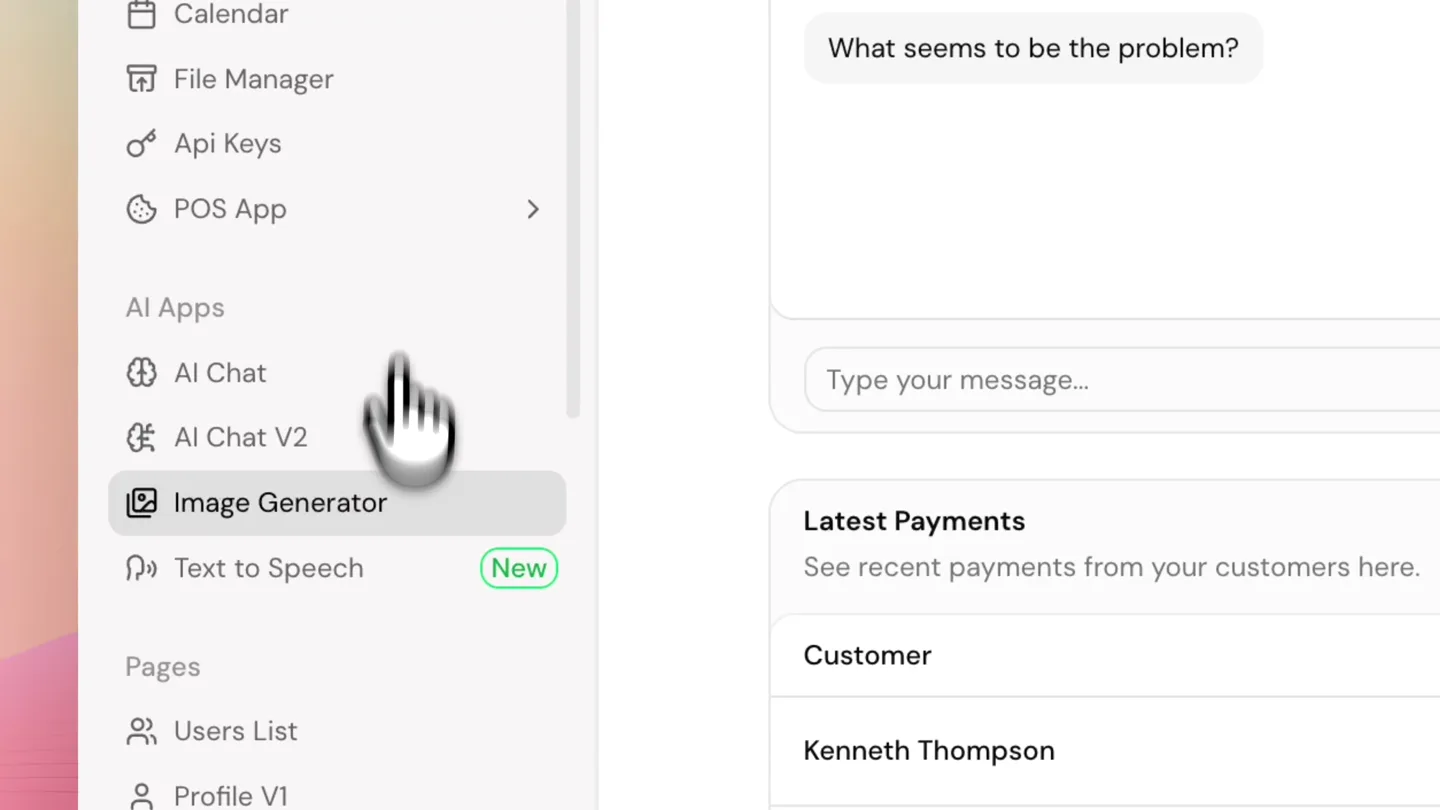
Dashboard Overview & Feature Discovery
“(No spoken dialogue — silent video with ambient UI interactions.)”
- On screen
- Shadcn UI Kit, Shadcn Outlet, Dashboard, Team Members, Subscriptions, Total Revenue, Exercise Minutes, Latest Payments, Customer, Email, Amount, Status, Payment Method, Card, Paypal, Apple, Card number, Kanban, Notes, Chats, Social Media, Workflow Automation, Mail, Todo List App, Tasks, Calendar, File Manager, API Keys, POS App, AI Apps, AI Chat, AI Chat V2, Image Generator, Text to Speech, Pages, Users List, Profile V1, Profile V2, Onboarding Flow, Get This Template, Download Template, New, Search, Download, 30 Jul 2028 - 26 Aug 2028, +4850, +26.1% from last month, 240, 300, 278, 289, 278, 189, $15,231.89, +42.1% from last month, Hi, how can I help you today?, Hey, I'm having trouble with my account., What seems to be the problem?, Type your message..., Kenneth Thompson, ken99@yahoo.com, $380.00, Success, Abraham Lincoln, ab45@gmail.com, $242.00, Success, Monserrat Rodriguez, monserrat44@gmail.com, $857.00, Processing, Silas Johnson, silas22@gmail.com, $874.00, Success, Carmella Davis, carmella@hotmail.com, $721.00, Failed, Maria Garcia, maria@mail.com, $529.00, Success, See recent payments from your customers here., Filter payments..., View All, Add a new payment method to your account., Export
- Camera
- Static, wide shot of a desktop UI, with a subtle zoom-in and pan to the left sidebar.
- Motion
- Smooth camera pan and zoom, cursor interaction highlighting new features.
Product Reveal
Text-to-Speech Feature Activation
“(No spoken dialogue — silent video with ambient UI interactions.)”
- On screen
- Shadcn UI Kit, Shadcn Outlet, Text to Speech, Convert text into natural-sounding speech., From ancient tools to modern tech, product design has shaped the way we live, work, and play. But how did we get here? Who were the pioneers that revolutionized the way we interact with the world? In this video, we're diving into the fascinating history of product design, exploring the movements, innovations, and game changing moments that brought us everything from minimalist furniture to cutting edge gadgets. Let's take a journey through time and see how design has evolved to shape our everyday lives!, 508 / 5,000 characters, 30,000 credits remaining, Generate speech, Settings, History, Voice, James - Narrative & Story, Model, Vernal Multilingual v2, Voice adjustment, Speed, 90%, Slower, Faster, Stability, 20%, More variable, More stable, Similarity, Low, High, Style Exaggeration, None, Exaggerated, Speaker Boost, Reset values, Download
- Camera
- Static shot, focused on the 'Text to Speech' section of the UI.
- Motion
- Cursor click animation, immediate UI transition to the feature's dedicated page.
Feature Teaser
Speech Generation & Playback
“(No spoken dialogue — silent video with ambient UI interactions.)”
- On screen
- Shadcn UI Kit, Shadcn Outlet, Text to Speech, Convert text into natural-sounding speech., From ancient tools to modern tech, product design has shaped the way we live, work, and play. But how did we get here? Who were the pioneers that revolutionized the way we interact with the world? In this video, we're diving into the fascinating history of product design, exploring the movements, innovations, and game changing moments that brought us everything from minimalist furniture to cutting edge gadgets. Let's take a journey through time and see how design has evolved to shape our everyday lives!, 508 / 5,000 characters, 30,000 credits remaining, Generating, Speech generated successfully., James - Narrative & Story, Paused - 0:00/0:30, MP3 - 1.3 MB, Voice Generated, Settings, History, Voice, James - Narrative & Story, Model, Vernal Multilingual v2, Voice adjustment, Speed, 90%, Slower, Faster, Stability, 20%, More variable, More stable, Similarity, Low, High, Style Exaggeration, None, Exaggerated, Speaker Boost, Reset values, Download
- Camera
- Static shot, centered on the text input and audio waveform.
- Motion
- Loading spinner, success notification, and a dynamic audio waveform visualization.
Call to Action
Advanced Voice Customization
“(No spoken dialogue — silent video with ambient UI interactions.)”
- On screen
- Shadcn UI Kit, Shadcn Outlet, Text to Speech, Convert text into natural-sounding speech., From ancient tools to modern tech, product design has shaped the way we live, work, and play. But how did we get here? Who were the pioneers that revolutionized the way we interact with the world? In this video, we're diving into the fascinating history of product design, exploring the movements, innovations, and game changing moments that brought us everything from minimalist furniture to cutting edge gadgets. Let's take a journey through time and see how design has evolved to shape our everyday lives!, 508 / 5,000 characters, 30,000 credits remaining, Generate speech, Speech generated successfully., James - Narrative & Story, Paused - 0:16/0:30, MP3 - 1.3 MB, Voice Generated, Settings, History, 1, James, From ancient tools to modern tech, product design has shaped the way we live, work, and play. But ho..., Voice, James - Narrative & Story, Model, Vernal Multilingual v2, Voice adjustment, Speed, 94%, Slower, Faster, Stability, 20%, More variable, More stable, Similarity, Low, High, Style Exaggeration, None, Exaggerated, Speaker Boost, Reset values, Download
- Camera
- Static shot, highlighting the voice adjustment sliders and history tab.
- Motion
- Interactive UI elements, slider adjustments, and tab switching for feature exploration.
Motion design primitives
Synthesizable in Remotion · key components of the shadcn-ui-kit-feature-demo template.
DynamicAudioWaveform
After a 'Generate speech' button click, a loading spinner appears, followed by a success toast, and then a responsive audio waveform visualizes the generated speech, with a playhead scrubbing through it.
+ Code construction recipe
Animate a `LoadingSpinner` component with `loop` and `rotate`. Implement a `Toast` component with `spring` for entry/exit. The waveform can be an SVG path or `Canvas` drawing, with `interpolate` driving the playhead position and `random` or `Perlin noise` for dynamic bar heights.
InteractiveSliderAdjust
A cursor interacts with UI sliders, dragging them to new values, which are reflected numerically. A toggle switch is also clicked, changing its state.
+ Code construction recipe
Use `interpolate` for the cursor's drag path and the slider's thumb position. Bind slider value changes to `Text` components. Implement a `spring` animation for the toggle switch's state change (e.g., `x` position of the thumb, background color).
Style DNA & aesthetic system
Visual aesthetic
Typography
Motion
Special effects
Pacing & rhythm
Conceptual story rhythm
- 1
Initial Exploration
Purpose. Introduce the broad capabilities of the Shadcn UI Kit and hint at new features.
Execution. Wide shot of a complex dashboard, followed by a guided cursor navigation through the sidebar.
- 2
Feature Spotlight
Purpose. Direct attention to the specific new 'Text to Speech' functionality.
Execution. Zoom-in on the sidebar, cursor click on 'Text to Speech', and immediate transition to the feature's dedicated page.
- 3
Core Functionality Demo
Purpose. Showcase the primary use case of the text-to-speech feature: generation and playback.
Execution. Typing animation, 'Generate speech' button click, loading state, success message, and audio waveform visualization.
- 4
Advanced Customization & History
Purpose. Highlight the depth of control and additional features available within the tool.
Execution. Interaction with voice adjustment sliders, toggling options, and switching to the 'History' tab.
Remix in Animatiq Studio
Master remix prompt · agent-ready
Sample remix
Objective
A user wants to generate a React component using natural language with a new AI code generation tool.How the recipe adapts
The video would open with a wide shot of the code editor UI. A cursor would navigate a sidebar to 'AI Code Generator', click it, and transition to a prompt input field. The user types 'Generate a responsive React Navbar with Tailwind CSS'. A 'Generate Code' button is clicked, a loading spinner appears, then the generated code populates the editor. The cursor then interacts with sliders to adjust 'Responsiveness' and 'Tailwind Version', and a 'Compile' button is clicked, showing a success message.Remix blueprint · shadcn-ui-kit-feature-demo
Scene durations (4 scenes, 14s)
Key Remotion components
Related Developer Tools Product Launches
Explore all Developer Tools launches →
xAI opens voice cloning on its API: build a custom voice in about two minutes or pick from 80+ voices in 28 languages.

Agentic CLI for coding, building apps, and automating workflows.
Sakana AI launches Fugu, a multi-agent orchestration system served through a single model API, led by its Fugu Ultra model.